How One Team Transformed Ideas into Intelligent System Design Using Visual Paradigm’s AI-Powered Chatbot
The Challenge: Building a Search Engine from Scratch – Without the Headaches
When Alex Chen, a senior software architect at Nexora Tech, was tasked with designing a scalable, real-time search engine for their new e-commerce platform, he knew the stakes were high. The system needed to index billions of product pages, respond to queries in under 200 milliseconds, and scale dynamically during peak traffic—like Black Friday sales.
But here’s the catch: Alex didn’t want to start with code. He wanted a clear, intelligent architecture—a blueprint that would guide development, align stakeholders, and ensure long-term maintainability.
“I’ve spent years building systems from the ground up,” Alex shared. “But this time, I didn’t want to reinvent the wheel. I wanted to design smarter, not harder.”
That’s when he discovered Visual Paradigm’s AI-Powered Chatbot—a game-changer in architectural modeling.
From Vision to Diagram: A Conversational Journey
Alex began with a simple prompt:
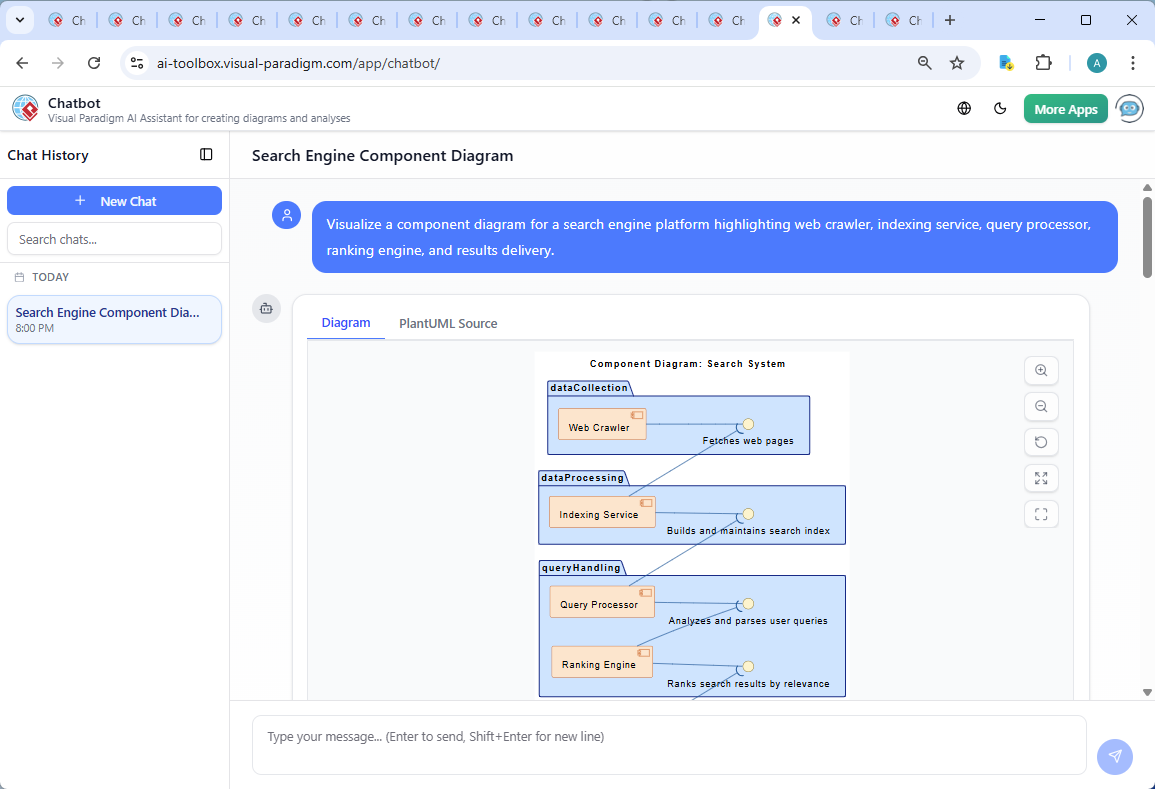
“Visualize a component diagram for a search engine platform highlighting web crawler, indexing service, query processor, ranking engine, and results delivery.”
Within seconds, the AI responded with a fully rendered PlantUML-based component diagram, clean, professional, and instantly understandable.
✅ What stood out: The diagram wasn’t just a visual—it was intentional. Components were grouped into logical domains (data collection, processing, query handling, presentation), interfaces were clearly defined, and the flow felt natural, like a real-world system.
But Alex didn’t stop there. He asked:
“Can you explain how the Web Crawler interacts with the Indexing Service in terms of data flow and timing?”
This is where the real magic happened.
The AI as a Co-Designer: Deep Technical Insight in Plain Language
Instead of a generic textbook answer, the AI delivered a rich, contextual breakdown—like a senior architect walking through the system with you.
🔍 What the AI Explained:
-
Data Flow Stages:
-
Crawler fetches raw HTML.
-
Extracts content, metadata, and links.
-
Sends structured data to a message queue (e.g., Kafka or RabbitMQ).
-
Indexing Service pulls from the queue and builds inverted indexes.
-
-
Timing Behavior:
-
Asynchronous communication prevents the crawler from being blocked by slow indexing.
-
Batch processing for bulk updates; real-time indexing for critical content (e.g., new product launches).
-
-
Architectural Nuances:
-
Use of message brokers for decoupling.
-
Caching layers (Redis) to reduce database load.
-
Retry mechanisms and dead-letter queues for fault tolerance.
-
“I’ve worked with message queues before,” Alex said, “but I’ve never seen the why behind the design explained so clearly—especially how it impacts scalability and reliability.”
The AI even offered to generate a sequence diagram to visualize the interaction step-by-step—something Alex hadn’t even asked for, but found incredibly valuable.
Why This Architecture Works: A Technical Deep Dive
The final component diagram wasn’t just pretty—it was engineered for performance and growth.
🧩 Key Design Principles Embedded in the Diagram:
| Feature | Why It Matters |
|---|---|
| Asynchronous Data Flow | Prevents bottlenecks; enables horizontal scaling. |
| Interface-Driven Communication | Components can evolve independently (e.g., swap indexing engines without breaking the crawler). |
| Layered Architecture | Mirrors real-world data flow: collect → process → query → deliver. |
| Modular Packaging | Clear separation of concerns (e.g., dataCollection, queryHandling) improves team ownership and CI/CD efficiency. |
“It’s like the AI didn’t just draw a diagram—it understood the system,” Alex reflected. “It wasn’t just showing connections. It was showing intent.”
Beyond Diagrams: A Living Design Artifact
What made this experience truly transformative was the conversational nature of the modeling process.
Alex didn’t just get a static image. He got a collaborative design partner—one that:
-
Answered follow-up questions in real time.
-
Adapted to technical depth (from high-level overviews to low-level timing behaviors).
-
Offered actionable insights (e.g., “Consider using a bloom filter to reduce index size”).
“I’ve used other diagram tools before,” Alex said. “But this felt different. It wasn’t a tool. It was a consultant.”
One AI, Infinite Possibilities: A Platform That Scales with You
The beauty of Visual Paradigm’s AI Chatbot lies in its multi-standard versatility. While this case focused on a UML Component Diagram, the same AI assistant can generate:
-
🔄 Sequence Diagrams – for modeling query lifecycle.
-
📊 C4 Model Diagrams – to show system context and container relationships.
-
🏗️ SysML & ArchiMate – for enterprise-grade system engineering and business alignment.
-
📈 Data Visualizations – pie charts, timelines, and SWOT analysis for stakeholder presentations.
“We’re using it for everything now,” Alex shared. “From product roadmaps to technical onboarding. It’s like having a senior architect in your pocket.”
From Concept to Code: The Full Lifecycle Experience
Alex didn’t stop at the component diagram. He used the AI to:
-
Generate requirement diagrams to define system constraints (e.g., “Support 10K queries/sec”).
-
Create sequence diagrams to model how a user query flows through the system.
-
Export the component diagram into PlantUML and Mermaid code for version control and integration.
“Now, every developer on the team can open the diagram and immediately understand the system’s structure—no more guessing.”
Try It Yourself: Join the Design Revolution
If you’re building complex systems—whether it’s a search engine, a fintech platform, or a cloud-native SaaS product—you don’t need to go it alone.
👉 Experience the future of system design:
👉 Try the Shared AI Modeling Session
(Click to join Alex’s exact session and explore the same search engine architecture in real time.)
Resources to Get Started
Want to dive deeper? Here are the tools and guides that helped Alex—and can help you too:
-
📘 What is a Component Diagram? – Visual Paradigm
A beginner-friendly guide to UML component diagrams with real-world examples. -
📚 Component Diagram Tutorial – Visual Paradigm Online
Step-by-step walkthroughs to build your first component diagram with AI assistance. -
🧠 Mastering Sequence Diagrams with AI – Visual Paradigm Tutorial
Learn how to model complex workflows using natural language prompts. -
🌐 Wikipedia: Component Diagram
The foundational definition of UML component diagrams—perfect for reference.
Conclusion: Design with Intelligence, Not Just Tools
Alex’s journey from idea to architecture wasn’t just about creating a diagram. It was about co-creating a vision—with an AI that didn’t just generate visuals, but understood the system, its constraints, and its future.
“This isn’t just a tool,” Alex said. “It’s a design partner. It’s made me a better architect—and faster, too.”
Whether you’re building a search engine, a microservices platform, or a mission-critical enterprise system, Visual Paradigm’s AI-Powered Chatbot turns abstract ideas into precise, intelligent models—through conversation, clarity, and collaboration.
✨ Ready to design smarter?
👉 Start your next modeling session today
No code. No jargon. Just brilliant design—guided by AI.
Visual Paradigm – Where Architecture Meets Intelligence.
www.visual-paradigm.com

 English
 Arabic
 Chinese (Simplified)
 Dutch
Dutch French
 German
 Italian
 Japanese
 Korean
 Portuguese
 Russian
 Spanish