


1. Introduction
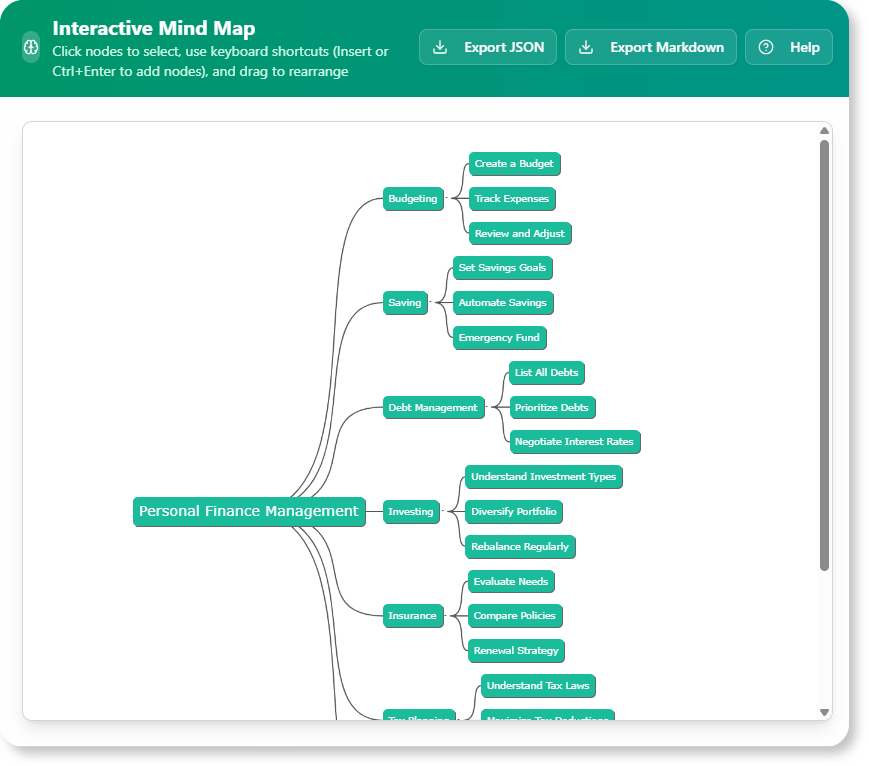
The AI Brainstorming Tool is a free, intelligent application designed to transform ideas into visual mind maps instantly. It helps users overcome creative blocks, organize complex thoughts, and visualize connections, making brainstorming sessions more productive and insightful.
2. Key Concepts
A. The Challenge of Brainstorming

- : Starting from scratch can be overwhelming, leading to repetitive ideas or disorganized thoughts.
- : Traditional brainstorming methods often fail to provide immediate visual organization, making it difficult to explore connections effectively.
B. How the AI Brainstorming Tool Helps
- : Enter a topic, problem, or question, and the AI generates a dynamic mind map with interconnected ideas, concepts, and keywords.
- Instant Visual Organization: Provides a clear, hierarchical, and visually engaging representation of brainstormed ideas.
- : Acts as a creative partner, offering a starting point to bypass the blank page syndrome.
- Expand and Refine: Users can add their own ideas, rearrange concepts, and refine the mind map collaboratively.
C. Who Can Benefit?
- Students: Organize study topics, project ideas, and research.
- Professionals: Plan projects, solve problems, and visualize workflows.
- Teams: Collaborate on brainstorming sessions and share mind maps for presentations.
3. How to Use the AI Brainstorming Tool
Step-by-Step Workflow
Step 1: Access the Tool
- For Visual Paradigm Online Users: Navigate to https://ai-toolbox.visual-paradigm.com/app/brainstorming/.
- For Visual Paradigm Desktop Users: Open the desktop application, go to Tools > App, and select the Brainstorming Tool.
Step 2: Enter Your Prompt
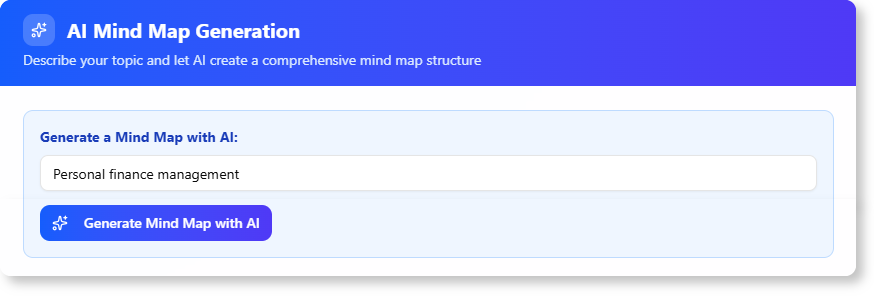
- Type a topic, problem, or question into the input field. Be as specific or broad as needed.
Step 3: Generate the Mind Map
- Click the “Generate” button. The AI processes your prompt and instantly creates a visual mind map.
Step 4: Explore and Expand
- Review the generated mind map.
- Add your own nodes, rearrange ideas, and build upon the AI’s suggestions.

Step 5: Refine and Export
- Refine the mind map further.
- Export it in JSON or Markdown formats for presentations or further analysis.
4. Practical Examples
Example 1: Project Planning
- Prompt: “How to launch a new product?”
- AI-Generated Mind Map:
- Central Node: “Product Launch”
- Branches: “Market Research,” “Target Audience,” “Marketing Strategy,” “Budget Planning,” “Timeline”
- User Actions: Add sub-nodes like “Social Media Campaign” under “Marketing Strategy” and refine the timeline.
Example 2: Academic Research
- Prompt: “Causes of Climate Change”
- AI-Generated Mind Map:
- Central Node: “Climate Change”
- Branches: “Greenhouse Gases,” “Deforestation,” “Industrialization,” “Human Activities”
- User Actions: Expand “Greenhouse Gases” with sub-nodes like “CO2 Emissions” and “Methane.”
5. Benefits of Using the Tool
- Saves Time: Instantly generates structured mind maps.
- Enhances Creativity: Provides a visual framework to explore ideas.
- Improves Collaboration: Teams can work together on the same mind map.
- Flexible Export Options: Share mind maps in multiple formats.
6. Summary
The AI Brainstorming Tool is a powerful, free resource for anyone looking to generate, organize, and visualize ideas quickly. By leveraging AI, it transforms brainstorming into a dynamic and , helping users overcome creative blocks and .

 English
 Arabic
 Chinese (Simplified)
 Dutch
Dutch French
 German
 Italian
 Japanese
 Korean
 Portuguese
 Russian
 Spanish