


Use case diagrams are a fundamental part of UML (Unified Modeling Language) modeling, used to capture functional requirements by illustrating interactions between actors (users or external systems) and the system itself through use cases. They help software developers, business analysts, and project managers visualize system behavior clearly and ensure alignment with stakeholder needs.
Visual Paradigm offers powerful AI tools that streamline the creation and refinement of use case diagrams, reducing manual effort while ensuring compliance with UML best practices. This tutorial is based on Visual Paradigm’s guide to their AI Use Case Diagram Refinement Tool, expanded with a practical example, detailed explanations, and broader insights into their AI ecosystem.
What is a Use Case Diagram?
A use case diagram typically includes:
- Actors: External entities (e.g., users like Customer or Admin).
- Use Cases: Oval shapes representing system functions (e.g., Login, Checkout).
- Relationships: Associations (lines connecting actors to use cases), include (mandatory sub-use cases), extend (optional extensions), and generalizations.
Here is an annotated example of a basic use case diagram from Visual Paradigm’s resources:

Advanced diagrams incorporate include and extend relationships for better modularity and clarity.
Benefits of Using AI for Use Case Diagrams
Traditional manual creation can be time-consuming and prone to overlooking UML standards. Visual Paradigm’s AI tools automate initial generation and refinement, adding proper relationships, suggesting improvements, and allowing iterative enhancements. This makes diagramming accessible to both novices and experts, speeds up requirements gathering, and produces professional results.
Overview of Visual Paradigm’s AI Tools
Visual Paradigm provides a suite of AI-powered features for diagramming:
- AI Diagram Generator: Converts text descriptions into various diagrams, including use cases, instantly.
- AI Chatbot (Just Ask): A conversational assistant for generating, refining, and analyzing diagrams via natural language prompts.
- Dedicated Refinement Tools: Specialized apps like the Use Case Diagram Refinement Tool, which focuses on generating basic diagrams and then intelligently adding include/extend relationships.
- Integration across Visual Paradigm Online (free edition available) and desktop versions.
These tools leverage AI to understand system descriptions and apply best practices.
Step-by-Step Tutorial: Using the AI Use Case Diagram Refinement Tool
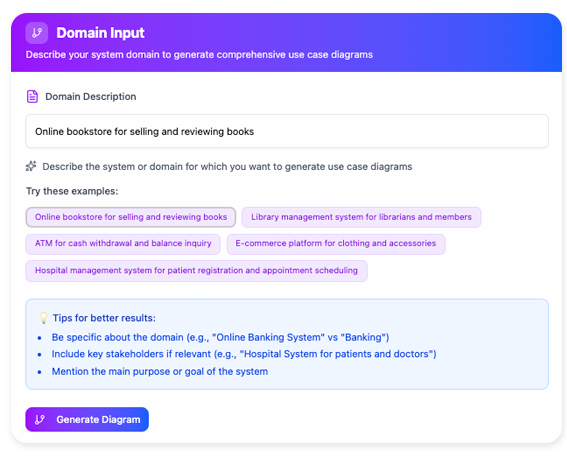
The dedicated Use Case Diagram Refinement Tool is ideal for focused, high-quality use case modeling. Access it at: https://ai-toolbox.visual-paradigm.com/app/use-case-diagram-refinement/ (or via Tools > Apps in Visual Paradigm).
Step 1: Access the Tool and Describe the System Domain
Provide a detailed description of your system, including the domain, key actors, main functionalities, and purpose. The more specific and comprehensive the description, the better the AI’s output.
Tip: Include actors, primary use cases, and any conditional or shared behaviors.
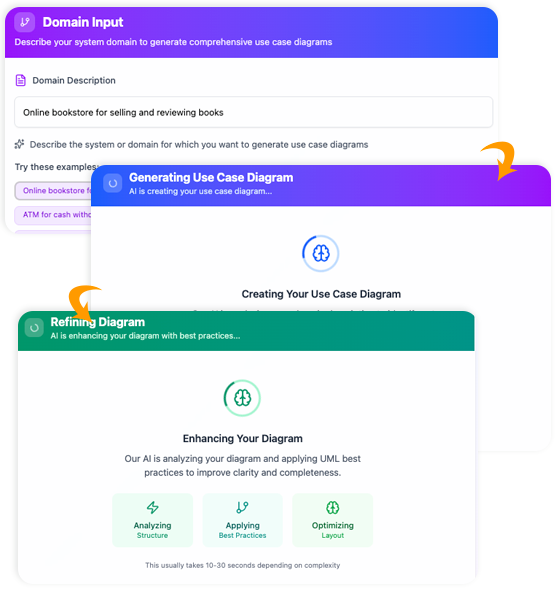
Step 2: Generate the Initial Diagram
Click Generate Diagram. The AI creates a basic use case diagram with actors, use cases, and simple associations.
Step 3: Refine the Diagram with AI
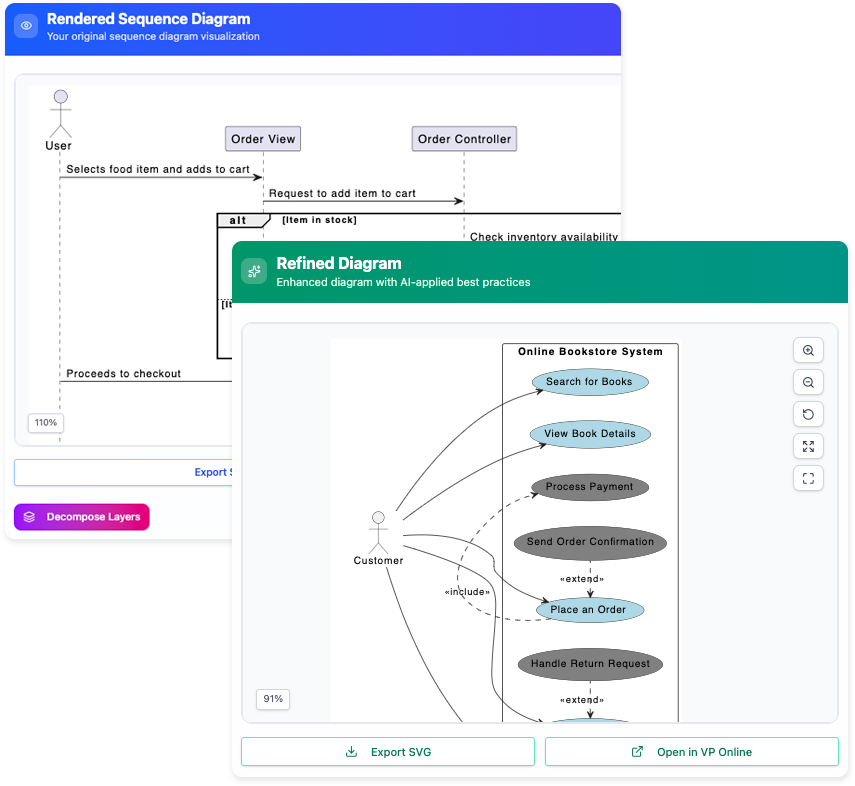
Click Refine Diagram with AI. The tool analyzes the diagram and adds include (for common sub-steps) and extend (for optional behaviors) relationships, ensuring UML compliance.
Step 4: Preview, Export, or Edit Further
View the live preview. Export as SVG for reports, or open in Visual Paradigm Online for manual customization. Iterate by editing the description and regenerating if needed.
Alternatively, use the broader AI Chatbot (at chat.visual-paradigm.com) for conversational refinements, e.g., “Add an extend relationship for guest checkout.”
Practical Example: Online Shopping System
Let’s apply the tool to a common scenario—an Online Shopping System.
Sample System Domain Description (Input)
“An online shopping platform that allows customers to browse products, search for items, view details, add to cart, checkout, and make payments. Registered customers can log in, manage their profile, and track orders. Guests can checkout without registration. Administrators manage inventory, view orders, and process shipments. Key features include applying discounts during checkout and handling multiple payment methods.”
Expected Initial Diagram (After Generation)
The AI would generate a basic diagram with:
- Actors: Customer, Guest, Administrator
- Use Cases: Browse Products, Search Products, View Product Details, Add to Cart, Login/Register, Checkout, Make Payment, Manage Profile, Track Orders, Manage Inventory, Process Shipments
Relationships are mostly direct associations.
Refined Diagram (After AI Refinement)
The AI adds structure:
- Include relationships: e.g., Checkout includes Make Payment; Checkout includes Apply Discount.
- Extend relationships: e.g., Checkout extended by Guest Checkout (optional for non-registered users).
- Better organization for shared behaviors.
These visuals illustrate the improvement: the refined diagram is more modular and professional.
Review of Visual Paradigm’s AI Tools
Pros:
- Extremely efficient—diagrams generated in seconds with minimal input.
- Ensures UML best practices (e.g., proper use of include/extend).
- User-friendly interface with live previews and easy exports.
- Iterative and flexible; supports refinement via text or chat.
- Broad support for diagram types beyond use cases.
Cons:
- Output quality heavily depends on the detail and clarity of your input description—vague prompts may require multiple iterations.
- Specialized tools (like the refinement app) are web-based and separate from the main editor in some cases.
- Advanced customizations still require manual editing in the full Visual Paradigm editor.
Overall, the tools are highly effective for rapid prototyping and requirements modeling, scoring high on usability and accuracy.
Recommendation
Visual Paradigm’s AI tools, including the Use Case Diagram Refinement Tool and AI Chatbot, are strongly recommended for anyone involved in software design— from solo developers to large teams. They excel at bridging the gap between requirements text and visual models, saving hours of work while producing compliant, clear diagrams.
Start with the free Visual Paradigm Online edition or the dedicated AI toolbox to try them out. For complex projects, the full desktop version with integrated AI provides the best experience. If you’re modeling system requirements frequently, these tools will significantly boost your productivity and diagram quality.

 English
 Arabic
 Chinese (Simplified)
 Dutch
Dutch French
 German
 Italian
 Japanese
 Korean
 Portuguese
 Russian
 Spanish