


Introduction
The integration of AI is transforming how software architects and developers create and maintain C4 architecture diagrams. Traditional methods—manual drawing, complex syntax management, and error-prone updates—are being replaced by instant, conversational, and automated workflows. This guide explores the paradigm shift, the AI tools provided by Visual Paradigm (VP), and a step-by-step workflow for generating C4 diagrams using AI.
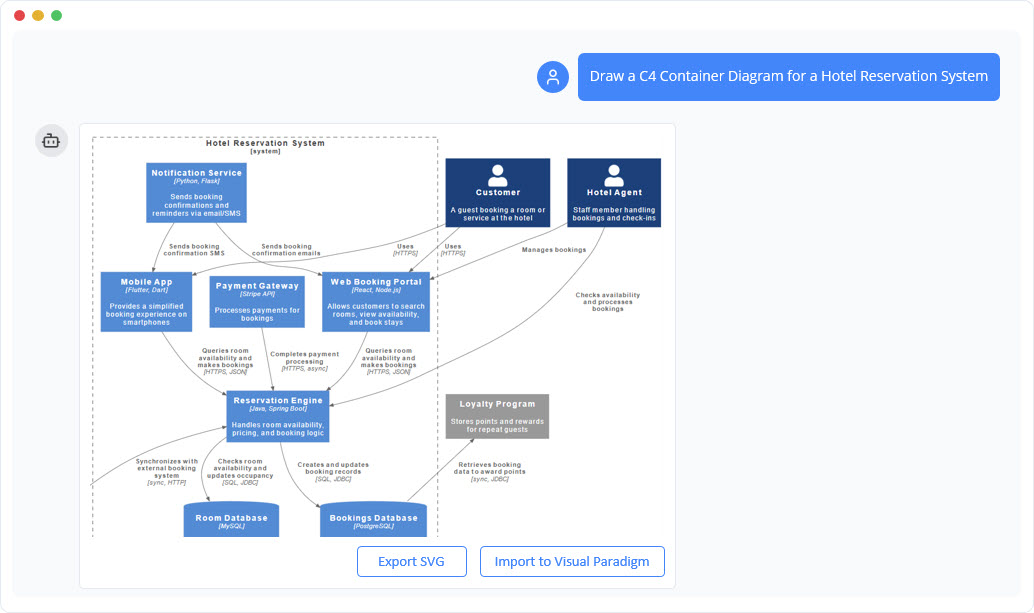
1. The Core Paradigm Shift: From Syntax to Conversation
Traditional vs. AI-Powered Workflows
| Traditional Process | AI-Powered Process (Visual Paradigm) |
|---|---|
| Manual coding/drawing (PlantUML, drag-and-drop) | Natural language input (plain English descriptions) |
| Error-prone consistency (manual linking) | Automated compliance (AI enforces C4 standards) |
| High maintenance (outdated diagrams) | Conversational iteration (instant updates via prompts) |
Key Benefit: AI the diagramming process, allowing teams to focus on design rather than syntax.
2. Visual Paradigm’s AI Ecosystem for C4 Modeling
Visual Paradigm offers a suite of AI-powered tools to streamline C4 diagram creation:
A. AI-Powered C4 PlantUML Studio
- Browser-based tool that converts text descriptions into valid PlantUML code and interactive diagrams.
- Features:
- Instant code preview and diagram rendering.
- .
- Seamless switching between code and visual views.
B. AI Diagramming Chatbot
- A conversational engine for interactive architectural design.
- Capabilities:
- Add components, restructure dependencies, and refine diagrams via natural language.
- Acts as a “thinking partner” to clarify and validate design decisions.
C. AI Diagram Generator (Desktop/Online)
- Generates full C4 diagram suites from a single topic input.
- Advantages:
- .
- Supports version control and CI/CD integration via JSON exports.
3. The AI-Powered C4 Diagram Generation Workflow
Step 1: Project Setup & Content Generation
- : Enter the project name, and the AI drafts an initial Problem Statement and System Context.
- Example Prompt: “Create a C4 System Context Diagram for an E-Commerce Platform.”
Step 2: Selecting Diagram Scope & Dependencies
- Choose the C4 level (Context, Container, Component, etc.).
- For nested diagrams (e.g., Component, Dynamic), the AI guides users to select the correct parent container first.
Step 3: Instant Diagram Creation
- Describe the system in plain English (e.g., “Add a Payment Service container using REST API”).
- The AI generates a C4-compliant diagram with:
- Technology labels (e.g., “PostgreSQL,” “React”).
- Responsibilities and protocols.
- Consistent hierarchical structure.
Step 4: Iteration & Version Control
- Refine diagrams via conversational prompts (e.g., “Move the Auth Service to a separate container”).
- Export diagrams as JSON for sharing, backup, or CI/CD pipelines.
4. Full C4 Model Coverage: The Six Views
| C4 Level | Purpose & Audience | How AI Assists |
|---|---|---|
| System Landscape | Maps an organization’s IT portfolio. | Generates a high-level view from an enterprise description. |
| System Context | Shows the system as a “black box” with users and external systems. | Instantly creates the diagram from a text prompt. |
| Container | Reveals major technical building blocks (microservices, databases). | Auto-generates architecture with technology annotations. |
| Component | Models internal structure of a container. | Builds detailed Level 3 diagrams from natural language. |
| Deployment | Maps containers to infrastructure (cloud, VMs). | Syncs with DevOps changes via conversational updates. |
| Dynamic/Sequence | Illustrates runtime behavior (use case flows). | Generates sequence diagrams from behavior descriptions. |
5. Best Practices for AI-Generated C4 Diagrams
For Architects & Developers:
- Start broad, then refine: Begin with a System Context, then drill down to Containers and Components.
- Use natural language: Describe requirements as you would in a meeting (e.g., “The Order Service depends on Kafka for event streaming”).
- Leverage version control: to track changes in Git.
For Teams:
- Collaborate in real-time: Use the AI chatbot to explore design options together.
- Integrate with CI/CD: Automate diagram updates alongside code changes.
6. Conclusion: The Future of C4 Diagramming
AI-powered tools like Visual Paradigm’s C4 PlantUML Studio, AI Chatbot, and Diagram Generator are redefining architectural documentation. By replacing manual effort with , teams can:
✅ Reduce errors (AI enforces C4 standards).
✅ Save time (instant generation and iteration).
✅ Improve collaboration (natural language workflows).
Next Steps:
- Try Visual Paradigm’s AI tools with a sample project.
- Experiment with conversational prompts to refine diagrams.
- .
- C4-PlantUML Studio | AI-Powered C4 Diagram Generator (matches “AI-Powered C4 PlantUML Studio (C4-PlantUML Studio)” and “AI-Powered C4 Diagram Generator”)
- AI-Powered C4 Diagram Generator | Create Architecture Diagrams from Text (related AI tool entry point)
- C4 Component Diagram: A Definitive Guide to Your Code’s Internal Structure with AI (linked in multiple guide pages, e.g., from C4 System Context Guide)
- C4 Container Diagram: A Definitive Guide to Visualizing Your Software’s Building Blocks with AI (linked in multiple guide pages, e.g., from C4 System Context Guide)
- C4 Deployment Diagram (direct AI tool page for generating C4 Deployment Diagrams)
- C4 System Context Diagram: A Definitive Guide to Seeing the Big Picture with AI
- Generate the Complete C4 Model Instantly with Visual Paradigm’s AI Diagram Generator (featured in product updates, e.g., Visual Paradigm Desktop Updates)
- Streamline C4 Diagrams with Our New AI-Powered Markdown Editor (no exact matching page found; may be an older or internal feature reference)
- The Ultimate AI C4 Diagram Tool & Modeling Software
- New: Full C4 Model Support Added to Visual Paradigm Desktop (announced in AI Diagram Generator Release)
- C4 Diagram Tool & Modeling Software (core landing page for C4 tools)

 English
 Arabic
 Chinese (Simplified)
 Dutch
Dutch French
 German
 Italian
 Japanese
 Korean
 Portuguese
 Russian
 Spanish