


Introduction
In modern software development, clarity and communication are critical. The C4 model is a for visualizing software architecture, designed to provide clarity across different levels of abstraction. It helps teams document, discuss, and refine their systems efficiently, ensuring alignment between technical and non-technical stakeholders.
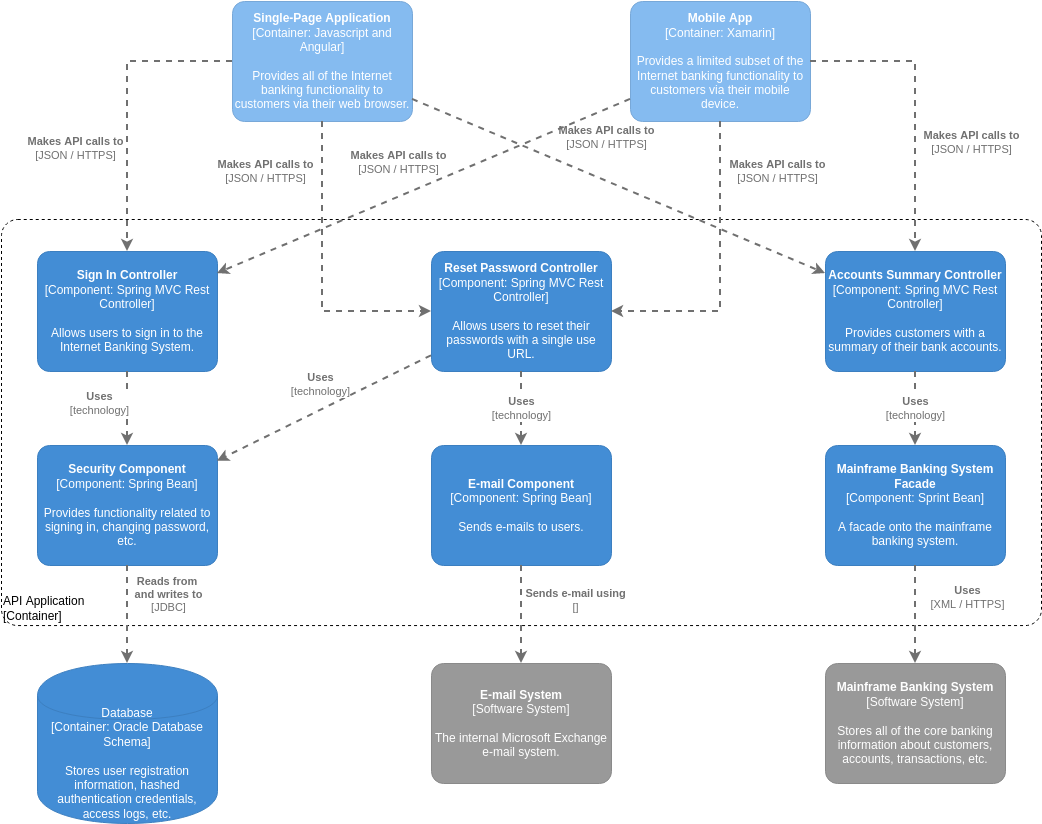
The C4 model consists of four core levels—Context, Containers, Components, and Code—each offering a distinct perspective on the system. Additionally, supporting diagrams (such as Deployment and System Landscape diagrams) provide further insights into infrastructure and interactions.
This article explores the C4 model’s structure, its core and supporting diagrams, and how revolutionizes the creation and management of C4 diagrams.
The Four Core Levels of the C4 Model
1.
Purpose: To place the software system in its broader environment. Audience: Technical and non-technical stakeholders. What it shows:
- The system as a single “black box.”
- Key users (actors) and external systems it interacts with. Key Insight: Helps stakeholders understand the system’s role in the bigger picture.
2.
Purpose: To illustrate the high-level technical structure of the system. Audience: Architects and developers. What it shows:
- Containers (deployable units like web apps, databases, microservices).
- Technology choices (e.g., Java, PostgreSQL, Kubernetes).
- Communication protocols (e.g., HTTPS, REST, JDBC). Key Insight: Clarifies how the system is partitioned and what technologies are used.
3.
Purpose: To model the internal structure of a single container. Audience: Developers working within a specific container. What it shows:
- Components (logical groupings of code, such as modules or services).
- Responsibilities and interactions between components. Key Insight: Provides a detailed view of how components collaborate to deliver functionality.
4. Code-Level Diagrams (Level 4, Optional)
Purpose: To zoom into individual components for implementation details. What it shows:
- UML class diagrams (classes, interfaces, functions).
- Code structure (useful for developers working directly in the codebase). Key Insight: Offers granular insights for developers, though this level is often optional since IDEs can provide similar details.
Supporting Diagrams for Enhanced Clarity
Beyond the core C4 diagrams, additional visualizations help address specific architectural concerns:
- Maps containers to physical infrastructure (servers, VMs, Kubernetes clusters).
- Shows where software runs in production.
- Provides an organization-wide view of all systems.
- Helps stakeholders understand portfolio dependencies.
- Illustrates runtime behavior (e.g., how components interact to fulfill a use case).
- Useful for debugging and validating workflows.
Visual Paradigm’s AI-Powered C4 Ecosystem
Visual Paradigm (VP) offers a comprehensive suite of tools for creating, managing, and sharing C4 diagrams. Its ecosystem blends traditional modeling tools with AI-powered automation, making architecture documentation faster and more consistent.
I. AI-Powered Generation Suite
1.
- Instant Diagram Creation: Converts plain-language descriptions into full C4 diagrams (Context, Container, Component, Deployment).
- Intelligent Content Generation: Drafts problem statements and system contexts automatically.
- Full C4 Coverage: Supports all six official C4 diagram types.
2.
- Conversational Workflow: Users describe structures in natural language, and the AI generates diagrams.
- Frictionless Refinement: Allows iterative adjustments (e.g., adding components, restructuring dependencies).
- Broad Support: Works with C4, UML, and SysML diagrams.
3.
- Text-to-C4 Conversion: Translates descriptions into PlantUML code for real-time diagram rendering.
- Ease of Editing: Provides a side-by-side editor for refining diagrams.
- Version Control Ready: PlantUML output integrates seamlessly with version control systems.
II. Traditional Modeling Tools
1.
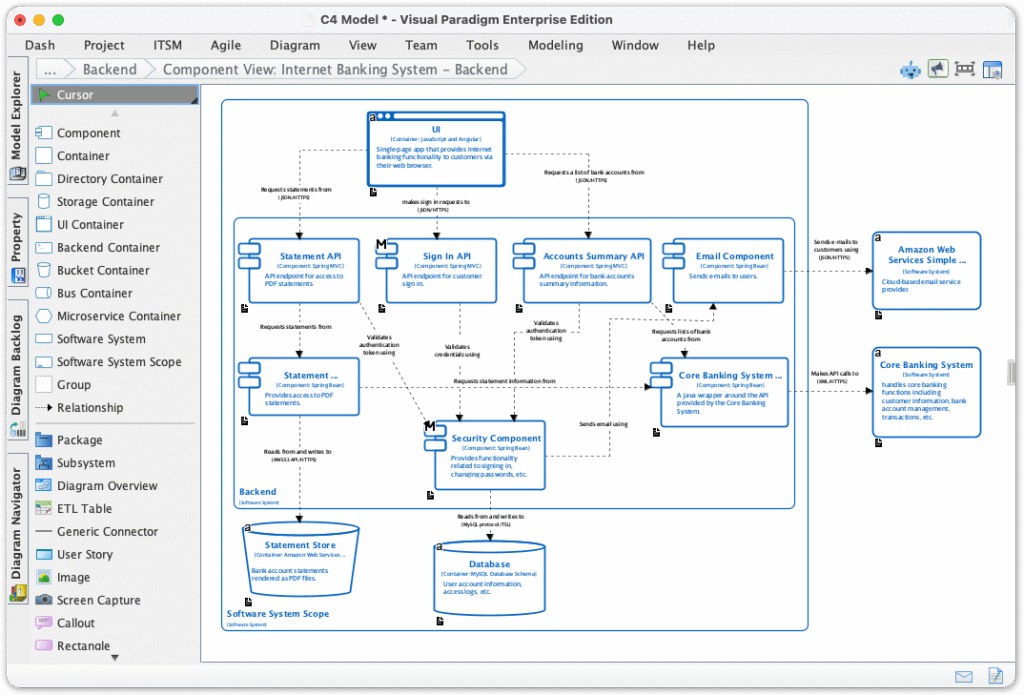
- Professional C4 Modeling: Dedicated shapes and templates for all C4 diagrams.
- Advanced Features: Custom attributes, smart magnets, and sub-diagram drill-down.
- Team Collaboration: Version control, threaded comments, and Doc. Composer for documentation.
2.
- Cloud-Based Workspace: Accessible without installation.
- Real-Time Collaboration: Multi-user editing and commenting.
- Multi-Export Options: Supports PNG, JPG, SVG, GIF, and PDF exports.
Key Resources for Learning and Implementation
For those looking to explore further, Visual Paradigm provides comprehensive guides and tools:
- C4-PlantUML Studio | AI-Powered C4 Diagram Generator
- AI-Powered C4 Diagram Generator
- C4 System Context Diagram Guide
- C4 Deployment Diagram Tool
- The Ultimate AI C4 Diagram Tool
Conclusion
The C4 model is a powerful framework for documenting software architecture, ensuring clarity and alignment across teams. With Visual Paradigm’s AI-powered tools, creating and maintaining C4 diagrams has never been easier—whether through automated generation or professional modeling.
By leveraging these tools, architects and developers can streamline documentation, improve collaboration, and deliver better software systems.
Have you tried AI-powered diagram generation? Share your thoughts!

 English
 Arabic
 Chinese (Simplified)
 Dutch
Dutch French
 German
 Italian
 Japanese
 Korean
 Portuguese
 Russian
 Spanish