


Introduction to the C4 Model
The C4 Model is the , offering a hierarchical, standardized approach to communicating technical details across diverse audiences—from executives to developers. It structures architectural visualization into four core levels and three supporting views:
Core Levels
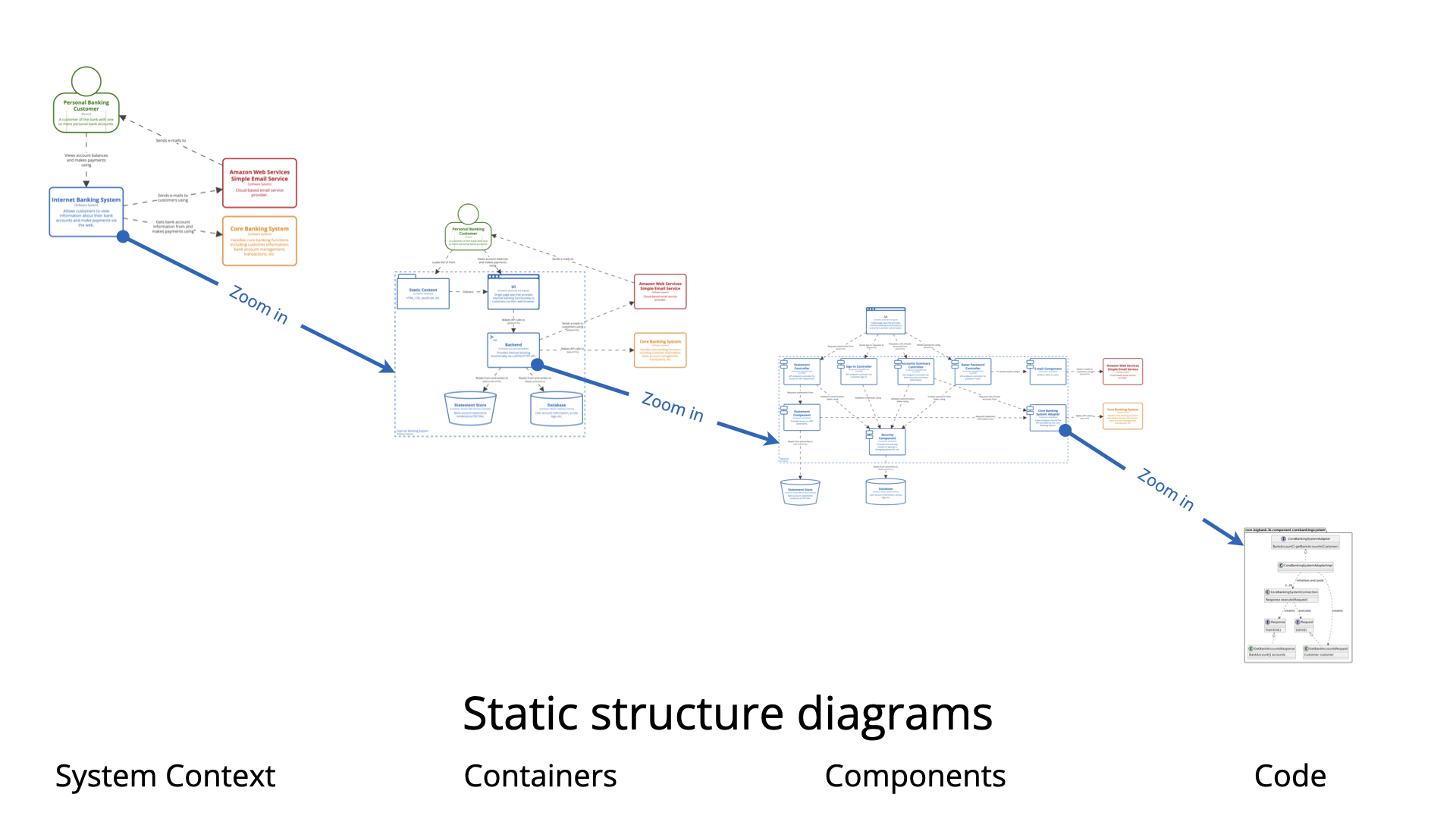
- System Context: High-level view of the system and its interactions with users and other systems.
- Containers: Breakdown of the system into deployable units (e.g., microservices, databases).
- Components: Internal structure of each container, showing modules and their relationships.
- Code: Low-level details, such as classes, interfaces, and functions.
Supporting Views
- System Landscape: Overview of multiple systems in an enterprise.
- Dynamic: Runtime interactions (e.g., sequence diagrams).
- Deployment: How software maps to infrastructure.
Why Use Visual Paradigm (VP) for C4 Modeling?
Visual Paradigm (VP) provides a comprehensive ecosystem for C4 modeling, combining traditional diagramming with AI-driven automation. Its tools are designed to:
- Eliminate manual effort in diagram creation.
- Ensure consistency across all architectural views.
- Accelerate documentation with AI-generated content.
Visual Paradigm’s C4 Modeling Solutions
1. Traditional Diagramming & Professional Modeling
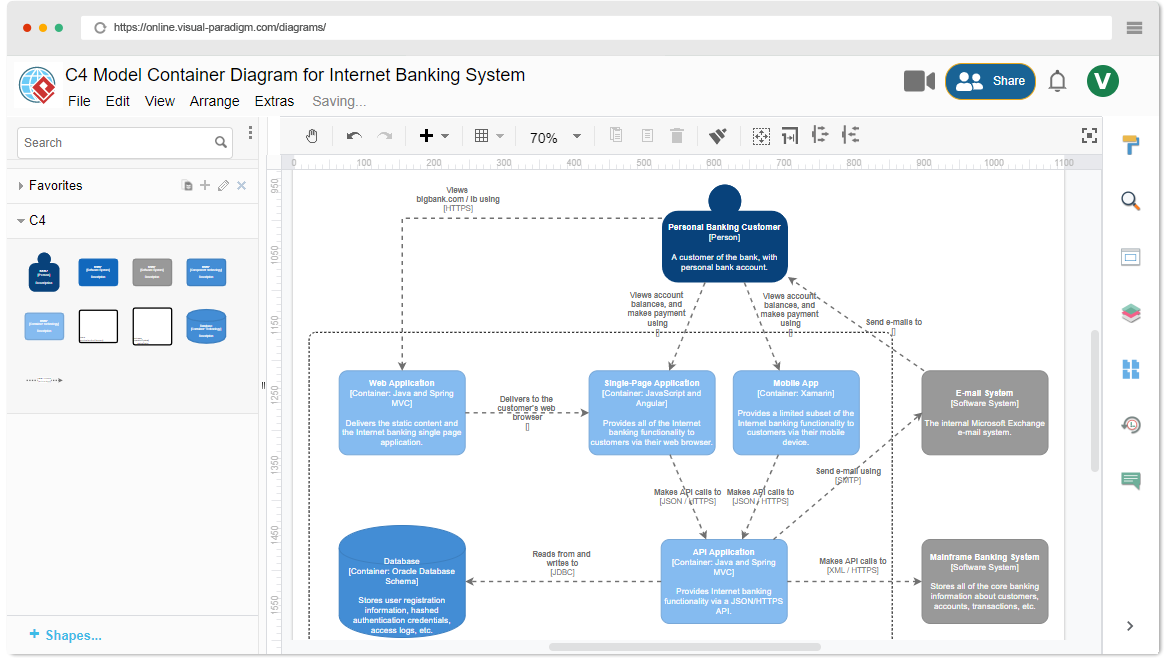
For users who need deep control, offline capability, or manual editing, VP offers robust tools:
A. VP Desktop: Professional C4 Modeling
- Full Suite of C4 Diagrams: Supports all six C4 views.
- Advanced Features:
- Custom attributes (stereotypes, tagged values).
- Hierarchical traceability via drill-down sub-diagrams.
- One-click smart magnets for efficient element creation.
B. VP Online: Cloud-Based C4 Editor
- Drag-and-Drop Simplicity: Create C4 diagrams quickly.
- Real-Time Collaboration: Multi-user editing.
- Professional Templates: Optimized for C4 best practices.
2. The AI C4 Suite: Instant Generation & Conversational Design
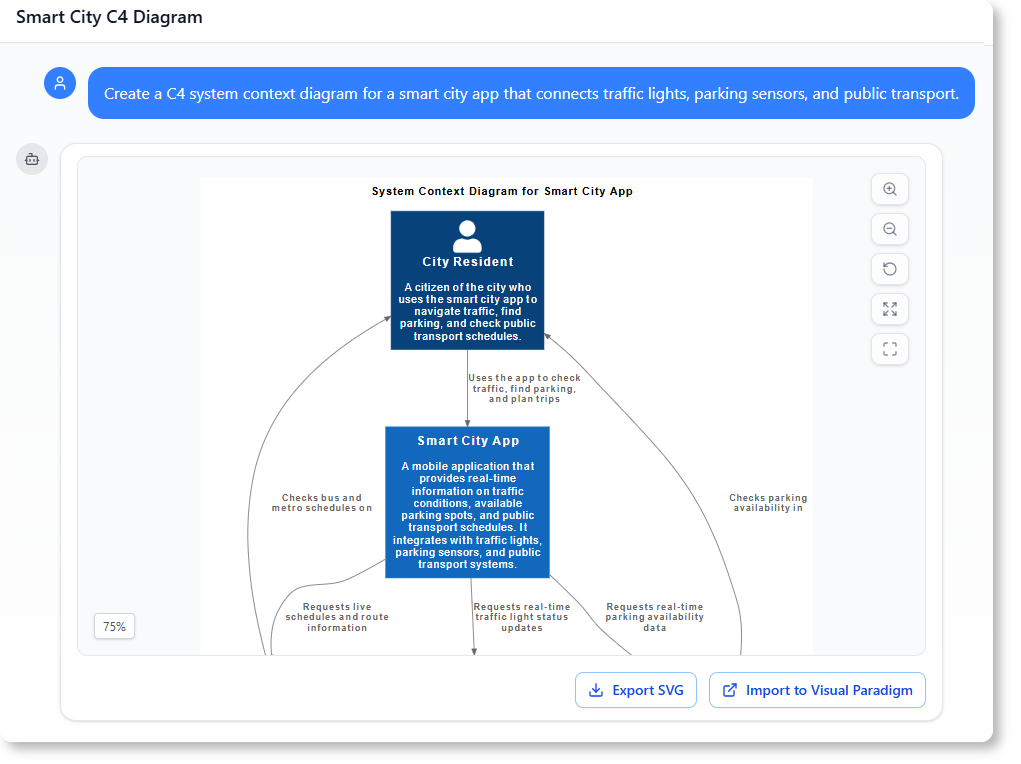
VP’s AI tools automate diagram creation, transforming natural language into structured C4 diagrams.
A.
- Instant Generation: Create any of the six C4 diagrams from a text description.
- Intelligent Content Drafting: AI generates high-level content (e.g., problem statements, system context).
- Structured Workflow: Ensures consistency by managing dependencies (e.g., selecting a parent container before generating components).
Example:
User Input: “Generate a System Context diagram for an e-commerce platform with payment and inventory services.” AI Output: A System Context diagram with the e-commerce system, users, payment gateway, and inventory database.
B.
- Text-to-C4 Conversion: Describe your system in plain language; AI generates PlantUML code and diagrams.
- Real-Time Refinement: Edit the PlantUML code, and the diagram updates instantly.
- Seamless Markdown Editor: View and edit code alongside the rendered diagram.
Example:
User Input: “Create a Container diagram for the e-commerce platform with a frontend, backend, and database.” AI Output: PlantUML code and a visual Container diagram.
C.
- Conversational Iteration: Describe or modify diagrams using natural language.
- Interactive Partner: Validates design decisions and suggests improvements.
- Natural Language Support: Converts descriptions (e.g., “Add a load balancer to the deployment view”) into C4-compliant diagrams.
Example:
User Input: “Add a Redis cache to the backend container.” AI Output: Updated Component diagram with Redis integrated.
Key Benefits of Using VP for C4 Modeling
| Feature | Benefit |
|---|---|
| AI Automation | Reduces manual effort and speeds up documentation. |
| Consistency | Ensures all diagrams follow C4 standards. |
| Collaboration | Supports real-time teamwork in VP Online. |
| Flexibility | Choose between traditional diagramming and AI-driven generation. |
| PlantUML Integration | Seamlessly generate and refine diagrams using code. |
Conclusion: Transforming Architecture Workflows
By combining the C4 Model’s structured approach with Visual Paradigm’s AI tools, teams can:
- Eliminate the blank canvas problem: Start with AI-generated drafts.
- Maintain : Keep architectural diagrams up-to-date.
- : Use conversational commands to refine designs.
- : Ensure all stakeholders understand the architecture.
Visual Paradigm’s AI suite empowers teams to design with clarity, communicate with precision, and build architecturally sound systems—all with .
- C4-PlantUML Studio | AI-Powered C4 Diagram Generator (matches “AI-Powered C4 PlantUML Studio (C4-PlantUML Studio)” and “AI-Powered C4 Diagram Generator”)
- AI-Powered C4 Diagram Generator | Create Architecture Diagrams from Text (related AI tool entry point)
- C4 Component Diagram: A Definitive Guide to Your Code’s Internal Structure with AI (linked in multiple guide pages, e.g., from C4 System Context Guide)
- C4 Container Diagram: A Definitive Guide to Visualizing Your Software’s Building Blocks with AI (linked in multiple guide pages, e.g., from C4 System Context Guide)
- C4 Deployment Diagram (direct AI tool page for generating C4 Deployment Diagrams)
- C4 System Context Diagram: A Definitive Guide to Seeing the Big Picture with AI
- Generate the Complete C4 Model Instantly with Visual Paradigm’s AI Diagram Generator (featured in product updates, e.g., Visual Paradigm Desktop Updates)
- Streamline C4 Diagrams with Our New AI-Powered Markdown Editor (no exact matching page found; may be an older or internal feature reference)
- The Ultimate AI C4 Diagram Tool & Modeling Software
- New: Full C4 Model Support Added to Visual Paradigm Desktop (announced in AI Diagram Generator Release)
- C4 Diagram Tool & Modeling Software (core landing page for C4 tools)

 English
 Arabic
 Chinese (Simplified)
 Dutch
Dutch French
 German
 Italian
 Japanese
 Korean
 Portuguese
 Russian
 Spanish