


-
No need to sketch or guess: Just describe the system — AI does the rest.
-
Auto-generates states, transitions, events, and actions.
-
Validates logic (e.g., checks if “dispensing” has a proper exit).
-
Exports to PDF, PNG, or embeds in docs (great for reports).
-
Generates code (Java, Python, etc.) from the diagram — turn models into real apps.
🚀 You can go from idea to full state diagram in under 2 minutes.
🛠 Step-by-Step: Generate a Vending Machine State Diagram with Visual Paradigm AI

✅ Step 1: Go to Visual Paradigm Online
Open your browser and go to:
👉 https://www.visual-paradigm.com/
Click “Try it Free” → Choose “Create New UML Diagram” → Select “State Machine Diagram”.
✅ Step 2: Use the AI Assistant (The Magic Button!)
Click the AI icon (🤖) in the top toolbar. A chat-like box will appear.
✅ Step 3: Type Your Prompt (Use This Exact One)
📝 Copy & paste this prompt:
Create a UML state machine diagram for a vending machine that sells drinks for $1.50. The machine starts in "Waiting for Coin" state. It accepts 25¢, 50¢, and $1 coins. When enough money is inserted, it transitions to "Has Credit". If the user cancels, it returns to "Waiting for Coin". If the user selects a drink and has enough credit, it goes to "Dispensing". After dispensing, it resets to "Waiting for Coin". Include a "Dispensing" state with entry action "dispense drink" and exit action "reset balance". Add a "Change Return" state if overpaid. Include guards like [enough money] and [selected product].
💡 This prompt gives AI clear context: price, states, events, guards, actions, and behavior.
✅ Step 4: Wait for AI to Generate the Diagram
In seconds, Visual Paradigm will:
-
Auto-generate the full state machine diagram
-
Add all states:
Waiting for Coin,Has Credit,Dispensing,Change Return,Cancelled -
Draw transitions with events:
coin inserted,select drink,cancel,timeout -
Add guards like
[enough money],[selected product] -
Add entry/exit actions
-
Auto-layout the diagram so it’s readable
✅ Step 5: Review & Customize
You’ll see:
-
Black dot (●) → Initial state (
Waiting for Coin) -
Thick-circle (●) → Final state (optional — you can remove it if the machine runs forever)
-
Arrows with labels: e.g.,
coin inserted [enough money] / add to balance -
Self-transitions: e.g.,
coin inserted→Has Credit(if more coins are added)
🛠 Tip: If you want to add a “Refunded” state, just ask:
“Add a new state ‘Refunded’ that appears when the user cancels after inserting money.”
✅ Step 6: Export or Share
Once happy, export your diagram:
-
🖼️ Export as PNG/SVG (for reports)
-
📄 Export as PDF (for documentation)
-
🔗 Embed in Confluence, Word, or GitHub
-
🔄 Generate code (Java/Python/C#) → turn the diagram into real logic!
🎯 Pro tip: Use “Generate Java Code” to see how this state machine would look in real software using the State Pattern.
🌟 Example Output (AI-Generated)
Here’s what your generated diagram will likely include:
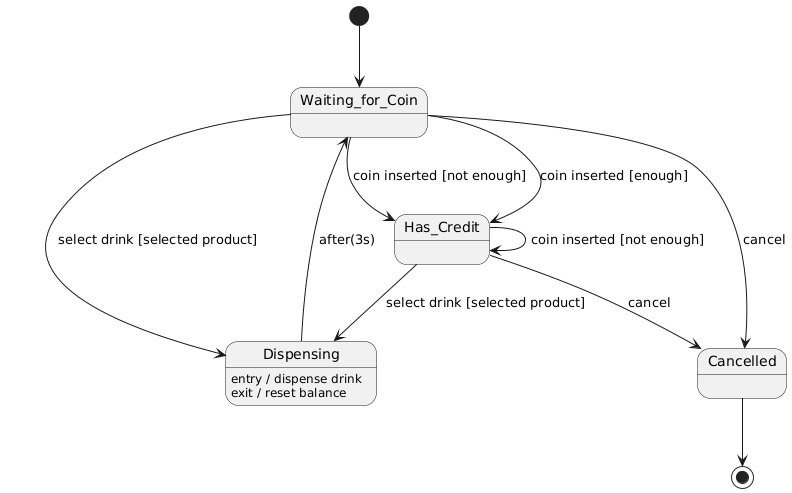
● → [Waiting for Coin]
   | coin inserted [enough money] → [Has Credit]
   | cancel → [Cancelled]
   | select drink [selected product] → [Dispensing]
   | coin inserted [not enough money] → [Has Credit]  ← self-transition
   |
   ▼
[Dispensing]
   entry / dispense drink
   exit / reset balance
   | after(3s) → [Waiting for Coin]
✅ With guards, actions, self-transitions, and realistic behavior — all from one prompt.
🛠 Bonus: Tips for Better AI Results
| Prompt Tip | Why It Works |
|---|---|
| Be specific: include price, coin types, user actions | AI understands context |
| Mention entry/exit actions | AI adds them automatically |
| Say “add a guard” or “include timeout” | Prevents missing logic |
| Use “generate code” after diagram is ready | Turn model into real software |
🎯 Why This Is Better Than Drawing by Hand
| Task | By Hand | With Visual Paradigm + AI |
|---|---|---|
| Generate states | ❌ Guesswork | ✅ AI gives 6–8 accurate states |
| Add guards/actions | 📝 Easy to miss | ✅ Automatically added |
| Validate logic | ❌ Hard to spot gaps | ✅ AI flags unreachable states |
| Turn into code | ❌ Manual coding | ✅ One click → Java/C# code |
| Share | 📸 Scan or screenshot | ✅ Export, embed, collaborate |
🌐 Try It Now!
👉 Go to: https://www.visual-paradigm.com/
👉 Create a new State Machine Diagram
👉 Click the AI icon (🤖)
👉 Paste this prompt:
“Create a UML state machine diagram for a vending machine that sells drinks for $1.50. It accepts 25¢, 50¢, and $1 coins. Include states: Waiting for Coin, Has Credit, Dispensing, Cancelled, and Change Return. Use guards like [enough money] and actions like entry / dispense drink. Add self-transitions for multiple coin insertions.”
🎉 In seconds — you’ll have a clean, professional, fully functional state diagram.
✅ Final Thoughts
🔍 You don’t need to be a UML expert to create high-quality state diagrams.
With Visual Paradigm’s AI, you can:
Describe your system in plain English,
Get a complete, validated, and beautiful diagram instantly,
And even generate code to bring it to life.
🎯 Whether you’re a student, developer, or engineer — AI is your co-pilot in system modeling.
💬 Need help? Try asking:
“Add a bonus state for when the machine is out of stock.”
Or: “Generate Java code for this vending machine state machine.”
Let me know — I’ll help you build it step by step! 🛠💡
Articles and resources:
- Mastering State Diagrams with Visual Paradigm AI: A Guide for Automated Toll Systems: This guide demonstrates how to use AI-enhanced state diagrams to model and automate the complex logic required for toll system software.
- Definitive Guide to UML State Machine Diagrams with AI: This resource provides a detailed look at using AI-powered tools to accurately model object behavior with UML state machine diagrams.
- Interactive State Machine Diagram Tool: A specialized web-based tool for creating and editing state machine diagrams that leverages GenAI capabilities for real-time behavior modeling.
- Generating Source Code from State Machines in Visual Paradigm: This technical guide provides instructions on generating implementation code directly from state machine diagrams to execute state-driven logic.
- Visual Paradigm – UML State Machine Diagram Tool: An overview of a cloud-based interface designed for architects to build, edit, and export precision state machine models.
- 3D Printer State Machine: A Comprehensive Step-by-Step Guide: A walkthrough of the state machine concept as applied to 3D printing systems, explaining their operational logic and automation paths.
- State Diagram Quick Tutorial: Master UML State Machines in Minutes: A beginner-friendly tutorial for mastering UML state machines, covering core concepts and modeling techniques within Visual Paradigm.
- Visualizing System Behavior: A Practical Guide to State Diagrams with Examples: An analysis of how state diagrams provide an intuitive visualization to identify potential system issues early in the design process.
- Creating State Machine Diagrams in Visual Paradigm: Official documentation detailing how to design and implement system behavior modeling using state machine diagrams.
- Visual Paradigm AI Suite: A Comprehensive Guide to Intelligent Modeling Tools: This overview details how the platform’s AI Chatbot supports technical modeling, including state machines and other behavioral diagrams, within the modeling environment.

 English
 Arabic
 Chinese (Simplified)
 Dutch
Dutch French
 German
 Italian
 Japanese
 Korean
 Portuguese
 Russian
 Spanish