


What is the C4 Model?
The C4 model is a simple, visual way to describe and communicate software architecture. It stands for:
- Context – the big picture (who uses the system and what other systems exist around it)
- Container – the high-level technical building blocks (web app, mobile app, databases, etc.)
- Component – (optional) internal structure of each container
- Code – (optional) class/implementation level
It helps teams and stakeholders understand the system at different zoom levels without drowning in details.
Below we apply the first two levels (Context and Container) to a real-world Healthcare Appointment Booking System.
Why do we need this system?
Traditional hospital appointment scheduling is painful:
- Patients call during office hours and wait on hold
- Staff manually check doctor schedules across paper or fragmented systems
- Double-bookings and no-shows are common
- No easy way for patients to see their medical summary or join a video consultation
- Reminders are forgotten → wasted clinic time
The new Healthcare Appointment Booking System solves these problems by giving patients 24/7 self-service booking, real-time availability, automatic reminders, and integration with telemedicine and EHR.
Who are the main actors?
| Actor | Description |
|---|---|
| Patient | Person needing medical care. Books, reschedules, cancels appointments; joins virtual visits |
| Healthcare Staff | Doctors, nurses, receptionists who manage schedules and treat patients |
Level 1: System Context Diagram
This is the 30,000-foot view
@startuml
!include https://raw.githubusercontent.com/plantuml-stdlib/C4-PlantUML/master/C4_Context.puml

LAYOUT_TOP_DOWN()
LAYOUT_WITH_LEGEND()

title System Context Diagram – Healthcare Appointment Booking System

Person(patient, "Patient", "Books appointments, joins video visits")
Person(healthcare_staff, "Healthcare Staff", "Doctors, nurses, admins")

System(booking_system, "Healthcare Appointment Booking System", "Core system for booking, rescheduling, cancelling appointments and virtual consultations")

System_Ext(ehr_system, "EHR System", "Electronic Health Records")
System_Ext(telemedicine_platform, "Telemedicine Platform", "Video consultation infrastructure")
System_Ext(schedule_system, "Hospital Schedule System", "Master calendar of doctors/rooms")
System_Ext(messaging_system, "Hospital Messaging System", "SMS/email gateway")

Rel(patient, booking_system, "Books/reschedules appointments, joins video calls")
Rel(patient, telemedicine_platform, "Has virtual consultations via")
Rel(patient, ehr_system, "Views own records (read-only)")

Rel(healthcare_staff, booking_system, "Manages appointments")
Rel(healthcare_staff, ehr_system, "Reads/writes patient records")
Rel(healthcare_staff, schedule_system, "Views master schedule")
Rel(healthcare_staff, messaging_system, "Sends notifications")

Rel(booking_system, schedule_system, "Checks & updates real-time availability")
Rel(booking_system, ehr_system, "Syncs patient identifiers and basic data")
Rel(booking_system, messaging_system, "Triggers SMS/email reminders")

@enduml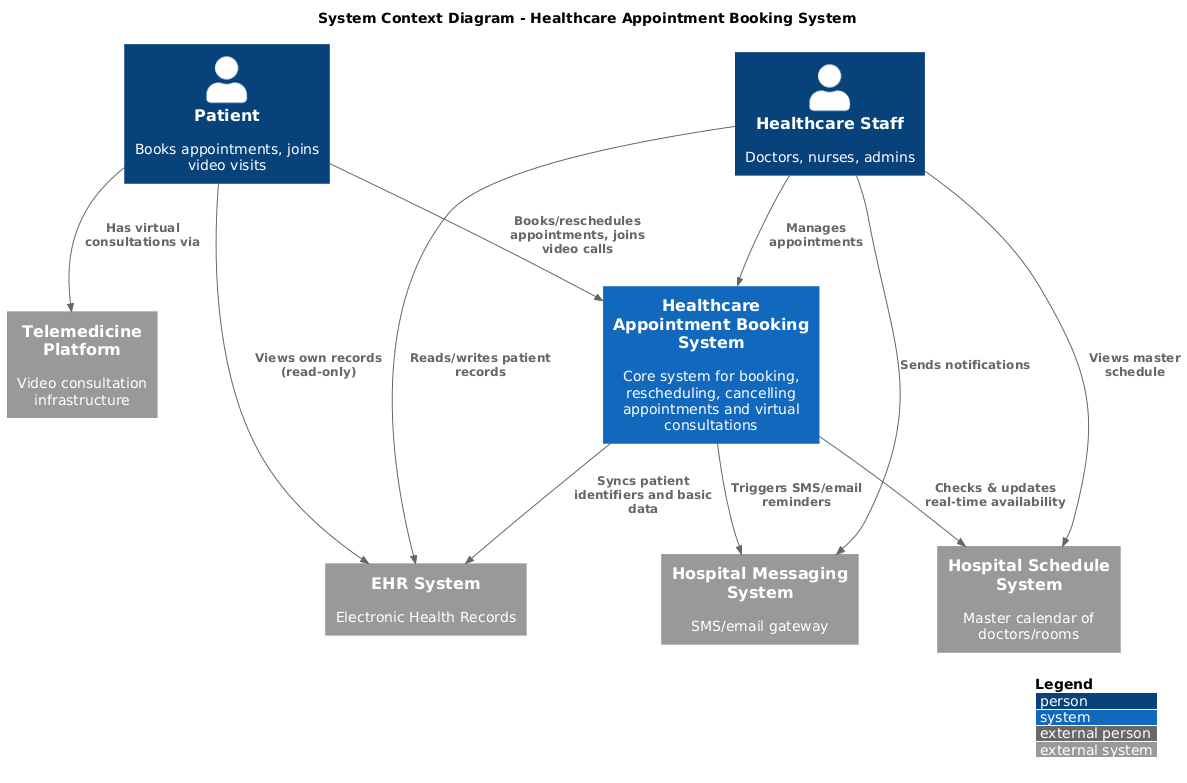
Key takeaway from Context: Our booking system is the central hub that connects patients, staff, and four existing enterprise systems.
Level 2: Container Diagram
Now we zoom in and show the major technical parts inside our system boundary.
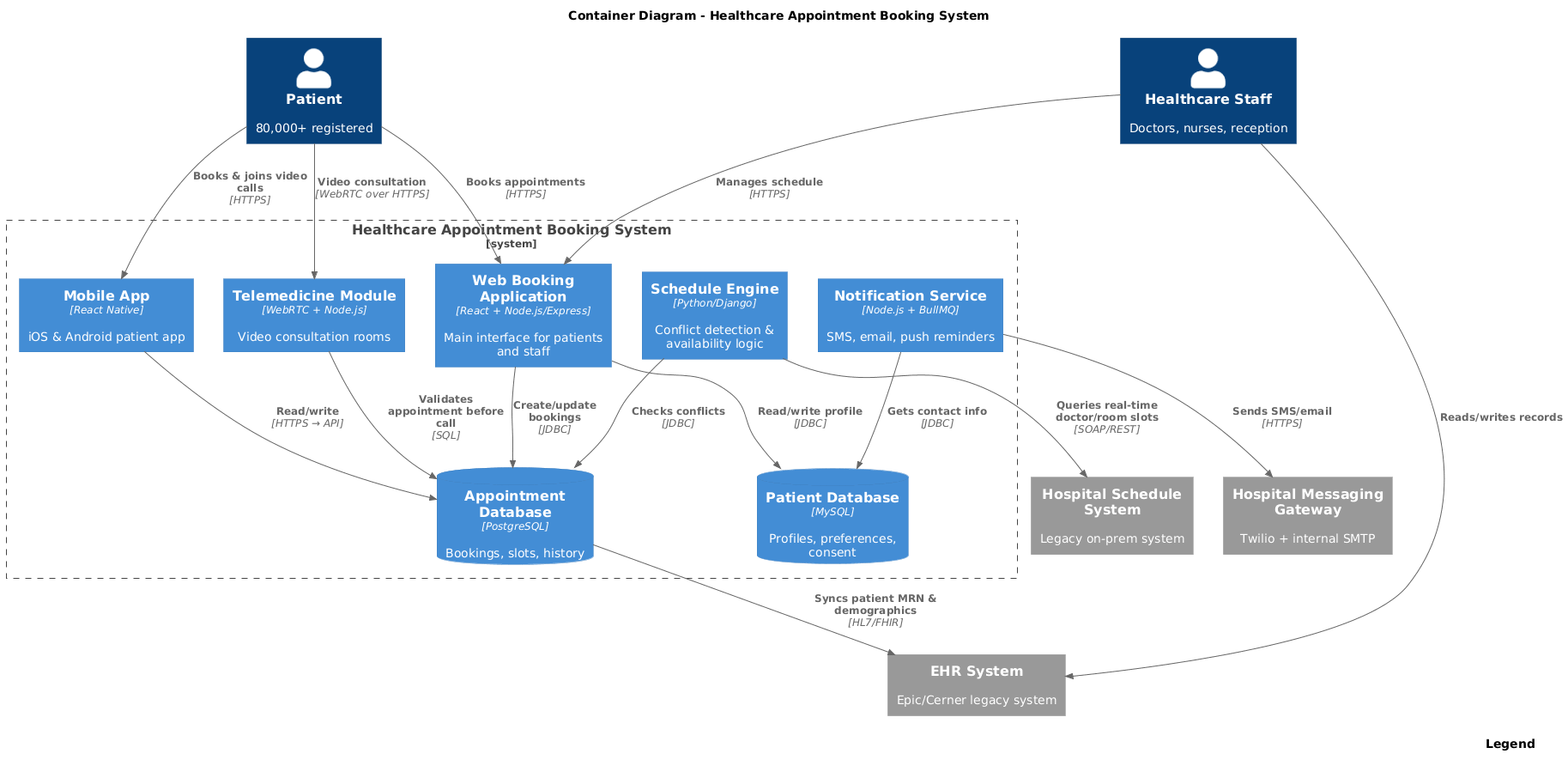
Key Containers Explained
| Container | Technology | Responsibility |
|---|---|---|
| Web Booking Application | React + Node.js/Express | Single page app used by both patients and staff |
| Mobile App | React Native | Native iOS/Android experience for patients |
| Telemedicine Module | WebRTC + signaling server | Secure video calls, waiting room, screen sharing |
| Schedule Engine | Python/Django | Core business logic: no double-bookings, buffer times, holidays |
| Notification Service | Node.js + Redis + BullMQ | Reliable delivery of reminders 24h, 2h, and 15min before |
| Patient DB (MySQL) | MySQL 8 | Personal data, consent, preferred language |
| Appointment DB (PostgreSQL) | PostgreSQL 15 | Immutable audit trail of all bookings and changes |
When do we use each diagram?
| Situation | Which diagram to show |
|---|---|
| Talking to hospital executives or patients | Context diagram (big picture, no tech jargon) |
| Onboarding new developers | Container diagram (shows where code lives) |
| Discussing security & compliance boundaries | Container (clear internal vs external systems) |
| Choosing tech stack or cloud deployment | Container (shows databases, message queues, etc.) |
| Writing RFP or contract with external vendor | Context + Container |
How to Use Visual Paradigm’s AI-Powered Visual Modeling Chatbot to Streamline the Entire C4 Modeling Process for the Healthcare Appointment Booking System
Here’s a real-world, step-by-step workflow that turns hours of manual diagramming and documentation into a 10–15 minute conversation with the AI.
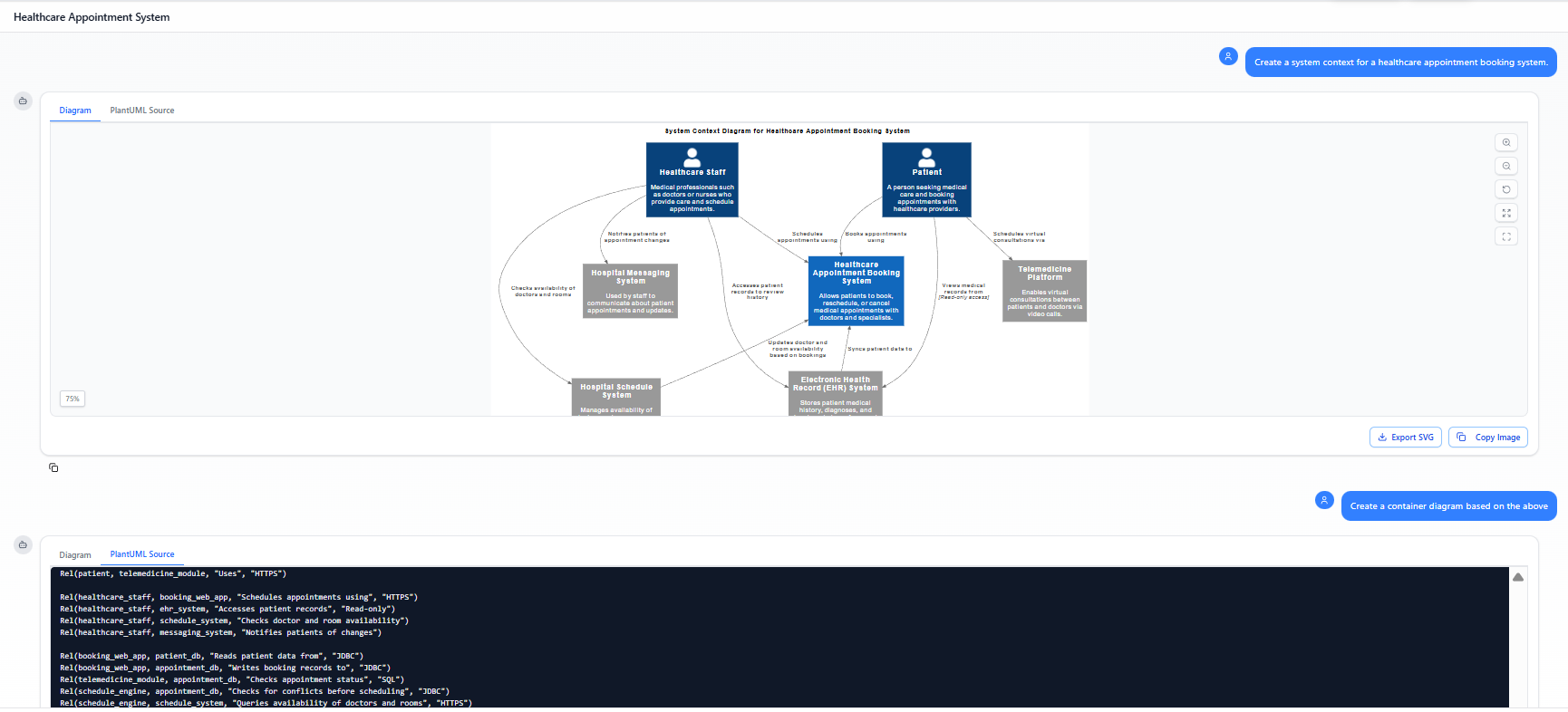
Step 1: Start from Zero with a Single Prompt (30 seconds)
Just type this into Visual Paradigm’s AI chat:
“Create a complete C4 model (Context + Container diagrams) for a modern Healthcare Appointment Booking System. Actors: Patients and Healthcare Staff (doctors, nurses, admins). The system lets patients book, reschedule, and cancel appointments 24/7, join telemedicine video calls, receive automated reminders, and view their own medical summary. It integrates with an existing EHR system, a hospital master schedule system, and a messaging gateway. Use modern tech stack: React web app, React Native mobile app, Node.js backend, Python scheduling engine, PostgreSQL + MySQL databases, WebRTC for video.”
→ In less than 10 seconds you get a beautiful, correctly laid-out C4 Context diagram and C4 Container diagram — almost identical to the PlantUML examples you saw earlier, but already rendered and presentation-ready.
Step 2: Refine Instantly with Natural Commands (2–5 minutes)
Now just chat with the diagram:
- “Add a Notification Service container that sends SMS and email reminders”
- “Connect the Notification Service to the Hospital Messaging System”
- “Show the Telemedicine Module using WebRTC”
- “Split the database into Patient DB (MySQL) and Appointment DB (PostgreSQL)”
- “Rename ‘Healthcare Staff’ to ‘Doctor / Nurse / Receptionist’ and give it an icon”
- “Change the layout to top-down and add a legend”
- “Make the Web App and Mobile App both use HTTPS to the backend”
Every command instantly updates the live diagram — no dragging, no re-aligning, no syntax errors.
Step 3: Ask Your Diagram Questions (Instant Insight)
Treat it like a knowledgeable architect sitting next to you:
- “What are the external systems this depends on?”
- “List all the containers and their technologies”
- “What are the main security boundaries?”
- “Generate a one-page executive summary of this architecture”
- “Write a 3-paragraph description for our RFP”
You immediately get perfectly written text you can copy-paste into proposals, Confluence, or PowerPoint.
Step 4: Get Full Documentation on Demand (30 seconds)
Tell the AI:
“Generate professional architecture documentation for this C4 model, including Context description, Container description, key design decisions, and technology choices.”
You receive a complete, beautifully formatted Markdown or Word-ready document in seconds.
Step 5: One-Click Export to Pro Tool When You Need Team Collaboration
When the design is approved:
- Click “Open in Visual Paradigm Desktop” or “Export as .vpp project”
- The entire model (with shapes, layout, notes, glossary) opens in the full Visual Paradigm tool for team review, version control, adding Component or Sequence diagrams, generating PDF/PNG, etc.
Why This Is a Game-Changer for the Healthcare Project
| Traditional Way (2–8 hours) | With Visual Paradigm AI (10–15 minutes) |
|---|---|
| Open PlantUML / draw.io / Lucidchart | Just type a paragraph |
| Manually create every box and arrow | AI creates 95% correct diagram instantly |
| Fix layout and alignment again and again | AI keeps perfect layout after every edit |
| Write documentation separately | Ask → get perfect documentation instantly |
| Copy-paste between tools | One-click seamless handover to full-featured desktop tool |
Result: Solution architects, enterprise architects, and development teams can now produce stakeholder-ready C4 diagrams and documentation faster than it takes to schedule the next meeting.
Start now: Go to Visual Paradigm Online → “AI Chat” → paste the prompt above and watch the magic happen in seconds.
Summary
Using just two simple diagrams we can now clearly answer:
- What the system does and who benefits
- How it fits into the existing hospital IT landscape
- What major applications and databases we need to build or integrate
This clarity dramatically reduces misunderstandings between business stakeholders, architects, and development teams — which is exactly why the C4 model has become the de-facto standard for modern software architecture documentation.


 English
 Arabic
 Chinese (Simplified)
 Dutch
Dutch French
 German
 Italian
 Japanese
 Korean
 Portuguese
 Russian
 Spanish