Class diagrams are foundational in object-oriented design, offering a clear view of a system’s structure through classes, attributes, methods, and relationships. Traditionally, creating them required deep familiarity with UML notation and careful manual layout. Today, with the rise of intelligent tools, that process has evolved—especially with AI-powered solutions like Visual Paradigm’s AI Chatbot.
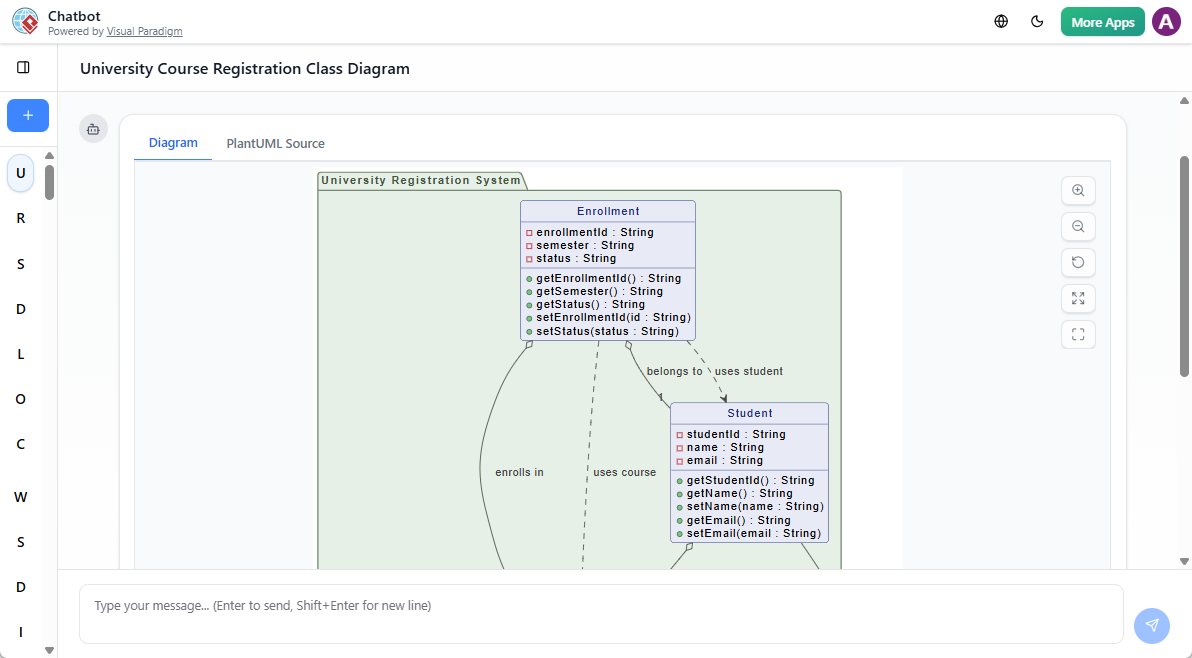
This guide walks you through how an AI class diagram maker can streamline your workflow, support learning, and accelerate system design—without sacrificing accuracy or UML semantics.
🎯 What Is an AI Class Diagram Generator?
An AI class diagram generator is a tool that translates natural language descriptions into fully compliant UML class diagrams. Unlike generic diagram tools, a true AI UML tool understands object-oriented concepts such as inheritance, composition, aggregation, and encapsulation.
Visual Paradigm’s AI chatbot stands out because it doesn’t just generate diagrams—it interprets intent. Whether you’re a beginner sketching a simple system or a developer designing a complex architecture, the AI adapts to your level and evolves with your needs.
✨ Key Features That Make It Stand Out
1. Instant Text-to-Diagram Generation
Describe your system in plain English—no UML syntax required.
Example prompt:
“Create a class diagram for a library management system with Book, Member, and Loan classes.”
The AI instantly generates a clean, UML-compliant diagram with appropriate classes, attributes, and relationships.
2. Conversational Refinement Without Redrawing
Instead of manually editing each element, refine your model through natural conversation:
-
Add a new class:
“Add a Reservation class linked to Member.”
-
Modify an existing class:
“Add a ‘status’ attribute with getter and setter methods to the Staff class.”
-
Rename a class:
“Rename ‘Employee’ to ‘Staff’.”
The AI updates all related references automatically—no risk of broken links or inconsistent naming.
3. Intelligent UML Understanding
The AI doesn’t treat every entity as a generic box. It recognizes:
-
The difference between a class and an attribute.
-
Whether a relationship is composition (strong ownership) or aggregation (loose association).
-
Correct usage of visibility modifiers (
+,-,#).
This ensures your diagrams reflect real-world design principles—not just visual structure.
4. Design Guidance & Feedback
Struggling to identify core components? Ask the AI for input:
“What are the essential classes in a university course registration system?”
Or:
“Are there any missing relationships in my current diagram?”
The AI responds with actionable suggestions, turning it into a collaborative design partner.
5. Context-Aware Conversations
You can build a diagram over multiple interactions without losing progress. The chatbot remembers your previous inputs, so you can:
-
Expand a module.
-
Revisit earlier decisions.
-
Iterate on design without starting over.
This is especially helpful during team brainstorming or design reviews.
🧠 Why This Matters for Learners and Practitioners
For Beginners: Learn UML Through Doing
Learning UML often starts with frustration—memorizing syntax, drawing correct notations, and avoiding common mistakes. An AI class diagram maker removes these barriers.
With instant visualization, you can:
-
Test ideas immediately.
-
See how adding a method affects the class.
-
Understand relationships by seeing them rendered in real time.
This interactive feedback loop accelerates learning and builds confidence.
For Developers: Accelerate Design & Implementation
Instead of spending hours on initial sketches, you can:
-
Generate a baseline diagram in seconds.
-
Use it as a foundation for code generation.
-
Export to Visual Paradigm Desktop App for advanced features like documentation, reverse engineering, and code synchronization.
This seamless transition from idea to implementation cuts design time by up to 70%—ideal for agile teams and rapid prototyping.
🛠️ Practical Example: Building a Hotel Booking System
Let’s walk through a real-world scenario using the AI chatbot:
-
Initial Prompt:
“Create a class diagram for a hotel booking system with Guest, Room, Booking, and Payment classes.”
-
Refine Relationships:
“Make Booking a composition of Room and Guest. Add a ‘totalAmount’ attribute to Payment.”
-
Add Functionality:
“Add a ‘checkIn()’ and ‘checkOut()’ method to the Booking class.”
-
Review & Improve:
“Suggest improvements to this design.”
The AI might respond:
“Consider adding a ‘RoomType’ class to model different room categories. Also, ensure Payment is associated with Booking via a dependency.”
Each step is fast, accurate, and builds on the previous one—no backtracking, no frustration.
🔄 Seamless Integration with Development Workflows
Once your diagram is ready, you can:
-
Export it to the Visual Paradigm Desktop App.
-
Generate Java, C#, or Python code directly from the model.
-
Create professional documentation with one click.
-
Share it with team members via collaborative cloud workspace.
This integration ensures your design remains a living document throughout the development lifecycle.
📌 Final Thoughts
AI class diagram tools are no longer a luxury—they’re a practical extension of modern software design. Whether you’re learning UML, prototyping a new system, or refining an existing architecture, an AI class diagram generator removes friction and focuses your energy on the right questions: What should the system do? How should it be structured?
By combining natural language input with deep UML understanding, tools like Visual Paradigm’s AI chatbot make class diagram creation intuitive, accurate, and efficient.
💡 Ready to Try It?
Start with a simple prompt today. Describe your next system in plain English—and watch the diagram appear. No syntax, no guesswork, just clarity.
Try it now: Visual Paradigm AI Chatbot
📚 References
-
https://www.visual-paradigm.com/guide/uml-unified-modeling-language/uml-practical-guide/
-
https://blog.visual-paradigm.com/visual-paradigm-ai-chatbot-turn-your-ideas-into-diagrams-instantly/
-
https://www.cybermedian.com/ai-powered-uml-class-diagram-creation-in-visual-paradigm/
-
https://explore.visual-paradigm.com/articles/generate-uml-class-diagrams-ai/

 English
 Arabic
 Chinese (Simplified)
 Dutch
Dutch French
 German
 Italian
 Japanese
 Korean
 Portuguese
 Russian
 Spanish