The ArchiSurance case study is a fictional example created to illustrate the use of the ArchiMate® modeling language within the TOGAF® framework. The case study involves the insurance company ArchiSurance, which was formed by the merger of three previously independent companies. The case study describes the company’s baseline architecture, followed by several change scenarios.
This case study is required as an example in certified ArchiMate training courses. However, it is not part of the official TOGAF definition. The work supports The Open Group’s vision of boundaryless information flow by demonstrating the combined use of the TOGAF and ArchiMate standards, enabling consistent representation of architecture information across different organizations, systems, and programs.
Introduction
This fictional case study illustrates the practical use of the ArchiMate enterprise modeling language within the TOGAF framework. The case study concerns the insurance company ArchiSurance, the result of a merger of three previously independent companies operating in different metropolitan areas.
The case study is used as an example throughout certified ArchiMate training courses and serves as background material for the ArchiMate certification examination. It begins with the baseline business, application, data, and technology architecture using appropriate ArchiMate or TOGAF viewpoints. The study then proceeds with two change scenarios. The first scenario provides examples of views illustrating the TOGAF Architecture Development and Implementation cycles. It shows the architecture vision, business goals, principles and requirements, target business, application, data and technology architecture, gap analysis results between baseline and target, and views supporting implementation and migration planning. In the second scenario, the target state of the first scenario is taken as the new baseline, and customers can directly access their insurance portfolio via the web. No models are currently available for this scenario.
The Open Group expects the case study to evolve over time and encourages its members to add new aspects and views or create new change scenarios, as long as they remain consistent with the original case description and models.
TOGAF® and ArchiMate®
Enterprise architecture frameworks cover different aspects supporting enterprise architects. Among others, they may contain any combination of the following ingredients:
- A process for creating architecture (“way of working”)
- A collection or classification of viewpoints
- A language for describing architecture (defining concepts and relationships, but also including notation)
The Open Group maintains two open standards for enterprise architecture: TOGAF [1] and ArchiMate [2].
The core of TOGAF is the process for developing and implementing enterprise architecture — the Architecture Development Method (ADM). TOGAF also describes viewpoints, techniques, reference models, and a content framework for identifying the types of building blocks that make up architectures. However, TOGAF does not prescribe the use of a specific modeling language for creating architecture views.
ArchiMate is a graphical language that provides a uniform representation for models to support the entire architecture development cycle. Version 2.0 of the standard includes a core language intended to describe actual architectures (business, information systems, and technology architectures, and the relationships between them), as well as extensions for modeling architecture motivation, and for implementation and migration planning. Figure 1 describes how the core language and extensions link to the TOGAF ADM. In addition to defining modeling concepts and relationships, ArchiMate — like TOGAF — defines a set of architecture viewpoints.
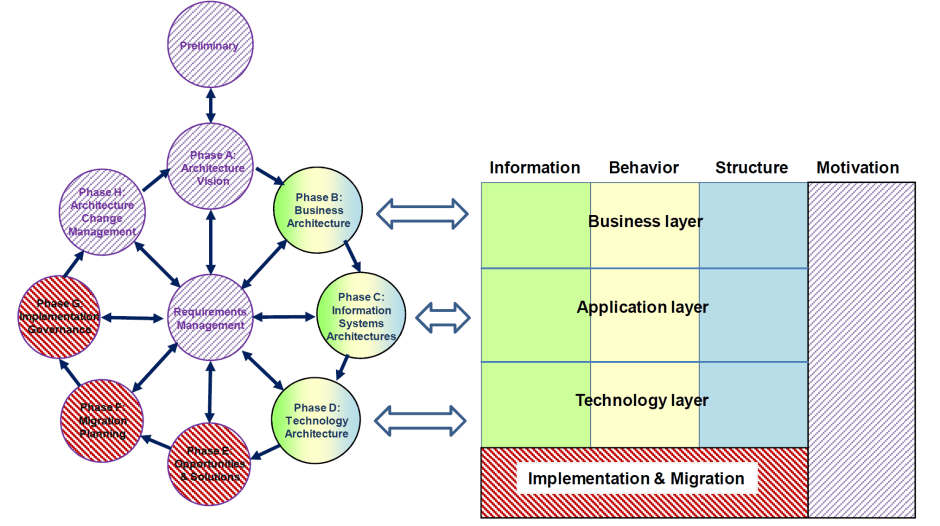
Figure 1: Correspondence between ArchiMate and TOGAF
TOGAF and ArchiMate have a solid common foundation in their philosophy and use of viewpoints to capture and communicate different aspects of a single underlying architecture model. The standards complement each other because TOGAF focuses on the process of developing and implementing architectures, while ArchiMate focuses on a uniform language for modeling architecture artifacts.
The ArchiMate language, as described in the Technical Standard [2], complements TOGAF [1] by providing a vendor-independent set of concepts and relationships, including graphical notation, to help create consistent, integrated models that can be represented in the form of views.
Background
ArchiSurance [3,4] is the result of a recent merger of three previously independent insurance companies:
- Home & Away, specializing in homeowners and travel insurance
- PRO-FIT, specializing in auto insurance
- Legally Yours, specializing in legal expense insurance
The company now consists of three divisions with the same names and headquarters as their independent predecessors.
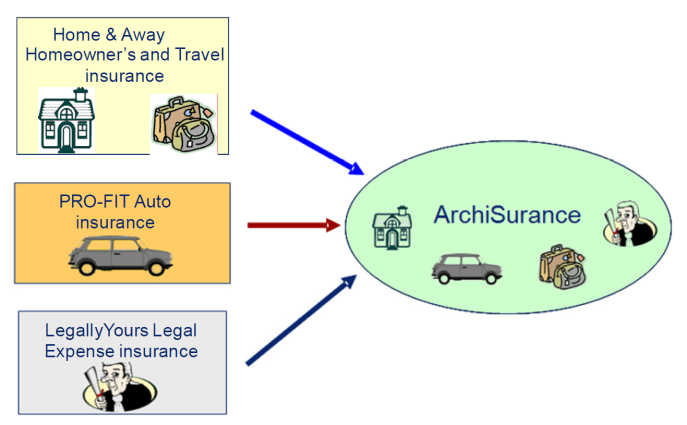
Figure 2: ArchiSurance: Result of the merger of three insurance companies
ArchiSurance was formed to exploit numerous synergies among the three organizations. Although the three pre-merger companies sold different types of insurance, their business models were similar. All three products were sold directly to consumers and small businesses via web, email, telephone, and postal channels. Although headquartered in different cities, each was fully housed in a modern office building in a metropolitan area. Each company had a loyal customer base and enjoyed a good reputation for integrity, value, service, and financial stability. All three companies were privately held by chains of institutional and individual investors.
The major investors of the three companies initiated merger talks after noticing low-cost competitors entering their markets, new opportunities in high-growth regions, and the need for substantial new IT investment in each company to remain competitive. They realized that only a larger merged company could simultaneously control costs, maintain customer satisfaction, invest in new technology, and exploit emerging markets with high growth potential. Merger negotiations and regulatory approval took 18 months, but the documents were signed two years ago and the merger was completed.
The new company offers all insurance products of the three pre-merger companies and intends to frequently adjust its offerings based on changing market conditions. Like its three predecessors, ArchiSurance sells directly to customers via print, web, and direct marketing.
The merger presented many integration and coordination challenges for the new company’s business processes and information systems. These challenges are evident in ArchiSurance’s baseline business, application, data, and technology architecture. But first, the TOGAF ADM Preliminary Phase established the motivational context for these challenges.
Preliminary Phase
To guide its future business and IT changes, ArchiSurance decided to develop an enterprise architecture based on TOGAF 9.1 and ArchiMate 2.0 with minimal tailoring.
As part of the Preliminary Phase, the main stakeholders in the architecture engagement and their concerns were identified (modeled in ArchiMate as internal drivers). TOGAF defines a stakeholder mapping matrix to represent this. In ArchiMate, this can be expressed using the Stakeholder viewpoint:
The Stakeholder viewpoint allows the analyst to model stakeholders, their concerns, and the assessments thereof (in terms of strengths, weaknesses, opportunities, and threats). In addition, it is possible to associate these concerns and assessments with initial (high-level) goals to resolve them.
Figure 3 shows a fragment of such a diagram, identifying two stakeholders (the Architecture Board and its current and potential customers) and their concerns, modeled as drivers. Customer satisfaction is a concern shared by both stakeholders. Stakeholder satisfaction can be refined into more detailed concerns; e.g., profit.
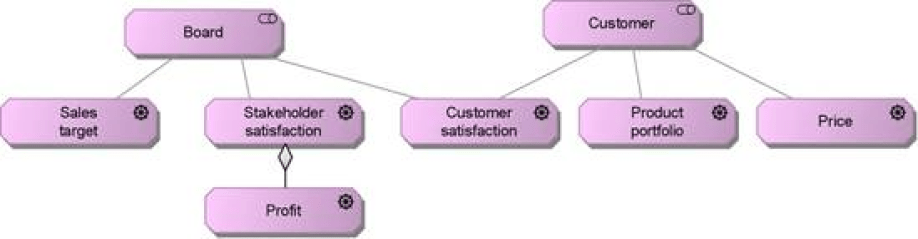
Figure 3: Fragment of Stakeholder View
Drivers lead to the development of specific business goals, as shown below to achieve profit. Goals such as reducing costs can be decomposed into reducing maintenance costs and reducing personnel costs.
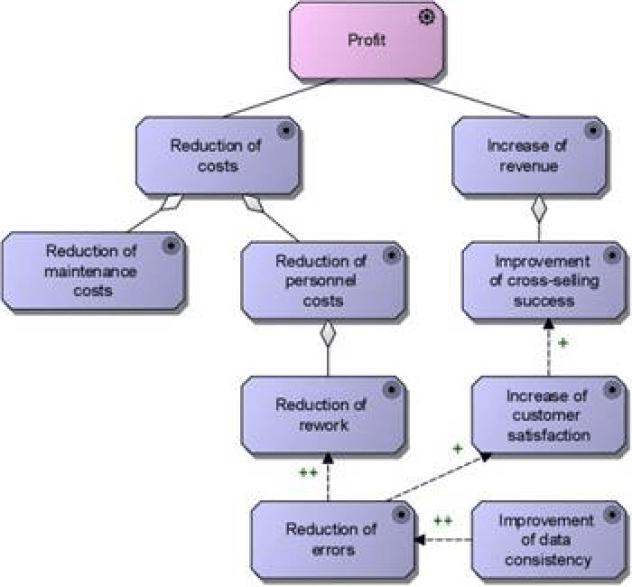
Figure 4: Business Goals Driving Profit
ArchiMate defines principles as normative properties of all systems in a given context, or of the way they are realized. Note that “system” here includes organizations and organizational units, not just IT systems. Thus, principles help realize business goals. TOGAF defines principles as qualitative statements of intent that architecture must fulfill. A principle must have a supporting rationale and an important implication.
The ArchiMate Principles viewpoint (an example shown in Figure 5) graphically describes principles, their dependencies, and the goals they realize:
The Principles viewpoint allows the analyst or designer to model principles that are relevant to the design problem at hand, including the goals that motivate these principles. In addition, relationships between principles and goals can be modeled. For example, principles may positively or negatively influence each other.
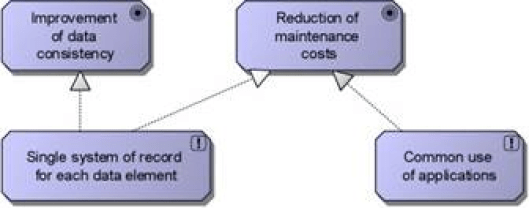
Figure 5: Principles View
TOGAF defines a Principles Catalog to provide an overview of principles.
Phase B: Baseline Business Architecture
After the merger, ArchiSurance established a shared front office as a multi-channel contact center for sales and customer service, with the main contact center located at the former Home & Away headquarters. Three separate back offices still handle the insurance products of the three original companies. A shared service center (SSC) for document processing has been established at the former profitable headquarters. This center manages the central document repository and all automated document workflows. In addition, it performs all scanning, printing, and archiving operations when legally binding documents enter or leave ArchiSurance. To ensure business continuity and handle peak activity, the SSC is also equipped with trained personnel and equipment to perform front-office functions, and the front office is similarly prepared.
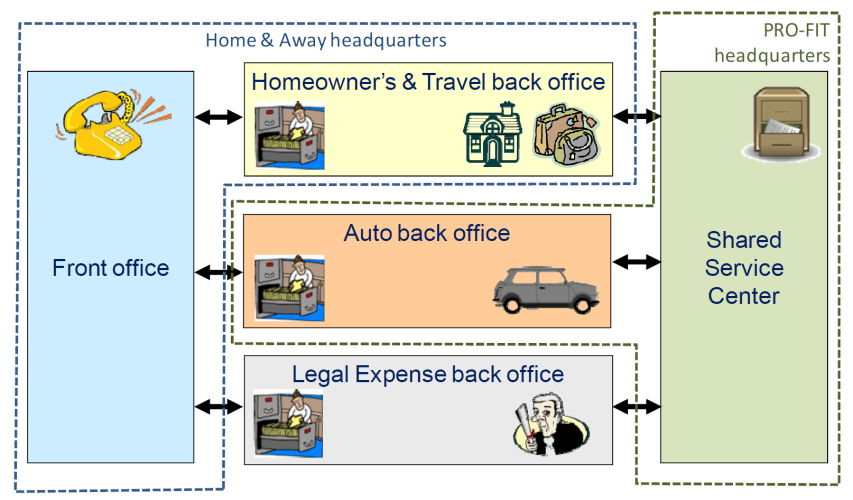
Figure 6: Global organizational structure of ArchiSurance
In Phase B (Business Architecture) of the TOGAF ADM, ArchiMate can express and relate ArchiSurance’s organizational structure, products, services, functions, processes, and information. The business architecture provides context for the data, application, and technology architectures.
Organizational Structure
To describe organizational structure, ArchiMate defines the Organization viewpoint:
The Organization viewpoint focuses on the (internal) organization of a company, department, business network, or other organizational entity. In this viewpoint, models can be represented as nested box diagrams, but more traditional representations such as organization charts can also be used. The Organization viewpoint is very useful for identifying capabilities, authority, and responsibility within an organization.
The TOGAF equivalent to this viewpoint is the Organization Decomposition Diagram.
Organizational structure is typically represented as a tree, as shown in Figure 7, although the organization decomposition methods used in ArchiMate and TOGAF offer more options than simple tree organization charts. This view shows the high-level organizational structure of ArchiSurance, along with its primary locations and divisions. Alternatively, a nested diagram could subdivide the organization by location and division.
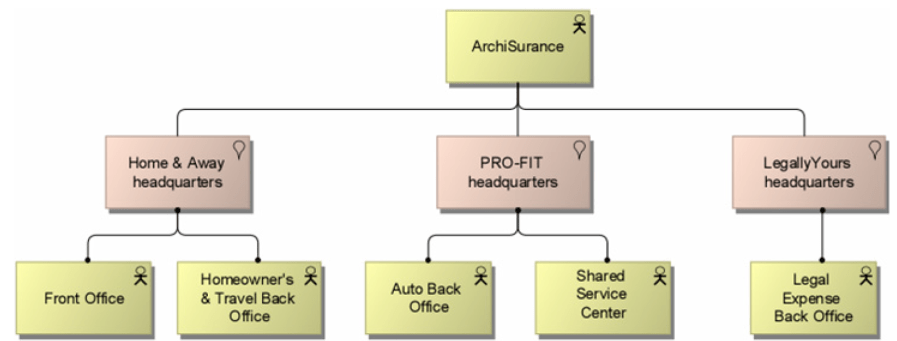
Figure 7: Organization View
Business Functions
ArchiMate business functions group behavior according to a selected set of criteria (typically required business resources and/or competencies).
The main business functions distinguished by ArchiSurance are:
- Marketing — research, planning, promotion, and management of products and segments, and cooperating with actuaries to design products
- Actuary — determining product prices and reserve levels, cooperating with Marketing to design new products, and analyzing enterprise risk
- Customer Relations — interactions between ArchiSurance and its customers; handling customer questions, capturing received claims, and conducting direct marketing campaigns
- Underwriting — setting prices for individual policies and generating insurance proposals and policies
- Claims — formulating and executing ArchiSurance’s response to each claim filed against its policies
- Finance — periodic collection of premiums from customers according to contracts and processing payments of insurance claims
- Document Processing — supporting other functions through document scanning, printing, and archiving
- Investment Management — managing financial and real estate assets to achieve maximum return within corporate and regulatory liquidity and risk constraints
Some of these business functions are replicated in the back offices of the three divisions of ArchiSurance.
To model business functions and their relationships, ArchiMate defines the Business Function viewpoint:
The Business Function viewpoint shows the main business functions of an organization and their relationships in terms of information flow, value flow, or goods flow.
The TOGAF equivalent to this viewpoint is the Function Decomposition Diagram.
Figure 8 shows ArchiSurance’s main business functions, along with the most important information flows between functions and external roles. It also shows the replication of business functions in the back offices of the different divisions.
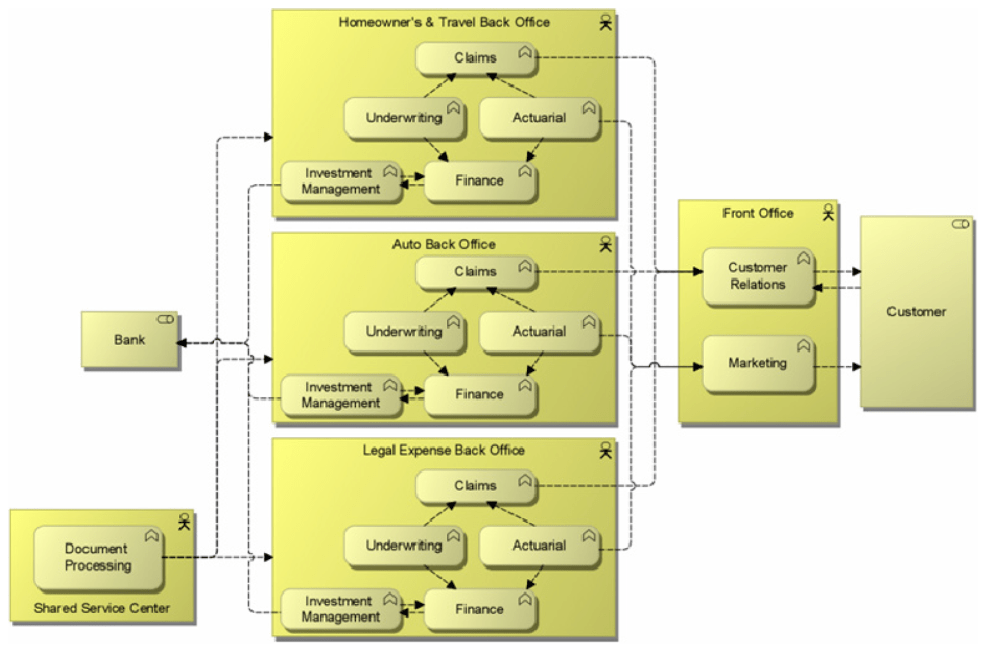
Figure 8: Business Function View
Business Processes
ArchiMate business processes group behavior according to the order of activities. It produces a defined set of products or services. Process architecture shows the most important business processes and their relationships, possibly also showing the main steps in each process. It typically does not show all the details of process flow — that is the purpose of business process modeling languages. ArchiMate defines a Business Process viewpoint:
The Business Process viewpoint is used to show the high-level structure and composition of one or more business processes (or parts thereof).
The TOGAF equivalent to this viewpoint is the Process Diagram.
Figure 9 shows two core business processes of ArchiSurance and their high-level sub-processes: Close contract (executed when selling a new insurance product) and Handle claim (executed when a damage claim is received). Although the details of these processes may vary for different types of insurance products, the main steps are the same.
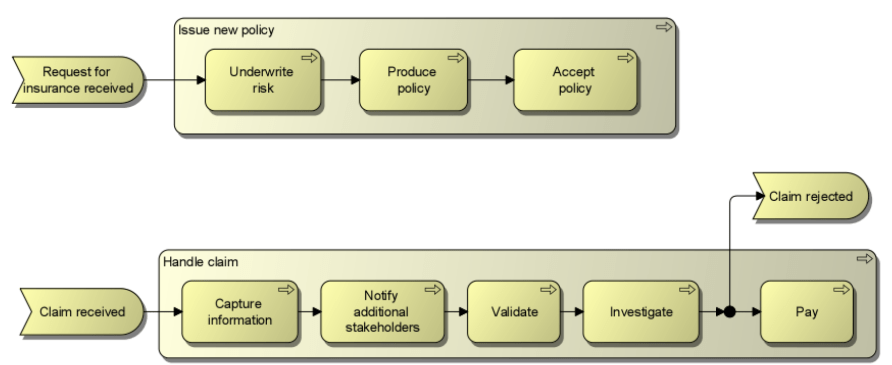
Figure 9: Business Process View
Phase C: Baseline Information Systems Architecture (Applications)
Since the merger, the three divisions have adopted a common portal, contact center software suite, and document management system. In addition, the company selected a strategic CRM solution and implemented it for Home & Away and PRO-FIT. However, because management focused on minimizing post-merger risk while continuously improving daily performance in each division, rationalization of core business applications has not yet begun. Now that ArchiSurance has met post-merger performance expectations, investors expect substantial IT cost savings through the adoption of a common set of products and customer-centric applications. Challenges remain. Home & Away still uses its pre-merger policy administration and finance application package, while PRO-FIT and Legally Yours still use their own pre-merger custom applications.
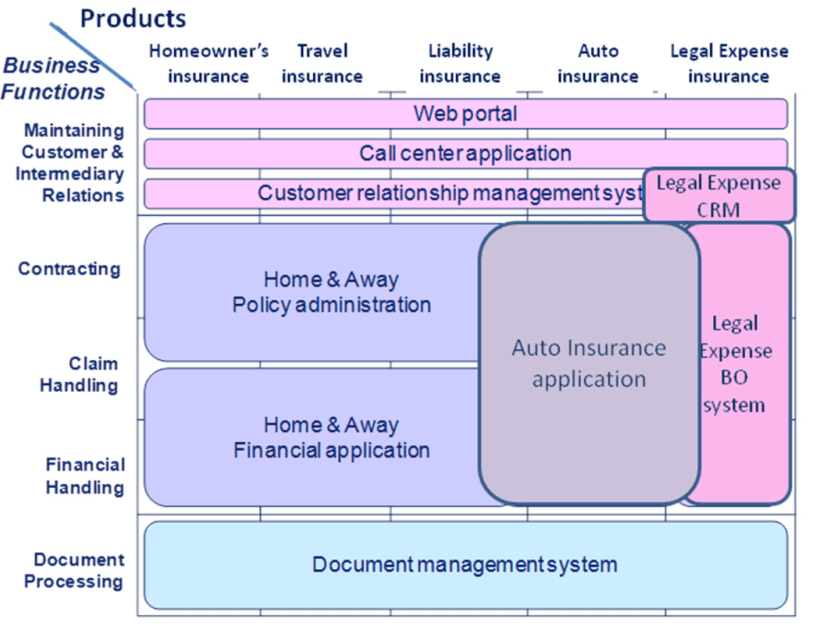
Figure 10: Application Environment
Application Cooperation
ArchiMate defines an Application Cooperation viewpoint to provide an overview of the application landscape and dependencies between applications:
The Application Cooperation viewpoint describes the relationships between application components, i.e., the information flows between them, or the services they provide and use. This viewpoint is typically used to create an overview of the application landscape of an organization. This viewpoint is also used to express (internal) cooperation or orchestration of services that together support the execution of business processes.
The TOGAF equivalent to this viewpoint is the Application Communication Diagram.
Figure 11 shows ArchiSurance’s main applications and the primary data flows between applications.
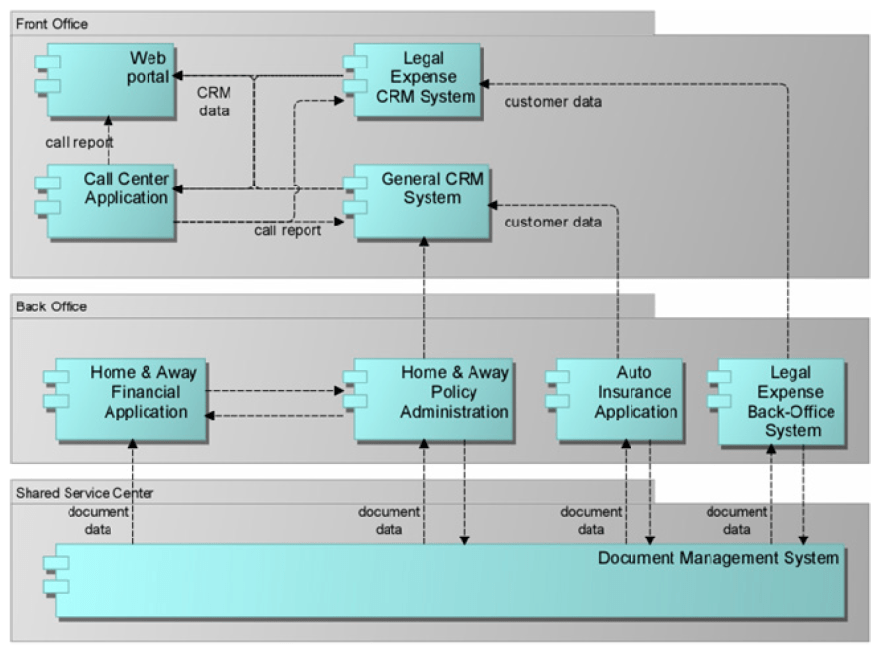
Figure 11: Application Cooperation View
Business-Application Alignment
TOGAF does not define diagrams for business-application alignment. However, it does specify matrix-based viewpoints to show linkages between business and application architecture; e.g., Application/Organization matrix and Application/Function matrix.
Relationships between application components can also be modeled graphically. ArchiMate defines the Application Usage viewpoint:
The Application Usage viewpoint describes how applications are used to support one or more business processes, and how they are used by other applications. It can be used to design applications by identifying services required by business processes and other applications, or to design business processes by describing available services. In addition, since it identifies dependencies of business processes on applications, it can be useful for operational managers responsible for these processes.
The application service concept plays a central role in this viewpoint. Figure 12 shows a subset of the services provided by applications used by the ArchiSurance Home & Away division, and which sub-processes of the claims handling process use which of these services.
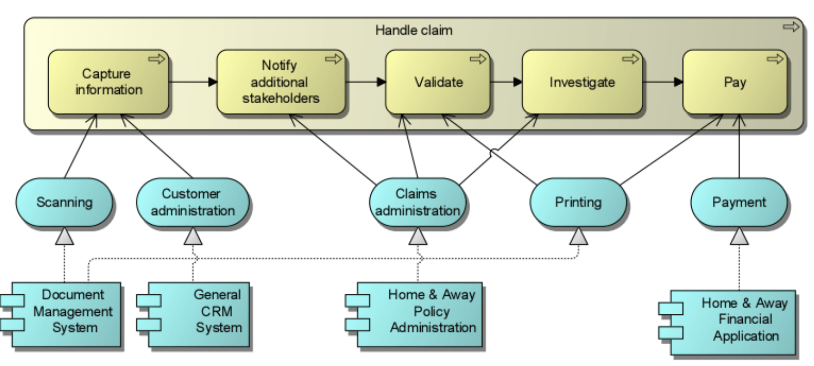
Figure 12: Application Usage View
Phase C: Baseline Information Systems Architecture (Data)
The ArchiSurance data architecture describes the main relationships between its conceptual business objects and logical data objects. ArchiMate defines the Information Structure viewpoint for this purpose:
The Information Structure viewpoint is comparable to the traditional information models created in almost any information system development process. It shows the structure of the information used in the enterprise or in specific business processes or applications in the form of data types or (object-oriented) class structures.
One of the data viewpoints defined by TOGAF is the Logical Data Diagram.
Figure 13 shows a subset of the business objects defined by ArchiSurance. Part of the customer information is the insurance file, consisting of insurance requests, insurance policies, and damage claims. Many specializations of the insurance policy object are defined, one for each type of insurance sold by ArchiSurance.
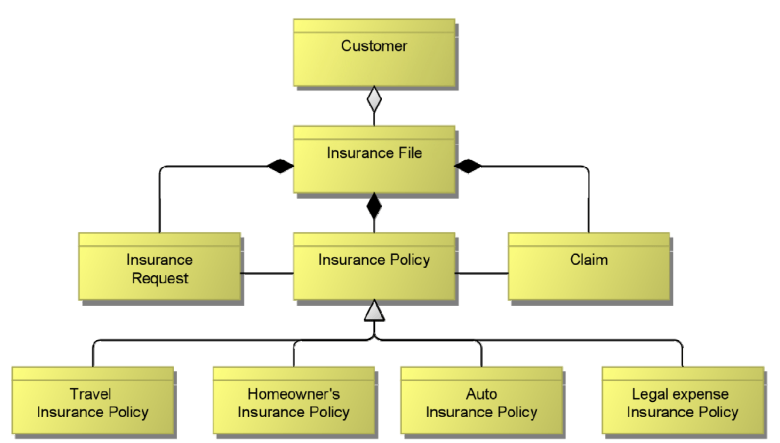
Figure 13: Information Structure View
Another data viewpoint defined by TOGAF is the Data Dissemination Diagram:
The purpose of the Data Dissemination Diagram is to show the relationships between data entities, business services, and application components. The diagram shows how application components physically realize logical entities. This enables effective sizing and optimization of the IT footprint. In addition, by assigning business value to data, an indication of the business criticality of application components can be obtained.
Figure 14 shows a Data Dissemination Diagram for an ArchiSurance application.
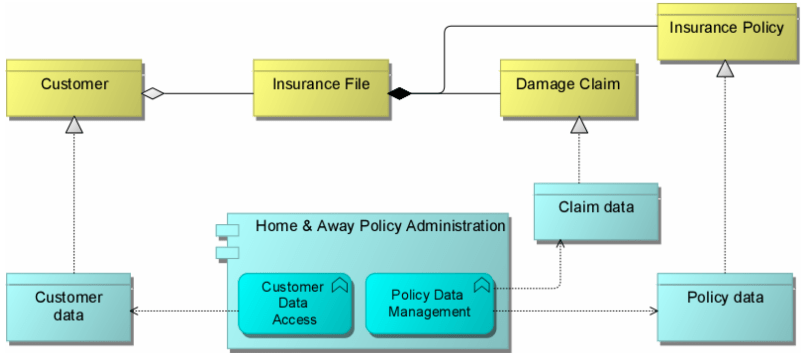
Figure 14: Data Dissemination Diagram
Phase D: Baseline Technology Architecture
Figure 15 outlines ArchiSurance’s technology infrastructure landscape. In the front office, located at the Home & Away headquarters, there is a common server and a server dedicated to web hosting. The shared service center (SSC) located at the PRO-FIT headquarters has its own file management system server. Each of the three back offices has a server for its applications.
Local area networks (LANs) connect the servers and personal computers at the three ArchiSurance locations, which in turn are connected by the corporate wide area network (WAN).
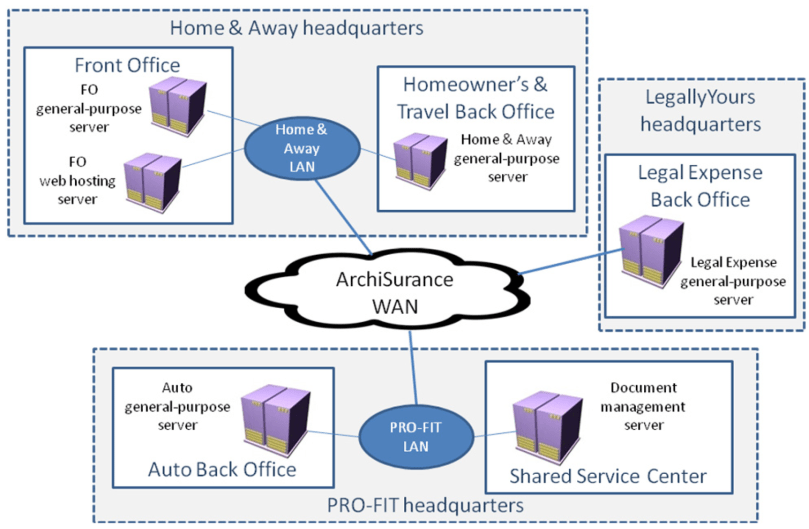
Figure 15: Infrastructure Landscape
For an overview of the infrastructure landscape, ArchiMate defines the Infrastructure viewpoint:
The Infrastructure viewpoint comprises software and hardware infrastructure elements that support the application layer, such as physical devices, networks, or system software (e.g., operating systems, databases, and middleware).
The TOGAF equivalent to this viewpoint is the Environments and Locations Diagram.
Figure 16 shows ArchiSurance’s main infrastructure components grouped by location and division. This view also shows the networks connecting different devices and the (application) artifacts deployed on the devices.
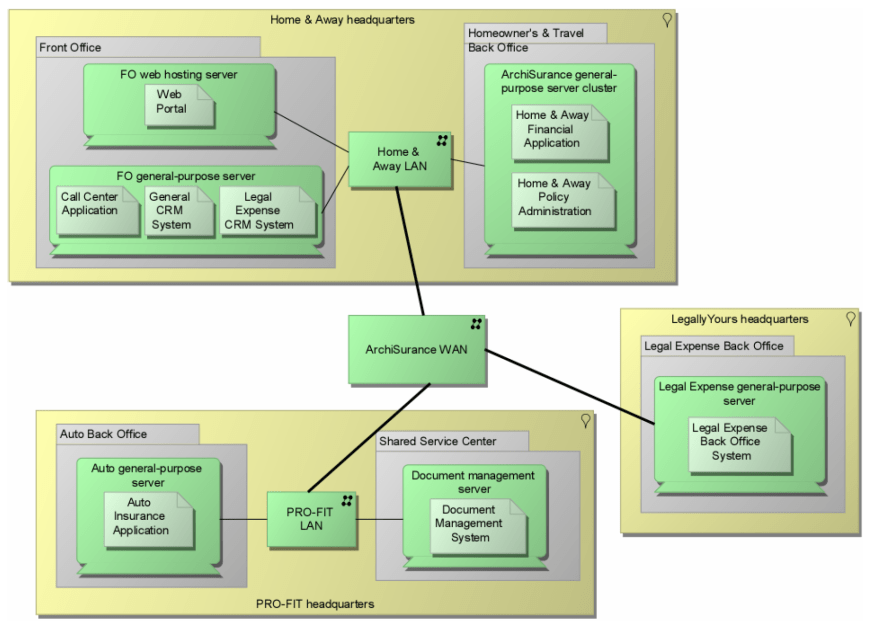
Figure 16: Infrastructure View
Change Scenarios
Scenario 1: Application Portfolio Rationalization
The inflexibility of ArchiSurance’s application architecture makes it difficult to adapt to changing business conditions. Partly due to the merger, the application environment has become fragmented, resulting in data redundancy and functional overlap, as well as point-to-point application integration using various data formats and methods. These problems lead to internal instability, increased application maintenance costs, and hinder information sharing within the company and with partners. As a result, the IT department has a large backlog of work requests. ArchiSurance senior management is very concerned about the backlog, particularly the inability to automatically share information with a large number of contracted sales partners and influential insurance advisors.
This scenario rationalizes ArchiSurance’s application portfolio by:
- Migrating to an integrated back-office suite that performs functions such as policy administration and financial transactions. The suite will include:
- An automated underwriting system that generates proposals and policies — AUTO-U
- A packaged policy administration system, integrated with the automated underwriting system, to issue, modify, and renew policies; this system also handles customer accounting and billing — P-ADMIN
- A packaged claims system with screens and workflows configurable to support ArchiSurance’s three lines of business — VERSA-CLAIM
- A product configuration manager to define all insurance products and expose these definitions via web services to AUTO-U, P-ADMIN, and VERSA-CLAIM — P-CONFIG
- A business rules management system (BRMS) consisting of a rules repository, processing engine, rules development environment, and authoring tools for rules management user interface. The business rules engine exposes rules execution functionality via web services to AUTO-U, P-ADMIN, VERSA-CLAIM, and P-CONFIG — EDGE
- Completing migration to the strategic CRM system
ArchiSurance’s lead investor and CEO support these plans on the condition that ArchiSurance customers and partners see none of the changes. The insurer’s products and services must not be affected, and all customer and partner interactions must proceed without interruption.
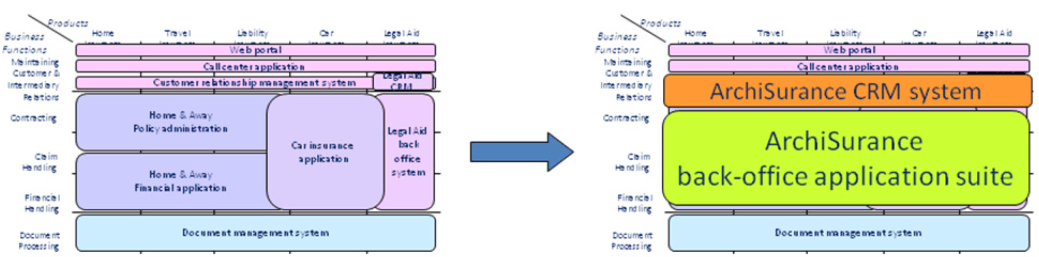
Figure 17: Application Portfolio Rationalization
As part of this effort, the technical infrastructure will also be simplified. Separate back-office servers will be replaced by a shared server cluster located at the Home & Away headquarters data center. However, to ensure business continuity, a backup server cluster will also be installed at the PRO-FIT headquarters data center.
Phase A: Architecture Vision
Phase A of the TOGAF ADM establishes the architecture work by setting scope, constraints, and goals, and initiates iteration of the architecture development cycle. This phase also validates the business context and develops the architecture work statement.
The business context consists of key business requirements based on primary business goals and architecture principles. Figure 18 shows some relevant business goals and principles for the current scenario.
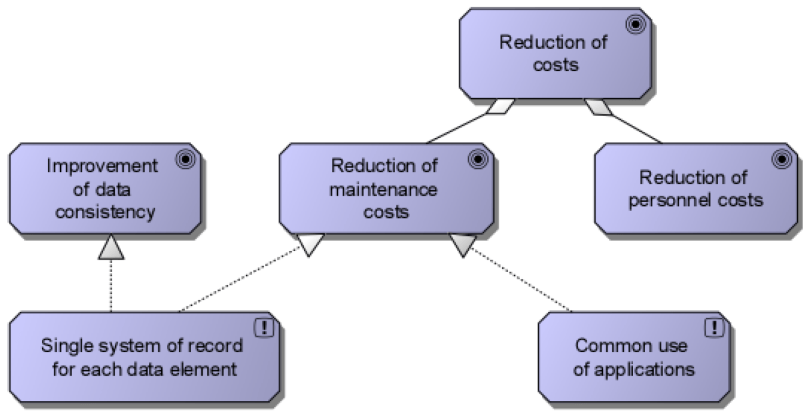
Figure 18: Business Goals and Principles
Goals and principles form the basis for concrete requirements, as shown in the ArchiMate Goal Refinement viewpoint:
The Goal Refinement viewpoint allows the designer to model the refinement of (high-level) goals into more concrete goals, and concrete goals into requirements or constraints that describe the properties needed to realize the goals. Aggregation relationships are used to refine goals into sub-goals. Realization relationships are used to model the refinement of goals into requirements.
Figure 19 shows an example of this viewpoint for the current change scenario.
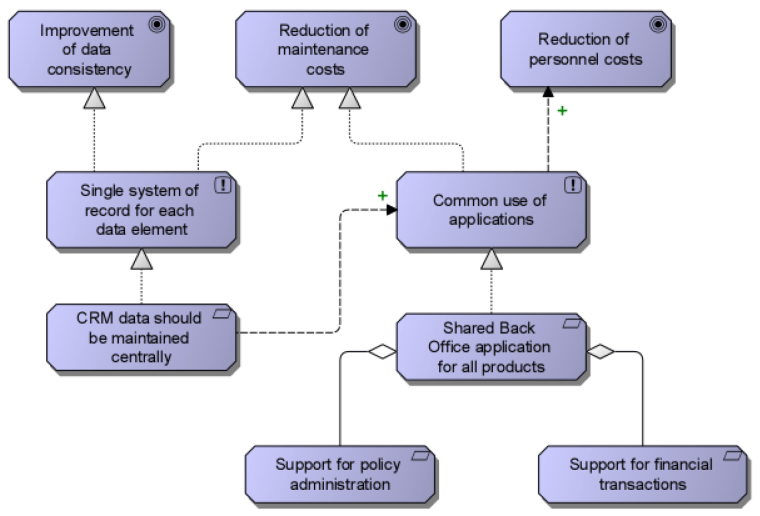
Figure 19: Goal Refinement View
An important element of the architecture vision is a high-level representation of the baseline and target architecture to explain the added value of the architecture work to stakeholders. For this purpose, ArchiMate defines the Introductory viewpoint:
The Introductory viewpoint uses a simplified notation that forms a subset of the full ArchiMate language. It is typically used at the start of a design trajectory, when not everything needs to be detailed yet, or to explain the essence of an architecture model to non-architects who need a simpler, more intuitive notation. Another use of this basic, less formal viewpoint is that it tries to avoid the impression that the architecture design is already fixed — an impression that is easily created when using more formal, highly structured, or detailed visualizations.
The TOGAF equivalent to this viewpoint is the Solution Concept Diagram.
The example below highlights the most important changes needed in the current change scenario:
- In the front office, the separate legal expense CRM system will disappear.
- In the back office, separate back-office applications will be replaced by a single back-office suite. Three separate common back-office servers will be replaced by one shared server cluster and one backup server cluster.
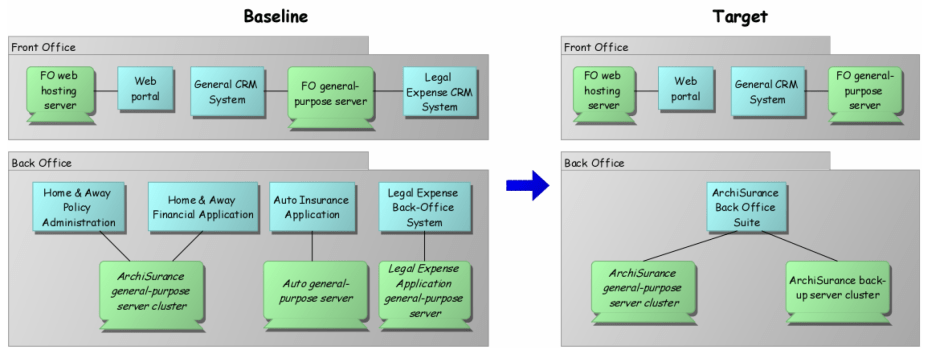
Figure 20: Introductory View
Phase B: Target Business Architecture and Gap Analysis
In this scenario, the business architecture remains unchanged. However, within the business architecture, we also show how the target architecture realizes key business requirements. For this purpose, TOGAF specifies a Business Footprint Diagram. In ArchiMate, this can be expressed using the Requirements Realization viewpoint, defined as follows:
The Requirements Realization viewpoint allows the designer to model the realization of requirements by core elements such as business actors, business services, business processes, application services, application components, etc. Usually, requirements originate from the Goal Refinement viewpoint.
The example below shows how business requirements established in the architecture vision phase are realized by elements in the architecture.
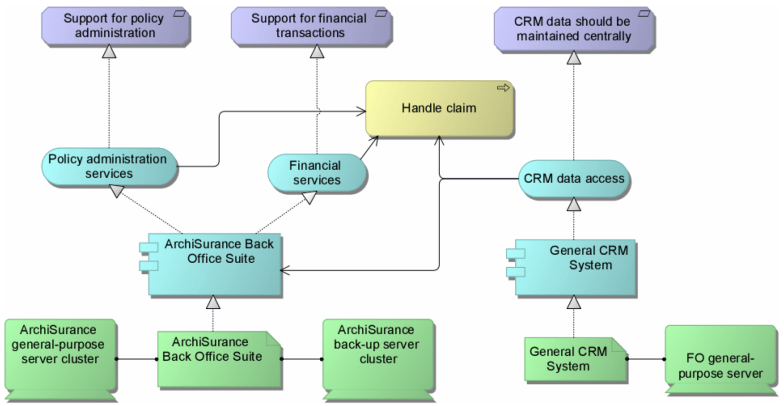
Figure 21: Requirements Realization View
Phase C: Target Application Architecture and Gap Analysis
The Application Communication Diagram below shows the proposed target situation of the application landscape.
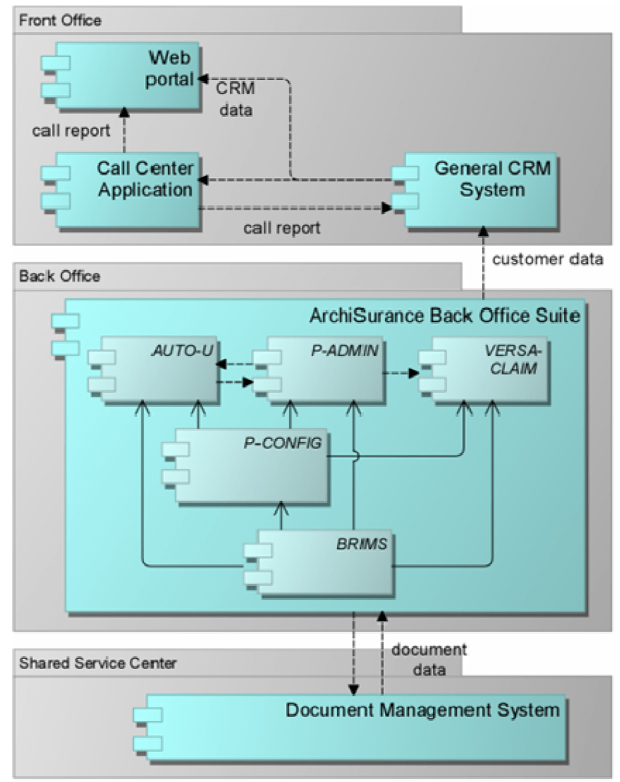
Figure 22: Target Application Architecture: Application Cooperation View
The global gap analysis results of the application architecture are shown below. Several application components present in the baseline architecture no longer exist in the target architecture: separate back-office applications and the separate legal expense insurance CRM system. The CRM functionality for legal expense insurance customers is taken over by the common CRM system; therefore, this does not require a new component (although existing common CRM systems may need adjustment or reconfiguration, this is not shown in the gap analysis). In addition, an entirely new back-office application suite is introduced.
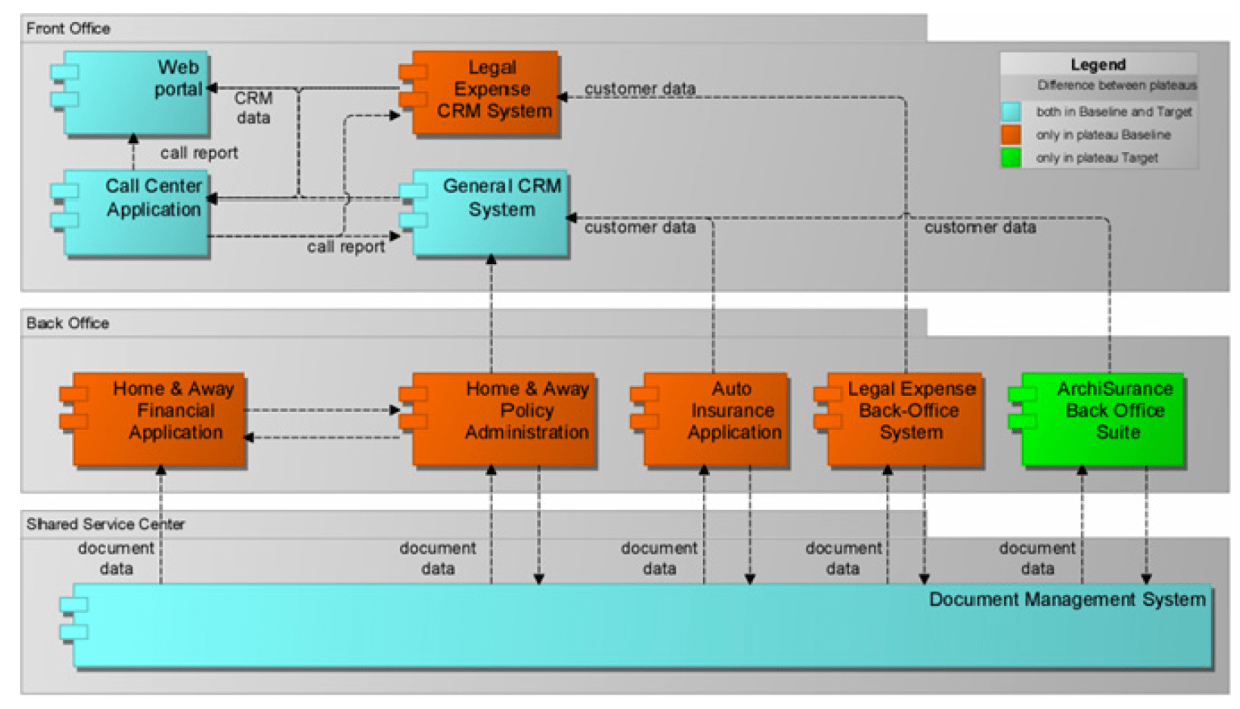
Figure 23: Application Architecture: Gap Analysis
Phase D: Target Technology Architecture and Gap Analysis
The Infrastructure View below shows the proposed target situation in the technology infrastructure domain.
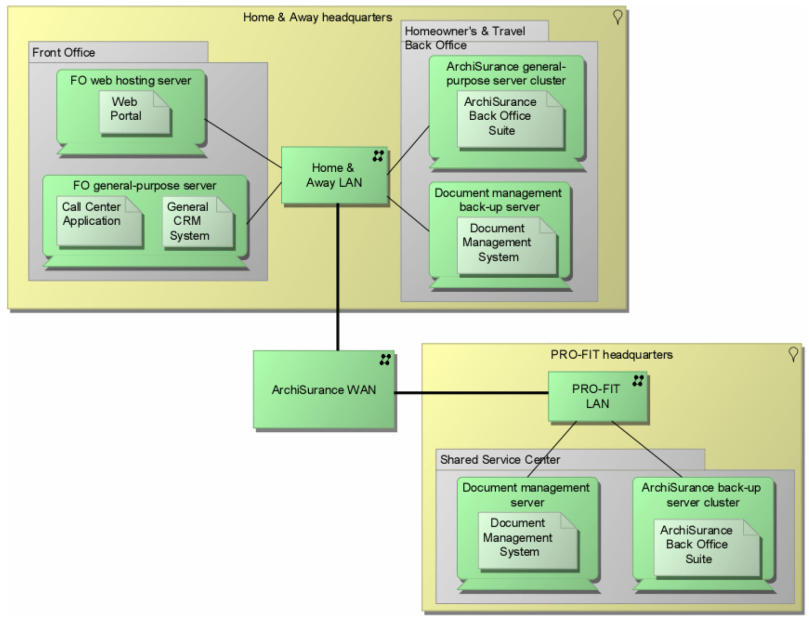
Figure 24: Target Technology Architecture: Infrastructure View
Figure 25 shows the global gap analysis results of the technology architecture. Separate common back-office servers will be removed. The original server cluster of Home & Away will become the central ArchiSurance back-office service cluster, and an additional backup server cluster will be placed at the SSC in PRO-FIT headquarters. There is also a backup document management server in the Home & Away back office. The new back-office suite and document management system will be replicated on respective primary and backup servers.
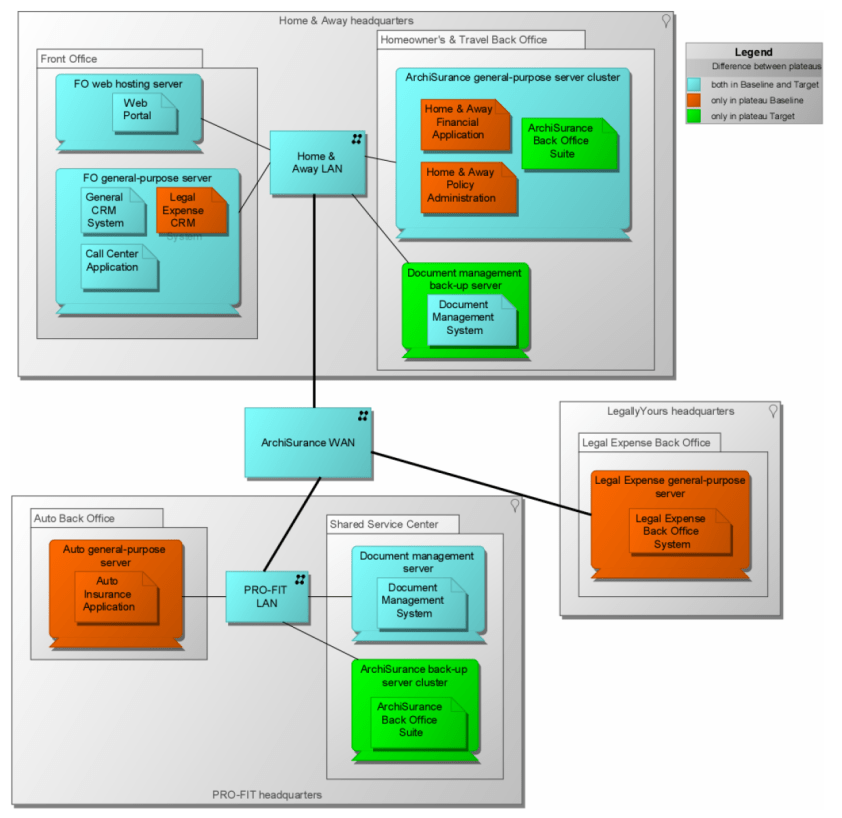
Figure 25: Technology Architecture: Gap Analysis
Implementation and Migration Planning
TOGAF 9 introduced transition architectures for Phases E and F, representing possible intermediate states (“plateaus”) between baseline and target architecture.
In ArchiMate, baseline, target, and transition architectures and the relationships between them are shown using the Migration viewpoint:
The Migration viewpoint contains models and concepts that can be used to specify the transition from an existing architecture to a desired architecture.
Figure 26 shows an example for the current scenario. The ArchiSurance IT department does not have sufficient resources to execute back-office system integration and CRM system integration in parallel. Therefore, one transition architecture replaces the two CRM systems with one but has separate back-office systems. Another has a back-office suite but two CRM applications.
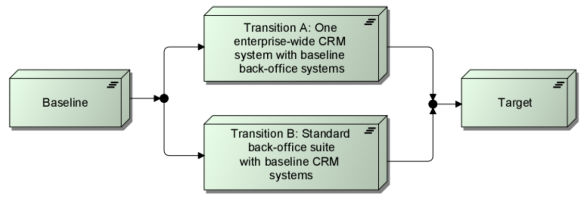
Figure 26: Migration View
Transition architectures support planning of implementation projects such as CRM integration and back-office application integration. The sequence of these projects depends on which transition architecture is chosen. This can be shown in the TOGAF Project Context Diagram (Figure 27):
The Project Context Diagram shows the scope of work packages to be realized as part of a broader transformation roadmap. The project context relationship diagram links work packages to organizations, functions, services, processes, applications, data, and technology that will be added, removed, or impacted by the project.
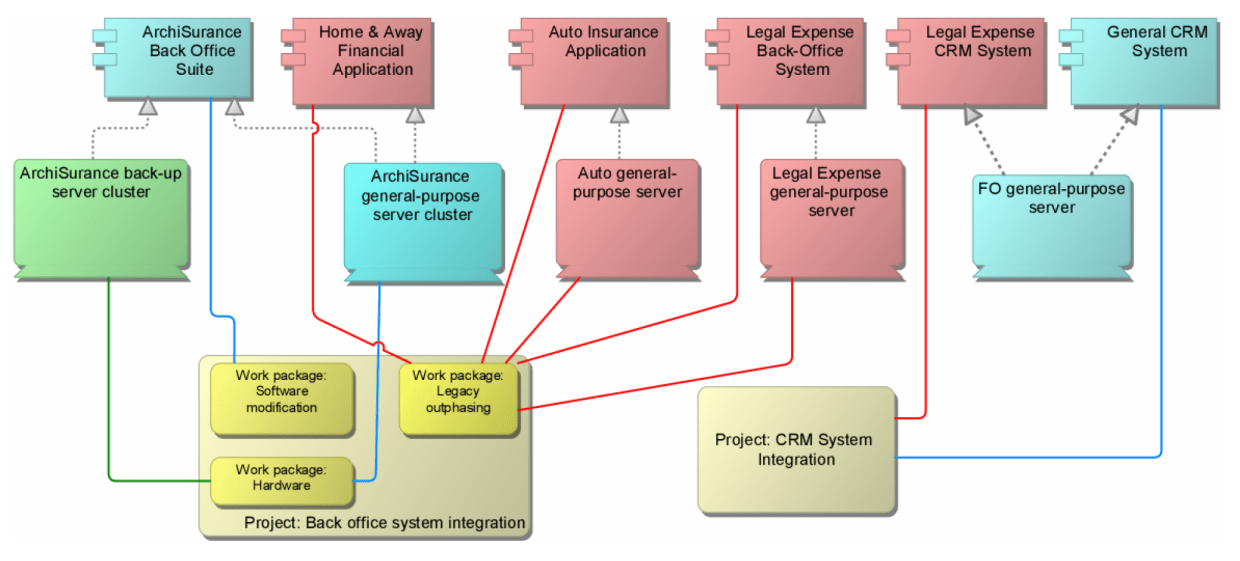
Figure 27: TOGAF Project Context Diagram represented in ArchiMate
Scenario 2: Online Portfolio Management
In this scenario, the target state of Scenario 1 is assumed as the new baseline, and customers can directly access their insurance portfolio via the web. By enabling customers to:
- Securely purchase, renew, or modify their homeowners, travel, auto, or legal expense insurance online according to rules used by ArchiSurance when conducting business
- Obtain help with online transactions via:
- Searching for answers in the knowledge base
- Initiating a chat session with a customer service representative (CSR)
- Writing and submitting an email using a web form, replied to by a CSR
- Requesting a phone call from a CSR using a web form
- Obtaining information and special offers from ArchiSurance partners to meet their needs, such as banking and financial planning services, investments, credit cards, and other types of insurance
No models are currently available for this scenario. The Open Group encourages its members to contribute to future versions of this case study. Contributors can extend or add detail to the two scenarios introduced here or create new scenarios. However, to facilitate a coherent body of work, the baseline architecture of new change scenarios should be the baseline or target of the change scenarios introduced here.
References
- TOGAF® Version 9.1, The Open Group, published by The Open Group, 2011.
- ArchiMate® 2.0 Specification, The Open Group, January 2012.
- Doest, H., Iacob, M.-E., Lankhorst, M.M. (eds.), and van Leeuwen, D.: Viewpoints Functionality and Examples, ArchiMate Deliverable D3.4.1a v2, TI/RS/2003/091, Telematica Instituut, Enschede, The Netherlands, 2004.
- van den Berg, H., Moelaert, F.: PRO-FIT Autoschade Open Trial Bench, Trial Bench Deliverable WP3/N004/V001, TRC, Enschede, The Netherlands, 1997.
- What is ArchiMate?
- Complete ArchiMate Viewpoints Guide
- ArchiMate 3 Update
- What’s New in ArchiMate 3?
- Using ArchiMate Tool with TOGAF ADM
- How to Use Value Stream in ArchiMate 3.1?
- What’s New in ArchiMate 3.1

 English
 Arabic
 Chinese (Simplified)
 Dutch
Dutch French
 German
 Italian
 Japanese
 Korean
 Portuguese
 Russian
 Spanish