As a Scrum Master, serving an agile Scrum team is no easy task. From daily stand-ups to the next sprint, managing tight schedules is challenging. You need a set of agile tools to boost team productivity and help alleviate pain points—even with remote team members. In this article, you’ll get a list of 10 latest and most effective agile project management tools that can help your team complete the entire Scrum development process.
Free Agile Tools
Mattermost
Team communication is vital. Without effective communication, a project cannot reach its full potential. With the growing number of remote work setups and teams spread across geographical regions, traditional email no longer meets the needs of most modern software development teams.
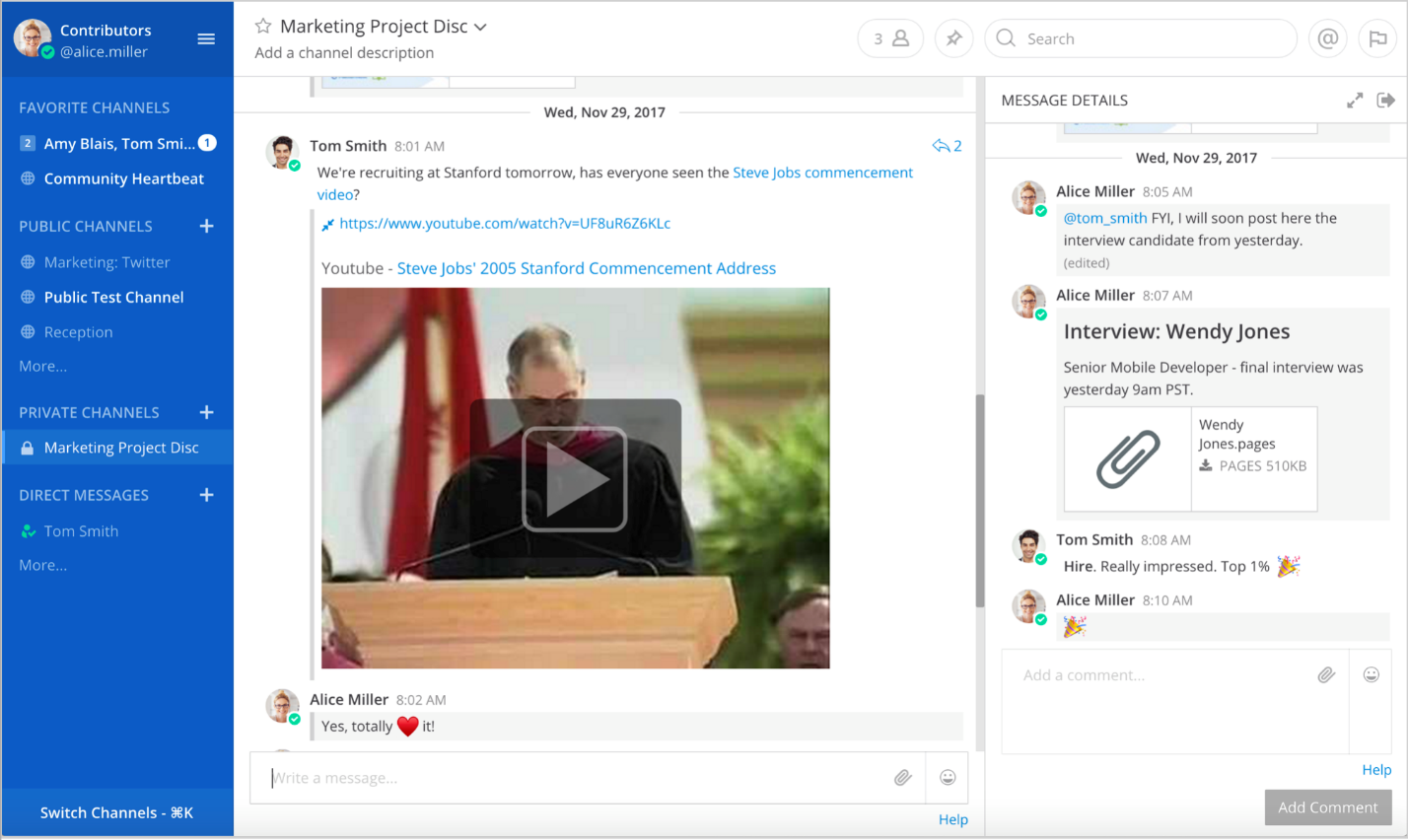
Mattermost
Mattermost is both a company name and the software solution it offers. It provides a Slack-like chat tool designed specifically for team communication. It offers a free open-source version, along with two enterprise editions with advanced features. As an alternative to proprietary SaaS messaging, Mattermost centralizes all team communication in one place, making it searchable and accessible from anywhere. It is built with Golang and React and runs as a production-ready Linux binary under the MIT license, using MySQL or Postgres.
Visual Paradigm Community Edition
Since its launch in 2004, Visual Paradigm Community Edition has provided free UML software for non-commercial use, supporting users taking their first steps in UML modeling, as well as individuals needing free, cross-platform UML modeling tools for personal use—such as applying UML in student projects. Key reasons to choose Visual Paradigm Community Edition include:
- Free UML modeling tool for various non-commercial purposes. Supports 13 UML 2.x diagrams
- Trusted by millions of users, including IT professionals and large organizations
- High quality – award-winning
- Most widely used modeling platform in academia
- Abundant free learning resources (supported by VP Community Circle)
- Clear upgrade path to commercial versions for broader applications and possibilities
- Active user forum for help and sharing ideas and experiences
- Cross-platform, user-friendly, fast, and responsive application
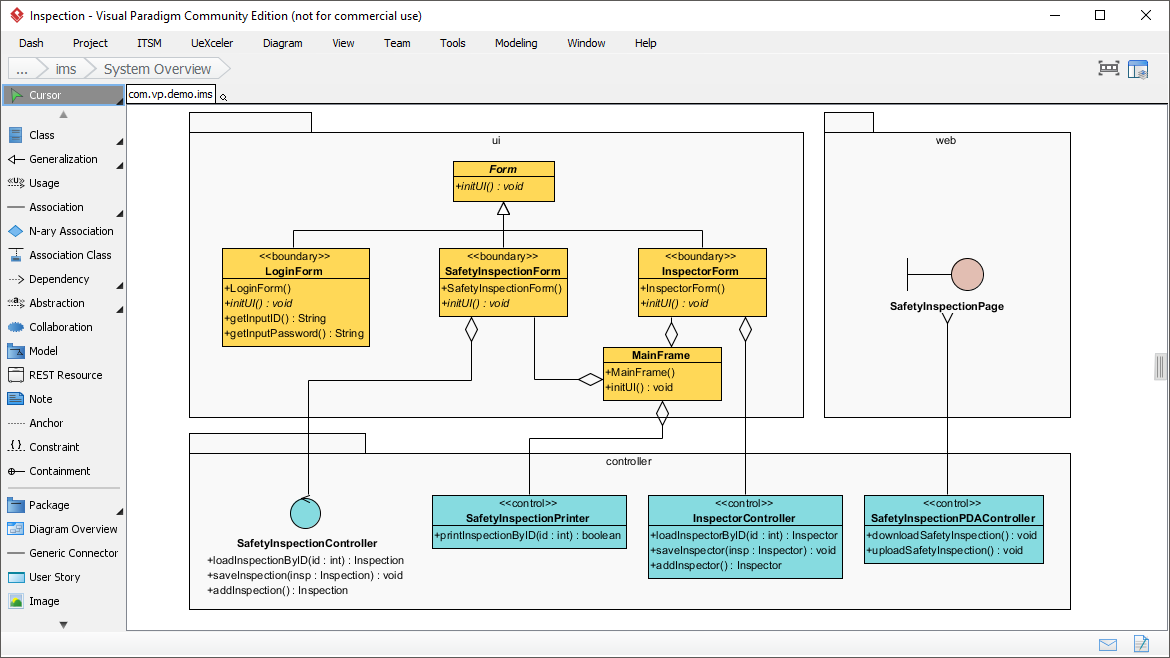
Best UML Software
Visual Paradigm Online – Express Edition
Visual Paradigm Online (VP Online) Express Edition is a free online diagramming tool supporting UML, ERD, organizational charts, and more. It features a simple, intuitive, yet powerful UML editor that allows you to create professional UML diagrams quickly and smoothly. The free UML tool comes with no ads, no time limits, no watermark in output, and no restrictions on chart or shape count. You have full freedom to create diagrams for personal and non-commercial use.
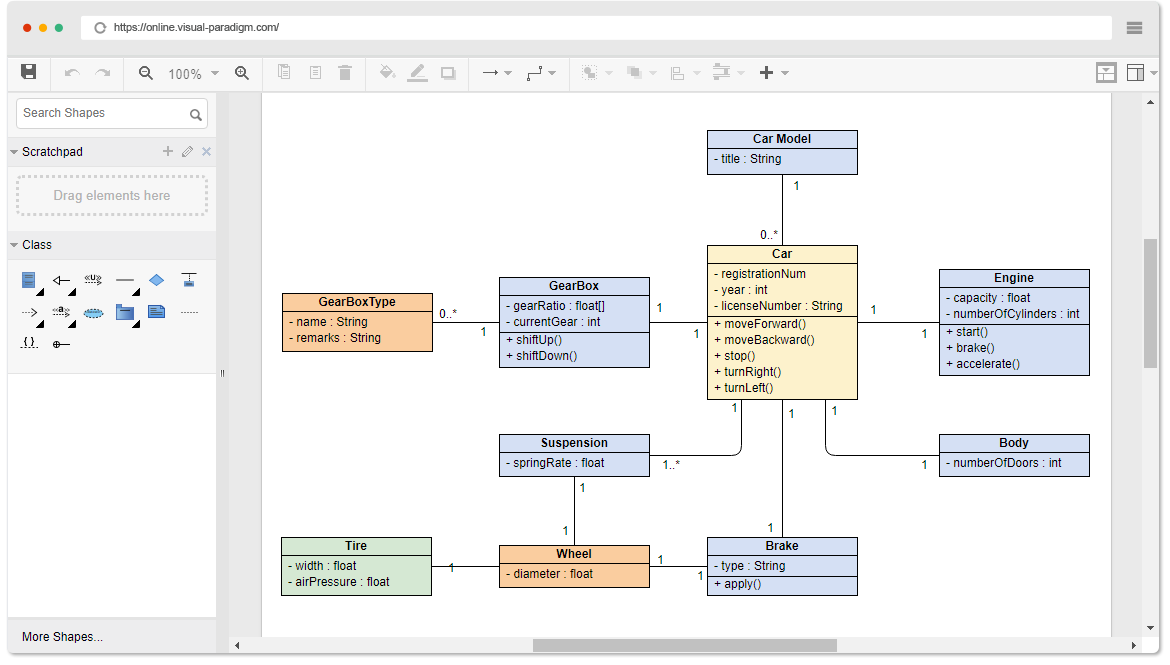
Online Class Diagram Example
Best Commercial Agile Tools
Visual Paradigm Scrum Process Canvas
Do you want to manage your entire Scrum project on a single canvas and eliminate the need to jump between different software silos? Scrum Process Canvas allows you to seamlessly navigate the entire Scrum process within a beautifully designed Scrum workflow canvas. You can quickly, easily, and seamlessly perform Scrum activities on one single page—whether your team is remote or co-located—ensuring full team engagement. As the Scrum Master, you can now communicate with your team and manage all events, more effectively generate or track artifacts, keep everyone on the same page, and provide real-time updates and online services anytime, anywhere.
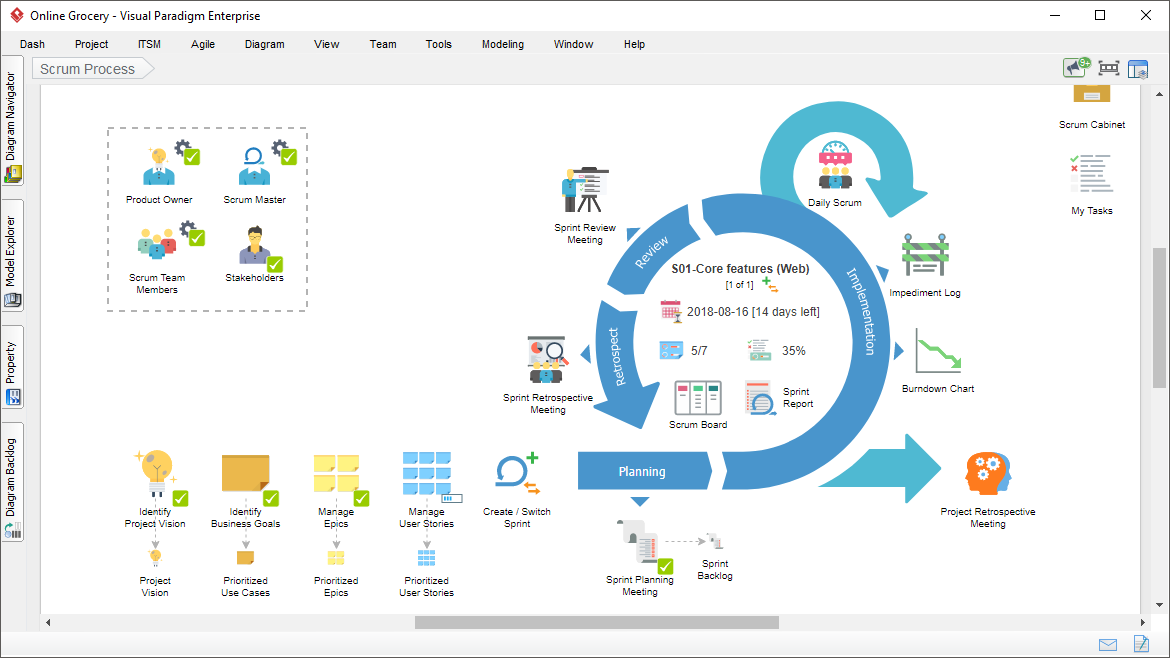
Scrum Process Canvas
Microsoft Office 365 – Microsoft Planner
Microsoft Planner is designed to be the place where team members collaborate and manage work using the Kanban method. To access Planner, you must subscribe to an Office 365 Business Premium, Business Essentials, or Enterprise account. Due to this requirement, users who are not subscribers are unlikely to choose it. However, if you already have it and use other Microsoft applications, Planner can easily integrate with the rest of your workflow—whether it’s a database, email, or calendar.
Microsoft Planner is a lightweight Kanban-style collaboration tool. While it supports teamwork to some extent, it lacks essential features found in competing applications.
PROS
Seamless integration with other Office 365 applications. The listed price includes access to other Office 365 apps.
CONS
Requires an Office 365 Business Premium, Business Essentials, or Enterprise account. Lacks @mentions, filtering tools, search bar, timers, or swimlanes.
Visual Paradigm Online – Commercial Edition
VP Online platform makes creating professional diagrams easier than you might imagine. With just a few drag-and-drop actions, you can produce a visually appealing and professional diagram that effectively communicates your ideas. It supports a wide range of visualization needs, including software design (e.g., UML diagrams), data modeling (e.g., ER diagrams, DFDs), business process mapping (e.g., BPMN, business concept maps, infographics), strategic analysis (SWOT, value chain, PEST, Five Forces, Four-Box), mind maps, project timelines (PERT charts), and more—widely used across business, education, and social sectors. It also offers a large collection of diagram templates for various problem domains.
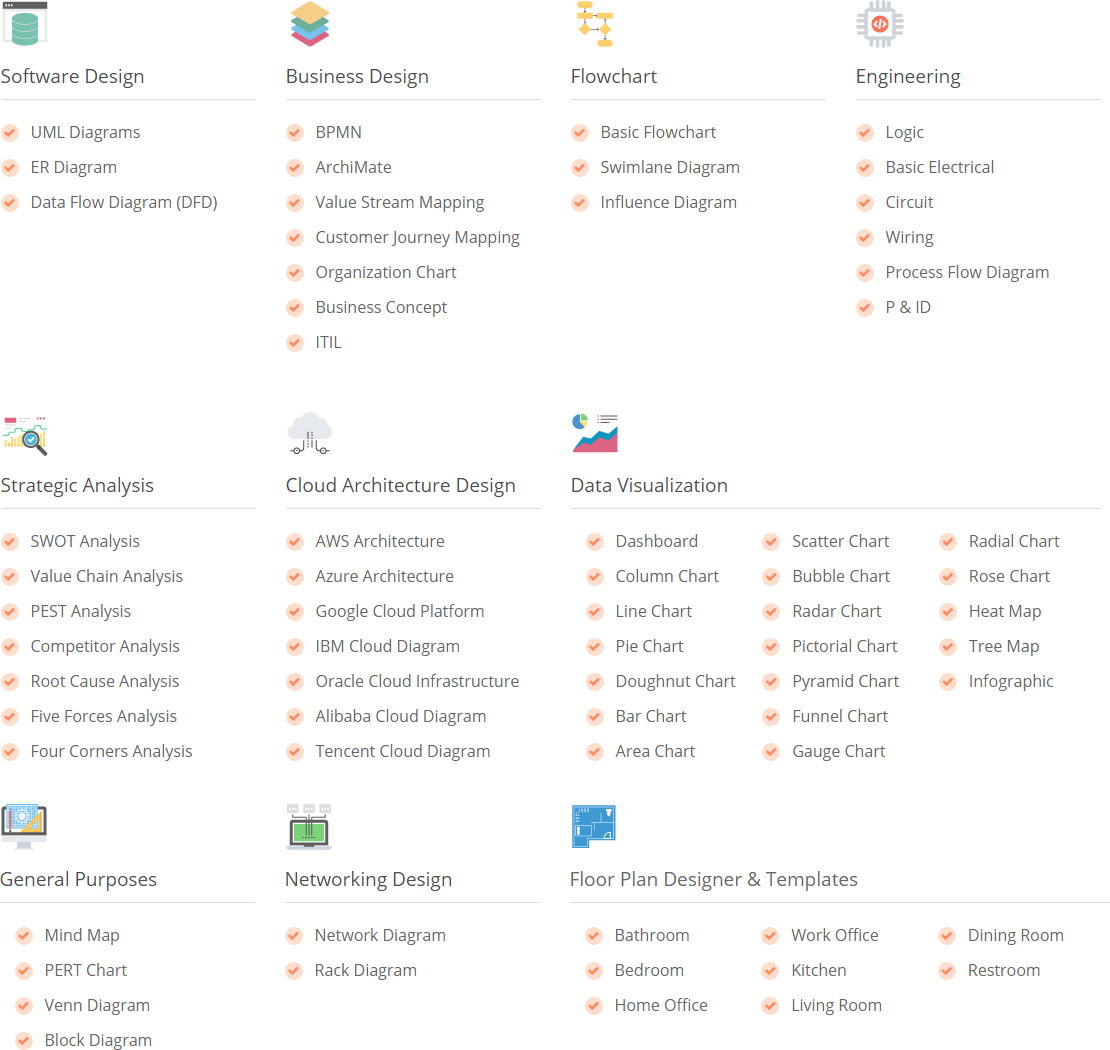
Online Diagram Tools
Atlassian Jira
Jira is a tool developed by Australian company Atlassian. It is used for defect tracking, issue tracking, and project management. The name “Jira” is actually derived from the Japanese word “Gojira,” meaning “Godzilla.”
Jira is designed to help users capture, assign, and prioritize work. It enables you to manage the entire application development lifecycle, ensuring all aspects from concept to release are covered. Its simple and intuitive interface facilitates collaboration with teammates, allowing you to complete tasks efficiently.
Currently, over 51,000 clients worldwide use Jira, including top brands like eBay, Spotify, Cisco, and LinkedIn. It is the leading software development application used by agile teams. Your team members can use Jira to plan, track, and release software effectively. You can create user stories and issues, plan sprints, and assign tasks to team members. With visibility across the board, team tasks can be identified and discussed in real time. Additionally, Jira offers real-time visual reporting with data insights to improve team performance.
Key Features:
- Customizable Scrum Board, adjustable to your team’s workflow. These Scrum boards visualize all work in progress during a sprint. Backlog items automatically move to the board.
- Flexible Kanban board to deliver maximum output with minimal work in progress.
- Out-of-the-box agile reports with burn-down charts, sprint reports, cumulative flow diagrams, velocity charts, epic reports, release burn-downs, and more—showing real-time sprint visuals.
- Custom filters using JIRA Query Language (JQL).
- Developer tool integrations.
- Over 1,000 add-ons.
- Rich API.
- Mobile apps to ensure uninterrupted workflow.
- Customizable workflows.

 English
 Arabic
 Chinese (Simplified)
 Dutch
Dutch French
 German
 Italian
 Japanese
 Korean
 Portuguese
 Russian
 Spanish