Combining TOGAF and ArchiMate is an excellent way to create a fully optimized EA practice. TOGAF’s comprehensive and flexible approach enables the creation of architectures perfectly tailored to your business, while ArchiMate’s clarity makes architectural changes easier to communicate and facilitate.
Of course, combining both is the best choice, but not mandatory. Ultimately, the decision should be based on your current EA setup. If you have enterprise architects on hand, they are likely to have their own preferences and recommendations regarding what to learn and whether to offer training for individuals, teams, or departments.
For new enterprise architects, learning both TOGAF and ArchiMate can provide excellent career opportunities. Each offers a valuable certification path that helps candidates understand high-level EA concepts and eventually become well-rounded professionals qualified for senior roles.
ArchiMate modeling language is designed to be compatible with the TOGAF framework; that is, architects who follow the guidelines and best practices provided by the TOGAF framework can use the ArchiMate language to cover many modeling tasks, including creating views based on the various architectural viewpoints suggested in the TOGAF framework. The improvements made in ArchiMate 3.0 allow them to integrate seamlessly:
- There is overlap between the TOGAF framework and the ArchiMate language in terms of viewpoint usage and the underlying common repository concept for architectural artifacts and models—meaning they share a solid common foundation.
- The two standards complement each other in defining the Architecture Development Method (ADM) and the enterprise architecture modeling language.
- ArchiMate 3.0 standard supports architectural modeling throughout all phases of the TOGAF Architecture Development Method (ADM).
The approximate mapping of the ArchiMate 3.0 modeling language to the TOGAF 9.1 Architecture Development Method (ADM) is shown in the figure below:
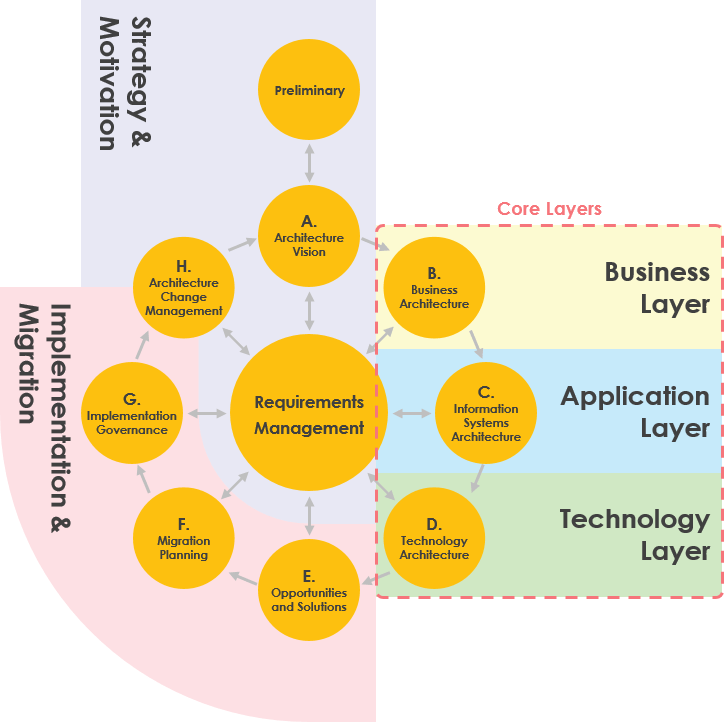

Upgrading ArchiMate 3.0 Standard for TOGAF Integration
In addition to improvements in core elements in the business, application, and technology layers, the ArchiMate 3.0 standard has added several extensions related to enterprise architecture practices:
- Version 3.0 introduced the Physical Layer as an extension of the Technology Layer, adding structural elements such as facilities, equipment, and materials. The Physical Layer reuses behavioral elements from the Technology Layer.
- The Motivation Extension includes elements that drive enterprise design and operations. These include stakeholders, drivers, assessments, goals, requirements, and principles.
- The Implementation and Migration Extension models implementation across all aspects of enterprise architecture and migration between generations of implemented architectures. It includes work packages, deliverables, platforms, and gaps.
- The Strategy Extension provides modeling support for business strategies and capability-based planning. Elements include capabilities, resources, and action plans.
Using ArchiMate to Develop TOGAF ADM – Case Study
The following examples are excerpts from the ArchiSurance case study, illustrating models that might be developed during the TOGAF ADM cycle.
Phase A: Architectural Principles
In the TOGAF standard, principles are established and maintained as part of the Preliminary Phase. This example shows how principles, their dependencies, and their objectives can be represented graphically.
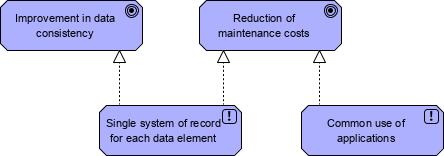

Phase A: Architectural Vision
In the TOGAF standard, Phase A involves establishing a high-level vision of the target architecture across all subdomains of enterprise architecture. A key part of this is establishing and modeling the business strategy and demonstrating how the architecture and possible solutions for implementing it support the strategy.
Example: Strategy View
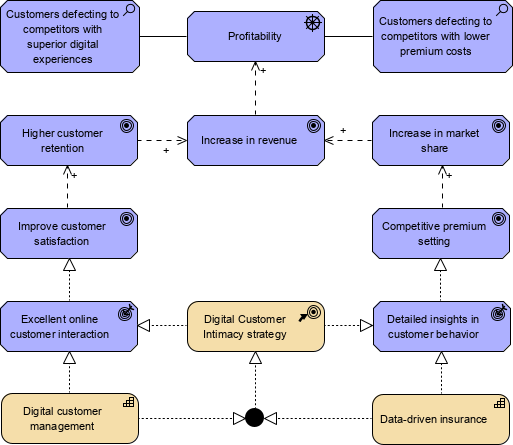

The Strategy View allows business architects to model the chosen or considered action paths, the capabilities and resources supporting them, the envisioned outcomes, and how these contribute to organizational goals and drivers.
Phase B: Business Architecture
Business architecture models the business-related elements of enterprise architecture. The TOGAF standard highlights business processes as critical elements because they effectively coordinate the use of all other elements to deliver value aligned with the enterprise mission. The ArchiMate language is used to graphically model TOGAF business architecture. However, ArchiMate standard specifies a service-oriented architecture style in its core metamodel, as this style promotes maximum flexibility, reusability, and speed of change at low cost and low risk. Business processes are realized as business services, where value is associated with the service.
Example: Business Process
This example shows how to model two business processes for business architecture. It displays two core business processes of ArchiSurance and their high-level sub-processes.
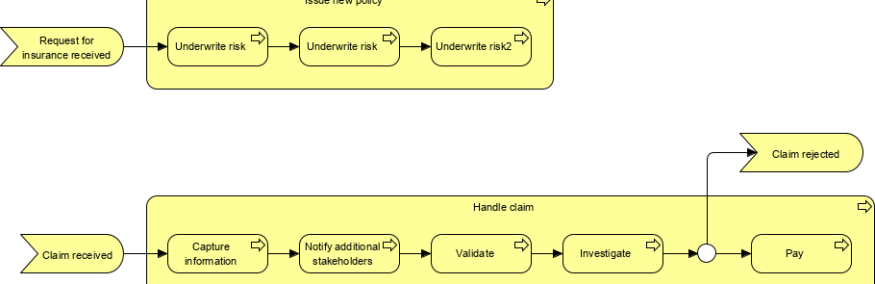

Phase C: Information System Architecture
TOGAF Phase C covers application and data architecture. These are treated as separate subdomains in the TOGAF framework, but in ArchiMate language, data is a facet of each architectural domain.
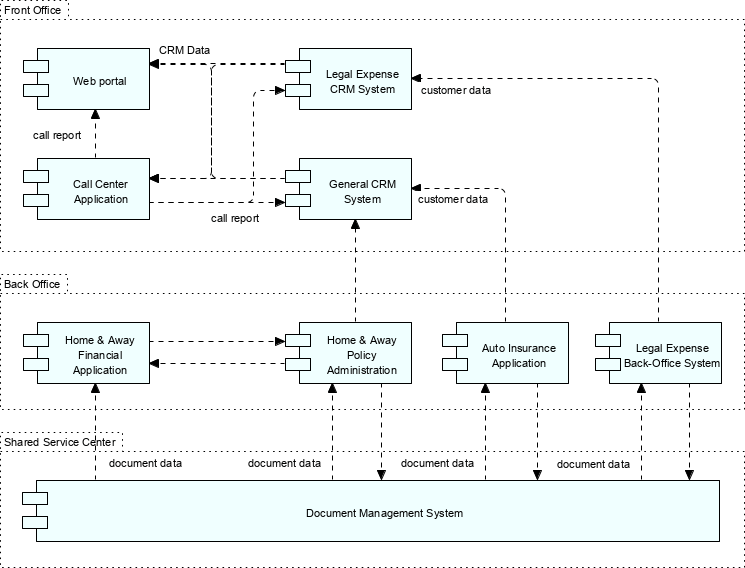
Example: Application Collaboration
This example shows how multiple applications collaborate and depicts the main data flows between them.

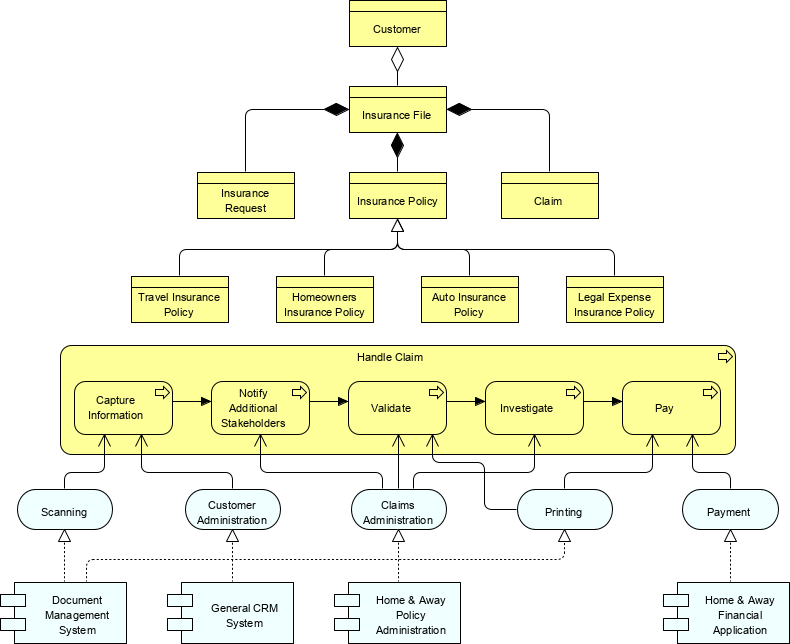
Example: Information Structure
This example shows how to graphically model relationships between business objects. It is the ArchiMate version of a classic conceptual data model.

A common requirement in business architecture is to view how applications and data support business processes. The above image is an example of a cross-layer view, which can be built across different layers based on stakeholder needs.
Phase D: Technology Architecture
TOGAF Phase D involves technology architecture, showing how information technology is deployed to fulfill the application and data requirements defined in Phase C. ArchiMate standard has a separate technology architecture layer, which includes technical elements such as devices, system software, DBMS, and can represent communication paths.
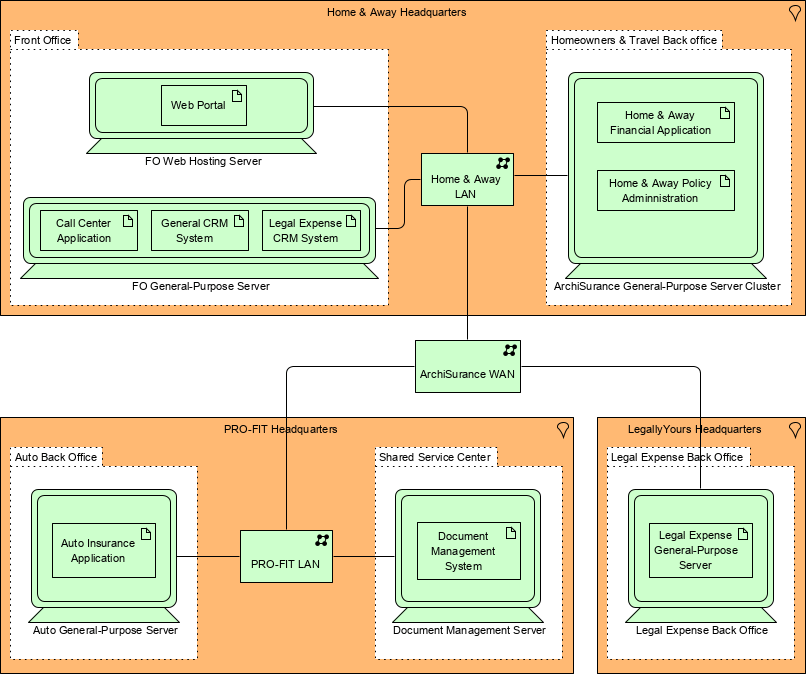
Example: Infrastructure
This example shows the main infrastructure components of the enterprise, grouped by location and department. It also shows the network connecting different devices and the (application) artifacts deployed on the devices.

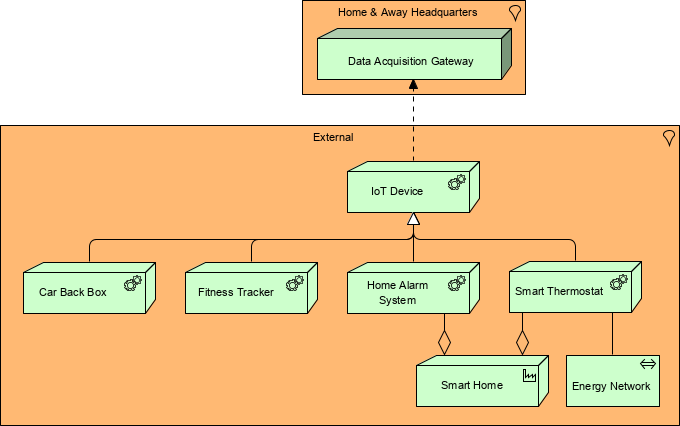
The ArchiMate 3.0 specification now includes a new set of physical elements and their relationships based on the technology layer. These elements can be used to model tangible things such as machinery and facilities; the following figure shows a useful example.

Phases E and F: Opportunities and Solutions, and Migration Planning
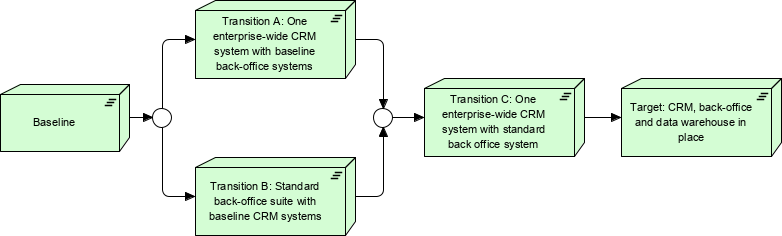
TOGAF ADM continues into Phases E and F, which deal with selecting solutions and planning the implementation and migration of the architecture from baseline to target states. ArchiMate standard has an implementation and migration extension to the core language, so this part of the ADM can be described as shown in the figure below:
Example: Migration View

Modeling EA – Hand-Drawn, Drawing Tools, or Modeling Tools?
Actually not long ago, the hallmark of modeling EA was three things: a pencil, a piece of paper, and a marker. However, time moves forward, and technology evolves. Everything seems to be trending toward digitization. But are you ready to jump in?
Drawing Tools
Drawing tools provide speed and momentum for their software modeling work. Effectively using digital tools can save you a significant amount of time—for example, printing high-quality diagrams, easier undo/redo, copy and paste, using shape palettes, or chart templates.
Modeling Tools
Many people consider drawing tools and modeling tools interchangeable, but that is not the case. In fact, modeling tools should offer more functionality than drawing tools, as these features are not always obvious to most users.
Drawing tools cannot be considered modeling tools unless the tool “understands” the rules of connections between symbols—i.e., shapes or model elements. The following points list these additional features of modeling tools compared to drawing tools.
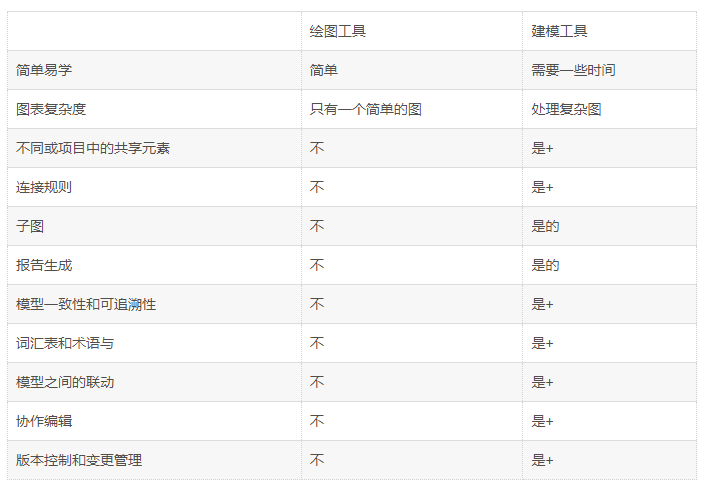
- Not all modeling tools support these features (while Visual Paradigm supports all of them above)
Does ArchiMate Require TOGAF ADM Support?
ArchiMate is an excellent visual modeling language for EA, but it is not a method that provides step-by-step guidance through the entire EA development process. Although ArchiMate can be seamlessly integrated with TOGAF ADM by design, starting an EA project with just a pencil and paper is like doing things in the Stone Age without proper tools.
Although organizations recognize the benefits of EA practices, building enterprise architecture is never easy. One common issue many organizations face is not knowing where to start or how to begin. The immaturity of enterprise architecture leads to gaps and obstacles in the early stages, which may hinder further progress. In 2007, Gartner found that 40% of enterprise architecture projects were abandoned; later in 2015, a survey showed that 70% of organizations wanted to start or restart an enterprise architecture project.
Tooling
If you search for enterprise architecture tools, you might find two alternatives: mature EA tools with very high prices, but they only offer a tree-structured repository with a set of templates you can edit yourself. The second option is some drawing tools, such as Visio, which require excessive management and handling of information across multiple applications.
Visual Paradigm Guided Process Tool
TOGAF ADM is the process for developing enterprise architecture, and Visual Paradigm features a process navigator that guides you step-by-step through the execution and completion of TOGAF ADM and is fully integrated with ArchiMate 3. The figure below shows a screenshot of the TOGAF ADM Guide-Through tool. It displays the steps executed in TOGAF ADM Phase B.
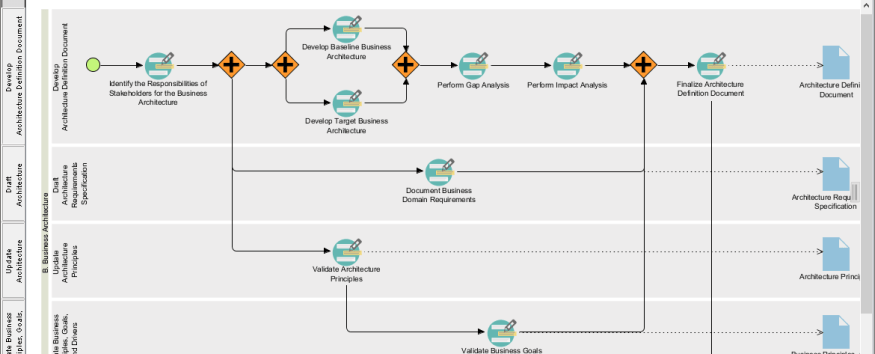

In broad terms, Visual Paradigm offers/promotes the following features:
- An ADM process navigator that guides you step-by-step through developing enterprise architecture using TOGAF ADM
- Clear instructions guiding you to create deliverables and artifacts
- Generates deliverables upon completion of ADM phases
- Automatically archives deliverables into the architecture repository
- Helps you understand TOGAF by providing sample templates
- Provides tools and charts needed for analysis and documentation, including ArchiMate 3 charts and viewpoints (The Open Group certified), implementation plan charts, migration roadmap charts, maturity assessments, PERT charts, RACI charts, implementation factor evaluation and deduction matrices, merge gap analysis, solution and dependency matrices, etc.
- Finally, it is an award-winning tool at an affordable price with incredible features
Example Steps in the Guided Process
Using ArchiMate 3 for gap analysis – view the color legend in the lower right corner. It allows you to effectively apply color coding to elements in the chart.
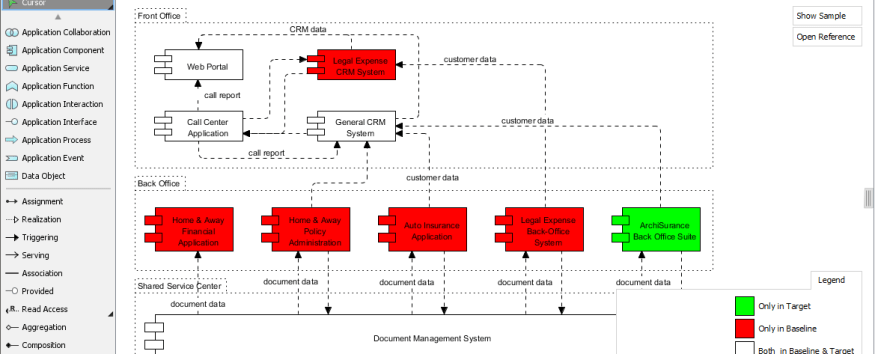

Automatic Deliverable Generation
Example screenshot – TOGAF ADM deliverables generated after completing an activity.

Benefits of the Visual Paradigm Guided Process Approach
- Structured TOGAF ADM into phases, activities, and steps, embedded with instructions, examples, and input references
- Progress indicator showing your current position and completion status of phases, activities, and steps
- Step-by-step execution of analysis, diagramming, and work, with automatic generation of deliverables and reports
- Automatically transcribes data from one step to another for further processing or different types of analysis
- Advances deliverables as input references to the next step
- Automatically assigns activities or deliverables as tasks to task managers with assigned timelines and roles
- Seamlessly integrates EA, project management processes, with agile software development processes and toolsets
Checklist for Selecting an ArchiMate Tool
Finally, let’s review the following list to understand what a good ArchiMate tool should support.
- Is it an ArchiMate-certified tool?
- Does it provide the modeling tool features listed in the table above?
- Does it support ArchiMate viewpoints for ArchiMate 2 and ArchiMate 3?
- Does it fully support TOGAF ADM from Preliminary Phase A to Phase H?
- Does it provide an electronic architecture repository for deliverables, and is it configurable?
- Can you customize the process framework to meet your needs?
- Does it provide standard TOGAF templates for deliverable development?
- Is the process fully automated and user-friendly?
- Does it support team collaboration?
- Does it support automatic generation of deliverables?
- Does it provide step-by-step embedded instructions, examples, and references?
- Does it offer a reasonable price?
- Does it support both ArchiMate modeling and TOGAF ADM with ArchiMate integration?
- What is ArchiMate?
- Full ArchiMate Viewpoints Guide
- ArchiMate 3 Update
- What is TOGAF?
- TOGAF ADM Tutorial
- TOGAF 9.1 Framework – A Comprehensive Guide
- TOGAF Software for Enterprise Architecture
- The Best TOGAF Software
- A Practical Tutorial for TOGAF
- Step-by-Step Enterprise Architecture Tutorial with TOGAF ADM
- Essential Knowledge of TOGAF ADM for EA Development
- TOGAF 9.2: What is New?
- How to Perform Stakeholder Management in TOGAF?
- TOGAF Stakeholders – Views, Concerns, and Requirements
- TOGAF vs Zachman Framework
- Case Study: Using ArchiMate with TOGAF
- TOGAF ADM and Architecture Content Framework
- What’s New in ArchiMate 3?
- Using ArchiMate Tool with TOGAF ADM
- How to Use Value Stream in ArchiMate 3.1?
- What is New in ArchiMate 3.1

 English
 Arabic
 Chinese (Simplified)
 Dutch
Dutch French
 German
 Italian
 Japanese
 Korean
 Portuguese
 Russian
 Spanish