


Introduction
Understanding and documenting is a critical step in software development. Use cases help define system requirements, but manually analyzing all possible scenarios—main flows, alternative paths, and edge cases—can be error-prone and time-consuming.
The Use Case Scenario Analyzer is a free AI-powered tool designed to automate this process. It transforms use case descriptions into structured Decision Tables, ensuring clarity, completeness, and unambiguous system behavior.
Key Concepts
1. Use Cases
A use case describes how a user interacts with a system to achieve a specific goal. It includes:
- Main Success Scenario: The ideal path where everything works as expected.
- Alternative Flows: Variations from the main path (e.g., user cancels an action).
- Exception Paths: Error conditions or unexpected events (e.g., network failure).
2. Decision Tables
A Decision Table is a structured way to represent complex logic. It maps conditions (inputs or states) to actions (system responses). Decision Tables are useful for:
- Clarifying business rules.
- Ensuring all scenarios are covered.
- Improving communication between stakeholders.
Why Use the Use Case Scenario Analyzer?
- Automated Scenario Identification: The AI analyzes your use case description and identifies all relevant scenarios.
- Automatic Decision Table Generation: The tool constructs a Decision Table, mapping conditions to actions.
- Comprehensive Logic Coverage: Ensures no scenario is overlooked, reducing the risk of bugs.
- Improved Clarity: Decision Tables make complex logic easier to understand for both technical and non-technical teams.
Step-by-Step Tutorial
Step 1: Access the Tool
- For Visual Paradigm Online Users: Navigate to https://ai-toolbox.visual-paradigm.com/app/use-case-scenario-analyzer/.
- For Visual Paradigm Desktop Users: Open the desktop application, go to Tools > App, and select Use Case Scenario Analyzer.
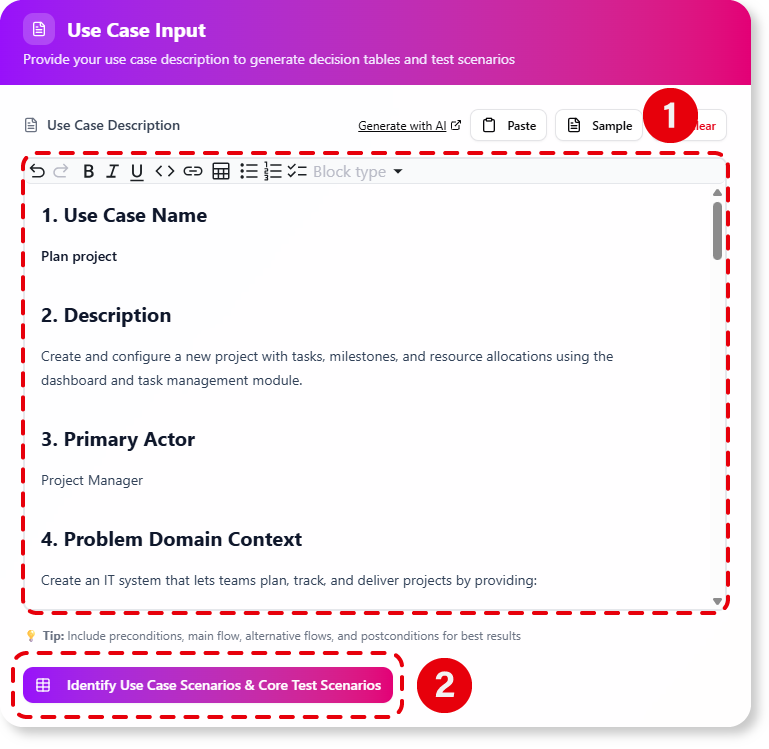
Step 2: Describe Your Use Case
- Provide a clear description of your use case, including:
- The main success scenario.
- Any known alternative flows or exception paths.
- Example:
““ Main Flow: User selects an item, proceeds to checkout, enters payment details, and confirms the transaction. Alternative Flow: User cancels the transaction before confirmation. Exception Path: Payment gateway times out.
Step 3: Click “Analyze”
- The AI processes your description and identifies all relevant scenarios.
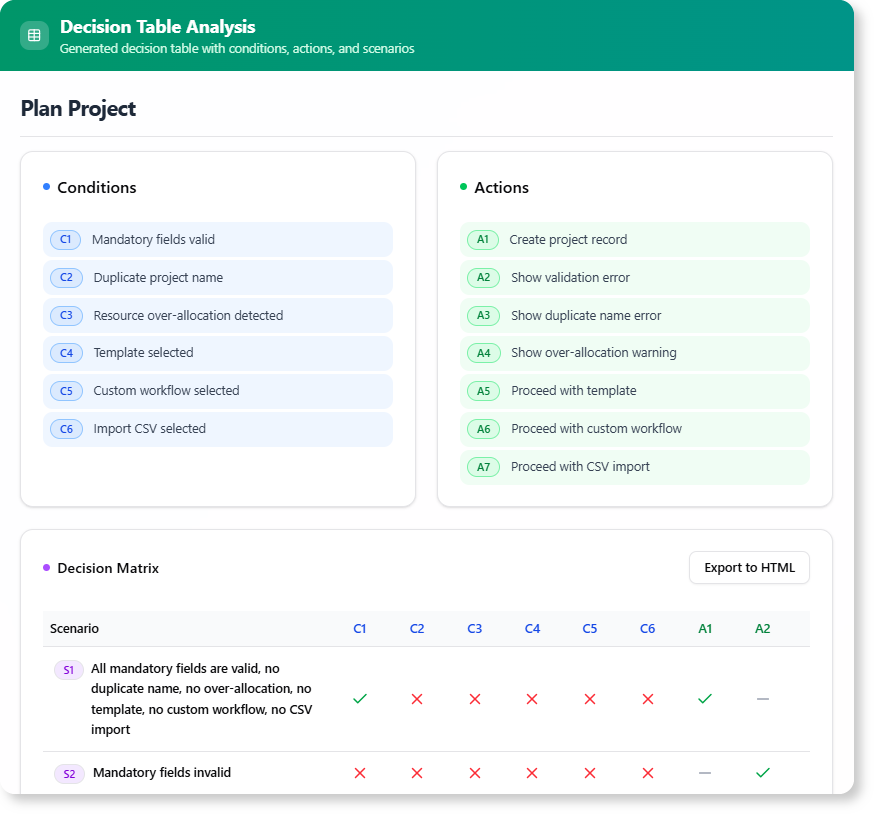
Step 4: Review the Decision Table
- The tool generates a Decision Table with:
- Conditions: Inputs or states (e.g., “Payment Confirmed,” “Network Available”).
- Actions: System responses (e.g., “Process Payment,” “Display Error Message”).
| Condition 1 (Payment Confirmed) | Condition 2 (Network Available) | Action 1 (Process Payment) | Action 2 (Display Error) |
|---|---|---|---|
| Yes | Yes | Yes | No |
| Yes | No | No | Yes |
| No | Yes | No | Yes |
Step 5: Refine Your Design
- Use the Decision Table to:
- Validate system logic.
- Identify missing requirements.
- Ensure robustness in your design.|
Example: Use Case Analysis
- Main Flow: User enters credentials, system authenticates, and grants access.
- Alternative Flow: User forgets password and requests a reset.
- Exception Path: System detects multiple failed login attempts and locks the account.
Decision Table Output
| Condition 1 (Valid Credentials) | Condition 2 (Failed Attempts > 3) | Action 1 (Grant Access) | Action 2 (Lock Account) | Action 3 (Send Reset Link) |
|---|---|---|---|---|
| Yes | No | Yes | No | No |
| No | Yes | No | Yes | No |
| No | No | No | No | Yes |
Summary
- Use Case Scenario Analyzer .
- It generates Decision Tables to clarify system behavior.
- The tool ensures and improves communication among stakeholders.
- Accessible for both Visual Paradigm Online and Desktop users.
Next Steps
- Try the tool with your own use cases.
- Use the generated Decision Tables to .
- Share the for better collaboration.

 English
 Arabic
 Chinese (Simplified)
 Dutch
Dutch French
 German
 Italian
 Japanese
 Korean
 Portuguese
 Russian
 Spanish