In the field of customer support, teams often struggle with unclear processes and slow handoffs between different support tiers. This Enhancing Customer Support Ticket Escalation Flow case study illustrates how using AI-generated sequence diagrams can flip the script, bringing clarity and efficiency to the escalation process. With Visual Paradigm Desktop’s cutting-edge AI features, support teams can visualize interactions and improve workflows dramatically.
What is a Sequence Diagram?
A sequence diagram is a type of interaction diagram that illustrates how processes operate with one another and in what order. In practical terms, it captures the flow of messages exchanged between objects or components in a specific scenario. This visual representation is crucial for understanding and analyzing complex systems, particularly in software development and customer support.
Create effective sequence diagrams by focusing on:
- Identifying key objects and participants in the process;
- Defining the interactions in a logical sequence;
- Utilizing lifelines and arrows to show message flow.
By mastering these elements, teams can cultivate better communication and automation in their workflows.
Enhancing Customer Support Ticket Escalation Flow in the Field

A multi-channel SaaS customer support platform faced significant challenges in managing the ticket escalation process. The core problem was the unclear and slow handoff between level-1 and level-2 support teams and engineering. Customer queries often fell through the cracks during this transition, leading to longer resolution times and reduced customer satisfaction.
By implementing Visual Paradigm’s AI diagram generation feature, the team began to visualize the flow of support tickets. The clear sequence diagrams helped pinpoint delays and bottlenecks in their current process. Here are some lessons they learned:
- The importance of transparency in ticket workflows.
- How visual representations can enhance communication between teams.
- Utilizing data-driven insights to continually optimize processes.
This consultative approach ultimately fostered a collaborative effort to refine support workflows effectively.
Why AI Fits Field Challenges for Sequence Diagrams
- Improved Accuracy: AI reduces human errors by generating precise diagrams based on real-time data.
- Time Efficiency: Automated diagram creation speeds up the design phase, allowing teams to focus on more strategic activities.
- Easy Collaboration: AI-generated diagrams can be seamlessly shared and integrated, promoting teamwork.
The combination of these advantages makes AI an indispensable tool for teams dealing with complex ticket escalation processes.
Field Guide: Generating with Visual Paradigm Desktop
- In Visual Paradigm Desktop, select Tools > AI Diagram Generation.
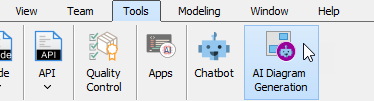
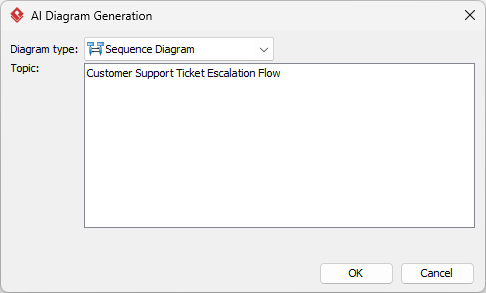
- Choose Sequence Diagram from the options of Diagram Type.
- Allow the AI to generate the sequence diagram based on the provided description.
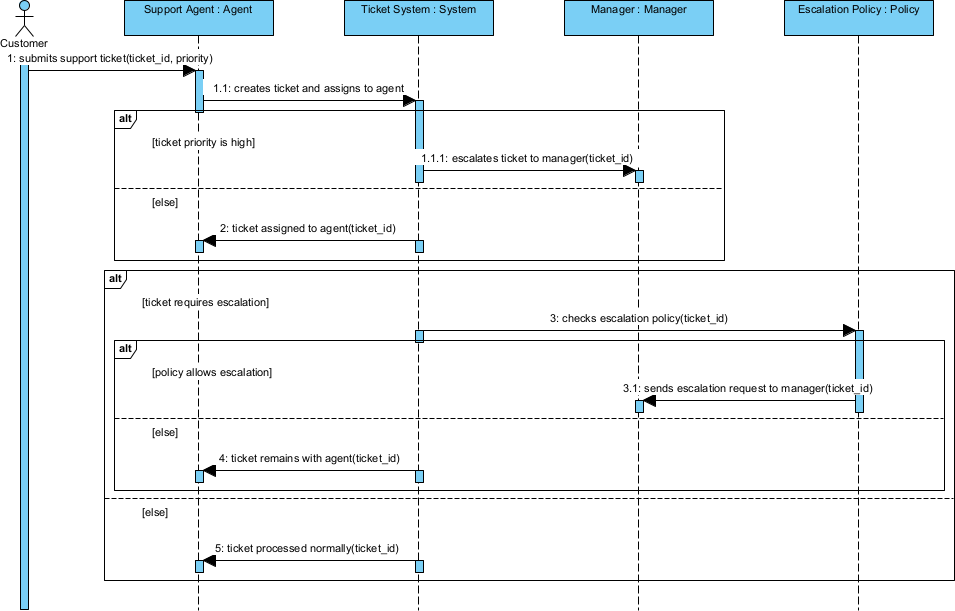
- Review the generated diagram and make necessary adjustments.
- Export and share your diagram for team collaboration.
Refining in Real Scenarios
Quick Field Tweaks
For quick improvements, focus on adjusting key elements like message sequences, adding lifelines, and defining clear roles within the sequence diagram. These quick tweaks enable teams to visualize immediate changes effectively.
Deeper Field Integrations
Delving deeper into the system, teams can integrate feedback loops and conditional paths into their sequence diagrams. For instance, incorporating various branches depending on ticket resolution outcomes helps clarify the escalation process further. This allows for a more robust and adaptable customer support framework, fostering an environment of continuous improvement.
Additionally, integrating customer feedback into these diagrams promotes a cycle of evaluation and enhancement, ensuring the team remains responsive to end-user needs.
Results Achieved
- Reduced ticket resolution times by over 30%.
- Improved communication clarity among support tiers.
- Increased customer satisfaction ratings by 25% within three months.
Key Lessons We Took Away
- AI is best suited for initial drafts: Generating sequence diagrams with AI provides a solid foundation that can be refined.
- Don’t skip refinement for compliance: Ensure that all diagrams meet regulatory and quality standards through thorough review.
- Utilize in team settings: Collaboration is key; share and discuss diagrams regularly to foster improvements.
These lessons emphasize the value of integrating AI in practical workflows while maintaining a commitment to quality and teamwork.
Apply These Lessons Today
Start transforming your customer support processes by utilizing Visual Paradigm‘s AI diagram generation. Leverage its powerful features to enhance communication and efficiency in your team, improving ticket resolution flows and overall customer satisfaction.

 English
 Arabic
 Chinese (Simplified)
 Dutch
Dutch French
 German
 Italian
 Japanese
 Korean
 Portuguese
 Russian
 Spanish