


Imagine a world where defining a software project is as simple as stating your goal. The Use Case Driven Development Assistant by Visual Paradigm makes this a reality. This AI-powered web application is the ultimate tool for transforming a vague idea into a clear, actionable software development plan. It guides you through the entire lifecycle, from defining the core problem to generating comprehensive reports, all with intelligent AI assistance. With its structured workflow and powerful automation, it eliminates guesswork, ensures clarity, and dramatically accelerates the journey from concept to execution. This is the future of software development planning.
Let’s take a closer look at how this powerful tool works, using a real-world example of an Online Course Platform. The journey begins with a simple input, and the assistant does the heavy lifting from there.
Step 1: Define Your Project’s Core Problem
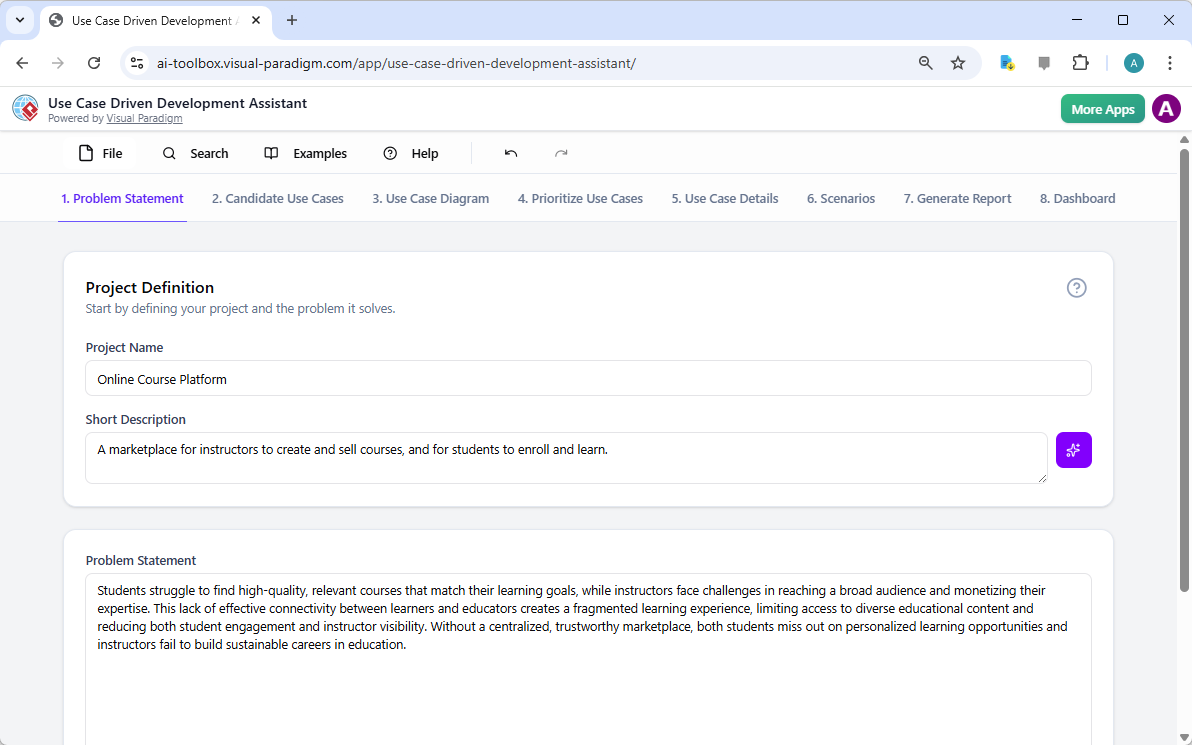
The first step is to establish the foundation. In the Problem Statement tab, you input your project’s name and a short description. The AI then takes this and generates a comprehensive problem statement. As seen in the image, for an “Online Course Platform,” the AI identifies the core challenges: students struggling to find relevant courses and instructors facing difficulties in reaching a broad audience. This initial step is crucial because it ensures everyone on the team—business analysts, developers, and project managers—starts with a shared, clear understanding of the problem the software aims to solve. It’s the essential first step in creating a Use Case Driven Development strategy.
Step 2: Identify Core Functionality with AI
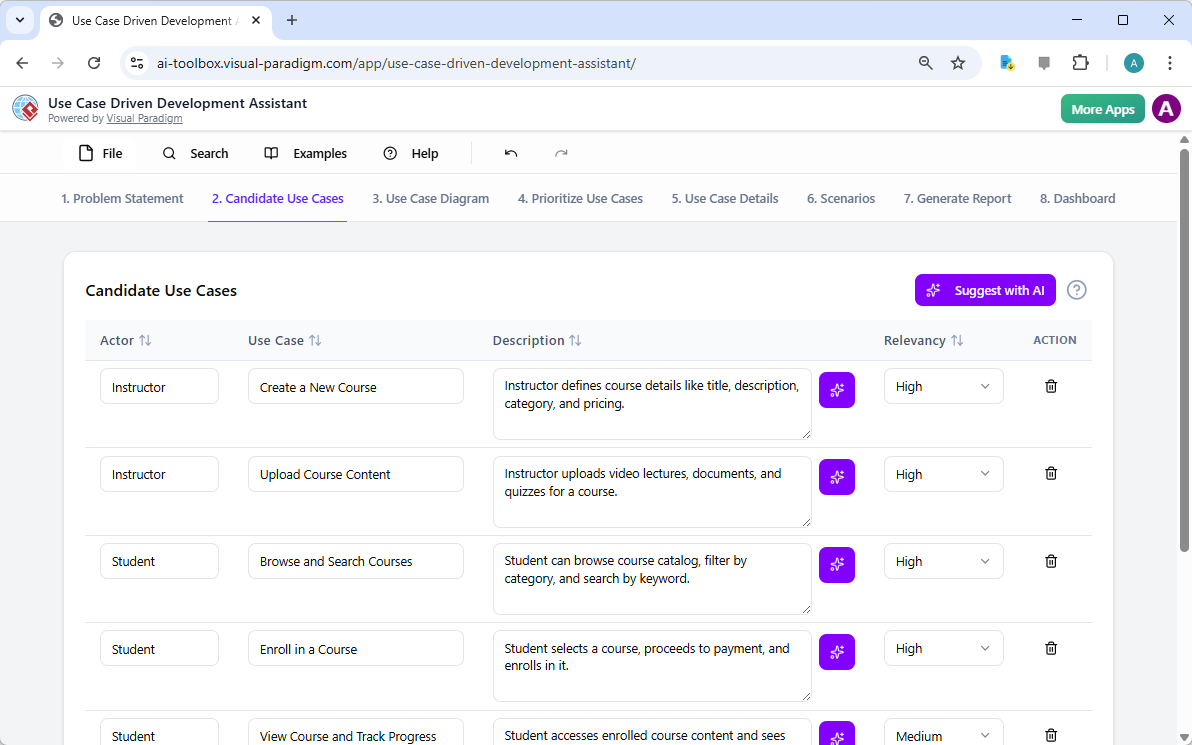
With the problem defined, the next step is to identify the key functionalities. The Candidate Use Cases tab is where the AI shines. After analyzing your problem statement, it suggests a list of use cases, each with an actor and a brief description. For our online course platform, the AI identifies actions like “Create a New Course” for the instructor, “Browse and Search Courses” for the student, and “Manage Users” for the admin. This step is critical for ensuring you don’t miss any essential features. The AI acts as a brainstorming partner, suggesting possibilities you might have overlooked, which is especially valuable for complex projects.
Step 3: Visualize Your System with a Use Case Diagram
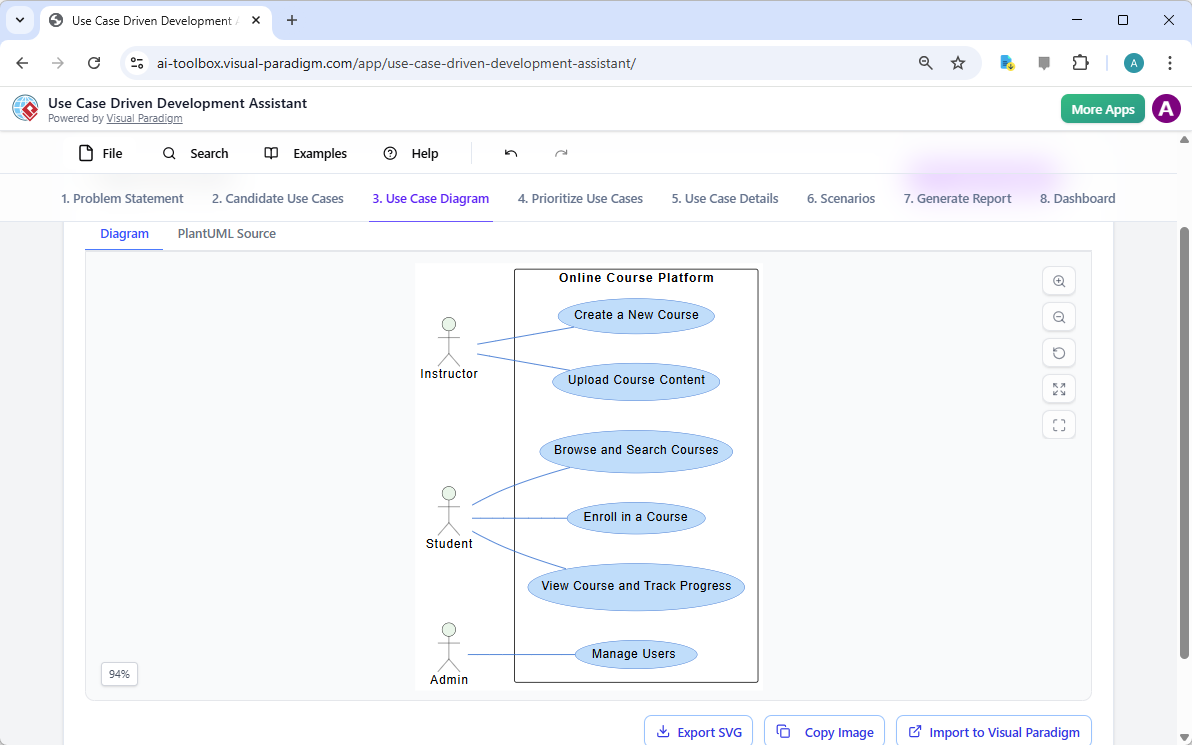
Once you have your list of use cases, the next logical step is to visualize them. The Use Case Diagram tab automatically generates a PlantUML diagram based on your identified actors and use cases. The diagram clearly shows the relationships between users (instructors, students, admins) and the system’s functionalities. This visual representation is a powerful communication tool. It allows stakeholders to quickly grasp the system’s scope and functionality without wading through dense text. It’s an instant way to align everyone on the project’s goals and boundaries.
Step 4: Prioritize Your Features
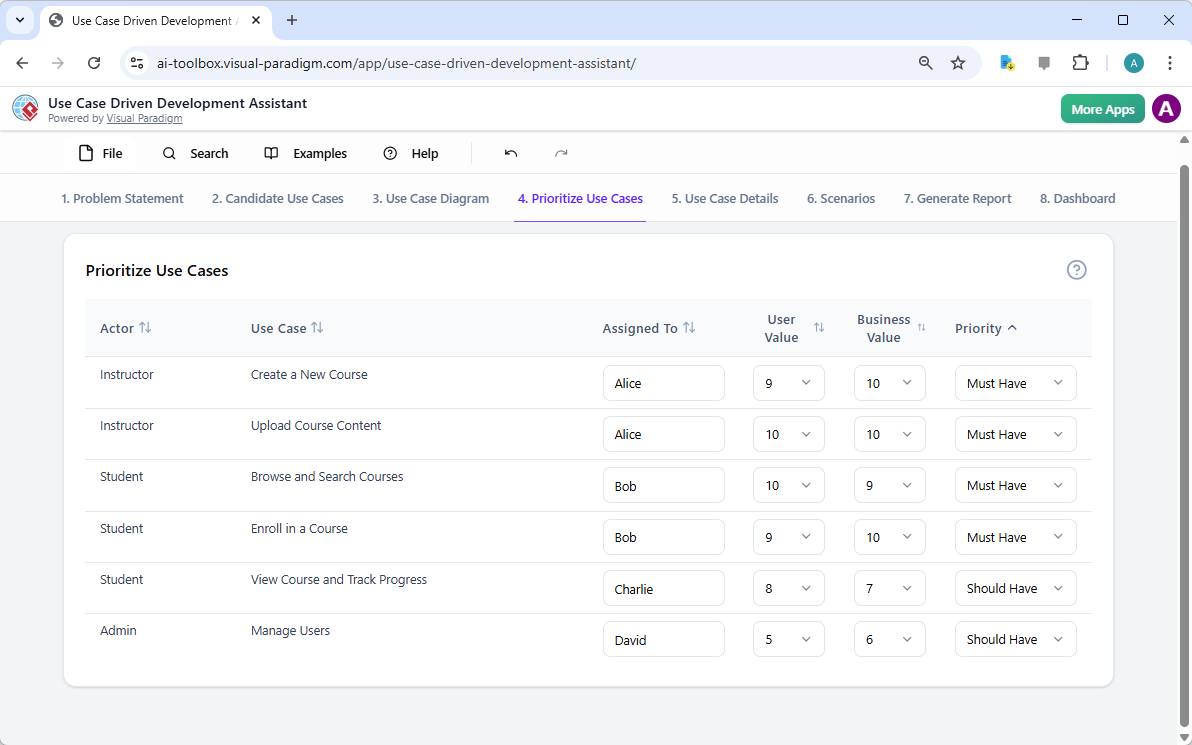
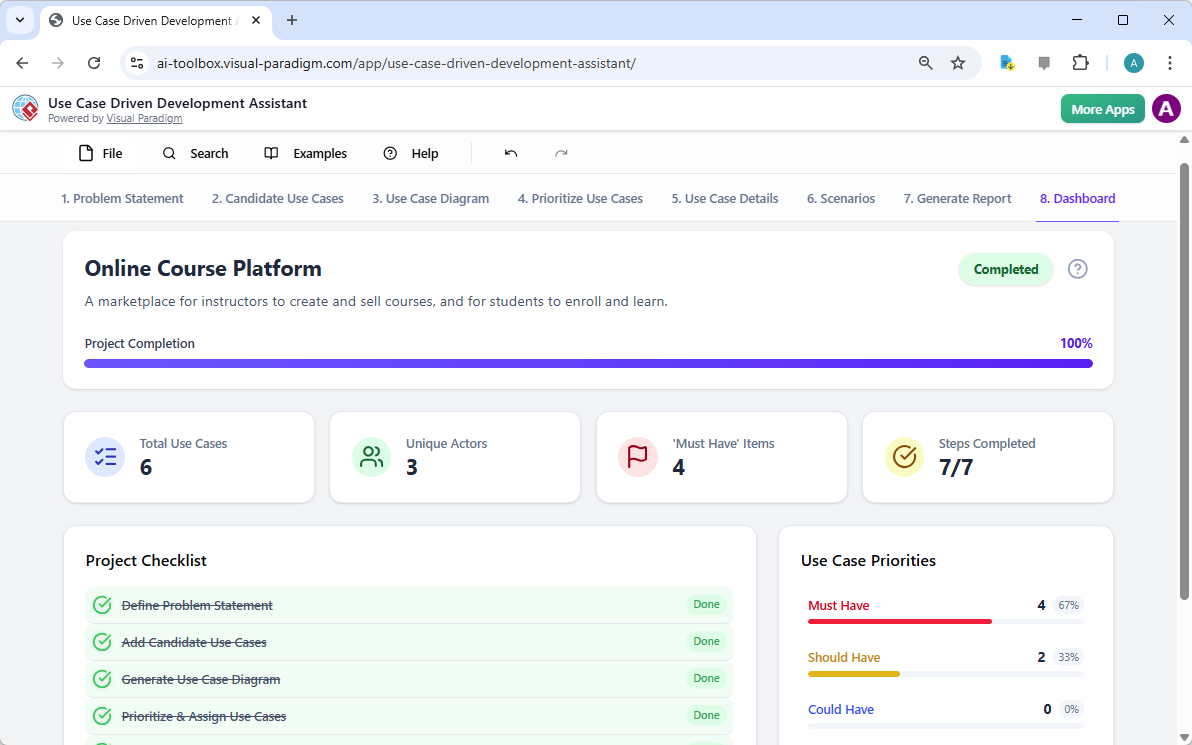
Not all features are created equal. The Prioritize Use Cases tab allows you to rank your use cases based on their user and business value. You can assign a score from 0 to 10 for both values and then apply the MoSCoW prioritization method (Must Have, Should Have, Could Have, Won’t Have). This step is vital for effective project management. It ensures that development efforts are focused on the most critical features first, maximizing the value delivered in each sprint. The dashboard provides a clear, visual summary of your priorities, helping you make informed decisions about your project roadmap.
Step 5: Detail Your Use Cases
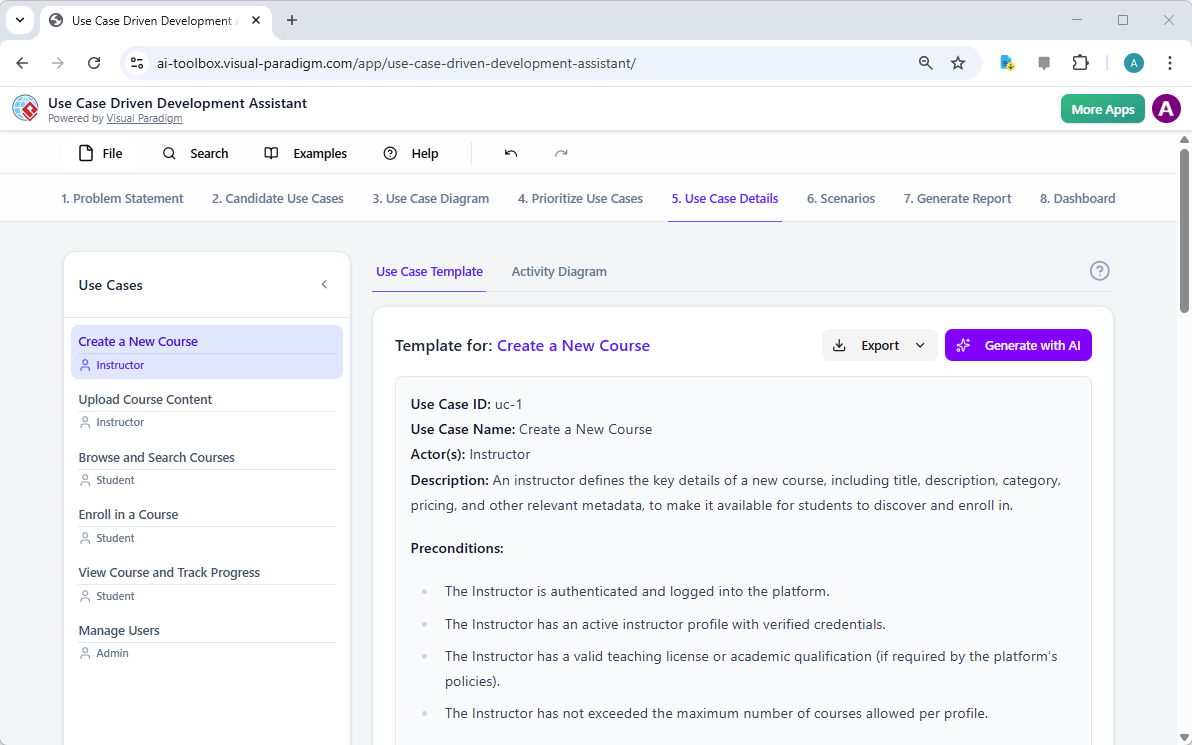
Now that you’ve identified and prioritized your features, it’s time to get into the details. The Use Case Details tab allows you to create a comprehensive template for any selected use case. The AI can generate a detailed description, including the main flow, alternative flows, pre-conditions, and post-conditions. For “Create a New Course,” the AI provides a structured template that defines exactly what happens when an instructor performs this action, from logging in to saving the course. This level of detail is essential for developers and QA engineers, as it removes ambiguity and provides a clear blueprint for implementation.
Step 6: Generate Activity Diagrams for Workflow
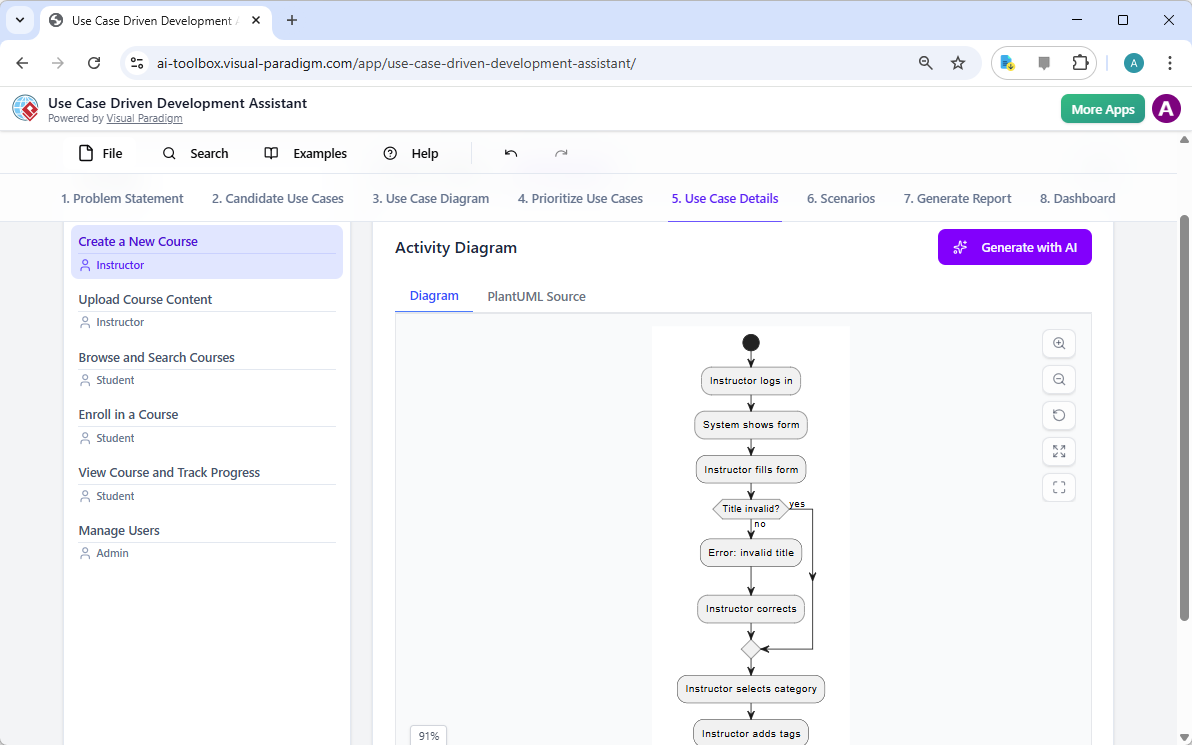
For a deeper understanding of a use case’s internal workflow, the AI can generate an Activity Diagram. This diagram visually maps out the step-by-step process, showing the flow of actions, decisions, and potential errors. For the “Create a New Course” use case, the diagram illustrates the sequence: the instructor logs in, the system shows a form, the instructor fills it out, the system validates the title, and so on. This visual representation of the workflow is invaluable for understanding complex processes and identifying potential bottlenecks or error conditions before development begins.
Step 7: Generate Test Scenarios with Gherkin
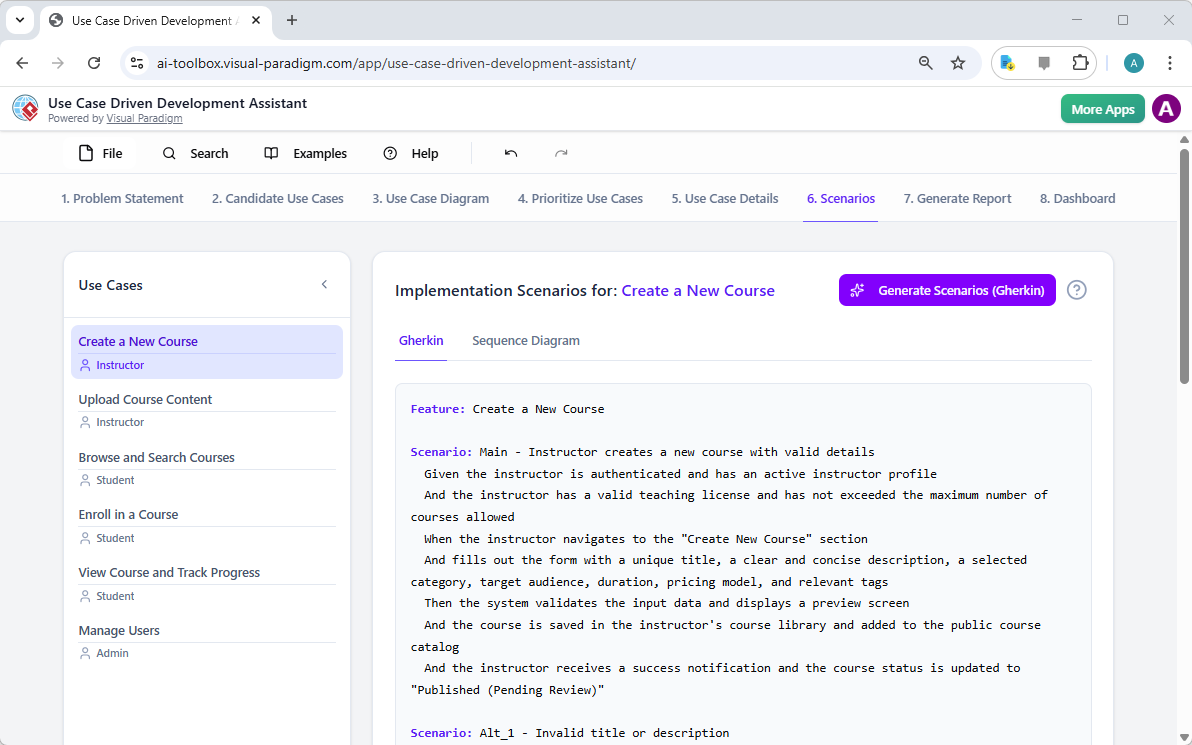
One of the most powerful features of the assistant is its ability to generate test scenarios. The Scenarios tab allows you to generate executable test cases in Gherkin syntax (Given-When-Then). For the “Create a New Course” use case, the AI creates detailed scenarios for both the main flow and alternative flows (like an invalid title). This directly links your requirements to your testing strategy, ensuring comprehensive test coverage and reducing the risk of bugs. It’s a game-changer for QA teams, as it automates a significant portion of the test planning process.
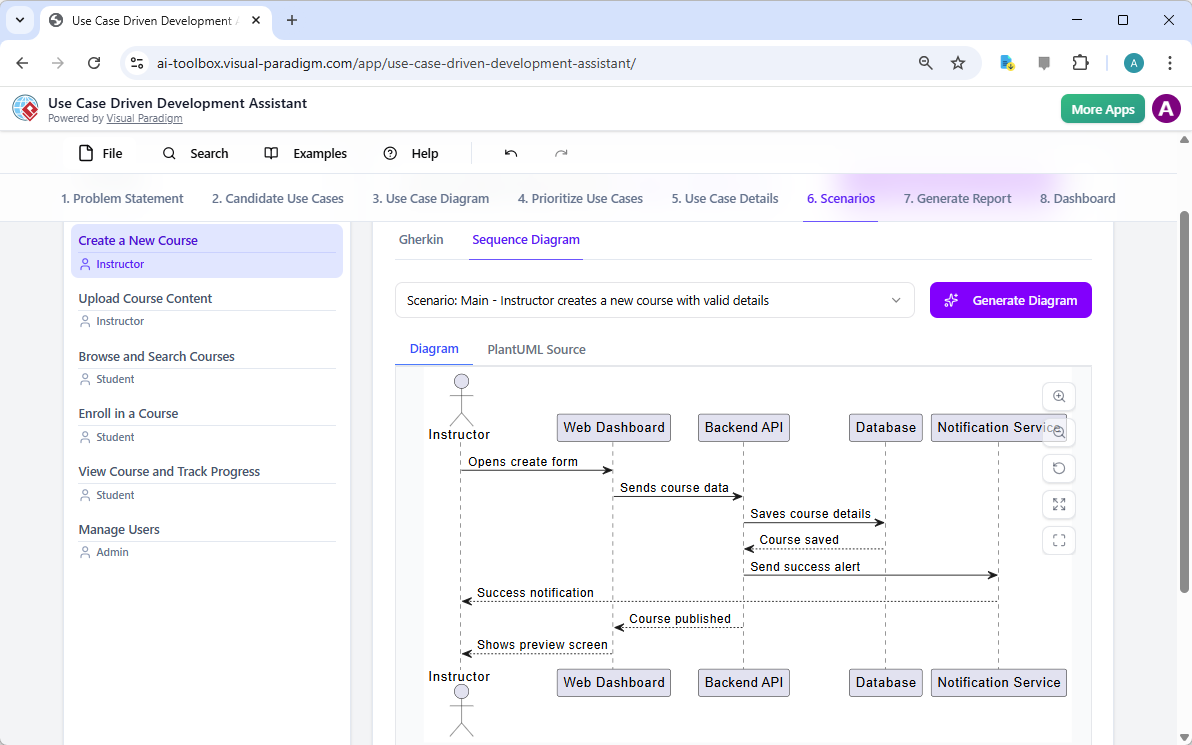
And you can also generate UML sequence diagrams for the scenarios.
Step 8: Generate a Complete Project Report
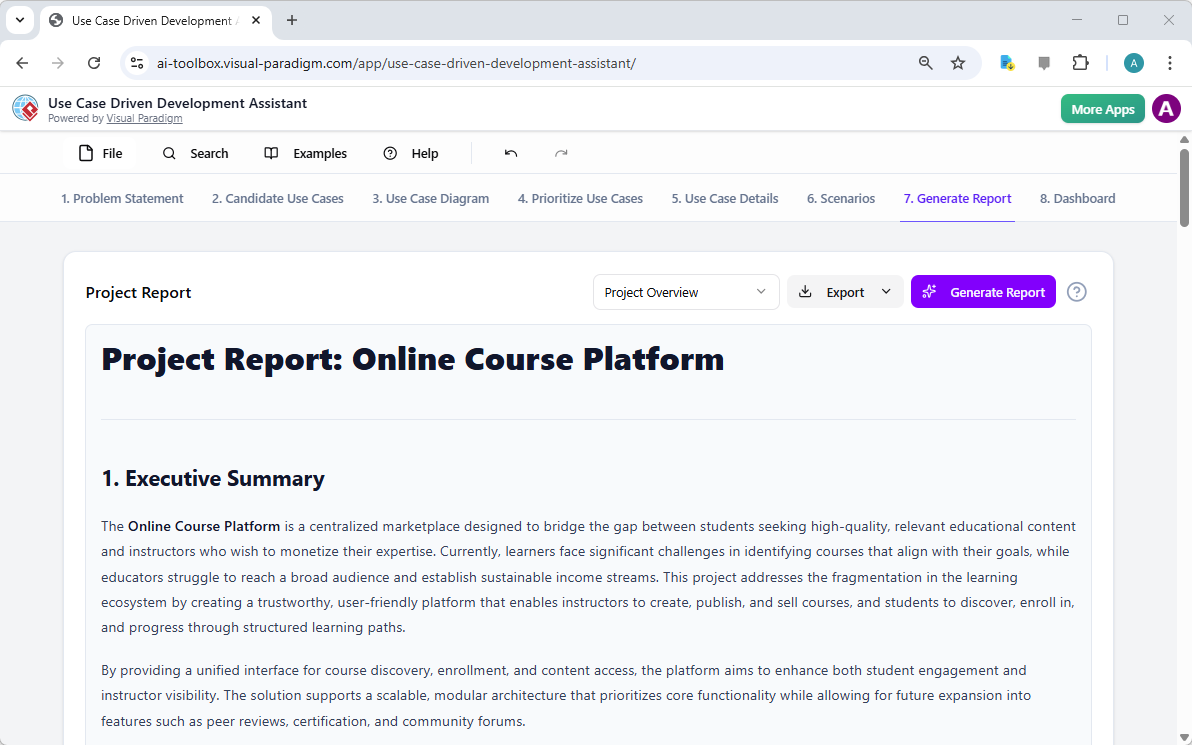
Finally, the assistant helps you create professional documentation. The Generate Report tab allows you to produce various types of reports, such as a Project Overview, Implementation Plan, or QA Test Plan. These reports are generated with AI assistance, pulling information from all the previous steps. They provide a comprehensive summary of your project, making it easy to share with stakeholders, investors, or your entire team. This ensures that everyone has access to the same, up-to-date information, fostering better collaboration and alignment.
Step 9: Monitor Your Progress on the Dashboard
After completing all the steps, the Dashboard provides a holistic view of your project’s status. It shows the project completion percentage, the total number of use cases, the number of unique actors, and the priority breakdown. The project checklist shows which steps have been completed, giving you a clear sense of your progress. This dashboard acts as a central hub, allowing you to easily track the evolution of your project from a simple idea to a fully documented and prioritized plan.
Accelerate Your Software Development with AI
The Use Case Driven Development Assistant by Visual Paradigm is not just a tool; it’s a transformative approach to software development. It leverages AI to automate the most time-consuming and error-prone parts of the requirements and design process. From generating a problem statement to creating detailed reports, it streamlines the entire workflow, allowing teams to focus on what they do best: building great software.
By providing a clear, structured, and AI-assisted path from problem to project, this tool reduces ambiguity, improves collaboration, and ensures that the final product delivers real value. It’s the perfect solution for business analysts, project managers, software architects, and development teams looking to accelerate their development cycles and build better software, faster.
Ready to transform your software development process? Try the Use Case Driven Development Assistant today and experience the power of AI-powered software development planning.
Related Links
Use case modeling is a fundamental technique in software engineering used to capture functional requirements by visualizing the interactions between external actors and a system’s internal functions. This method provides an essential foundation for requirement analysis and system design by establishing clear system boundaries and goals. Modern platforms now integrate AI-powered automation to refine diagrams, generate detailed use case descriptions, and convert models into test cases or activity diagrams to ensure design consistency and traceability across the development lifecycle. Specialized features like the Flow of Events editor and the Use Case Scenario Analyzer allow teams to precisely document and validate structured event sequences, significantly increasing system clarity. Furthermore, practitioners can leverage robustness analysis to transition from abstract requirements to detailed system components effectively.
-
What Is a Use Case Diagram? – A Complete Guide to UML Modeling: A comprehensive foundational resource explaining use case components, purposes, and best practices.
-
Step-by-Step Use Case Diagram Tutorial – From Beginner to Pro: A practical tutorial walking through techniques for creating effective diagrams for any project complexity.
-
Mastering AI-Driven Use Case Diagrams with Visual Paradigm: A guide to using generative AI to develop intelligent, dynamic models for modern software systems.
-
All You Need to Know About Use Case Modeling: An in-depth exploration of the principles and applications of use case modeling in software engineering.
-
Visual Paradigm – Use Case Description Features: Details on tools used to document user interactions and structured system behavior with precision.
-
Unraveling Scenarios with the Use Case Scenario Analyzer: A technical guide on examining and refining interaction flows for increased design clarity.
-
Guide to Using the Flow of Events Editor in Visual Paradigm: Step-by-step instructions for documenting the sequences of events that occur within a use case.
-
Generating Scenarios and Test Cases from Use Case Diagrams Using AI: An exploration of how AI tools automate the creation of requirement-driven test procedures.
-
Convert Use Case to Activity Diagram – AI-Powered Transformation: A resource focused on the automated conversion of user interactions into detailed system workflows.
-
Use Case Diagram Gallery – Templates & Examples: A curated collection of real-world use case diagrams for inspiration and rapid prototyping.

 English
 Arabic
 Chinese (Simplified)
 Dutch
Dutch French
 German
 Italian
 Japanese
 Korean
 Portuguese
 Russian
 Spanish