


Introduction
In modern software development, effective communication of architecture is critical for aligning stakeholders, guiding development teams, and ensuring system scalability. Two widely adopted modeling approaches—C4 diagrams and UML diagrams—serve distinct but complementary purposes. While C4 diagrams provide a high-level, abstraction-focused view of software architecture, UML diagrams offer detailed, code-level, and behavioral insights.
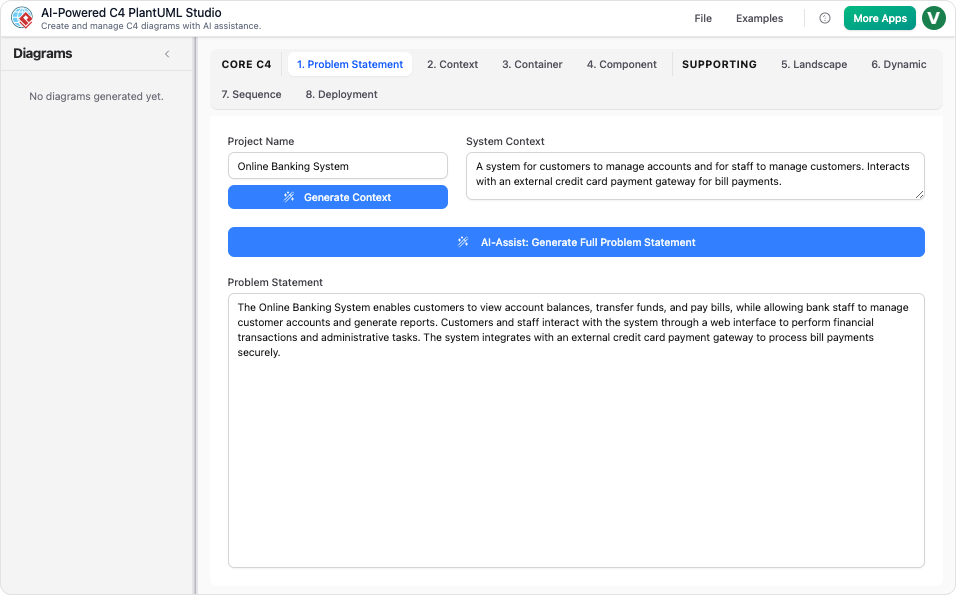
This article explores how C4 and UML diagrams can be synergistically integrated, and how Visual Paradigm’s AI-powered ecosystem facilitates this blending, enhancing clarity, consistency, and collaboration across software projects.
1. The Relationship Between C4 and UML
1.1 C4 Model Overview
The C4 model is a hierarchical approach to visualizing software architecture, consisting of four levels:
- Level 1 (System Context): The highest-level view, showing the system and its interactions with external entities.
- Level 2 (Container): Zooms into the system, illustrating major containers (e.g., microservices, databases).
- Level 3 (Component): Breaks down containers into components (e.g., modules, services).
- Level 4 (Code): The most granular level, detailing implementation specifics (e.g., classes, interfaces).
1.2 UML’s Role in C4
While C4 excels at structural abstraction, UML provides detailed implementation and behavioral views. The integration of UML within C4 is particularly valuable at:
- Level 4 (Code): UML Class Diagrams detail the internal structure of components.
- : UML Sequence Diagrams and Dynamic Diagrams illustrate runtime interactions.
- Deployment Views: UML Deployment Diagrams map software containers to physical infrastructure.
2. How C4 and UML Complement Each Other
2.1 Detailing Implementation at the Code Level (Level 4)
At Level 4, UML Class Diagrams are used to show the internal structure of a component, such as:
- Classes, interfaces, and their relationships.
- Methods, attributes, and inheritance hierarchies.
Example: A C4 Component Diagram might show a “Payment Service” component. A corresponding UML Class Diagram could detail the PaymentProcessor, Transaction, and Invoice classes within that component.
Tip: Limit the scope of UML Class Diagrams to a single component to avoid clutter and maintain clarity.
2.2 Modeling Runtime Behavior
UML Sequence Diagrams and Dynamic Diagrams are used to illustrate how components interact during execution.
Example: A C4 Dynamic Diagram might show the flow of a “Checkout Process” between the “Frontend,” “Payment Service,” and “Inventory Service.” A UML Sequence Diagram could then detail the exact message exchanges, such as:
- User clicks “Checkout.”
- Frontend calls
PaymentService.processPayment(). - Payment Service validates and updates the
InventoryService.
Tip: Use for high-level workflows and UML Sequence Diagrams for precise message flows.
2.3 Detailing Infrastructure and Deployment
The C4 Deployment Diagram maps containers to physical nodes, similar to UML Deployment Diagrams.
Example: A C4 Deployment Diagram might show:
- A “Web Server” node hosting the “Frontend” container.
- A “Database Server” node hosting the “Database” container.
Tip: Use C4 Deployment Diagrams for architectural overviews and UML Deployment Diagrams for detailed infrastructure modeling.
3. How Visual Paradigm Facilitates C4/UML Integration
3.1
Visual Paradigm’s AI Diagramming Chatbot and C4 AI Diagram Generator allow users to:
- Generate C4 diagrams (Context, Container, Component, Deployment) from natural language prompts.
- Seamlessly switch to UML diagrams (Class, Sequence, Deployment) for detailed views.
Example Workflow:
- Use the AI Chatbot to generate a C4 Container Diagram for an e-commerce system.
- Ask the AI to generate a UML Sequence Diagram for the “Order Processing” flow between containers.
3.2
Visual Paradigm provides a single platform for both C4 and UML modeling, ensuring:
- Consistency: Changes in C4 diagrams automatically reflect in linked UML diagrams.
- Collaboration: Teams can work on high-level architecture (C4) and detailed design (UML) simultaneously.
Tip: Use Visual Paradigm’s to maintain synchronization between C4 and UML views.
3.3
- Start with C4: Define the high-level architecture using C4 diagrams before diving into UML details.
- : Reserve UML Class Diagrams for complex components.
- : Use Visual Paradigm’s AI to generate and validate diagrams, reducing manual effort.
- : Ensure that UML diagrams align with the structural definitions in C4 diagrams.
Conclusion
The integration of C4 and UML diagrams provides a holistic approach to software architecture—balancing high-level abstraction with detailed implementation. Visual Paradigm’s AI-powered ecosystem simplifies this blending, enabling teams to create, maintain, and collaborate on architecture models efficiently.
By leveraging C4 for structure and UML for detail, software architects and developers can ensure clarity, consistency, and scalability in their projects.
Final Thought: “Architecture is not just about drawing boxes and lines—it’s about telling a story. .”
- C4-PlantUML Studio | AI-Powered C4 Diagram Generator (matches “AI-Powered C4 PlantUML Studio (C4-PlantUML Studio)” and “AI-Powered C4 Diagram Generator”)
- AI-Powered C4 Diagram Generator | Create Architecture Diagrams from Text (related AI tool entry point)
- C4 Component Diagram: A Definitive Guide to Your Code’s Internal Structure with AI (linked in multiple guide pages, e.g., from C4 System Context Guide)
- C4 Container Diagram: A Definitive Guide to Visualizing Your Software’s Building Blocks with AI (linked in multiple guide pages, e.g., from C4 System Context Guide)
- C4 Deployment Diagram (direct AI tool page for generating C4 Deployment Diagrams)
- C4 System Context Diagram: A Definitive Guide to Seeing the Big Picture with AI
- Generate the Complete C4 Model Instantly with Visual Paradigm’s AI Diagram Generator (featured in product updates, e.g., Visual Paradigm Desktop Updates)
- Streamline C4 Diagrams with Our New AI-Powered Markdown Editor (no exact matching page found; may be an older or internal feature reference)
- The Ultimate AI C4 Diagram Tool & Modeling Software
- New: Full C4 Model Support Added to Visual Paradigm Desktop (announced in AI Diagram Generator Release)
- C4 Diagram Tool & Modeling Software (core landing page for C4 tools)

 English
 Arabic
 Chinese (Simplified)
 Dutch
Dutch French
 German
 Italian
 Japanese
 Korean
 Portuguese
 Russian
 Spanish