Ever feel like your business processes are a tangled web of waiting, inefficiency, and confusion? You’re not alone. The good news? The AI-Powered Value Stream Mapping Editor from Visual Paradigm is here to be your process detective, turning that messy reality into a clear, actionable blueprint. This isn’t just another diagramming tool; it’s a smart, data-driven assistant that helps you see the big picture, identify hidden waste, and make decisions that actually move the needle. Forget guessing what’s slowing you down—this tool uses AI to analyze your operations and generate insights that feel like having a Lean expert in your pocket. Whether you’re a lean practitioner, operations manager, or just someone who wants to streamline their workflow, this guide will show you exactly how to use this powerful software to optimize your value stream and get from chaos to clarity.
Quick summary
- Use the AI-Powered Value Stream Mapping Editor to visualize and optimize your business processes.
- Start with an AI prompt, a pre-built template, or manual configuration.
- Let AI analyze your process and generate a professional VSM diagram.
- Refine the diagram by editing process data in the structured configuration pane.
- Use the built-in AI Analysis to generate reports and get actionable improvement suggestions.
- Export your final map as a high-quality PNG for presentations and sharing.
Getting Started: Your First Step to a Smarter Process
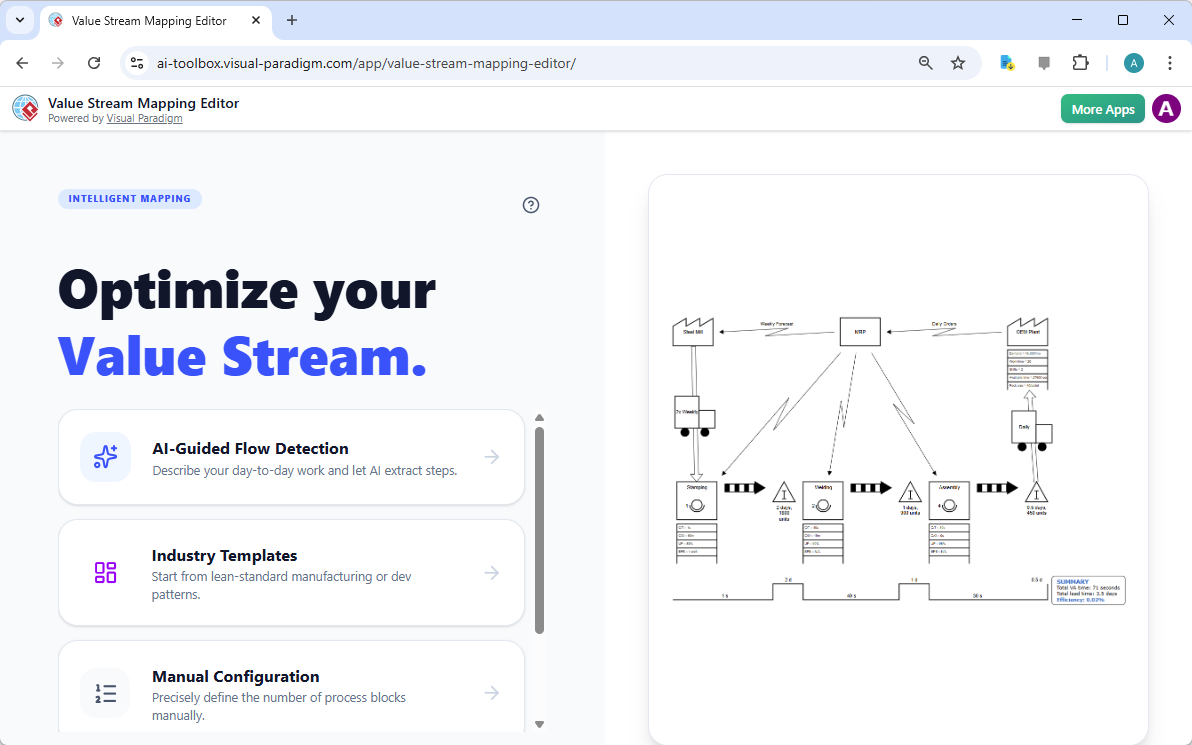
So, you’re ready to dive in. The first thing you’ll see is the main landing page of the AI-Powered Value Stream Mapping Editor. It’s designed to be welcoming, offering three clear paths to get started. Think of it like choosing your adventure: Do you want to let AI do the heavy lifting? Then go for the “AI-Guided Flow Detection” option. Are you already familiar with the process and want a jumpstart? The “Industry Templates” can be a great resource. Or, if you prefer to build your map from the ground up, the “Manual Configuration” option lets you define the number of process blocks yourself. The beauty of this tool is that it caters to all levels of expertise, making it easy for anyone to start their journey towards process excellence.
Let AI Do the Work: The AI-Guided Flow Detection
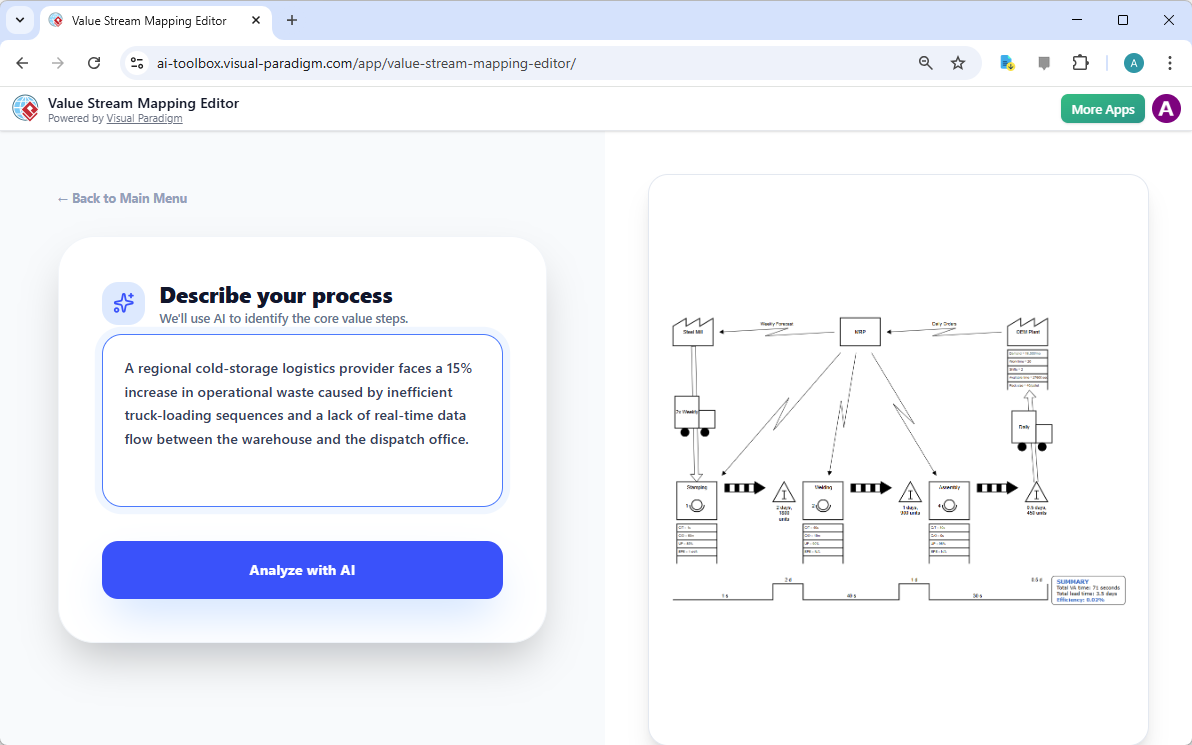
Let’s kick things off with the most exciting feature: AI-Guided Flow Detection. This is where the magic happens. Instead of staring at a blank canvas or trying to guess the process steps, you simply describe your problem in plain English. For example, you might say, “A regional cold-storage logistics provider faces a 15% increase in operational waste caused by inefficient truck-loading sequences and a lack of real-time data flow between the warehouse and the dispatch office.” The AI takes this description and, like a super-powered analyst, identifies the core value steps and begins to build the map. It’s like having a consultant who can read your mind and instantly understand your pain points. After you enter your description, you just click “Analyze with AI” and let the tool work its magic. The result? A preliminary value stream map that already captures the essence of your process, saving you hours of manual work.
Voilà: Your AI-Generated Value Stream Map
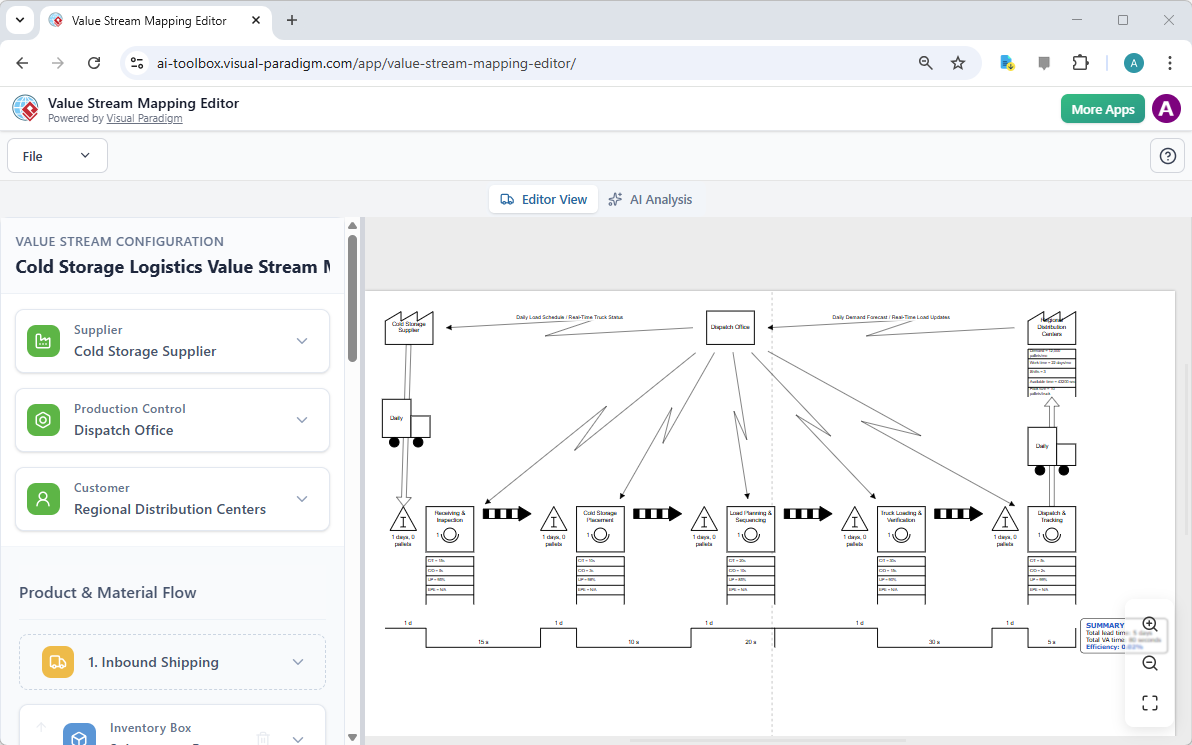
After you hit “Analyze with AI,” the tool works its magic and generates a complete value stream map. This is the moment of truth. You’ll see a professional-looking diagram that visualizes the flow of materials and information across your entire process. In our example, you can see the key components: the supplier (Cold Storage Supplier), the production control (Dispatch Office), and the customer (Regional Distribution Centers). The diagram shows the sequence of steps, including “Receiving & Inspection,” “Cold Storage Placement,” and “Load Planning & Sequencing,” all connected by arrows that represent the product and information flow. This visual representation is incredibly powerful because it makes the abstract concept of a process tangible. You can see where things are happening, how long they take, and where the bottlenecks might be. It’s like turning a complex puzzle into a clear, easy-to-understand picture.
Zoom In and See the Details
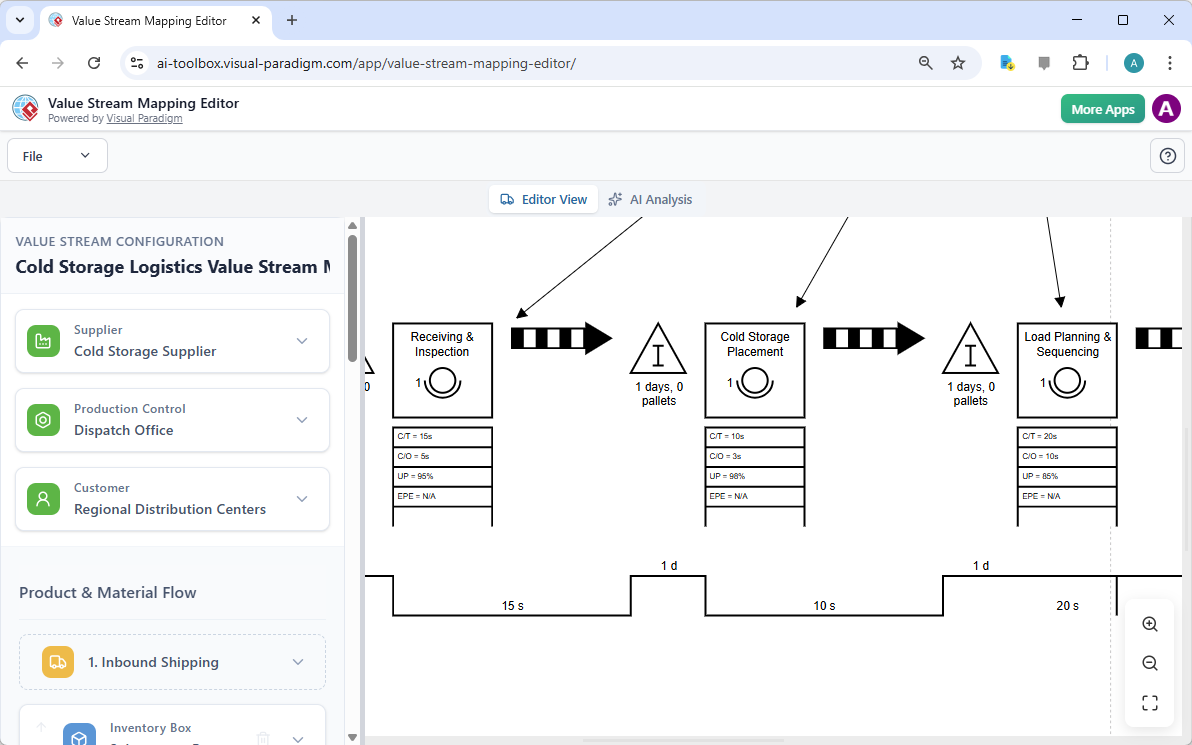
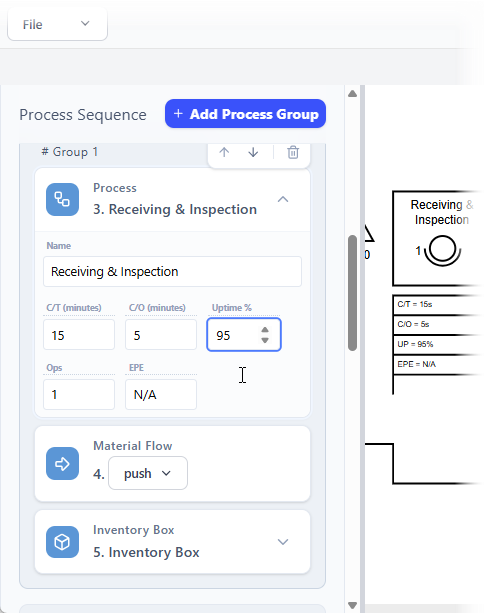
Now that you have your map, you might want to get a closer look at the details. The AI-Powered Value Stream Mapping Editor allows you to zoom in, which is perfect for examining the specific metrics of each process step. For instance, in the “Receiving & Inspection” step, you can see the cycle time (C/T) is 15 seconds, the changeover time (C/O) is 5 seconds, and the uptime is 95%. This level of detail is crucial for understanding the true performance of your process. You can see not just the flow, but the actual data that drives it. This granular view helps you pinpoint exactly where improvements can be made. It’s like being able to inspect every gear in a machine to see which ones are running smoothly and which ones are causing friction.
Make It Your Own: Editing the Configuration
Now that you have a solid foundation, it’s time to make it your own. The real power of this tool lies in its ability to let you edit and refine the map. On the left side of the screen, you’ll find the “Value Stream Configuration” pane. This is your control center. You can click on any process step and edit its properties, such as the cycle time, changeover time, uptime, and number of operators. You can also define the product and material flow, and adjust the inventory levels. The beauty of this split-pane editor is that as you make changes in the data editor, the diagram on the right updates in real-time. It’s like sculpting the map with data—every edit is immediately reflected in the visual representation. This seamless integration ensures that your data and your diagram are always in sync, eliminating the need for manual redrawing and reducing the risk of errors.
Get the Expert’s Opinion: AI Analysis
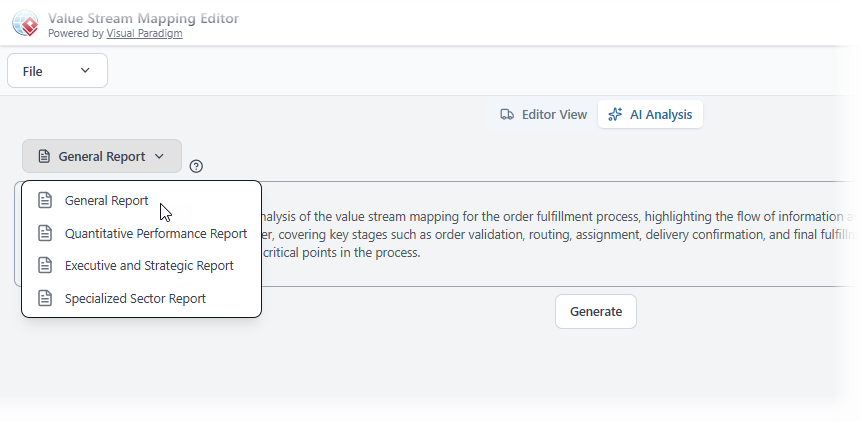
Once your map is complete, the next step is to analyze it. This is where the AI truly shines as a consultant. The “AI Analysis” tab allows you to generate a detailed report that analyzes your value stream and provides actionable insights. You can choose from different types of reports, such as a General Report, Quantitative Performance Report, or an Executive and Strategic Report. The AI analyzes your data, identifies potential bottlenecks, and suggests improvements. For example, it might highlight that the “Load Planning & Sequencing” step has a cycle time of 20 seconds, which is longer than the target of 15 seconds, and recommend ways to reduce it. This report is like having an expert on your team who can quickly spot issues that might be missed during a manual review. It turns your raw data into a powerful tool for decision-making and continuous improvement.
From Data to Action: The Executive Report
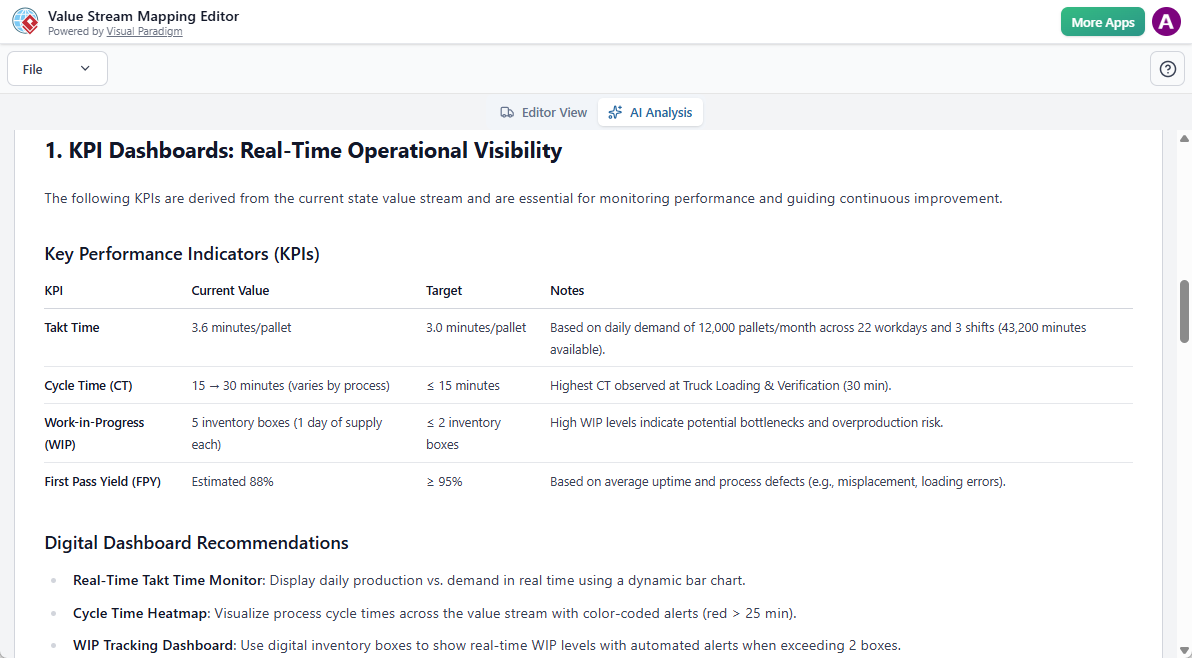
But what if you need to present your findings to leadership? That’s where the Executive and Strategic Report comes in. This report distills the complex data from your value stream into a clear, concise format that’s perfect for stakeholders. It highlights the key performance indicators (KPIs) and provides recommendations for improvement. For example, it might show that the current takt time is 3.6 minutes per pallet, while the target is 3.0 minutes, indicating a need for process optimization. It also includes digital dashboard recommendations, such as a Real-Time Takt Time Monitor, to help you track your progress. This report is a powerful communication tool that helps you build alignment and get buy-in from key decision-makers. It transforms your technical analysis into a strategic business case.
Conclusion: Your Journey to Process Excellence
Creating a value stream map used to be a time-consuming, manual process. But with the AI-Powered Value Stream Mapping Editor, it’s now a fast, intuitive, and data-driven journey. From describing your problem to generating a professional diagram, editing the details, and getting expert AI analysis, this tool simplifies the entire process. It helps you see your operations clearly, identify waste, and make data-driven decisions that lead to real improvements. Whether you’re a seasoned Lean practitioner or just starting out, this software empowers you to optimize your value stream and achieve operational excellence.
Ready to turn your process chaos into a clear, efficient flow? Try the AI-Powered Value Stream Mapping Editor today and see the difference for yourself.
Related Links
Value stream mapping (VSM) is a strategic framework used to visualize workflows and identify inefficiencies within a process, ultimately helping teams to eliminate waste and improve value delivery. By mapping end-to-end processes, organizations can track lead times, identify bottlenecks, and align their capabilities with strategic goals.
- What Is Value Stream Mapping? A Complete Guide: A foundational guide explaining how VSM visualizes workflows to identify and eliminate waste, thereby improving process efficiency.
- Comprehensive Guide to Value Stream Mapping: This article covers the fundamentals, benefits, and step-by-step procedures for continuous business improvement through mapping.
- Value Stream Mapping Tool – Visual Paradigm: An overview of a tool designed to help organizations streamline processes and improve operational efficiency through visual analysis.
- Value Stream Mapping as an Artifact of the Vision Phase: Explores how VSM serves as a key artifact to align teams and define strategic direction during the early phases of product development.
- How to Use Value Stream Mapping in Six Sigma Projects: Details how VSM reveals process bottlenecks and reduces cycle times to enable data-driven improvements in Six Sigma contexts.
- Eliminate Waste with Value Stream Mapping: A Practical Approach: A practical guide for identifying and removing the eight types of waste in both manufacturing and service-based environments.
- Value Stream to Capability Cross-Mapping View in ArchiMate: A specialized template for enterprise architects to map value streams directly to organizational capabilities using the ArchiMate framework.
- Free Value Stream Mapping Templates: A library of ready-to-use templates designed to accelerate process mapping and help teams uncover improvement opportunities.
- Value Stream Mapping Software – Visual Paradigm Online: An introduction to cloud-based software for collaborative workflow design and optimization for lean manufacturing.
- Value Stream Mapping Template for Bottleneck Identification: A professional template used to visualize end-to-end processes and track critical metrics like lead times.

 English
 Arabic
 Chinese (Simplified)
 Dutch
Dutch French
 German
 Italian
 Japanese
 Korean
 Portuguese
 Russian
 Spanish