Business Layer Structural Concepts
ArchiMate’s business layer identifies high-level concepts and relationships in enterprise architecture: final products and customer delivery systems. This layer of architecture represents the realization of high-level management goals and requirements, thus driving the implementation of enterprise architecture frameworks.
Business layer elements model the operational organization of an enterprise in a technology-independent manner, while strategic elements model the enterprise’s strategic direction and choices. The business layer, application layer, and technology layer are divided into three types of concepts: passive entities, behaviors, and active entities.
- Passive entities are acted upon by behaviors; system elements on which the system operates.
- Behavior entities describe transactions between active and passive entities, and among active entities. Examples of passive entities include contracts, data objects, and products.
- Active entities are participants, roles, collaborations, and other structural elements representing activities.
Active Entities (Active Entities)
Activity Entity – Executes certain behaviors, such as business processes or functions. They are individuals, groups of people, or long-term or permanent resources.
- Business Actors
- Business Roles
- Individuals (e.g., customers or employees)
- Groups (organizational units)
Business Actor (Business Actor)
A business actor is defined as an organizational entity capable of performing behaviors by being assigned to (one or more) business roles. A business actor is an organizational entity, not a technical one. The name of a business actor should preferably be a noun.
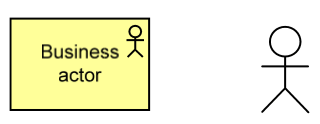
Participants may include entities outside the actual organization, such as customers and partners.
Business Actor Example:
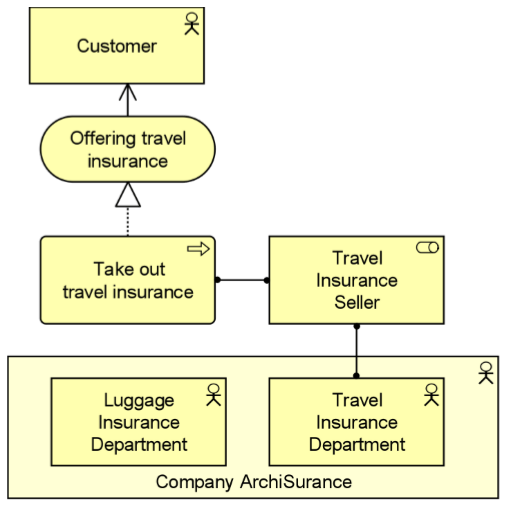
The following ArchiMate diagram illustrates the use of business actors:
- ArchiSurance Inc. is modeled as a business actor composed of two departments.
- The Travel Insurance Sales role is assigned to the Travel department.
- Within this role, the Travel department performs the travel insurance process, which provides services accessible via a business interface assigned to this role.
Business Role (Business Role)
A business role is defined as a responsibility for performing a specific behavior, which a participant can be assigned to. A business role may be assigned to one or more business processes or business functions, while a business participant may be assigned to one business role.
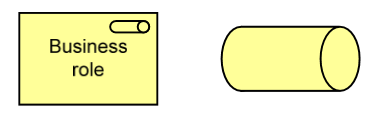
Example of Business Role in ArchiMate
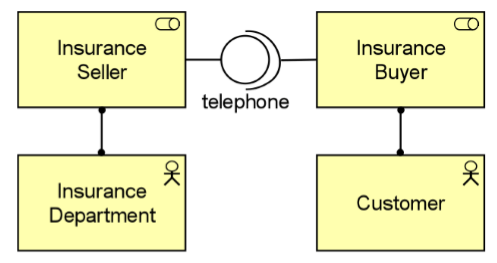
In the following ArchiMate diagram, the business role of Insurance Seller is fulfilled by a participant from the Insurance Department, with phone as the interface. The business role Insurance Buyer is fulfilled by the Customer participant, with phone as the required interface.
Business Collaboration (Business Collaboration)
A business process or function can be interpreted as an internal behavior assigned to a single business role. In some cases, the behavior is a collective effort of multiple business roles; indeed, the collaboration of two or more business roles results in a collective behavior, which may be more than the sum of individual role behaviors.
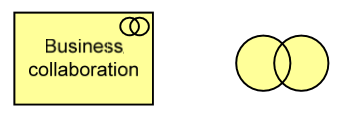
Business Collaboration Example
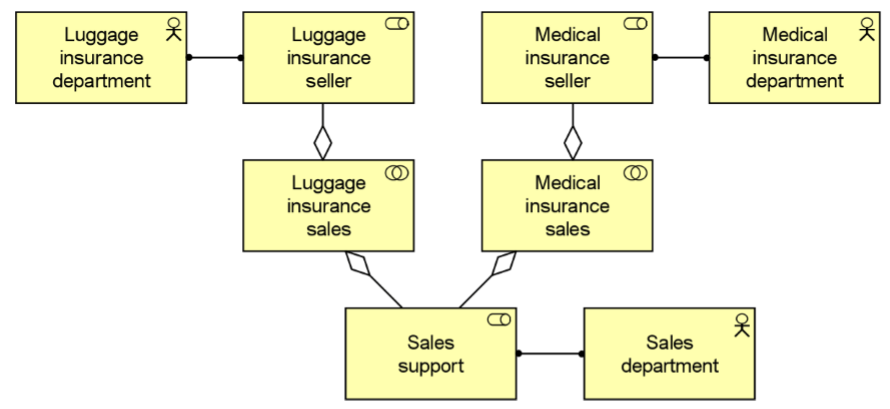
The following ArchiMate diagram illustrates a possible use of the collaboration concept. In this example, selling an insurance product involves the Sales Department fulfilling the Sales Support role, and a department specialized in this specific type of insurance fulfilling the Insurance Seller role. The example also shows that a role (in this case, Sales Support) can participate in multiple collaborations.
Business Interface (Business Interface)
A business interface can be assigned to one or more business services, meaning these services are exposed via the interface. A business interface is defined as an access point where business services are available to the environment. The name of a business interface should preferably be a noun.
Business Interface Example:
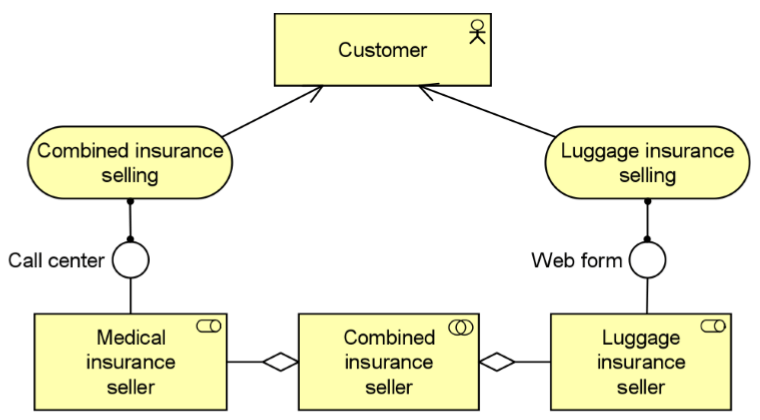
In the following ArchiMate diagram, the business service provided by the Baggage Insurance Seller and its collaboration with the Health Insurance Seller are exposed via a Web form and a call center business interface, respectively.
Location (Location)
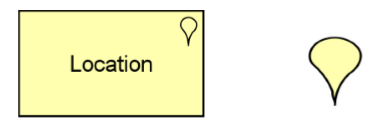
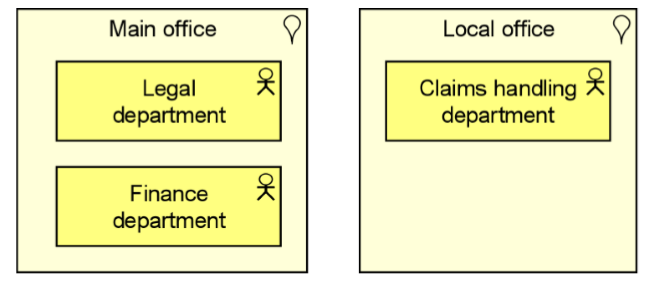
The location concept is used to model the distribution of structural elements such as business actors, application components, and devices. This is modeled through an assignment relationship from a location to a structural element. Locations can also be indirectly assigned to behavioral elements to indicate the location where the behavior is executed.
Location Example
The following ArchiMate diagram shows a department of an insurance company distributed across different locations. The Legal and Finance departments are centralized at headquarters, while the Claims department is located in various offices nationwide.
Business Objects (Business Objects)
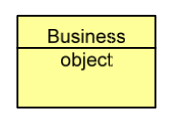
Business objects represent important “information” or “concept” elements in the business domain. Typically, business objects are used to model object types where multiple instances may exist within an organization. Multiple types of business objects can be defined. Business objects are passive because they do not trigger or execute processes.
Note:
- Business objects can be accessed by business processes, functions, business interactions, business events, or business services.
- Business objects may have associations, generalizations, aggregations, or compositions with other business objects.
- Business objects can be realized through representations or data objects (or both). The name of a business object should preferably be a noun.
Business Object Example
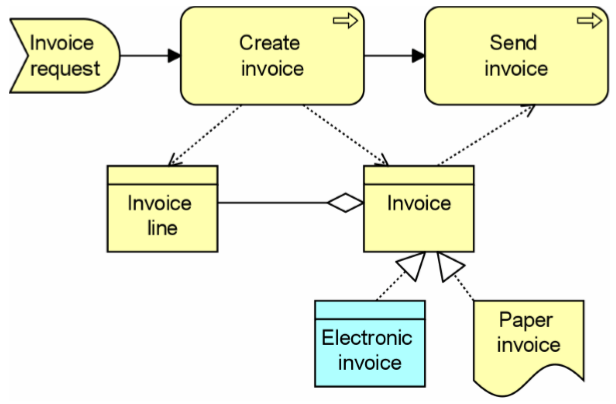
The following model shows a business object Invoice, which aggregates (multiple) business objects Invoice Line.
The business process – Create Invoice – creates the invoice and invoice lines, while the business process – Send Invoice – accesses the business object Invoice.
Behavior Entities (Behavior Entities)
Behavior entities are defined as units of activity executed by one or more active structural elements. Active structural concepts are assigned to behavior concepts to show who or what performs the behavior.
Internal vs. External Behavior Concepts
While internal business services provide supporting functions for processes or functions within the organization, externally visible behaviors are modeled by the concept **business service**. A business service represents a coherent function that provides added value to the environment, independent of how the function is implemented internally.
Behavioral Process Notation (Behavioral Process Notation)
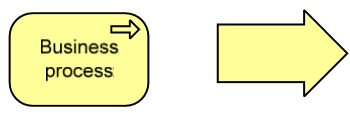
A business process describes the internal behavior performed by business roles required to produce a set of products and services.
For example: Products and services are related to customers, but the required behavior is a black box, so it is an “internal” behavior concept.
Behavior Concept Example
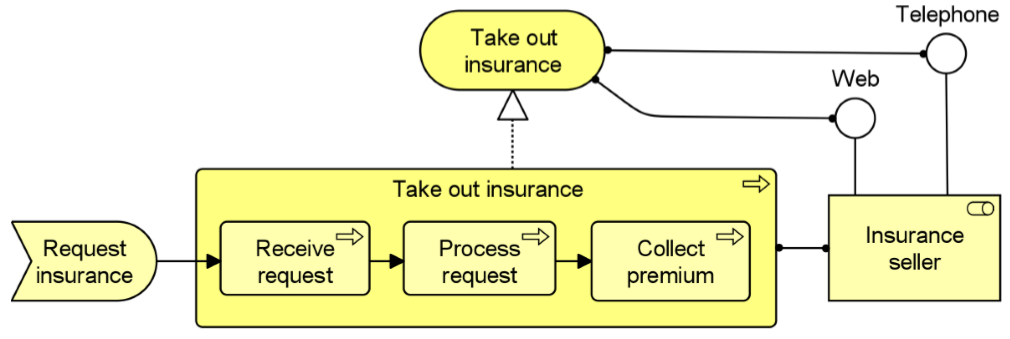
The following ArchiMate diagram illustrates the use of business processes and their relationships with other concepts.
Diagram
- The travel insurance process consists of three sub-processes.
- For clarity, the sub-processes are drawn within the overall process (structured).
- Each sub-process triggers the next sub-process.
- The event “Request Insurance” triggers the first sub-process.
- A specific role, in this case the insurance seller, is assigned to perform the required work.
- The process itself implements the insurance sales service.
- The “Receive Request” sub-process uses the business object Customer Information.
Business Function Notation (Business Function Notation)
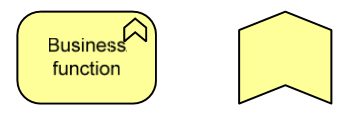
Like business processes, business functions also describe internal behaviors performed by business roles.
Business Process vs. Business Function (Business Process and Function)
However, while business processes group behaviors based on a sequence of activities or “processes” required to deliver a product or service, business functions usually group behaviors based on required business resources, skills, capabilities, knowledge, etc..
Business Function Example
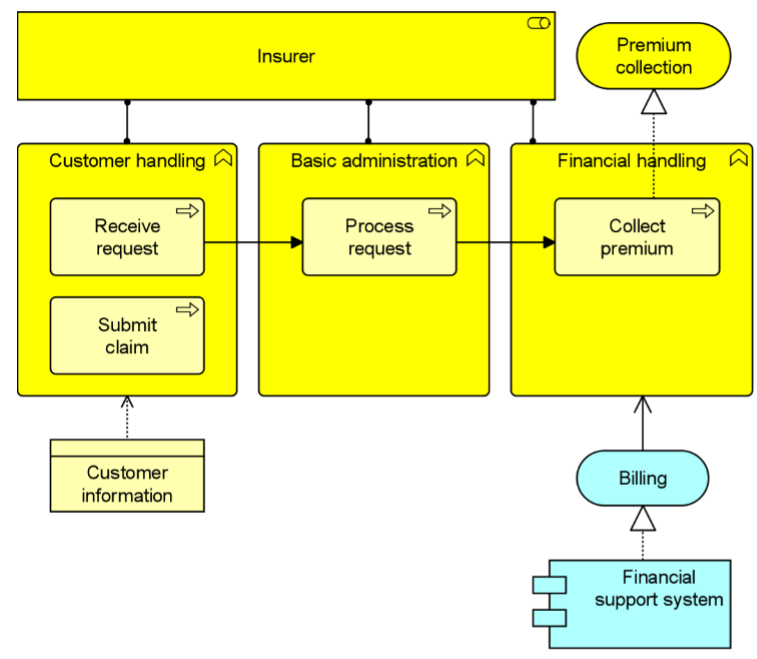
The following ArchiMate diagram illustrates the use of business functions and their relationship with business processes.
Diagram
- The insurance company role is assigned to each of the three business functions.
- These three business functions combine many business sub-processes.
- Business processes triggered by a business event involve sub-processes from different business functions.
- Business functions can access business objects:
- The Customer Handling function uses or manipulates the Customer Information object.
- The Financial Handling function utilizes the Billing application service, which implements the Premium Collection business service.
Business Interaction Notation (Business Interaction Notation)
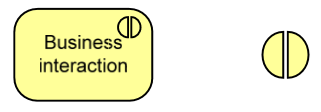
A business interaction is similar to a business process/function.
Business Interaction vs. Process/Function
While a process/function can be executed by a single role, an interaction is executed through the collaboration of multiple roles. The roles in the collaboration share the responsibility of executing the interaction.
Business Interaction Example
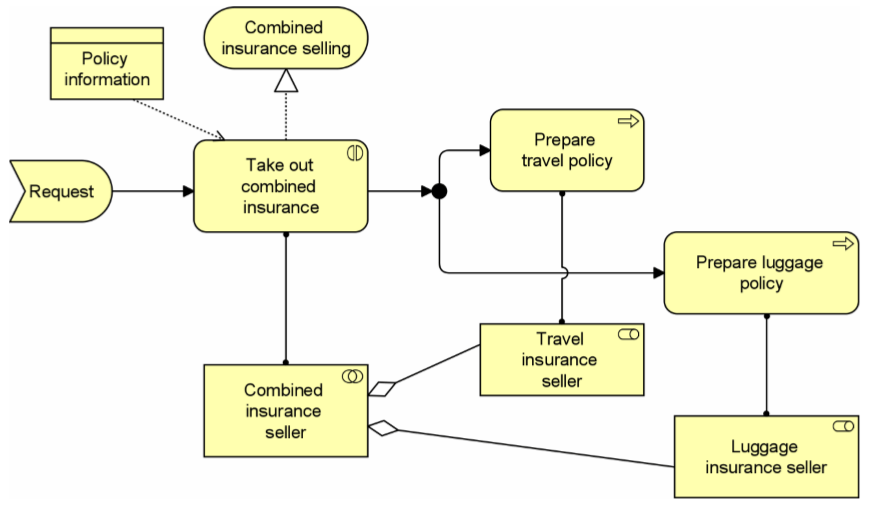
The ArchiMate diagram illustrates the use of business interactions:
- The business interaction is triggered by a request.
- The business interaction “Joint Travel and Baggage Insurance” is executed as a collaboration between the Travel Insurance Seller and Baggage Insurance Seller.
- The business interaction requires the Policy Info business object and implements (external) business service “Combined Insurance Sales”.
- As part of the business interaction, the processes “Prepare Travel Policy” and “Prepare Baggage Policy” are triggered.
- The Travel Insurance Seller and Baggage Insurance Seller respectively execute these processes.
Business Event Notation (Business Event Notation)
Business processes and other business behaviors may be triggered or interrupted by business events. Additionally, business processes may trigger events that initiate other business processes, functions, or interactions. Business events are most commonly used to model the triggering of behaviors, but other types of events can also be imagined.
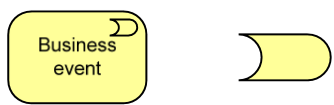
Unlike business processes, functions, and interactions, business events are instantaneous:
- Events have no duration.
- Events may originate from the environment external to the organization (e.g., from a customer).
- Events may occur or be generated by other processes internal to the organization.
Business Event Example
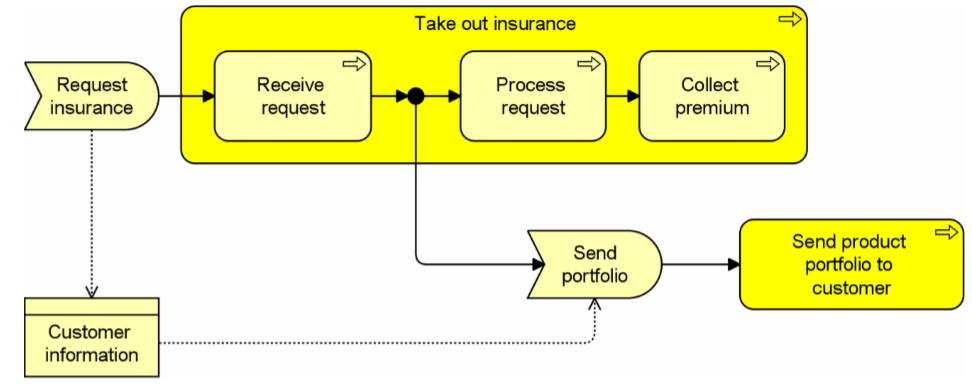
The ArchiMate diagram shows the usage of the business event notation:
- The “Request Insurance” event triggers the “Extract Insurance” process.
- The business object containing customer information accompanies the request.
- To persuade the customer to purchase more insurance products, a triggering event is raised during the request reception process.
- This triggers the process of sending the product bundle to the customer.
Business Service Notation (Business Service Example)
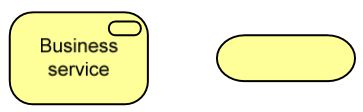
A business service exposes the capabilities of a business role or collaboration to an external environment. This capability can be accessed through one or more business interfaces. A business service is implemented by one or more business processes, business functions, or business interactions executed by a business role or business collaboration. It can access business objects.
Business Service Example
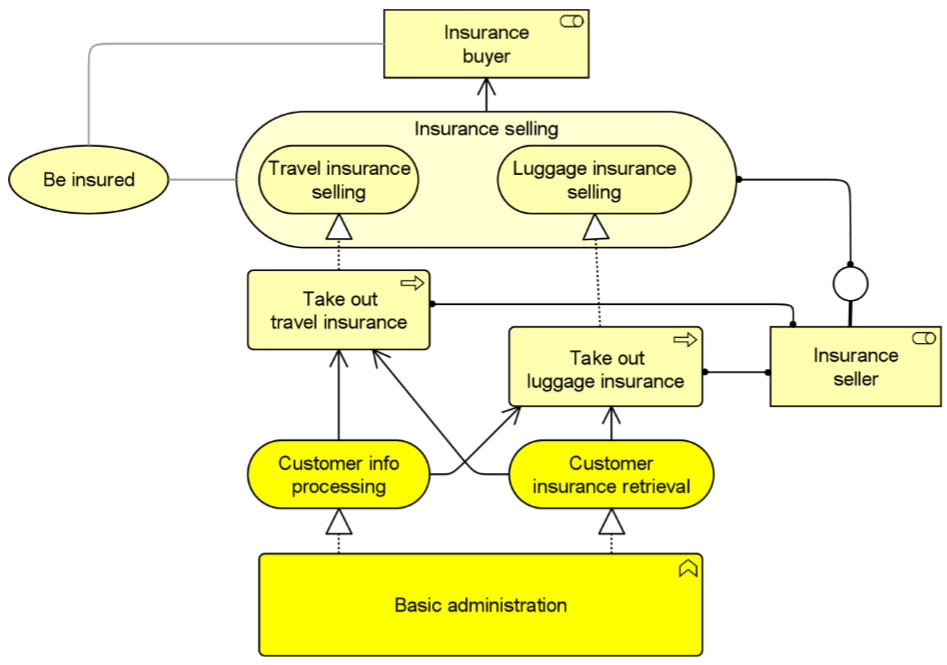
In the following ArchiMate diagram, external and internal business services are distinguished.
Diagram
- The core management function acts as a shared service center.
- The outbound business processes corresponding to travel and baggage insurance use the (internal) business services provided by the core management function.
- Both business processes implement (external) business services.
- The insurance sales service can be accessed via the business interface of the insurance seller (e.g., web form).
- Each business service should be valuable to its users (in this case, the insurance buyer role).
- If appropriate, this value can be explicitly modeled.
- The value of providing the travel insurance sales service to external customers (insurance buyers) lies in the fact that the customer is insured.
Passive Entities (Passive Entities)
Passive Entities (also known as business objects) — manipulated by behaviors such as business processes or functions. Information concepts are passive entities, providing a way to connect the organization’s operational entities with its business goals and the products it delivers to customers (via behavior entities).
- Business processes
- Business functions
- Contract entity is a business object (passive structure)
- Meaning associated with business objects
- Representation realizing a business object
- Value associated with products
- Product aggregates business services
- For example: Business actors play specific roles to perform business processes on business objects, as shown in the generic architecture diagram below.
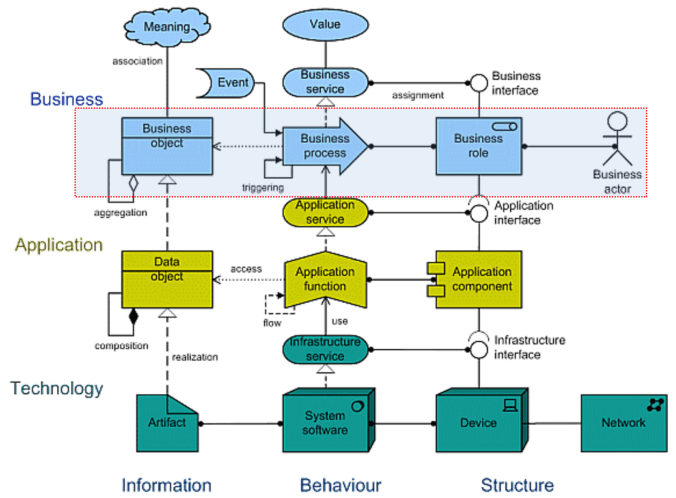
ArchiMate standard also classifies the product concept itself, along with the associated contract concept, as information concepts.
Information concepts differ from structural and behavioral concepts, which focus primarily on the enterprise’s operational perspective; information concepts focus on the “intention” perspective.
Information Concept Notation (Information Concept Notation)
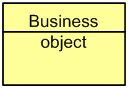
Business Object (Business Object)
A passive element relevant from a business perspective.
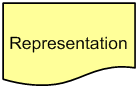
Representation (Representation)
A perceivable form of information carried by a business object.
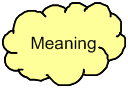
Meaning (Meaning)
Knowledge or expertise present in a business object or its representation, given a specific context.
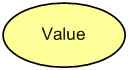
Value (Value)
The relative value, utility, or importance of a business service or product.
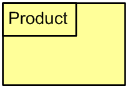
Product (Product)
A series of coherent services, accompanied by a contract/protocol, delivered as a whole to (internal or external) customers.
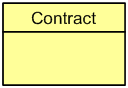
Contract (Contract)
A formal or informal agreement specifying rights and obligations related to a product.
Business Object Notation
Business objects represent important “information” or “concept” elements in the business domain.
Business objects are passive because they do not trigger or execute processes, and have the following characteristics:
- Therefore, business objects are used to model object types, such as UML classes, where multiple instances may exist within an organization.
- Business object representations are actual instances of information generated and used by behavioral elements such as business processes.
- Business objects can represent information assets relevant from a business perspective and can be realized via data objects.
Business Object Example: The following ArchiMate diagram shows:
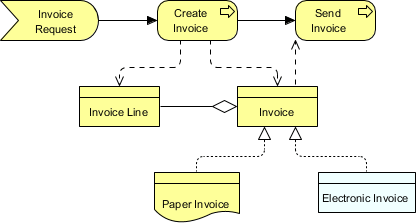
- A business object Invoice, which aggregates (multiple) business objects Invoice Line.
- This business object can be realized in two ways: Electronic Invoice (data object) and Paper Invoice (representation).
- The business process “Create Invoice” creates the invoice and invoice lines, while the business process “Send Invoice” accesses the business object “Invoice”.
Representation Notation
A representation is a perceivable carrier of information related to a business object (e.g., a message or document).
The name of a representation should preferably be a **noun**, and has the following characteristics:
- Representations can be classified in various ways; for example, by media (digital, paper, audio, etc.) or format (HTML, ASCII, PDF, RTF, etc.).
- A single business object can have multiple different representations. Additionally, a single representation can realize one or more specific business objects.
Representation Notation
The following ArchiMate diagram shows:
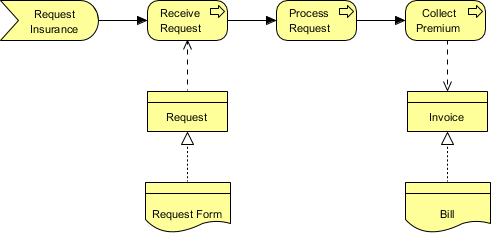
- The business object “Request for Insurance” is realized by a (physical) request form (representation).
- The “Invoice” business object is realized by a paper invoice (representation).
Meaning Notation
Meaning is defined as the knowledge or expertise present in a business object or its representation, associated with a given context. The name of a meaning should preferably be a noun or noun phrase.
Different users may perceive the information function of a business object or representation differently. For example, a “registration confirmation” for a customer may be a “customer change” for the CRM department (assuming it’s modeled as an external user). Moreover, various representations may have the same underlying meaning. For example, various documents (web documents, filled-out paper forms, “customer contact” reports from a call center) may have the same meaning.
Meaning Example
The following ArchiMate diagram shows:
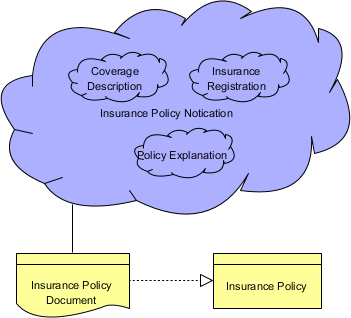
A policy document is a representation of an insurance policy, a business object.
The meaning associated with this document is Policy Notification, which includes:
- Policy explanation
- Insurance registration
- Underwriting details.
Representation vs. Meaning
A representation can realize one or more business objects. A meaning can be associated with a representation that carries this meaning.
Meaning vs. Value vs. Representation
- A meaning is the information-related counterpart to value.
- A meaning represents the intention behind a business object or a representation.
Value Notation
Value is defined as the relative value, utility, or importance of a business service or product. It has the following characteristics:
- Value can be associated with a product and indirectly with the business services it belongs to, as well as with the roles or participants using them.
- Value may apply to benefits gained by one party through selling or providing certain products or services.
Value Example
The following ArchiMate diagram shows:
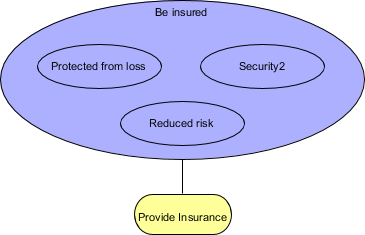
- The value of “Be Insured” is the highest-level expression of what the service “Provide Insurance” enables the customer to do.
- Three “sub-values” are distinguished, which are part of the insured amount.
Product Notation
A product is defined as a series of coherent services, accompanied by a set of contracts/protocols, delivered as a whole to (internal or external) customers. The product name is usually the name used in communication with customers or a more general noun (e.g., “Travel Insurance”).
Product Example
The following ArchiMate example shows:
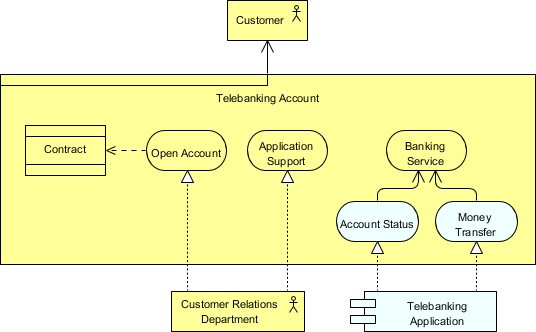
- The bank provides the product “Phone Banking Account” to its customers.
- Opening an account and application support (e.g., helpdesk, etc.) are modeled as business services implemented by the Customer Relations Department.
- As part of the product, customers can use bank services, which are implemented via the Telebanking application service, such as electronic transfers and requesting account status.
Product vs. Business Service vs. Contract vs. Value
- A product can aggregate business services or application services, as well as contracts.
- As noted above, value can be directly associated with a product but indirectly with business services, which are part of the roles or participants using them.
Contract Notation
A contract is defined as a formal or informal specification of an agreement that stipulates rights and obligations related to a product. A contract is a specialization of a business object.
- The contract concept can be used to model legally binding contracts, but can also model more informal agreements related to a product.
- It may also include a Service Level Agreement (SLA), describing agreements regarding functionality and quality of services delivered as part of the product.
Contract Example
The contract concept can be used to model legally binding contracts, but can also model more informal agreements related to a product. It may also include a Service Level Agreement (SLA), describing agreements regarding functionality and quality of services delivered as part of the product. A contract is a specialization of a business object.
The following ArchiMate diagram shows:
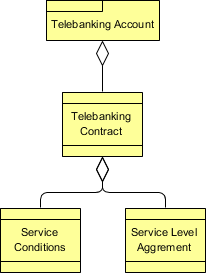
Diagram
- The Telebanking contract associated with the product Telebanking Account.
- The contract includes two parts (sub-contracts): Service Terms and Service Level Agreement (SLA).
Other ArchiMate Resources:
- Open Group Certified ArchiMate 3 Tools
- What is ArchiMate? How to Draw ArchiMate Diagrams?
- How to Draw ArchiMate 3.0.1 Diagrams?
- Learn ArchiMate Tutorials
- Physical View Guide
- What is ArchiMate?
- Full ArchiMate Viewpoints Guide
- ArchiMate 3 Update
- What’s New in ArchiMate 3?
- Using ArchiMate Tool with TOGAF ADM
- How to Use Value Stream in ArchiMate 3.1?
- What is New in ArchiMate 3.1

 English
 Arabic
 Chinese (Simplified)
 Dutch
Dutch French
 German
 Italian
 Japanese
 Korean
 Portuguese
 Russian
 Spanish