Introduction
Designing a scalable, maintainable application is a complex task. Developers and architects often spend countless hours drafting diagrams, refining structures, and ensuring that the application adheres to best practices. The Model-View-Controller (MVC) pattern has long been a gold standard for organizing code, but manually creating the necessary architectural diagrams—such as Class Diagrams and Sequence Diagrams—can be tedious and error-prone.
Enter AI-powered MVC System Architecture Generators. These tools leverage artificial intelligence to transform high-level application ideas into detailed architectural blueprints in seconds. By automating the creation of essential diagrams, they accelerate the development process, promote best practices, and provide a clear foundation for teams to build upon.
The Challenge of Designing Application Architecture
Why MVC Matters
The MVC (Model-View-Controller) pattern separates an application into three interconnected components:
- Model: Manages data, logic, and rules.
- View: Handles the user interface and presentation.
- Controller: Acts as an intermediary, processing user input and updating the Model and View accordingly.
This separation ensures scalability, maintainability, and reusability of code. However, designing and documenting an MVC architecture manually is time-consuming and prone to inconsistencies, especially as the application evolves.
The Pain Points
- Time-Consuming Documentation: Creating Class Diagrams (to show component structure) and Sequence Diagrams (to illustrate interactions) requires significant effort.
- Risk of Outdated Diagrams: As the application changes, diagrams may become obsolete if not updated regularly.
- Complexity for Beginners: Students and junior developers often struggle to visualize and implement MVC correctly.
Introducing the AI MVC System Architecture Generator
What Is It?
The AI MVC System Architecture Generator is a free tool that automates the creation of architectural diagrams. By simply describing your application, the AI generates:
- A Class Diagram: Visualizes the structure of Models, Views, and Controllers, including their relationships.
- A Sequence Diagram: Illustrates key interactions between components, showing how data flows through the system.
Key Features
- Dual Diagram Generation: Produces both Class and Sequence Diagrams from a single input.
- Adherence to Best Practices: Ensures proper and clean, organized code.
- Rapid Prototyping: Accelerates the initial design phase, saving time and reducing errors.
- Educational Value: Ideal for and developers prototyping new applications.
How It Works: Step-by-Step
Step 1: Describe Your Application
Provide a clear, concise description of your application. For example:
- “A simple e-commerce site for selling handmade crafts.”
- “A project management tool with tasks and users.”
Step 2: Generate the Architecture
Click the “Generate” button. The AI processes your input and identifies the necessary Models, Views, and Controllers.
Step 3: Review the Diagrams
The tool produces:
- Class Diagram: Shows the structure of your application, including classes, attributes, and relationships.
- Sequence Diagram: Illustrates how components interact, such as user actions triggering controller methods, which update the model and refresh the view.
Step 4: Refine and Develop
Use the generated diagrams as a blueprint for development. Teams can start coding with a shared understanding of the application’s structure and behavior.
Example: E-Commerce Application
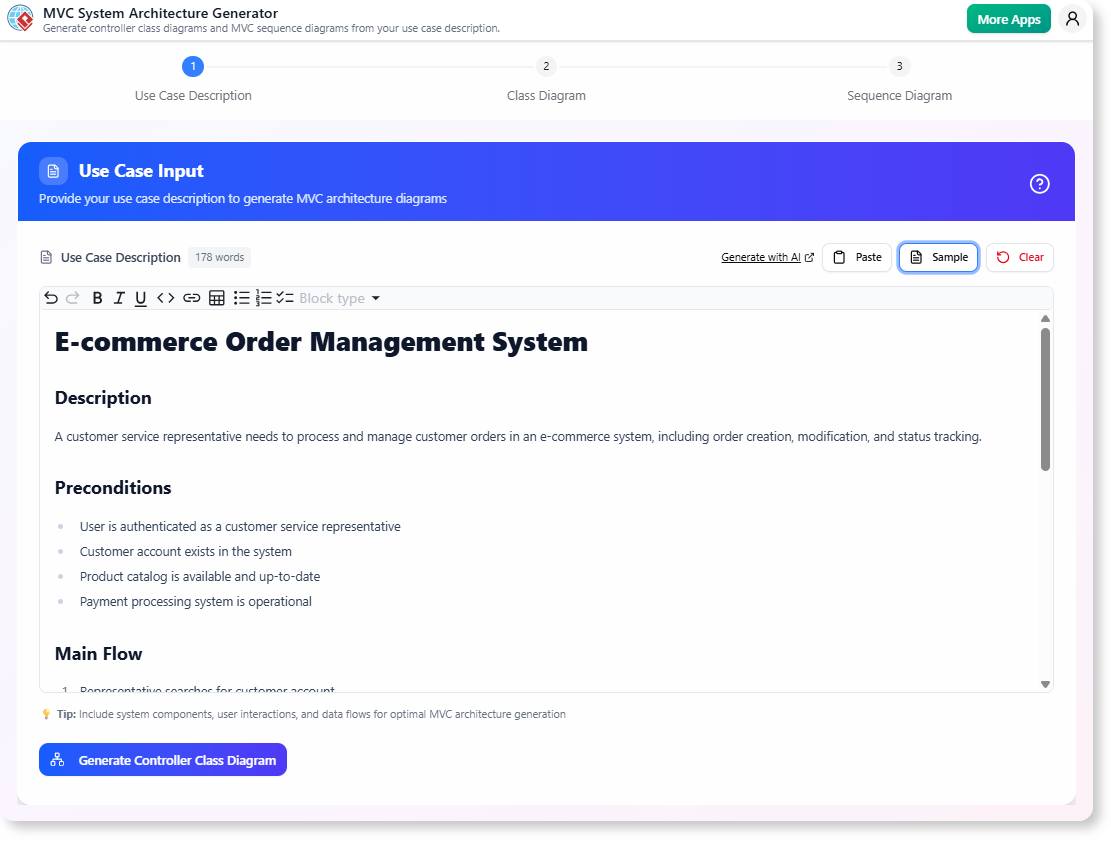
Input Description
“A simple e-commerce site for selling handmade crafts. . Admins can add or remove products.”
Generated Class Diagram
- Models:
Product,User,Cart,Order - Views:
ProductListView,CartView,CheckoutView,AdminDashboardView - Controllers:
ProductController,CartController,OrderController,AdminController
Generated Sequence Diagram
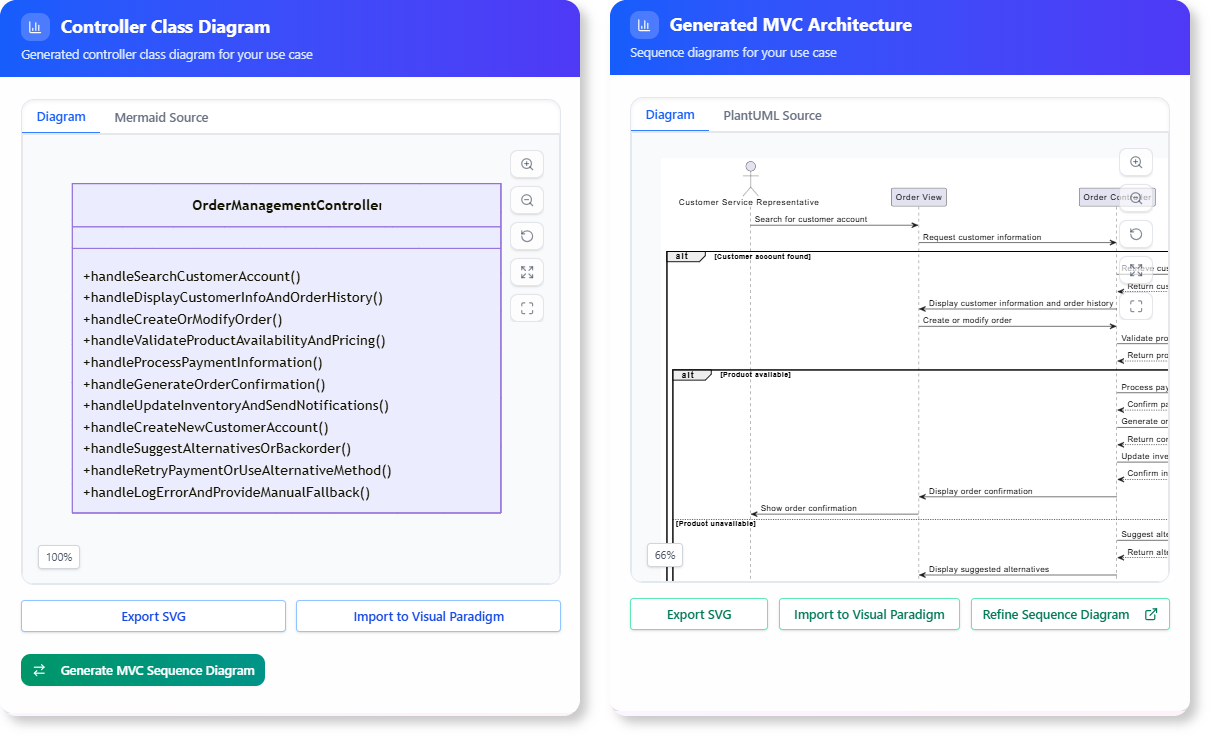
- User clicks “Add to Cart” on a product.
ProductControllerreceives the request and updates theCartmodel.CartViewrefreshes to display the updated cart.
Benefits of Using an AI MVC Generator
For Developers
- Faster Project Kickoff: Skip the blank slate and start with a well-structured foundation.
- Consistency: Diagrams are always up-to-date with the latest design.
- Collaboration: .
For Students
- Hands-On Learning: Visualize MVC concepts in action.
- Practice Without Overhead: Focus on understanding patterns rather than drawing diagrams.
For Businesses
- Cost-Effective: Reduce time spent on initial design and documentation.
- Scalability: Build applications that are easier to maintain and extend.
How to Access the Tool
For Visual Paradigm Online Users
- Navigate to: AI MVC System Architecture Generator
- Describe your application and generate the diagrams.
For Visual Paradigm Desktop Users
- Open the desktop application.
- Go to Tools > App and select the MVC System Architecture Generator.
Conclusion
The AI MVC System Architecture Generator is a game-changer for developers, students, and businesses alike. By automating the creation of Class and Sequence Diagrams, it eliminates the tedious aspects of architectural design, promotes best practices, and accelerates the development process.
Whether you’re a student learning MVC, a developer prototyping a new application, or a team looking to streamline your workflow, this tool provides a free, instant, and comprehensive solution to design scalable applications.
Ready to Build Better Applications, Faster?
Try the AI MVC System Architecture Generator today and in seconds.
🔗 Learn More: Visual Paradigm’s AI MVC Tool

 English
 Arabic
 Chinese (Simplified)
 Dutch
Dutch French
 German
 Italian
 Japanese
 Korean
 Portuguese
 Russian
 Spanish