In software development and system design, a class diagram is a crucial modeling tool used to illustrate classes within a system and their relationships. As part of the Unified Modeling Language (UML), class diagrams are widely used in object-oriented design and analysis. This article will provide a detailed explanation of class diagrams—covering their core concepts, applications, and importance in team collaboration—and recommend Visual Paradigm as the best tool for creating class diagrams.
Basic Concepts of Class Diagrams
Class diagrams are a type of static structure diagram in UML, used to describe the static structure of a system. They depict classes within a system, their attributes, methods, and relationships between classes. The main components of a class diagram include:
- Class (Class): The fundamental building block of a system, containing attributes and methods.
- Attributes (Attributes): Features or data members of a class.
- Methods (Methods): Behaviors or functions of a class.
- Relationships (Relationships): Connections between classes, such as association, aggregation, composition, generalization, and implementation.
Applications of Class Diagrams
Class diagrams are widely used across various stages of software development, including:
- Requirements Analysis: Helps analysts and developers understand system requirements, identifying key classes and their relationships.
- System Design: Used to design the static structure of a system, defining class attributes, methods, and inter-class relationships.
- Code Generation: Acts as a blueprint for code generation, allowing class diagrams to be directly converted into code skeletons, improving development efficiency.
- Documentation: Serves as part of system documentation, helping team members and stakeholders understand the system’s architecture.
Importance of Class Diagrams in Team Collaboration
In team environments, class diagrams serve as a visual tool that enhances understanding and communication of system design. Key benefits include:
- Improved Communication Efficiency: Visual representation helps team members quickly grasp the system’s structure.
- Consistent Design Standards: Ensures all team members share a uniform understanding of the system, minimizing miscommunication.
- Promotes Collaborative Development: Enables team members to jointly edit and update diagrams, supporting efficient collaboration.
This class diagram provides a comprehensive view of structure and relationships within a graphical application. It highlights how different classes interact, inherit, and depend on one another to form a cohesive system. Understanding these relationships is crucial for designing and maintaining application architecture.
Let’s break down the key concepts and components in the diagram:
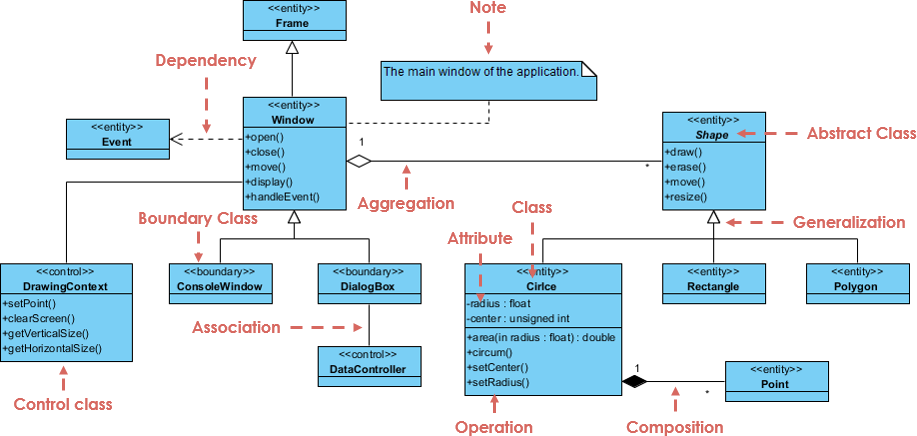
Key Concepts
- Classes and Objects
- Class: A blueprint for creating objects. It defines a data type by bundling data (attributes) and methods that operate on that data.
- Object: An instance of a class.
- Relationships
- Association: A general relationship between classes, which can be one-to-one, one-to-many, or many-to-many.
- Aggregation: A special form of association representing a “whole-part” relationship. The part can exist independently of the whole.
- Composition: A stronger form of aggregation where the part cannot exist independently of the whole.
- Dependency: A relationship where a change in one class may require changes in another.
- Generalization (Inheritance): A relationship where one class (subclass) inherits attributes and methods from another (superclass).
Components in the Diagram
- Classes
- Frame: Represents the main window of the application.
- Window: A boundary class with methods such as
open(),close(),move(),display(), andhandleEvent(). - Shape: An abstract class with methods like
draw(),erase(),move(), andresize(). - Circle, Rectangle, Polygon: Subclasses of
Shape, representing specific shapes. - Point: A class used within the composition of
Circle. - DrawingContext: A control class with methods like
setPoint(),clearScreen(),getVerticalSize(), andgetHorizontalSize(). - ConsoleWindow, DialogBox: Boundary classes for specific types of windows.
- DataController: A control class associated with
DialogBox. - Event: Represents an event in the system.
- Relationships
- Dependency:
Framedepends onEvent. - Aggregation:
WindowaggregatesDrawingContext. - Association:
DialogBoxis associated withDataController. - Composition:
Circleis composed ofPoint. - Generalization:
Circle,Rectangle, andPolygonare subclasses ofShape.
- Dependency:
Detailed Explanation
- Frame
- Represents the main window of the application.
- Includes a note explaining its role.
- Window
- A boundary class with methods to manage window state.
- Aggregates
DrawingContext, indicating a “whole-part” relationship whereDrawingContextcan exist independently.
- Shape
- An abstract class defining common methods for shapes.
- Subclasses like
Circle,Rectangle, andPolygoninherit fromShape.
- Circle
- A subclass of
Shapewith attributes likeradiusandcenter, and methods to manipulate them. - Composed of
Point, indicating a strong ownership relationship.
- A subclass of
- DrawingContext
- A control class with methods for managing drawing operations.
- Associated with
Window.
- ConsoleWindow and DialogBox
- Specific window types with their own methods and associations.
DialogBoxis associated withDataController, indicating a collaborative relationship.
- Event
- Represents events handled by the
Windowclass. Windowdepends onEvent, meaning changes inEventmay affectWindow.
- Represents events handled by the
Recommended Tool: Visual Paradigm
Visual Paradigm is a powerful modeling tool widely used in software development and system design. It offers comprehensive support for class diagrams, enabling teams to efficiently design and analyze systems. Key advantages include:
- Comprehensive Class Diagram Support: Offers a rich set of elements and relationship types to meet diverse system design needs.
- Intuitive User Interface: A user-friendly interface makes creating and editing class diagrams simple and intuitive.
- Real-Time Collaboration: Supports multi-user real-time collaboration, allowing team members to work on the same project simultaneously, boosting productivity.
- Strong Integration Capabilities: Integrates seamlessly with other tools and platforms, such as version control systems and project management tools, enhancing workflow efficiency.
- Abundant Resources and Support: Provides tutorials, examples, and an active community forum to help users get started quickly and solve problems effectively.
Conclusion
Class diagrams are an essential tool in software development and system design, enabling team members to understand and communicate system architecture effectively. Visual Paradigm, as a powerful modeling tool, offers full class diagram support, empowering teams to design and analyze systems efficiently. With its intuitive interface, real-time collaboration, and strong integration capabilities, it streamlines team collaboration and enhances productivity. Whether for requirements analysis, system design, or code generation, Visual Paradigm delivers professional-grade support, helping teams achieve efficient and effective modeling and design.

 English
 Arabic
 Chinese (Simplified)
 Dutch
Dutch French
 German
 Italian
 Japanese
 Korean
 Portuguese
 Russian
 Spanish