Visual Paradigm Online is a powerful online UML diagram tool that helps users easily create various UML diagrams. Whether you need to draw class diagrams, use case diagrams, sequence diagrams, or other UML diagrams, Visual Paradigm Online provides intuitive and user-friendly tools with powerful features to ensure the quality and completeness of your work.
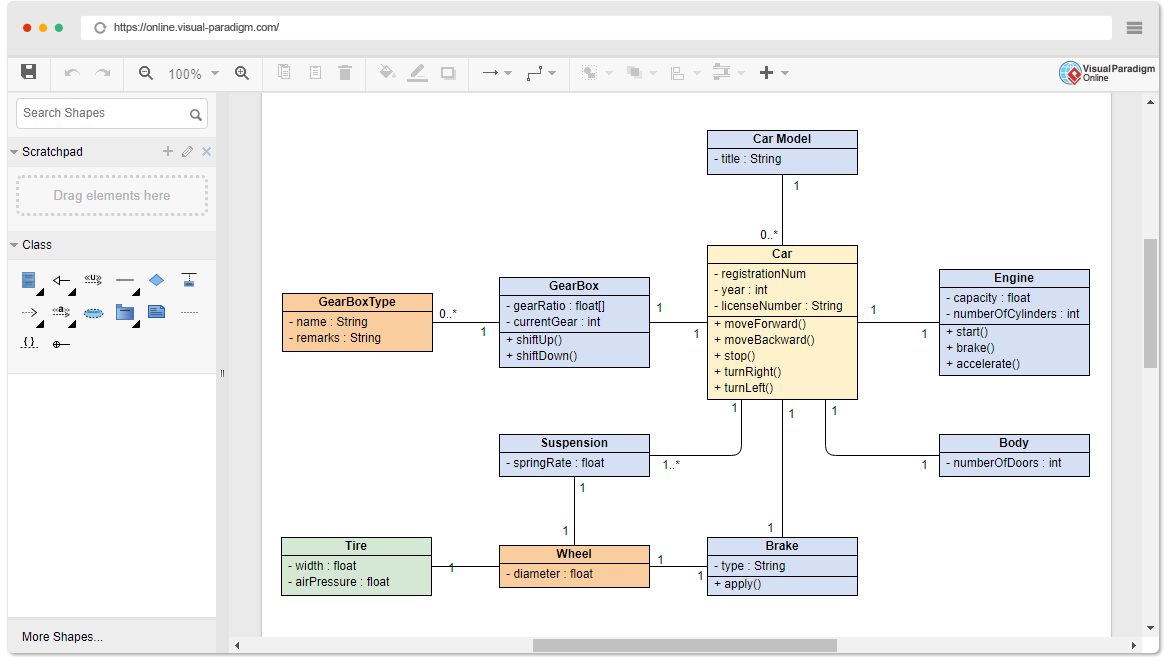
Supported UML Diagram Types
Visual Paradigm Online supports multiple UML diagram types, including:
- Class Diagram: such as a car class diagram
- Use Case Diagram: such as an ATM use case diagram
- Sequence Diagram: such as an MVC stereotypical sequence diagram
- Activity Diagram: such as an order processing activity diagram
- Deployment Diagram: such as a firewall and switch deployment diagram
- Component Diagram: such as an e-commerce component diagram
- State Machine Diagram: such as a phone state machine diagram
- Package Diagram: such as subsystem and package diagrams
Create UML Diagrams Quickly
Intuitive Online Tool
Visual Paradigm Online offers an intuitive online UML tool, enabling you to easily draw UML diagrams. We provide all the necessary features to help you complete your work quickly and efficiently, without compromising quality or completeness.
Inline Editing
- Edit shape names and members: such as use cases and attributes
- Quick shape creation: using the library
- Group and move shapes: align and distribute with one click
- Drag-and-drop sequence message creation: for fast sequence diagram creation
User-Friendly Sequence Diagram Editor
The sequence diagram editor uses specialized UML shapes instead of basic shapes like rectangles and arrows, ensuring your diagrams look professional and are easy to understand.
Reuse Shapes and Mix Markup
Reuse Shapes
Save frequently used shapes in the palette and reuse them across different diagrams. This not only saves time on repetitive tasks but also ensures consistency in design.
Mix Markup
Leverage the powerful capabilities of UML diagrams to convey accurate information. You can mix various markup types in any diagram, regardless of standard conventions. For example, you can place UML operations next to use cases, or place an ArchiMate work package next to a UML node, among others.
Customize Shape Design
Visual Paradigm Online supports hundreds of standard shape types and allows you to add more via import. You can create a palette of templates using image formats (such as SVG, JPG, PNG, etc.) and use them in your designs.
Additional Features
Beyond UML diagramming tools, Visual Paradigm offers a range of powerful diagramming and design tools:
- Flowchart Maker Tool
- System Design Tools: such as UML
- Cloud Architecture Design Tools: such as AWS
- Technical Diagrams: UML, ERD, DFD, PERT, network diagrams, wiring diagrams, PFD, P&ID, etc.
- Business Diagrams: ArchiMate, BPMN, SWOT, Value Chain, Value Stream Mapping, Organization Chart, etc.
- Cloud Architecture Design Tools: AWS, Azure, Google Cloud, IBM, Oracle, Alibaba, Tencent
- Potent Flowchart, Floor Plan Designer, Mind Mapping, and Venn Diagram Tool
- Flowchart Design Tools: Customer Journey Mapping, Competitor Analysis, Root Cause Analysis, and more templates
Get Started with Visual Paradigm Online
Start using Visual Paradigm Online today to easily create a wide range of diagrams. Whether you’re drawing UML diagrams, flowcharts, or other technical and business diagrams, Visual Paradigm offers a simple and flexible solution.

Visual Paradigm Online is not just a UML tool—it also offers rich diagramming and design features to help you efficiently complete various design tasks. Start using it today and boost your productivity and design quality.

 English
 Arabic
 Chinese (Simplified)
 Dutch
Dutch French
 German
 Italian
 Japanese
 Korean
 Portuguese
 Russian
 Spanish