🌟 Introduction
Chapter 4 of the ArchiMate 3.2 Specification, titled Generic Metamodel, lays the conceptual groundwork for the entire ArchiMate language. It defines what can be modeled—not specific layers (Business, Application, Technology), but the generic abstractions from which all layer-specific elements are derived.
Think of Chapter 4 as the “DNA blueprint” of ArchiMate:
- All business actors, application components, and devices → inherit from Internal Active Structure
- All processes, functions, and services → descend from Behavior elements
- All data objects, physical assets, and artifacts → specialize Passive Structure
This tutorial unpacks these ideas with clear definitions, real-world analogies, concrete modeling examples, visual notation references, and a summary table—helping architects and product leaders (like yourself, Alex 👋) apply ArchiMate rigorously and intuitively in strategic roadmaps, cross-layer dependency mapping, and stakeholder-aligned architecture documentation.
Let’s begin.
🧱 1. Core Taxonomy: Behavior vs. Structure
At the highest level, ArchiMate distinguishes two categories:
Category
Role
Everyday Analogy
ArchiMate “Part of Speech”
Structure Elements
Who/What performs or is acted upon
Nouns — e.g., Employee, Server, Database
🧱 Nouns
Behavior Elements
What happens, how, and when
Verbs — e.g., Approve, Process, Notify
🎯 Verbs
But ArchiMate goes deeper: both categories subdivide based on visibility and capability.
1.1 Structure Elements: Active vs. Passive
Subtype
Definition
Key Idea
Notation
Internal Active Structure
Entities that perform behavior (e.g., humans, systems, devices)
The “doers” inside the system
□ with square corners + icon
External Active Structure (Interface)
Points of access exposing behavior externally — hides internals
Like an API endpoint or customer service desk
▢ with “port” icon (circle with half-ring)
Passive Structure
Entities acted upon — no agency (e.g., data, documents, equipment)
The “patients” of behavior
□ with square corners + document icon
🔍 Key Insight:
- Interfaces are not physical—they are logical contracts for interaction.
- Passive elements can be digital (e.g.,
Customer Record) or physical (e.g.,MRI Machine).
✅ Example (Healthcare System):
plaintext
1
2
3
4
5
6
7
Here:
Doctor= Internal Active StructureEMR Interface= External Active Structure (e.g., HL7 API)Electronic Medical Record= Passive StructureDiagnose Patient= Internal BehaviorPatient Portal Service= External Behavior (Service)
1.2 Behavior Elements: Internal, External, and Events
Subtype
Definition
Key Idea
Notation
Internal Behavior
Activity inside the system (not directly exposed)
Hidden implementation
◓ with round corners + icon
Service (External Behavior)
Explicitly exposed behavior — defined by value, SLA, contract
“What we offer” to consumers
◓ with “globe” or “service” icon
Event
A state change that triggers or results from behavior
“Something happened” (e.g., OrderPlaced, PaymentFailed)
⚡ lightning bolt
💡 Service ≠ Interface:
- A Service is what is offered (
Process Refund).- An Interface is how it’s accessed (
Refund API,Call Center).
A single service can be served by multiple interfaces.
✅ Example (E-commerce):
plaintext
1
2
3
4
5
6
7
8
9
Order Fulfillment Service: external promise to customerWeb Interface: how customer accesses itPack & Ship Process: internal workflowShipping Label Template: passive artifact
✅ Event Example:
plaintext
1
2
Events enable modeling reaction chains—critical for event-driven architectures.
🔄 2. Key Relationships (Metamodel View)
⚠️ Reminder: These are metamodel relationships (defining language structure), not modeling relationships like realizes or triggers.
From Figure 5 (Behavior & Structure Metamodel), the core links are:
Relationship
Direction
Meaning
Real-World Analogy
Realizes
Internal Active → Internal Behavior
“Doer performs deed”
Developer → writes code
Serves
Service → Internal Behavior
“Service is backed by internal work”
“Fast Checkout” service ← realized by → “Optimized DB Query + Async Auth”
Used By
Internal Behavior → Passive Structure
“Activity acts on data/object”
ValidateUser → reads → User Profile
Assigned To
Internal Behavior → Internal Active
“Task assigned to actor/system”
Approve Loan → assigned to → Loan Officer
Triggers
Event → Behavior
Event starts behavior
NewSignup → triggers → SendWelcomeEmail
📌 Important:
- Composition & aggregation are always allowed between same-type elements (e.g., Process → composes → Sub-Process).
- Specialization (inheritance) is used only in the metamodel, not in concrete models.
🧬 3. Specialized Behavior: Process, Function, Interaction, Collaboration
While Internal Behavior is abstract, ArchiMate provides concrete specializations:
Element
Definition
Best Used For
Notation
Process
Sequential, goal-oriented flow (start → steps → outcome)
Cross-functional workflows (e.g., Onboard Customer)
◓ with gear icon + arrow swirl
Function
Grouped behavior by capability, skill, or ownership (often long-lived)
Organizational capabilities (e.g., Risk Assessment)
◓ with stacked blocks icon
Interaction
Collective behavior requiring ≥2 actors/systems
Peer-to-peer collaboration (e.g., Negotiate Contract)
◓ with two arrows converging
Collaboration
Group of active elements working together
Teams, clusters, microservice ensembles
□ with handshake icon
🔁 Key Insight: Processes can contain Functions (and vice versa!)
- A
Billing Processmay compose:Validate Invoice(Function)Apply Discounts(Function)Escalate Dispute→ Interaction betweenBilling Agent&Customer Support
✅ Real-World Example: SaaS Trial Conversion
plaintext
1
2
3
4
5
6
🎯 4. Motivation Elements: The “Why”
Chapter 4 introduces the generic Motivation Element—the root of why the architecture exists.
Element
Layer
Example
Role
Stakeholder
Who cares?
CIO, Customer, Regulator
Source of goals
Goal
What do we want?
“Improve NPS by 20%”
High-level objective
Driver
Why now?
“Competitor launched AI feature”
External catalyst
Principle
How do we decide?
“API-first design”
Guiding rule
Requirement
What must be true?
“99.95% uptime”
Measurable constraint
✨ Strategic Tip for PMs: Use Motivation elements to bridge product strategy ↔ technical architecture.
E.g.,Goal: Reduce onboarding time→ drivesRequirement: <2 min sign-up→ realized byService: InstantIdentityVerification.
📦 5. Composite Elements: Grouping & Location
5.1 Grouping
- Purpose: Logically bundle heterogeneous elements (e.g., processes + data + services).
- Use Cases:
- Architecture Building Blocks (ABBs) — e.g.,
"Customer 360 ABB"={ProfileService, DataSync, UI Widget} - Domains — e.g.,
"Security Domain"={AuthZ Policy, IAM Service, Audit Log} - Epics or Product Capabilities (great for roadmap alignment!)
- Architecture Building Blocks (ABBs) — e.g.,
✅ Grouping Example:
plaintext
1
2
3
4
5
⚠️ Caution: Don’t confuse Grouping with Views. Grouping is part of the model; Views are filtered presentations of it.
5.2 Location
- Represents Where things happen—physical (DC, office) or conceptual (cloud region, jurisdiction).
- Use aggregation from Location → Structure/Behavior.
✅ Example:
plaintext
1
2
3
4
🌐 Cloud Relevance: Model multi-region deployments:
[AWS us-west-2] → aggregates → [Auth Service] + [User DB Replica]
📊 Summary Table: Core Generic Elements (Chapter 4)
Category
Element
Abstract?
Key Question
Notation Sketch
Structure
Internal Active
✅
Who performs?
□ + actor/icon
Collaboration
❌
Who works together?
□ + handshake
Interface (External Active)
❌
How is it accessed?
▢ + port
Passive Structure
✅
What is acted upon?
□ + doc
Behavior
Internal Behavior
✅
What happens inside?
◓ + action
Process
❌
What sequence achieves a goal?
◓ + gear+arrow
Function
❌
What capability is grouped?
◓ + stack
Interaction
❌
What requires collaboration?
◓ + ↔ arrows
Service (External)
❌
What is offered to users?
◓ + globe
Event
❌
What changed?
⚡
Motivation
Motivation Element
✅
Why does this exist?
◊ (diagonal corners)
Composite
Grouping
❌
What belongs together?
▢ with dotted border + “G”
Location
❌
Where does it occur?
▢ with map pin
📝 Note: “Abstract?” = Not used directly in models—only layer-specific descendants (e.g.,
Business Actor,Application Component) are instantiated.
🧩 Putting It All Together: Mini-Case (Cloud Migration)
Scenario: Migrate legacy billing system to cloud.
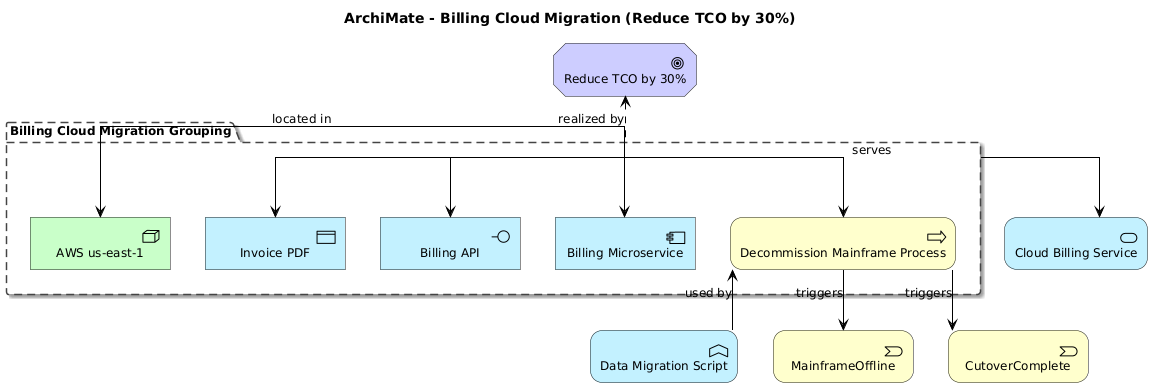
[Goal: Reduce TCO by 30%]
↑ realized by
[Billing Cloud Migration Grouping]
├─ contains → [Decommission Mainframe Process]
├─ contains → [Billing Microservice] (internal active)
├─ contains → [Billing API] (interface)
├─ contains → [Invoice PDF] (passive)
├─ serves → [Cloud Billing Service]
└─ located in → [AWS us-east-1]
[Decommission Mainframe]
triggers → [MainframeOffline] (event)
triggers → [CutoverComplete] (event)
used by → [Data Migration Script] (function)
This shows how motivation (Goal), composite (Grouping, Location), structure, and behavior interlock.
🏁 Conclusion
Chapter 4’s Generic Metamodel is the Rosetta Stone of ArchiMate. By mastering these abstractions—especially the Active/Passive, Internal/External, and Behavior/Structure distinctions—you gain:
✅ Precision: Avoid modeling anti-patterns (e.g., assigning behavior to passive elements).
✅ Consistency: Apply same mental model across Business/Application/Technology layers.
✅ Strategic Depth: Link product goals (motivation) to technical enablers (structure/behavior).
✅ Scalability: Use Grouping & Location to manage complexity in large enterprises.
For product leaders like you (with HCI + CS + PM depth, Alex 😊), this is gold:
- Use Services to define product APIs and SLAs.
- Use Groupings to model product capabilities or epics.
- Use Motivation to trace features back to business outcomes.
📚 Next Steps:
- Practice layering: Map generic elements to Business Layer (Ch. 8), Application (Ch. 9), Technology (Ch. 10).
- Explore relationships in Chapter 5—especially derivation rules (Sec. 5.7).
- Try modeling a product capability using only Chapter 4 concepts first—then specialize.
Happy modeling! 🏗️
Let me know if you’d like a companion tutorial on Relationships (Chapter 5) or a Product Manager’s ArchiMate Playbook.
—
Prepared with care for Alex Johnson, Senior PM @ Acme Cloud — SF Bay Area ☕📸🏃♂️

 English
 Arabic
 Chinese (Simplified)
 Dutch
Dutch French
 German
 Italian
 Japanese
 Korean
 Portuguese
 Russian
 Spanish