Understanding the Foundations of Enterprise Architecture Modeling
🌟 Introduction
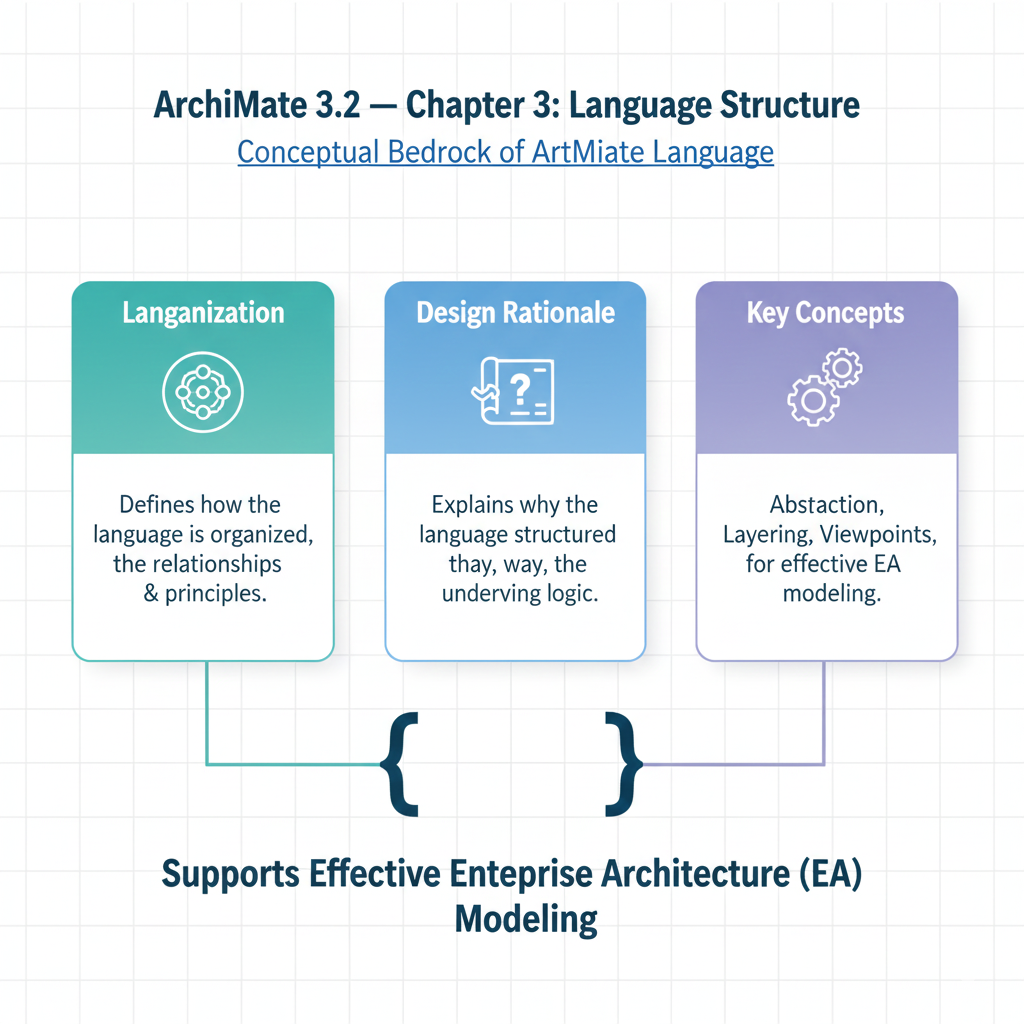
Welcome to this comprehensive tutorial on Chapter 3: Language Structure of the ArchiMate® 3.2 Specification. This chapter is the conceptual bedrock of the entire ArchiMate language — it doesn’t list specific modeling elements yet (those come in later chapters), but instead defines how the language is organized, why it’s designed the way it is, and how abstraction, layering, and viewpoints work together to support effective enterprise architecture (EA) modeling.
Understanding Chapter 3 is essential for any architect, modeler, or stakeholder aiming to:
- Create consistent, reusable EA models
- Navigate the “big picture” before diving into element details
- Apply ArchiMate beyond syntax — into strategy, alignment, and communication
This tutorial walks you through the core ideas of Chapter 3 with clear explanations, real-world examples, visual metaphors, and a summary table for quick reference.
Let’s begin.
🔑 Key Concepts
1. Language Design Philosophy: “Small, but Sufficient”
“The ArchiMate language has been limited to the concepts that suffice for modeling the proverbial 80% of practical cases.”
- ArchiMate avoids feature bloat: it’s intentionally minimalist, focusing on concepts that cover most EA use cases.
- Contrast with UML or SysML, which try to model everything — ArchiMate prioritizes clarity, learnability, and stakeholder alignment.
- Think of it as the “Swiss Army knife” — not the full toolbox.
📌 Tip: When modeling, always ask: “Is this concept needed for architecture-level understanding, or is it design/implementation detail?” If the latter — consider leaving it out.
2. Top-Level Structure: Concepts = Elements + Relationships
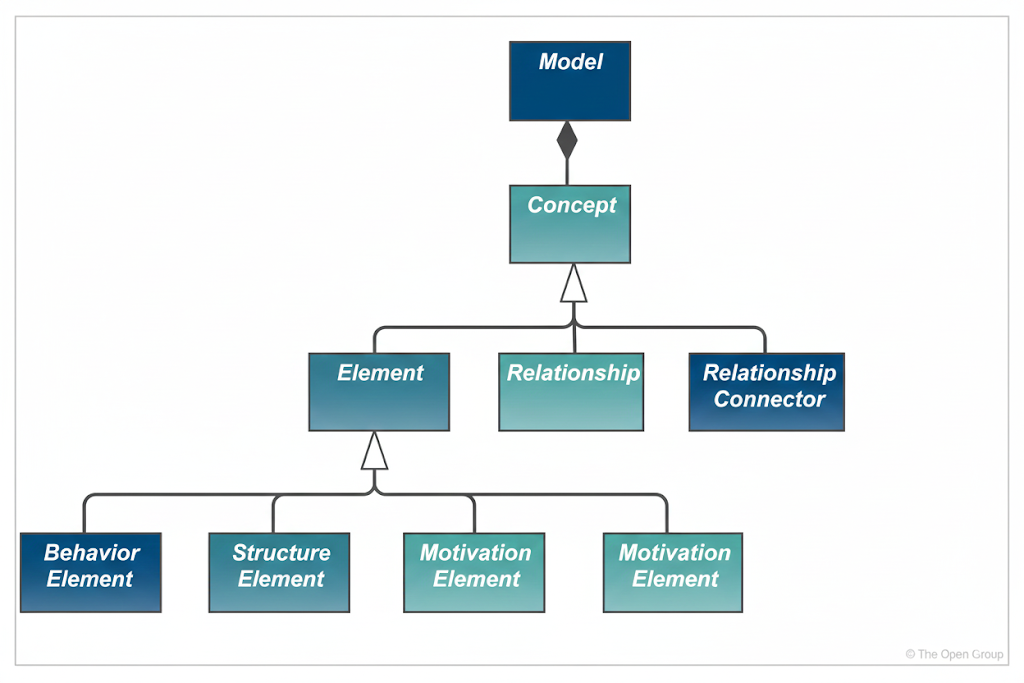
- Model = collection of concepts
- Concepts are either:
- Elements (things: what)
- Relationships (connections: how things relate)
- Concepts are either:
And Elements fall into four abstract categories (never used directly in diagrams):
| Abstract Category | Purpose | Example Instantiations |
|---|---|---|
| Structure | The “nouns” — who/what performs or is acted upon | Business actor, Application component, Node |
| Behavior | The “verbs” — what is done | Business process, Application function, Service |
| Motivation | The “why” — drivers, goals, rationale | Goal, Principle, Stakeholder |
| Composite | Cross-cutting concepts (e.g., grouping) | Grouping, Location, Plateau |
🔍 Important: These abstract concepts are not drawable in models — they’re like superclasses in OOP. You use their concrete specializations (e.g., Application Component, not just “Structure Element”).
3. The Three Layers: Business → Application → Technology
ArchiMate models the enterprise in three core layers, each with increasing technical specificity:
| Layer | Focus | Key Questions | Example |
|---|---|---|---|
| Business | Value creation & delivery | What services do we offer customers? Who delivers them, and how? | Customer onboarding process, Sales department, “Open Account” service |
| Application | Software that supports the business | What applications enable business capabilities? What services do they expose? | CRM system, “Customer Data API”, “Validate KYC” function |
| Technology | IT infrastructure & hardware | What servers, networks, and devices run the apps? | Cloud VM, Load balancer, Database server |
🔁 Cross-Layer Relationships:
- Serving: Higher-layer elements are served by lower-layer services
(e.g., “Sales Process” ←[serves]– “CRM Service”) - Realization: Lower-layer elements realize higher-layer ones
(e.g., “CRM Application Component” ←[realizes]– “CRM Service”)
✅ Realization chain example (top-down):
Business Service “Process Loan Application”
← realized by ← Application Service “Underwriting Decisioning”
← realized by ← Application Component “RiskEngineApp”
← realized by ← Artifact “risk-engine-v2.1.jar” on a Node “AppServer-Prod”
4. The Core Framework: 3 Layers × 3 Aspects = 9 Cells
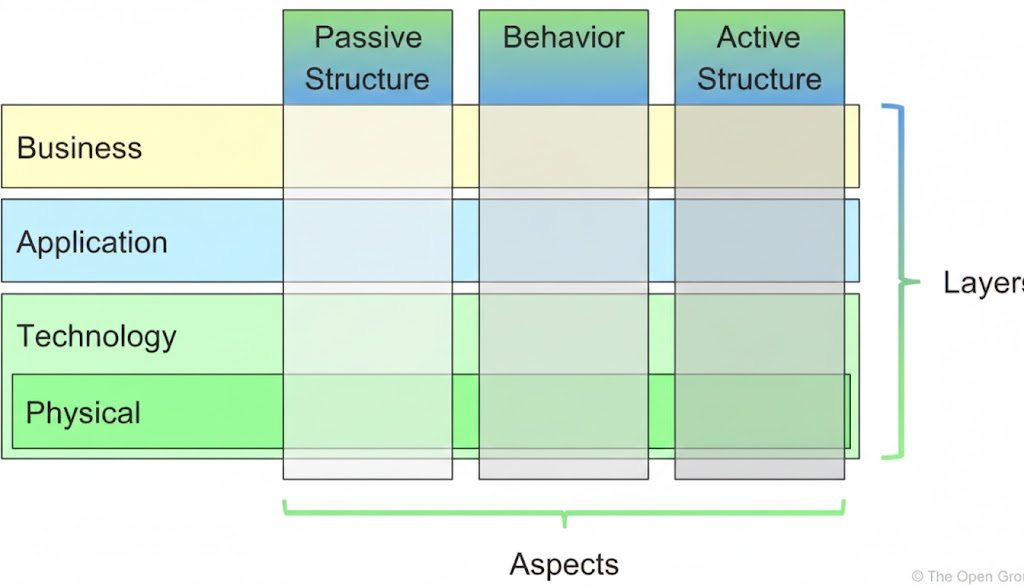
Think of this as the “periodic table” of ArchiMate — it organizes all core elements.
| Aspect | Purpose | Business Layer | Application Layer | Technology Layer |
|---|---|---|---|---|
| Active Structure | Who/What performs behavior (Subjects, “actors”) |
Business actor, Role, Collaboration | Application component, Collaboration, Interface | Node, Device, System Software |
| Behavior | What is performed (Verbs, actions) |
Business process, Function, Service, Event | Application process, Function, Service, Event | Technology process, Function, Service, Event |
| Passive Structure | What is acted upon (Objects, data) |
Business object (e.g., Customer) | Data object (e.g., CustomerRecord) | Artifact (e.g., database file, config) |
🧠 Memory Aid: Subject–Verb–Object (like natural language):
- The Sales Rep (Active) submits (Behavior) the Order Form (Passive).
💡 Composite Elements (e.g., Business Role) span aspects — a role is both structure (a position) and behavior (assigned processes).
5. Full Framework: Extending the Core
The ArchiMate Full Framework adds:
| Extension | Location | Purpose | Examples |
|---|---|---|---|
| Strategy Layer | Above Business | Long-term direction & choices | Capability, Resource, Course of Action |
| Physical Layer | Within Technology | Tangible, real-world assets | Facility, Equipment, Material, Distribution Network |
| Motivation Aspect | Across all layers | “Why” we do things | Stakeholder, Driver, Goal, Principle, Requirement |
| Implementation & Migration Layer | Overlay | Transition & change | Work Package, Deliverable, Plateau, Gap |
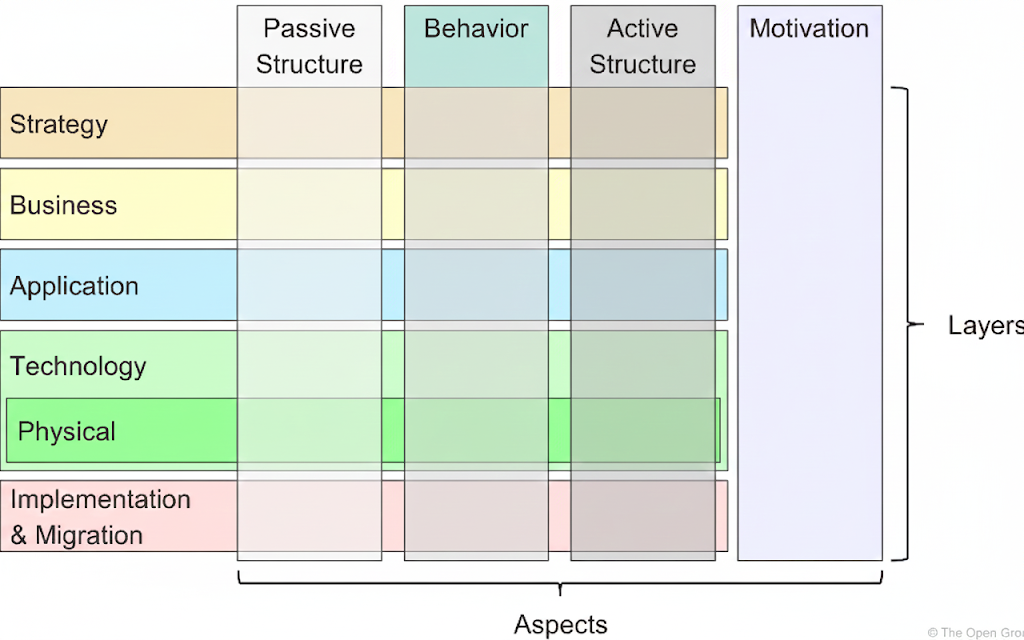
📝 Note: These extensions do not break the core — they integrate seamlessly via relationships (e.g., Goal ←[influences]– Business Process).
6. Abstraction: Managing Complexity
ArchiMate supports three powerful abstraction mechanisms:
| Type | Description | Example |
|---|---|---|
| Black-box vs White-box | Hide or expose internals | A “Payment Gateway” box may hide microservices inside |
| Behavior vs Structure | Separate what from who | Model “Fraud Detection” behavior first, then assign to “FraudService” app |
| Conceptual → Logical → Physical | Increasing concreteness | Conceptual: Customer (Business Object) Logical: CustomerRecord (Data Object) Physical: customers_v3.parquet (Artifact)← connected by realization relationships |
✅ Realization is key:
- It allows traceability across abstraction levels.
- Supports architecture evolution: “We’ll realize this new data object using the existing PostgreSQL table for now, but plan a NoSQL migration.”
🚫 ArchiMate does not model instances (e.g., “Customer #12345”) — only types (e.g., “Customer”).
7. Notation & Visualization: Flexible but Standardized
Unlike UML or BPMN (single notation), ArchiMate separates:
- Metamodel (what exists)
- Viewpoints (how to show it for a stakeholder)
But it provides a standard notation for consistency:
| Visual Cue | Meaning |
|---|---|
| 🟦 Blue background | Application Layer |
| 🟨 Yellow background | Business Layer |
| 🟩 Green background | Technology Layer |
| 🔲 Square corners | Structure elements |
| 🔴 Rounded corners | Behavior elements |
| ⬜ Diagonal corners | Motivation elements |
| 🏷️ Top-left letter (B, A, T, M, etc.) | Layer/Aspect tag for clarity |
| 📦 Box with icon (top-right) | Standard element symbol (e.g., gear for function, folder for artifact) |
🎨 Colors have no formal semantics — use them as visual aids.
📌 Nesting (e.g., putting a process inside a component) = shorthand for assignment or composition relationships.
🧪 Examples in Practice
Example 1: Cross-Layer Service Chain
A bank’s “Apply for Mortgage” service is offered to customers.
[Business] Customer (Actor)
     │
     ▼ serves
[Business] "Apply for Mortgage" (Business Service)
     │
     ▼ realizes
[Application] "MortgageApp" (Application Component)
     │
     ├── provides → "Submit Application" (Application Service)
     └── accesses → "MortgageApplication" (Data Object)
           │
           ▼ realizes
     [Business] "Mortgage Application" (Business Object)

[Technology] "AppServer-Prod" (Node)
     │
     ▼ hosts
[Technology] "mortgage-app.war" (Artifact)
     │
     ▼ realizes
[Application] "MortgageApp"
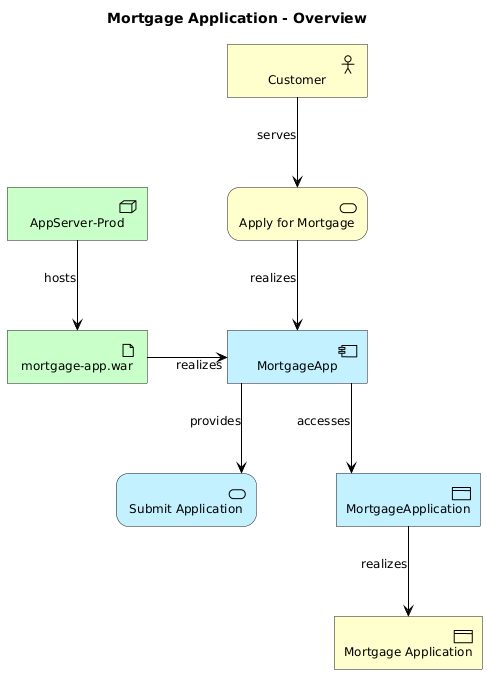
💡 Shows serving (vertical value flow) and realization (implementation traceability).
Example 2: Abstraction Levels for Data
| Level | Element | ArchiMate Type | Notes |
|---|---|---|---|
| Conceptual | Customer | Business Object | What the business cares about |
| Logical | CustomerRecord | Data Object | Structured for apps: ID, name, DOB, riskScore |
| Physical | customers_postgres_table |
Artifact | PostgreSQL table with columns, indexes, partitions |
Relationships:
CustomerRecord—[realizes]→Customercustomers_postgres_table—[realizes]→CustomerRecord
Example 3: Motivation Driving Design
[Driver] "Regulatory Compliance (GDPR)"
     │
     ▼ influences
[Goal] "Ensure data privacy"
     │
     ▼ realizes
[Principle] "Minimize data retention"
     │
     ▼ constrains
[Requirement] "Personal data must be deleted after 90 days"
     │
     ▼ assigned to
[Application Process] "Data Purge Job"
     │
     ▼ assigned to
[Application Component] "DataGovernanceService"
Shows how Motivation Aspect guides technical implementation.
📊 Summary Table: ArchiMate Language Structure at a Glance
| Concept | Description | Key Elements | Relationships | Visual Cues |
|---|---|---|---|---|
| Top-Level Hierarchy | Model = Elements + Relationships Elements = Structure / Behavior / Motivation / Composite |
Abstract (not used directly) | Composition, Aggregation, Specialization | White boxes, italic labels |
| Three Layers | Business / Application / Technology | See framework table below | Serving, Realization | Yellow / Blue / Green |
| Core Framework (9 Cells) | 3 Aspects × 3 Layers |
|
Assignment (Structure→Behavior), Access (Behavior→Passive) | Square / Round / Diagonal corners |
| Full Framework | Adds Strategy, Physical, Motivation, I&M | Capability, Facility, Goal, Plateau | Influence, Aggregation, Realization | Optional “M”/“S”/“P”/“I” tags |
| Abstraction | Conceptual → Logical → Physical Black-box/White-box Behavior/Structure separation |
Business Object → Data Object → Artifact | Realization, Assignment | Nesting for composition |
| Notation | Standard icons + colors + shapes | Icon in top-right corner | Nesting = shorthand for relationships | B/A/T/M labels, color coding |
Here are the official Visual Paradigm ArchiMate tool recommendations with real, up-to-date URLs:
1. Visual Paradigm Online (Free Online ArchiMate Tool)
- URL: https://online.visual-paradigm.com/diagrams/features/archimate-tool/
- Features: Free online ArchiMate diagram tool supporting ArchiMate 3 notation and syntax. Offers examples, templates, and collaborative features for enterprise architecture modeling.
2. Visual Paradigm Enterprise Edition (Certified ArchiMate 3.1 Tool)
- URL: https://www.visual-paradigm.com/features/archimate-tools/
- Features: Certified by The Open Group, supports all ArchiMate 3.1 vocabulary, notation, and semantics. Includes advanced modeling, collaboration, and AI-powered diagram generation.
3. AI ArchiMate Generator & Viewpoints
- URL: https://updates.visual-paradigm.com/releases/ai-archimate-viewpoints-generator/
- Features: AI-powered generation of ArchiMate diagrams and viewpoints, accelerating EA modeling and stakeholder communication.
4. ArchiMate Viewpoints Guide & Examples
- URL: https://www.visual-paradigm.com/guide/archimate/full-archimate-viewpoints-guide/
- Features: Comprehensive guide to all 23 official ArchiMate viewpoints with examples, drawn using Visual Paradigm’s certified tool.
Note: Visual Paradigm is widely used by Fortune 500 companies, startups, and government entities for enterprise architecture and digital transformation. The tool is certified by The Open Group and supports both ArchiMate 2.1 and 3.1 standards.
🎯 Conclusion
Chapter 3 of the ArchiMate 3.2 Specification is not about what to model — it’s about how to think about enterprise architecture.
By mastering:
- The layered structure (Business → Application → Technology),
- The aspect-based framework (Active/Behavior/Passive),
- The abstraction mechanisms (realization, black-boxing), and
- The flexible-yet-standardized notation,
…you gain the mental scaffolding to build coherent, scalable, and stakeholder-relevant EA models — whether you’re documenting current-state systems, designing target architectures, or planning digital transformation.
🚀 Pro Tip: Start every modeling effort by asking:
“Which layer(s) and aspect(s) are most relevant to my stakeholder’s concerns?”
Then use the ArchiMate framework to guide your element selection.
With this foundation, you’re now ready to dive into Chapter 4 (Generic Metamodel) and beyond — where the actual modeling elements (like Business Process, Application Component, Node, etc.) are defined in detail.
Happy modeling! 🏗️📊

 English
 Arabic
 Chinese (Simplified)
 Dutch
Dutch French
 German
 Italian
 Japanese
 Korean
 Portuguese
 Russian
 Spanish