


Transforming natural language requirements into professional UML class diagrams using systematic textual analysis — a structured, educational, and practical approach for beginners.
✅ Why Use Textual Analysis for Class Diagrams?
Textual analysis is a foundational technique in object-oriented analysis and design (OOAD). It bridges the gap between informal problem descriptions (user stories, requirements, or system specifications) and formal UML class diagrams.
For beginners, this method provides a clear, repeatable process to extract the core structure of a system without guesswork.
🎯 Key Benefits of Textual Analysis
| Benefit | Explanation |
|---|---|
| Structured Starting Point | No blank page anxiety — classes emerge directly from the text. |
| Improved Completeness | Captures domain entities that might be missed during brainstorming. |
| Higher Accuracy | Reduces invention of irrelevant classes or omission of key concepts. |
| Teaches Core UML Concepts | Nouns → Classes, Verbs → Operations, Prepositions → Relationships. |
| Enhances Communication | Visual diagrams help stakeholders, developers, and team members align. |
| Accelerates Modeling | Manual analysis builds understanding; automation speeds up iteration. |
| Supports Iterative Refinement | Encourages review, validation, and continuous improvement. |
This approach is rooted in classic OOAD principles from seminal works like Applying UML and Patterns by Craig Larman.
🔑 Key Concepts in Textual Analysis
Before diving into the process, understand these core UML modeling elements:
1. Candidate Classes
-
Nouns or noun phrases representing persistent, meaningful entities in the domain.
-
Focus on domain objects, not implementation details.
-
Examples:
Member,Book,Loan,Order,Account.
❌ Exclude: Transient items (e.g., “borrowing session”), synonyms (e.g., “user” vs “member”), or technical artifacts (e.g., “database”).
2. Attributes
-
Characteristics or properties of a class.
-
Often derived from nouns linked to a class.
-
Example:
Bookhas attributes:title,author,ISBN,status.
3. Operations (Methods)
-
Actions that a class can perform or that are performed on it.
-
Derived from verbs or verb phrases in the text.
-
Example:
Member.borrowBook(),Librarian.addBook().
4. Relationships
How classes interact. Use UML’s standard relationship types:
| Relationship | Meaning | Example |
|---|---|---|
| Association | General connection between classes | Member associates with Loan |
| Aggregation | “Has-a” (part-whole, weak ownership) | Library aggregates Book |
| Composition | Strong “has-a” (whole owns parts) | Order composes OrderItem |
| Inheritance (Generalization) | “Is-a” relationship | SavingsAccount is-a Account |
⚠️ Multiplicity (e.g.,
1,0..1,1..*,0..*) specifies how many instances are involved.
5. Other UML Elements
-
Visibility:
+(public),-(private),#(protected) -
Data types:
String,Integer,Date,Boolean -
Constraints:
{ordered},{unique}, etc.
🛠 Step-by-Step Manual Process with Example
Let’s walk through a real-world example using a Library Management System.
📝 Problem Statement
“A library management system allows members to borrow and return books. Each member has a unique ID and name. Books have titles, authors, ISBN, and status (available or borrowed). Librarians can add new books, search for books, and manage loans. When a member borrows a book, the system records the borrow date and due date. If overdue, fines are calculated.”
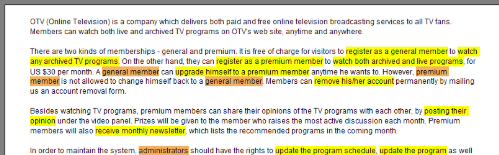
Step 1: Read and Highlight the Text
Underline nouns/noun phrases and circle verbs/actions.
“A library management system allows members to borrow and return books. Each member has a unique ID and name. Books have titles, authors, ISBN, and status (available or borrowed). Librarians can add new books, search for books, and manage loans. When a member borrows a book, the system records the borrow date and due date. If overdue, fines are calculated.”
Step 2: Identify Candidate Classes
| Noun/Phrase | Reason | Class? |
|---|---|---|
| library management system | System name (not a class) | ❌ |
| member | Persistent entity | ✅ Member |
| book | Core domain object | ✅ Book |
| librarian | Role with responsibilities | ✅ Librarian |
| loan | Transactional concept | ✅ Loan |
| fine | Financial consequence | ✅ Fine |
| ID, name, title, author, ISBN, status, borrow date, due date | Attributes | — |
| borrow, return, add, search, manage, calculate | Actions | — |
✅ Final Candidate Classes:
-
Member -
Book -
Librarian -
Loan -
Fine
📌 Note:
Finemay be modeled as a value object or class depending on complexity. We’ll include it for completeness.
Step 3: Identify Attributes
| Class | Attributes | Source in Text |
|---|---|---|
Member |
id, name |
“unique ID and name” |
Book |
title, author, ISBN, status |
“titles, authors, ISBN, status” |
Loan |
borrowDate, dueDate |
“records the borrow date and due date” |
Fine |
amount, isOverdue |
“if overdue, fines are calculated” |
💡 Tip: Avoid redundancy. Don’t duplicate attributes like
statusin bothBookandLoan.
Step 4: Identify Operations (Methods)
| Class | Operations | Source in Text |
|---|---|---|
Member |
borrowBook(), returnBook() |
“borrow and return books” |
Book |
updateStatus() |
implied by status change |
Librarian |
addBook(), searchBook(), manageLoan() |
“add new books, search for books, manage loans” |
Loan |
calculateFine() |
“fines are calculated” |
Fine |
calculateAmount() |
implied by “fines are calculated” |
🔄 Note: Some operations may be better placed in
LibrarianorLoandepending on responsibility.
Step 5: Identify Relationships
| Relationship | Direction | Multiplicity | Reason |
|---|---|---|---|
Member — Loan |
Member → Loan |
1..* |
One member can have many loans |
Book — Loan |
Book → Loan |
1..1 |
One loan per book (one copy) |
Librarian — Book |
Librarian → Book |
1..* |
Librarian adds/manages multiple books |
Librarian — Loan |
Librarian → Loan |
1..* |
Librarian manages multiple loans |
Loan — Fine |
Loan → Fine |
0..1 |
Only overdue loans generate fines |
⚠️ Multiplicity Notes:
-
1..*= one to many -
0..1= optional (zero or one) -
1..1= exactly one
Step 6: Draw the Class Diagram
Here is the PlantUML code for the final class diagram:
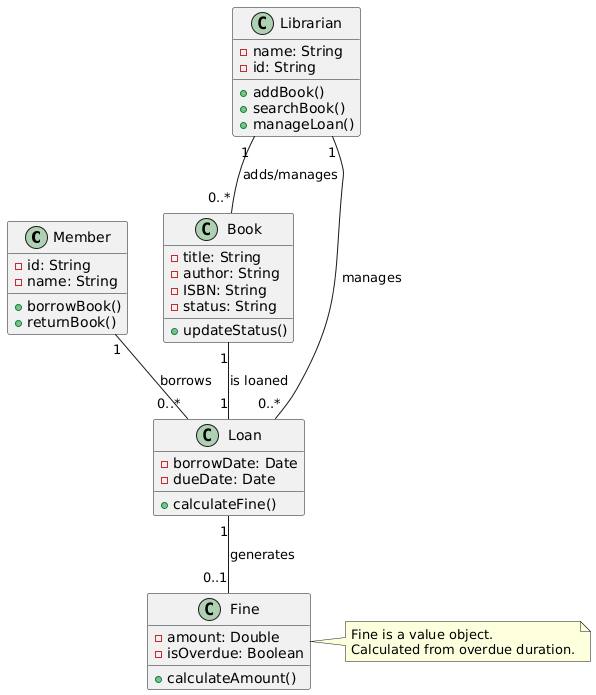
@startuml
' Define classes
class Member {
  - id: String
  - name: String
  + borrowBook()
  + returnBook()
}

class Book {
  - title: String
  - author: String
  - ISBN: String
  - status: String
  + updateStatus()
}

class Loan {
  - borrowDate: Date
  - dueDate: Date
  + calculateFine()
}

class Librarian {
  - name: String
  - id: String
  + addBook()
  + searchBook()
  + manageLoan()
}

class Fine {
  - amount: Double
  - isOverdue: Boolean
  + calculateAmount()
}

' Define relationships
Member "1" -- "0..*" Loan : borrows
Book "1" -- "1" Loan : is loaned
Librarian "1" -- "0..*" Book : adds/manages
Librarian "1" -- "0..*" Loan : manages
Loan "1" -- "0..1" Fine : generates

' Optional: Add stereotype for Fine if it's a value object
note right of Fine
  Fine is a value object.
  Calculated from overdue duration.
end note

' Style
skinparam shadowing false
skinparam rectangle {
  BackgroundColor White
  BorderColor Black
  FontSize 12
}
@enduml
🖼️ Visual Output (Rendered from PlantUML)
📌 How to View: Paste the code into PlantUML Live or use any PlantUML-compatible editor (e.g., VS Code with extension, IntelliJ, Visual Paradigm).
📊 Diagram Overview:
-
Classes are shown as rectangles with three compartments: name, attributes, operations.
-
Associations are lines with multiplicity labels.
-
Relationships reflect domain logic and responsibilities.
-
Note on
Fineclarifies its role as a value object.
🤖 Automating with Visual Paradigm’s AI-Powered Textual Analysis
For faster modeling and learning, Visual Paradigm (VP) offers an AI-Powered Textual Analysis Tool that automates the entire process.
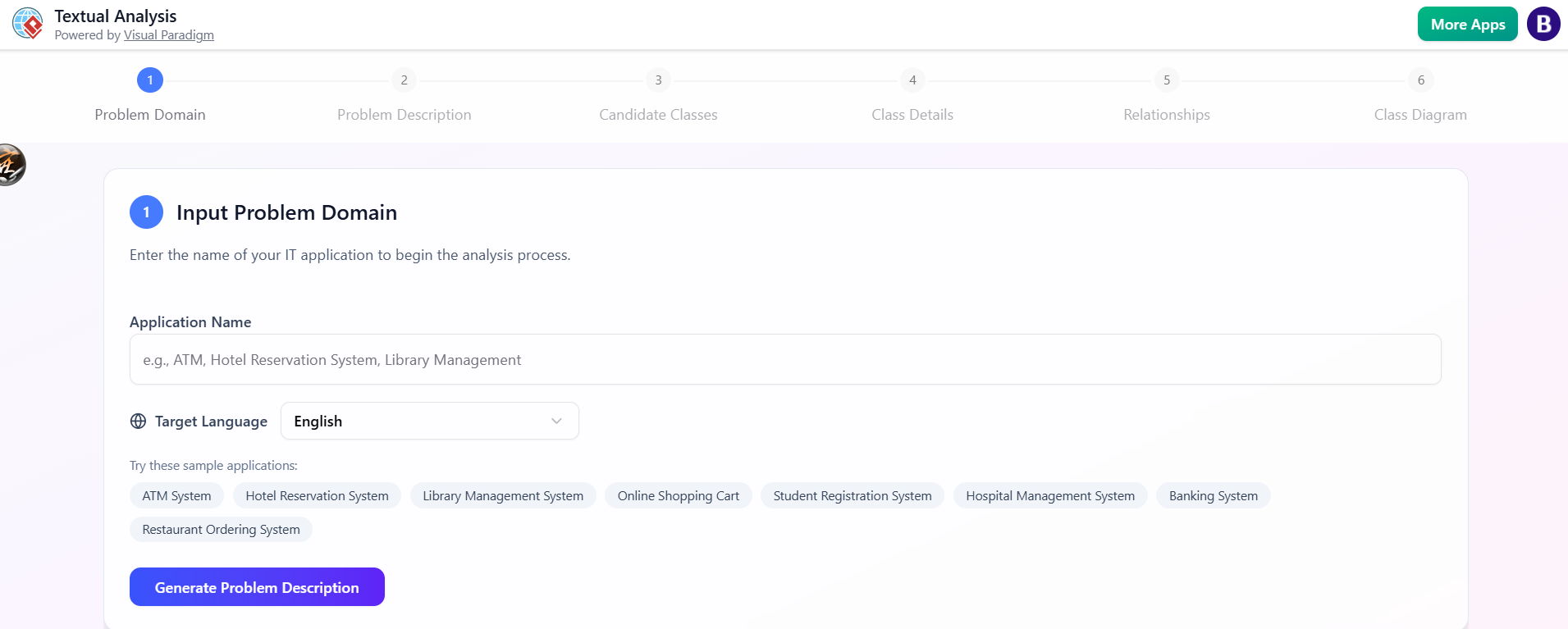
✅ Why Use the AI Tool?
| Benefit | Description |
|---|---|
| Instant Class Detection | AI scans text and suggests classes, attributes, operations. |
| Automatic Relationship Detection | Identifies associations, compositions, multiplicities. |
| Transparency | Shows reasons for inclusion/exclusion (e.g., “‘library’ is a system, not a class”). |
| Error Reduction | Minimizes human oversight and inconsistency. |
| Learning by Example | Compare AI output with your manual analysis. |
🧩 How It Works (Step-by-Step)
-
Launch Visual Paradigm
-
Open Desktop or Online version.
-
Go to Tools > Apps > Textual Analysis.
-
-
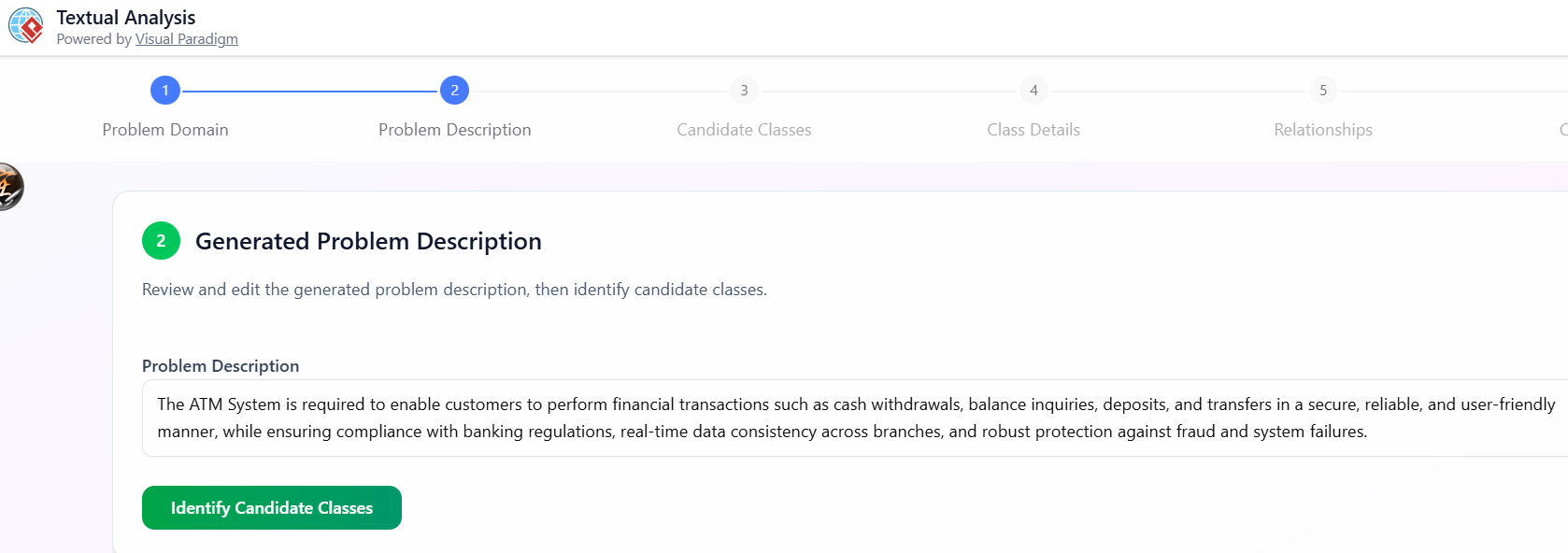
Enter or Generate Problem Description
-
Type:
"Library Management System" -
Click Generate Problem Description → AI creates a detailed paragraph.
-
Edit to match your exact needs (or paste your own).
-
-
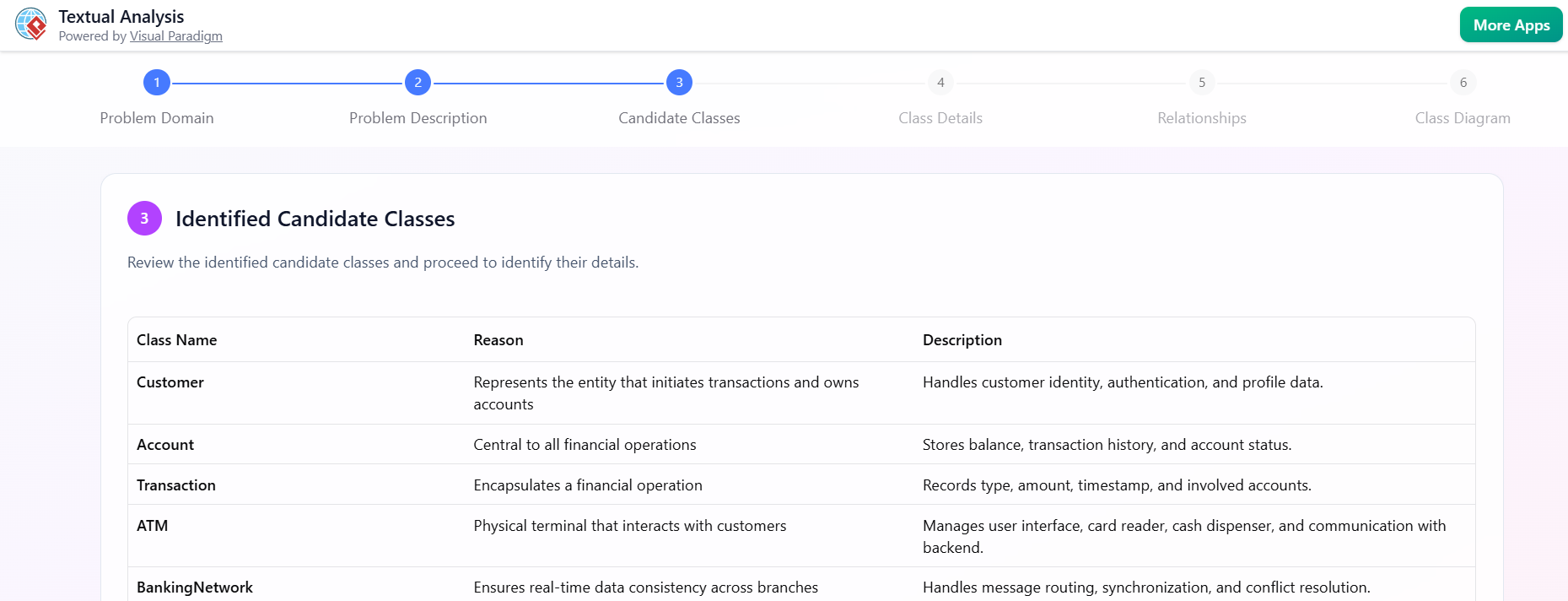
Identify Candidate Classes
-
Click Identify Candidate Classes.
-
AI returns a table:
Class Name | Reason | Description ---------------|---------------------------|------------------------- Member | Noun: persistent entity | A person who borrows books Book | Noun: core object | Physical book with ISBN Loan | Noun: transactional concept | Record of borrowing Librarian | Noun: role | Staff member managing system Fine | Noun: outcome | Financial penalty for overdue -
Toggle to see excluded nouns and reasons (e.g., “‘library’ is a system, not a class”).
-
-
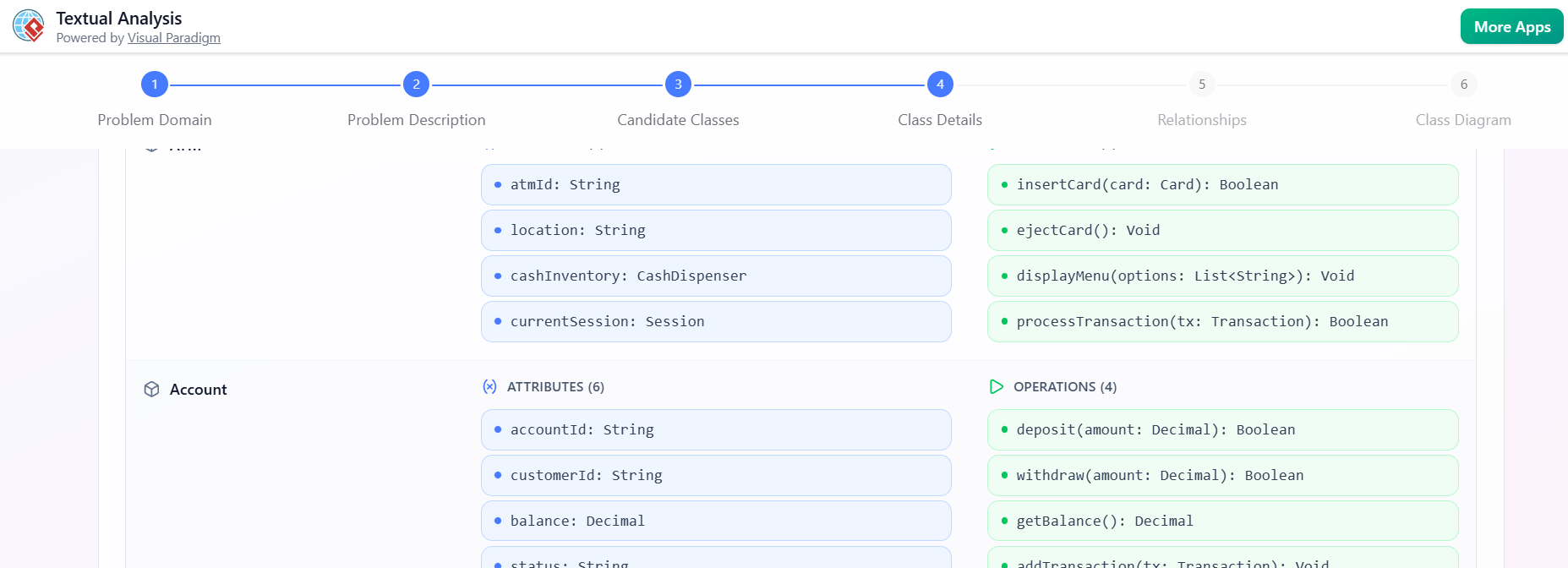
Identify Class Details
-
Click Identify Class Details.
-
AI suggests:
-
Member:id,name -
Book:title,author,ISBN,status -
Loan:borrowDate,dueDate -
Fine:amount,isOverdue
-
-
-
Identify Class Relationships
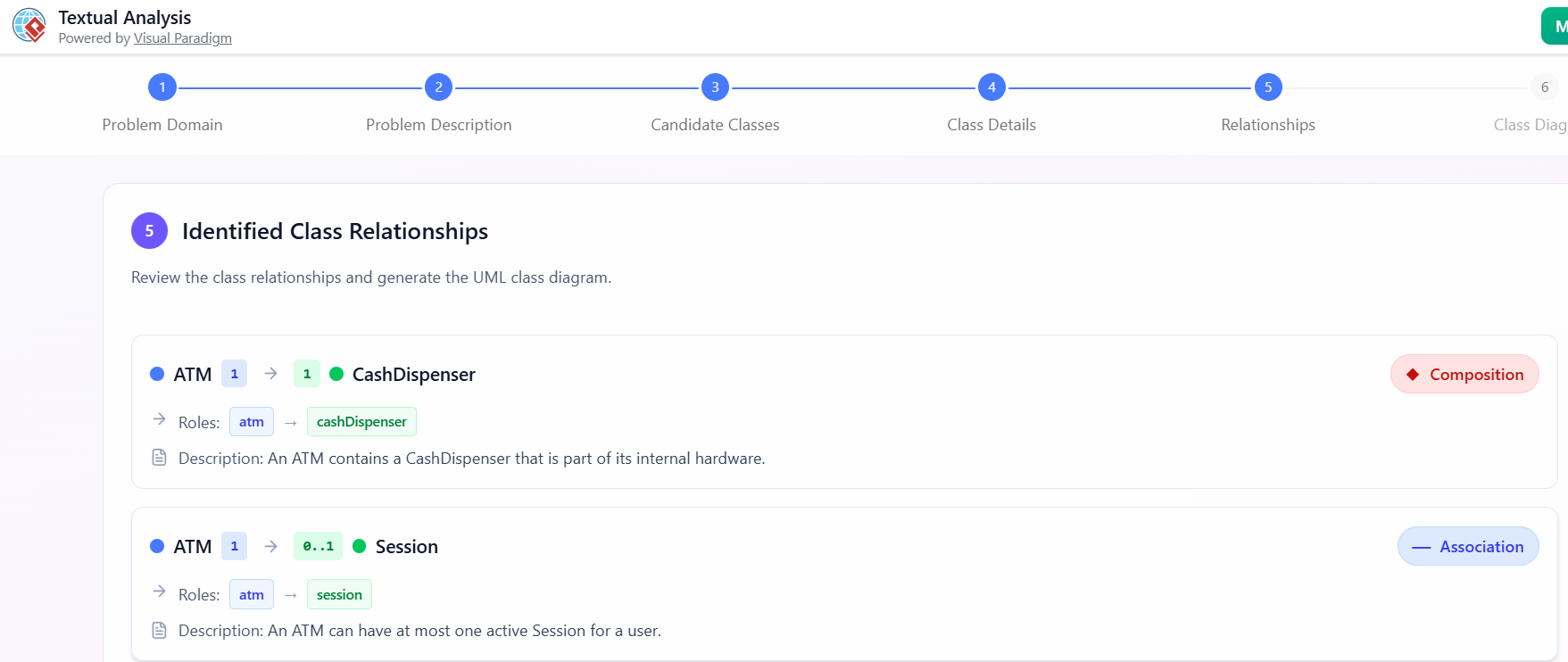
Click Identify Class Relationships.
-
AI proposes:
-
Member—Loan(1..*) -
Book—Loan(1..1) -
Librarian—Book(1..*) -
Librarian—Loan(1..*) -
Loan—Fine(0..1)
-
-
-
Generate Diagram
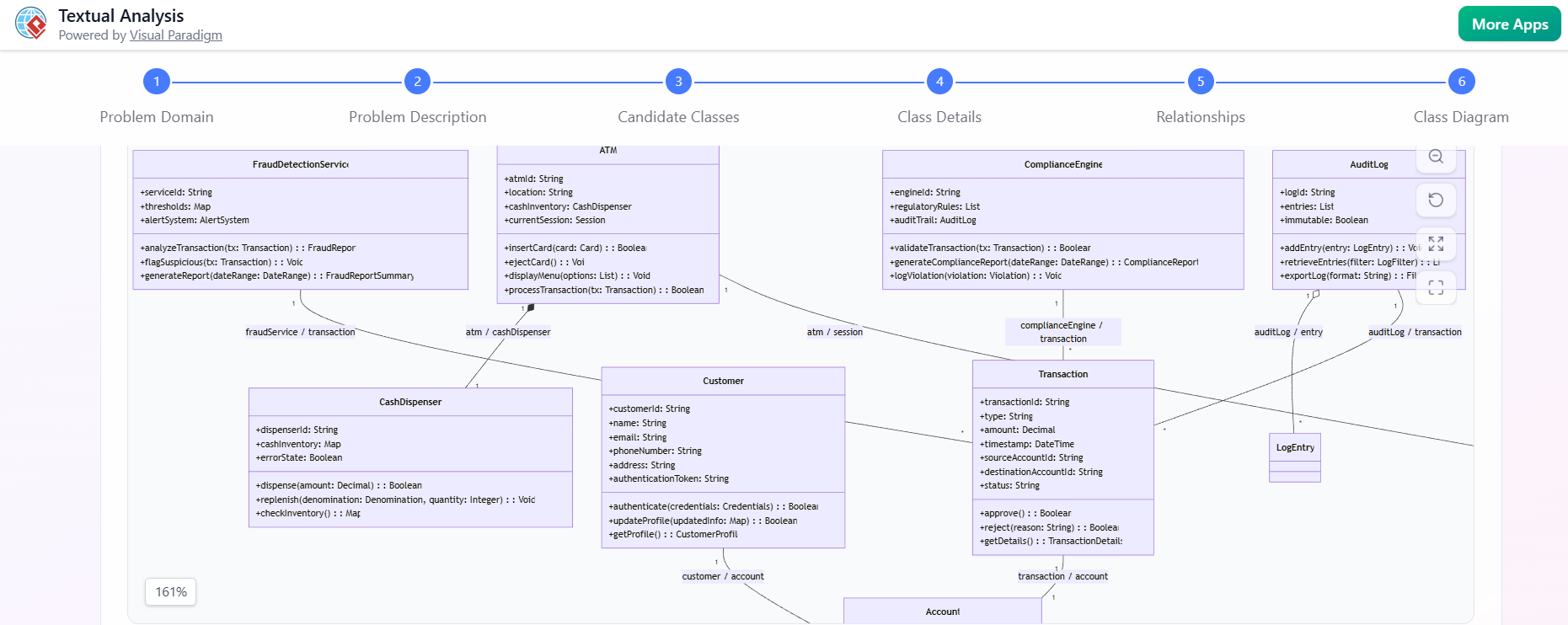
Click Generate Diagram.
-
A fully rendered, editable UML Class Diagram appears instantly.
-
✅ Pro Tip: Use the AI output as a first draft. Then manually refine:
Adjust multiplicities
Add visibility (
+,-)Reorganize layout
Apply naming conventions
🎓 Best Practices for Beginners
| Practice | Why It Matters |
|---|---|
| Start Manual | Builds deep understanding of UML and domain modeling. |
| Compare AI vs Manual | Learn why AI made certain choices; spot mistakes. |
| Iterate and Refine | Model evolves with feedback — don’t aim for perfection first. |
| Use Simple Examples | Start with: “Online Shopping Cart”, “ATM System”, “Student Registration”. |
| Avoid Over-Engineering | Don’t add every possible attribute or operation — focus on core domain. |
| Validate with Stakeholders | Ensure the model reflects real-world needs. |
🧩 Real-World Use Cases for Practice
Try these beginner-friendly systems to test your skills:
| System | Key Classes | Learning Focus |
|---|---|---|
| Online Shopping Cart | Customer, Product, Cart, Order, Payment |
Aggregation, composition |
| ATM System | User, Account, Card, Transaction, Withdrawal |
Inheritance, operations |
| Student Registration | Student, Course, Enrollment, Instructor |
Many-to-many relationships |
| Task Management App | User, Task, Project, Deadline |
Associations, multiplicity |
🧠 Final Thoughts & Recommendation
Textual analysis is the gold standard for turning requirements into design. It teaches you to think like a designer — not just code.
🎯 Recommended Workflow:
-
Manual Analysis First → Build understanding.
-
Use AI Tool (e.g., Visual Paradigm) → Speed up modeling and validate.
-
Refine Manually → Improve clarity, accuracy, and design quality.
-
Iterate → Use feedback to evolve the model.
🌟 Bottom Line:
Learn the manual process first. Use AI as a powerful assistant — not a replacement.
-
AI Textual Analysis – Transform Text into Visual Models Automatically: This feature uses AI to analyze text documents and automatically generate diagrams such as UML, BPMN, and ERD for faster modeling and documentation.
-
From Problem Description to Class Diagram: AI-Powered Textual Analysis: This guide explores how Visual Paradigm uses AI to convert natural language problem descriptions into accurate class diagrams for software modeling.
-
AI-Powered UML Class Diagram Generator by Visual Paradigm: This advanced AI-assisted tool automatically generates UML class diagrams from natural language descriptions, streamlining the software design process.
-
AI-Powered Textual Analysis Tutorial for Software Design with Visual Paradigm: This comprehensive tutorial demonstrates how to leverage AI-driven textual analysis to extract key software design elements directly from natural language requirements.
-
Case Study: AI-Powered Textual Analysis for UML Class Diagram Generation: An in-depth case study illustrating how AI-driven textual analysis enables the accurate generation of UML class diagrams from unstructured requirements.
-
Identifying Domain Classes Using AI Textual Analysis in Visual Paradigm: This resource teaches users how to automatically detect domain classes from textual inputs using specialized AI-powered analysis tools.
-
How AI Enhances Class Diagram Creation in Visual Paradigm: This article explores how the platform leverages AI to automate the creation of class diagrams, making software design significantly faster and more accurate.
-
Real-Life Case Study: Generating UML Class Diagrams with Visual Paradigm AI: A practical case study showing how the AI assistant successfully transformed textual requirements into accurate UML class diagrams in a real-world project.
-
Creating a UML Class Diagram for a Library System Using AI and Visual Paradigm: A hands-on blog post that walks through the process of building a class diagram for a library management system using AI.
-
Visual Paradigm AI Toolbox: Textual Analysis Tool for Software Modeling: This tool focuses on transforming unstructured text into structured software models by identifying entities, relationships, and key architectural concepts.


 English
 Arabic
 Chinese (Simplified)
 Dutch
Dutch French
 German
 Italian
 Japanese
 Korean
 Portuguese
 Russian
 Spanish