


Designing embedded systems requires precision. When building Internet of Things (IoT) devices, logic complexity often grows exponentially. A simple sensor reading can involve connectivity checks, power management, error recovery, and data transmission protocols. Without a clear visual representation of logic flow, code quality suffers. This is where the UML State Machine Diagram becomes essential. It provides a structured way to define how an IoT device behaves under different conditions.
Many engineers struggle with the initial steps of modeling. They confuse state diagrams with flowcharts or activity diagrams. This guide offers a clear path. We will explore the core concepts, the specific requirements for embedded systems, and a step-by-step method to create your first diagram. The goal is clarity, not complexity.
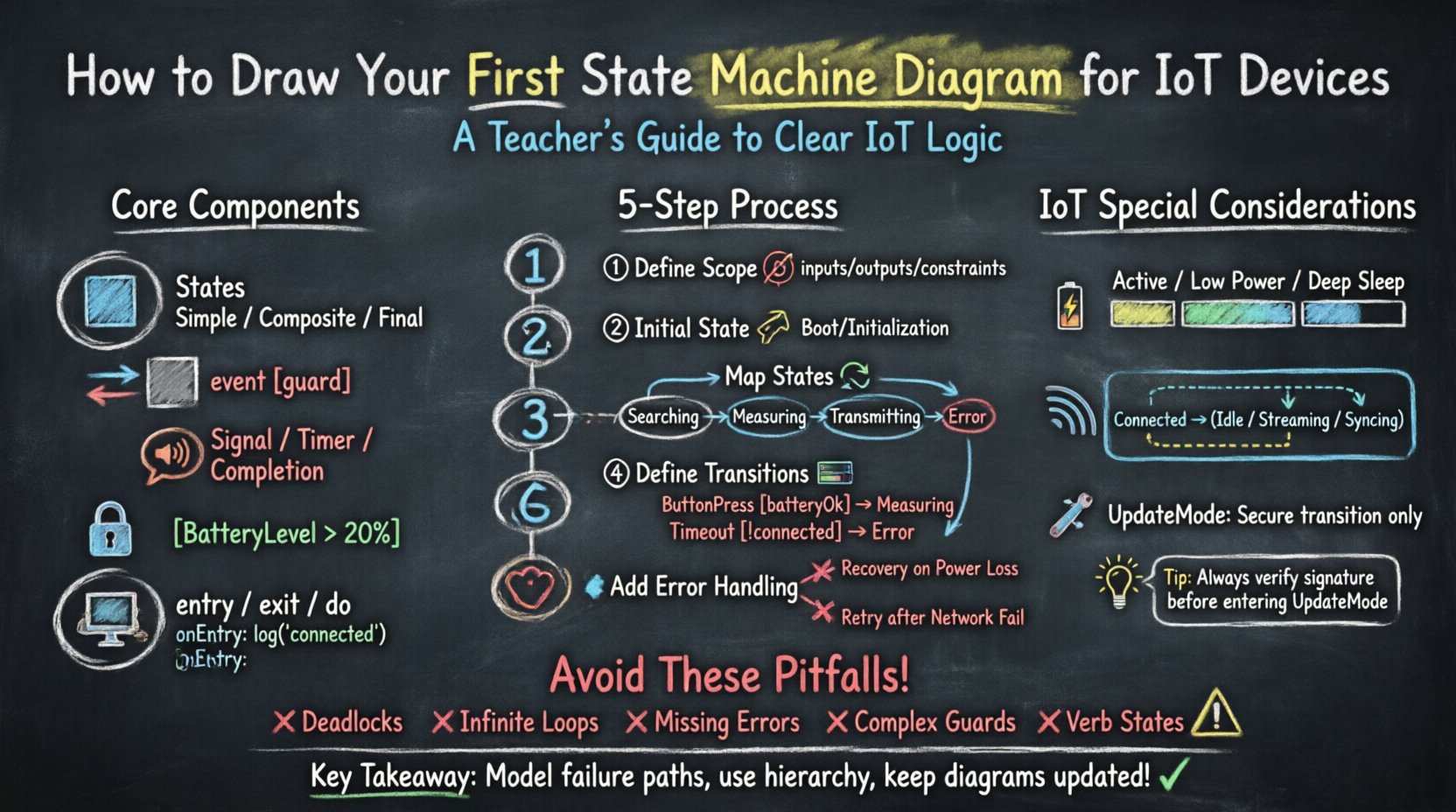
Why State Machines Matter in IoT Architecture 🏗️
IoT devices operate in environments that are unpredictable. Network connections drop. Batteries deplete. Sensors fail. A standard linear script cannot handle these interruptions gracefully. State machines allow you to define distinct modes of operation. Each mode has specific entry and exit behaviors. This modularity simplifies debugging and maintenance.
Consider a smart thermostat. It can be in a Heating state, a Cooling state, or an Off state. Transitions happen based on temperature thresholds or user input. If the network disconnects during Heating, the device must know how to react. Does it retry? Does it log an error? Does it stay in the state? A state machine diagram captures these rules before a single line of code is written.
Core Components of a UML State Machine Diagram 📝
To draw an effective diagram, you must understand the vocabulary. UML (Unified Modeling Language) provides a standardized set of symbols. Using these correctly ensures that other engineers can read your work.
1. States 🟦
A state represents a condition during the life of an object when it satisfies some condition, performs some activity, or waits for some event. In IoT, states often map to power modes or operational phases.
- Simple State: A single condition with no internal structure. Example: Idle.
- Composite State: A state containing substates. Example: Active (which contains Processing and Transmitting).
- Final State: The termination point of the lifecycle. Often shown as a filled circle.
2. Transitions ↔️
A transition defines how the system moves from one state to another. It is triggered by an event. The transition line should be directional, pointing from the source state to the target state.
3. Events 📢
Events are signals that trigger transitions. In IoT, these are often external stimuli.
- Signal: A message from an external source. Example: TemperatureChanged.
- Timer: A timeout mechanism. Example: ConnectionTimeout.
- Completion: The completion of an activity within a state.
4. Guard Conditions 🔒
Not all events trigger a transition immediately. A guard condition is a boolean expression that must evaluate to true for the transition to occur. It is placed on the transition line in square brackets.
Example: [BatteryLevel > 20%]
5. Actions 💻
Actions are activities performed during a state or transition.
- Entry Action: Executed when entering a state.
- Exit Action: Executed when leaving a state.
- Do Activity: Continuous activity while in a state.
Step-by-Step Guide to Modeling Your First Diagram 🛠️
Follow this structured approach to build your diagram without getting lost in details. Start broad and refine later.
Step 1: Define the System Scope 🎯
Before drawing, list the boundaries. What does the device do? What are its inputs? What are its outputs? Do not model the entire company workflow. Focus on the device firmware behavior.
- Input Sources: User buttons, sensors, network packets.
- Output Destinations: Actuators, cloud servers, LEDs.
- Constraints: Power limits, memory availability.
Step 2: Identify the Initial State 🚀
Every diagram needs a start point. This is usually represented by a filled black circle leading to the first state. For an IoT device, this is often a Boot or Initialization state. The system performs hardware checks and loads configuration here.
Step 3: Map the Operational States 🔄
Identify the main modes of operation. Use nouns for state names. Avoid verbs. This keeps the diagram stable even if logic changes.
- Searching: Looking for a network connection.
- Connected: Linked to the gateway.
- Measuring: Active sensor polling.
- Transmitting: Sending data to the cloud.
- Error: Handling faults.
Step 4: Define the Transitions 🛣️
Draw lines between states. Label them with the event that causes the move. If a condition is required, add the guard.
Scenario: From Searching to Connected on event WifiFound with guard [SignalStrength > -70dBm].
Step 5: Add Error Handling 🛑
IoT devices frequently encounter faults. Do not leave these out. Create an Offline or Recovery state. Ensure every state has a path to recovery or shutdown.
IoT Specific Considerations for State Modeling 🌐
General software state machines differ from embedded ones. You must account for hardware limitations and environmental factors.
Power Management States ⚡
Battery life is critical. Your state machine must explicitly model power consumption.
- Active: High power. CPU running, radio on.
- Low Power: CPU sleep, radio off.
- Deep Sleep: Minimal power, only wake-on-interrupt.
Transitions between these states must be managed carefully. Waking from Deep Sleep often requires a reboot or a specific reset sequence.
Connectivity Reliability 📶
Networks are unreliable. Your state machine needs retry logic. Instead of a single Transmitting state, consider substates for RetryAttempt1, RetryAttempt2, and MaxRetriesReached.
Configuration Updates 🔧
Firmware updates require a specific state. Often called UpdateMode. In this state, the device ignores normal commands to prevent corruption. Ensure the transition to UpdateMode is secure and irreversible until complete.
State vs. Event Mapping Table 📊
Use this reference table to ensure you have covered all interaction points.
| State | Trigger Event | Guard Condition | Action |
|---|---|---|---|
| Idle | SensorRead | [Battery > 10%] | StartADC |
| Processing | CalculationComplete | [DataValid] | CompressData |
| Transmitting | NetworkDown | [RetryCount < 3] | Wait(5s) |
| Error | ResetButton | [True] | RebootSystem |
Handling Complexity with Hierarchical States 📚
As your device grows, the diagram becomes cluttered. This is where composite states (hierarchical states) help. You can group related states together.
Example: The Active Mode 🟢
Instead of drawing lines between every processing step, define an Active state. Inside Active, you can have Sensing, Calculating, and Waiting. The system enters Active and stays there until a specific exit event occurs. This reduces visual noise and improves readability.
Orthogonal Regions ⬜
Sometimes, two things happen at once. For example, a device might be Communicating with a server while simultaneously Logging to an SD card. UML allows orthogonal regions. These are separate areas within a composite state that operate independently. This is crucial for multitasking embedded systems.
Common Pitfalls to Avoid ⚠️
Even experienced engineers make mistakes. Watch out for these common issues when drawing your diagram.
- Deadlocks: A state with no outgoing transitions except to itself. The device freezes. Always ensure there is an escape path.
- Infinite Loops: Transitions that cycle endlessly without progress. Use counters or timeout guards to prevent this.
- Missing Error States: Assuming everything goes perfectly. In IoT, failure is the norm. Model the failure paths explicitly.
- Overly Detailed Guards: Putting complex logic inside guard conditions. Keep guards simple. Move complex logic to actions.
- Verb-Based State Names: Avoid states like Starting or Stopping. Use nouns like Startup or Shutdown. States are conditions, not processes.
Validation and Testing the Diagram ✅
Once drawn, the diagram is not finished. It must be validated against requirements.
1. Traceability Review 🔍
Map every state and transition back to a requirement document. If a state exists but has no requirement, remove it. If a requirement exists but has no state, add it.
2. Scenario Walkthrough 🏃
Take a specific user journey. Start at the initial state. Apply events one by one. Does the diagram follow the expected path? If the user presses a button, does the LED light up? If the network fails, does the device enter the retry loop?
3. Code Review Alignment 👨💻
When developers write code, they often deviate from the design. Periodically compare the state machine implementation in the code with the diagram. If they differ, update the diagram. The diagram should be the source of truth.
Best Practices for Documentation 📄
A diagram is useless if no one understands it. Follow these documentation rules.
- Consistent Naming: Use PascalCase or snake_case consistently across all state names.
- Legend: Include a legend if you use custom symbols or specific colors for power states.
- Version Control: Treat the diagram as code. Store it in a repository. Commit changes with descriptive messages.
- Context Notes: Add notes explaining why certain states exist. This helps future maintainers understand the rationale.
Integrating State Machines into the Development Cycle 🔄
State machine modeling is not a one-time task. It fits into the broader development lifecycle.
Design Phase
Sketch the high-level states. Get stakeholder approval on the logic before coding begins.
Implementation Phase
Use the diagram to write the state transition table in code. Many embedded frameworks support state machine libraries. Map the diagram nodes directly to code functions.
Maintenance Phase
When bugs occur, trace them on the diagram. Did the transition happen? Was the guard condition wrong? Is an action missing? The visual model makes root cause analysis faster.
Advanced Topics: Deep History and Shallow History 🧠
UML offers advanced features for complex systems. You may not need them immediately, but knowing them is valuable.
Deep History (H*)
If a composite state exits and re-enters, should it start from the initial substate or remember where it was? Deep history remembers the exact substate. This is useful for restoring a previous operation without losing context.
Shallow History (H)
Shallow history remembers the last active substate of the composite state, but resets the substate’s own internal history. Use this when you need a quick resume but not a full restoration of context.
Summary of Key Takeaways 📌
Creating a state machine diagram for IoT devices is a foundational skill. It transforms abstract requirements into concrete logic. By following the steps outlined here, you can build systems that are robust and maintainable.
- Start with clear definitions of states and events.
- Account for power and network constraints specifically.
- Use hierarchy to manage complexity.
- Always model error paths and recovery mechanisms.
- Keep the diagram updated alongside the code.
Investing time in modeling pays dividends in code quality. It reduces the cognitive load on developers and provides a shared language for the team. You do not need complex tools to begin. Paper and pen are sufficient for the first draft. The discipline of modeling is the most important part of the process.

 English
 Arabic
 Chinese (Simplified)
 Dutch
Dutch French
 German
 Italian
 Japanese
 Korean
 Portuguese
 Russian
 Spanish