


Enterprise Architecture (EA) serves as the blueprint for organizational transformation. However, a comprehensive model often becomes too complex for specific stakeholders to digest. This is where ArchiMate Viewpoints become essential. Viewpoints define the perspective from which a subset of the architecture is presented. They address specific concerns of particular stakeholder groups. By isolating relevant information, architects ensure clarity and actionable insights. This guide explores practical applications through detailed case studies across different sectors.
We will examine how organizations leverage these viewpoints to bridge gaps between strategy and execution. The focus remains on principles and methodologies rather than specific tools. The goal is to demonstrate how structured visualization aids decision-making in complex environments.
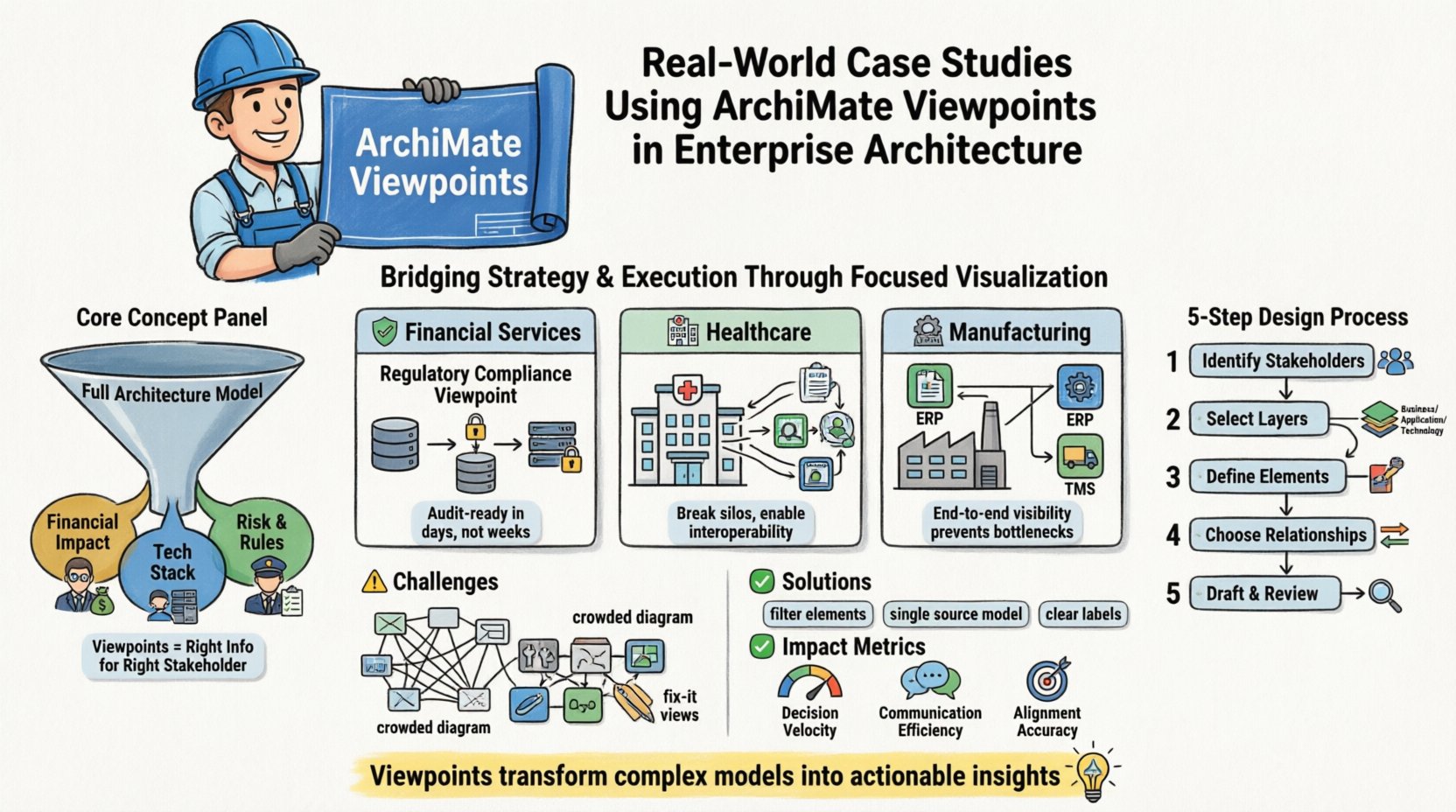
Understanding the Core Purpose of Viewpoints 🎯
Before diving into specific scenarios, it is vital to understand the function of a viewpoint. In the ArchiMate methodology, a model represents the whole system. A view represents a specific aspect of that system for a specific audience. A viewpoint defines the template for creating that view.
- Stakeholder Focus: Different roles require different information. A CFO needs financial impact data, while a CTO needs technology stack details.
- Abstraction Level: Some views operate at the business level, others at the application or technology level.
- Concern Resolution: Viewpoints are designed to resolve specific concerns, such as compliance, risk, or performance.
Without viewpoints, an architecture model risks becoming an unreadable web of relationships. Properly applied, they act as filters, delivering precise information exactly when it is needed.
Case Study 1: Financial Services Compliance and Risk 🏦
In the financial sector, regulatory compliance is a constant priority. A global bank needed to demonstrate adherence to new data protection regulations. The challenge involved mapping regulatory requirements to existing business processes and IT systems.
The Challenge
Regulatory auditors required proof that customer data was handled securely across multiple legacy systems. The IT landscape was fragmented, making it difficult to trace data flows. Executives struggled to understand the risk exposure associated with specific business services.
The Viewpoint Strategy
The architecture team designed a Regulatory Compliance Viewpoint. This viewpoint combined elements from the Business and Technology layers.
- Business Layer: Focused on Business Processes and Business Objects. Specifically, the handling of Customer Information.
- Technology Layer: Focused on Application Services and System Software. Specifically, the databases and encryption mechanisms.
- Relationships: Used the Association and Realization relationships to link processes to the systems that support them.
Implementation Details
The team constructed a view that highlighted the path of sensitive data. Every step in the process was linked to the technology component responsible for that step.
| Architecture Element | Viewpoint Purpose | Stakeholder |
|---|---|---|
| Business Process | Identify data handling steps | Compliance Officer |
| Application Service | Map data storage location | Security Architect |
| Business Rule | Define regulatory constraints | Legal Counsel |
This structured approach allowed the bank to generate reports automatically. When a regulation changed, the architecture team could update the Business Rules. The impact on specific applications became immediately visible. This reduced the time required for audit preparation from weeks to days.
Key Takeaway
Linking business processes directly to technical controls creates an audit trail. It transforms abstract requirements into tangible architectural artifacts. This ensures that compliance is built into the system design, not added as an afterthought.
Case Study 2: Healthcare Data Interoperability 🏥
A healthcare network comprised of multiple hospitals and clinics needed to improve patient data sharing. The legacy systems did not communicate effectively. Patient records were siloed, leading to duplicated tests and delayed care.
The Challenge
The primary goal was interoperability. Different departments used different software solutions. The architecture team needed to show how these disparate systems could exchange information securely without disrupting clinical workflows.
The Viewpoint Strategy
The team utilized an Application Integration Viewpoint. This viewpoint focused heavily on the Application Layer and the Technology Layer.
- Application Services: Defined the specific services offered by each system (e.g., Patient Registration, Lab Results).
- Interface: Used the Interface concept to show how systems connect.
- Deployment: Mapped applications to nodes (servers) to understand physical topology.
Implementation Details
The view did not attempt to model the entire hospital system. It focused only on the data exchange points. This reduced complexity significantly.
- Identify Interfaces: Cataloged all existing interfaces between systems.
- Map Flows: Visualized the direction of data flow.
- Identify Gaps: Highlighted areas where no interface existed but data exchange was required.
By visualizing the integration landscape, the team identified redundant interfaces. They consolidated three separate data feeds into a single standardized service. This reduced maintenance costs and improved data consistency.
Key Takeaway
Focusing on interfaces rather than entire systems allows architects to manage complexity. It highlights connectivity issues without getting bogged down in internal system logic. This is crucial for integration projects where multiple vendors are involved.
Case Study 3: Manufacturing Supply Chain Optimization 🏭
A manufacturing company faced supply chain disruptions due to lack of visibility. They needed to understand how changes in procurement affected production schedules and final delivery.
The Challenge
Procurement, production, and logistics operated as separate silos. Decisions made in one area were not communicated to others in real-time. The organization needed a unified view of the supply chain to optimize inventory levels.
The Viewpoint Strategy
The team developed a Supply Chain Flow Viewpoint. This viewpoint crossed the Business and Application layers.
- Business Processes: Procurement, Manufacturing, Shipping.
- Business Objects: Materials, Orders, Shipments.
- Application Services: ERP modules, Warehouse Management Systems.
Implementation Details
The view tracked a single product from raw material acquisition to final delivery.
| Stage | Business Process | Supporting Application |
|---|---|---|
| Procurement | Purchase Order Creation | ERP Procurement Module |
| Manufacturing | Production Scheduling | APS Planning Tool |
| Logistics | Shipment Planning | TMS Logistics Tool |
This visualization revealed bottlenecks. For instance, the Production Scheduling tool did not receive real-time updates from the Procurement module. Delays in material arrival were not reflected in the production schedule until it was too late.
Key Takeaway
Tracing the flow of objects across processes and applications exposes systemic inefficiencies. It allows management to see the end-to-end impact of operational decisions. This holistic view is critical for supply chain resilience.
Designing Effective Viewpoints: A Step-by-Step Approach 📝
Creating a viewpoint is not a one-size-fits-all activity. It requires a methodical approach to ensure it delivers value. The following steps outline the process.
1. Identify Stakeholders and Concerns
Begin by listing the stakeholders who will consume the view. What are their primary concerns? Is it cost, risk, performance, or compliance? The viewpoint must be tailored to answer these specific questions.
2. Select Relevant Layers
The ArchiMate framework consists of several layers. Do not include every layer in every view. If the concern is financial, the Business Layer is primary. If the concern is server load, the Technology Layer is primary. Select only what is necessary.
3. Define Element Constraints
Specify which element types are allowed in the view. For example, a strategic view might exclude specific technical components like ports or interfaces. This keeps the diagram clean and focused.
4. Choose Relationship Types
Decide which relationships to display. A process model might show flow relationships. An integration model might show communication relationships. Too many relationship types can confuse the reader.
5. Draft and Review
Create a draft view. Have stakeholders review it. Does it answer their questions? Is it understandable? Iterate based on feedback. A view that is technically accurate but unreadable fails its purpose.
Common Challenges and Mitigation Strategies ⚠️
Even with a solid methodology, challenges arise. Here are common issues and how to address them.
- Over-Crowding: Viewpoints often try to show too much. Mitigation: Strictly enforce element constraints. Remove elements that do not directly address the stakeholder concern.
- Inconsistency: Different views may show conflicting information. Mitigation: Ensure all views reference the same underlying model. Changes in the core model should propagate to all relevant views.
- Static vs. Dynamic: Some views show structure, others show behavior. Mitigation: Clearly label views as structural or dynamic. Use different colors or symbols to distinguish between the two.
- Stakeholder Buy-in: Stakeholders may not understand the notation. Mitigation: Provide legends and guides. Use plain language labels alongside standard notation.
Measuring the Impact of Viewpoint Usage 📈
How do organizations know if their viewpoints are working? Metrics should focus on value delivery rather than just artifact creation.
- Decision Velocity: How quickly do stakeholders make decisions based on the architecture? Improved views should reduce decision time.
- Communication Efficiency: How many meetings are required to explain a change? Better views reduce the need for repetitive explanations.
- Alignment Accuracy: Do the views reflect the actual state of the organization? Regular audits ensure the architecture remains a true representation.
- Adoption Rate: Are the views being used in planning and execution? High usage indicates relevance.
Tracking these metrics helps refine the approach. If a viewpoint is rarely used, it may be too complex or irrelevant. It should be retired or redesigned.
Advanced Considerations for Viewpoints 🔍
As maturity increases, organizations can explore advanced techniques.
Dynamic Views
Static diagrams are useful, but dynamic views show behavior over time. Sequence diagrams or state diagrams can illustrate how the system reacts to events. This is particularly useful for complex workflows.
Multi-Dimensional Views
Some concerns require looking at the architecture from multiple angles simultaneously. A matrix view might show the relationship between Business Services and Application Capabilities. This helps identify redundancy and gaps.
Automation
While we do not name specific software, the principle of automation applies. Reports can be generated directly from the model. Dashboards can update in real-time. This ensures that the views remain current without manual effort.
Bridging Strategy and Execution 🔗
The ultimate goal of using ArchiMate Viewpoints is to connect strategy with execution. Strategy defines where the organization wants to go. Execution defines what is being built today. Viewpoints act as the bridge.
When a new strategy is introduced, the architecture team can use specific viewpoints to map it to the current state. They can identify what needs to change. This creates a clear roadmap for transformation.
- Gap Analysis: Compare the target state view with the current state view.
- Impact Assessment: Use views to show what parts of the organization will be affected.
- Migration Planning: Define the steps to move from current to target.
This alignment ensures that resources are allocated to the right initiatives. It prevents investment in projects that do not support strategic goals.
Final Thoughts on Architecture Documentation 📄
Documentation should serve the audience, not the process. Viewpoints are a mechanism to tailor documentation to the needs of the reader. When designed well, they reduce ambiguity and increase confidence in architectural decisions.
Success depends on discipline. Architects must resist the urge to include everything. Every element on a page must justify its presence by answering a stakeholder question. If it does not, it should be moved to a different view or removed.
By following these principles, organizations can build a robust architecture practice. This practice supports agility, compliance, and innovation. The views become living documents that evolve with the organization.
Remember that the value lies in the insight, not the diagram itself. Use the ArchiMate framework to structure your thinking. Use viewpoints to communicate your findings. This combination drives enterprise success.

 English
 Arabic
 Chinese (Simplified)
 Dutch
Dutch French
 German
 Italian
 Japanese
 Korean
 Portuguese
 Russian
 Spanish