



In the rapidly evolving landscape of software architecture and documentation, the traditional method of “drag-and-drop” diagramming is facing a paradigm shift. The industry is moving towards Diagram-as-Code, a methodology that treats visual representations of systems as version-controlled text files. This tutorial explores the architecture of this workflow using VPasCode, a tool that bridges the gap between simple text editors and complex diagramming engines.
1. The Philosophy: Why Code Your Diagrams?
Historically, creating a system architecture diagram involved a tedious cycle of manual intervention. You would drag shapes onto a canvas, manually align them, draw connecting lines, and then spend hours tweaking the layout. If a stakeholder requested a change—such as adding a new database layer or rebranding the application—you would have to manually reposition every element to make room.
Diagram-as-Code eliminates this friction. Instead of manipulating pixels, you manipulate text. You define your system’s components and their relationships using a declarative language. A rendering engine then automatically calculates the layout, positioning, and styling for you.
The Traditional vs. The Modern Workflow
Consider the difference between the old and new approaches:
- Traditional: Add shapes manually → Connect them with lines → Reposition after every change → Export a static image.
- Diagram-as-Code: Maintain a text file → Define relationships → Rendering engine generates the visual.
By adopting this text-based approach, you gain the ability to store diagram source code in Git, review changes as simple text diffs, and ensure that your documentation remains consistent with your application code.
2. The Syntax: Understanding Mermaid
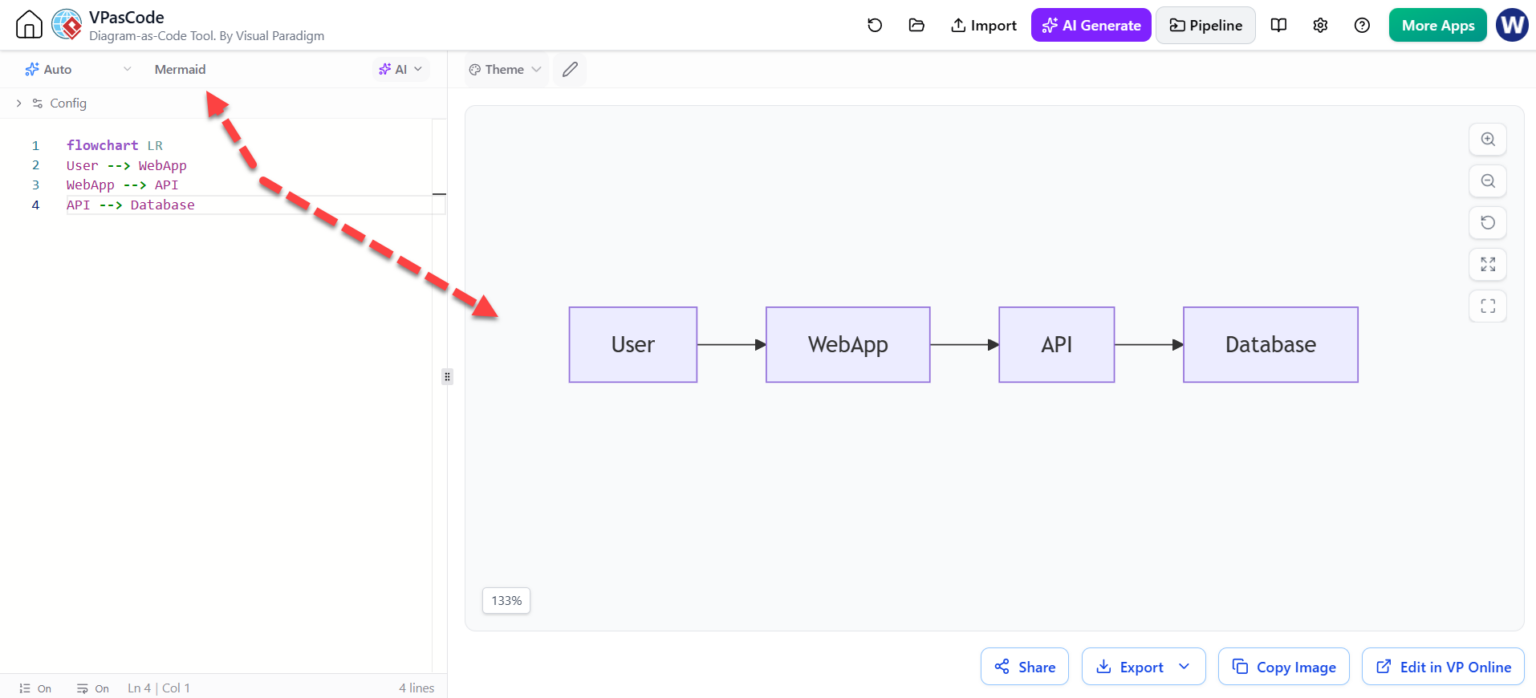
The screenshot provided illustrates the most popular standard for diagram-as-code: Mermaid. Mermaid is a JavaScript-based diagramming and charting tool that renders Markdown-inspired text definitions to create and modify diagrams dynamically.
Let’s break down the specific flowchart syntax used in the VPasCode editor shown in the image:
Line 1: Defining the Direction
The directive flowchart LR sets the stage. It tells the rendering engine that we are creating a flowchart and specifies the layout direction.
LRstands for Left-to-Right. Other common values includeTD(Top-Down) andBT(Bottom-Up).
Lines 2-4: Defining Nodes and Edges
The core logic is written in the form NodeID --> NodeID. This syntax is declarative; it describes the relationship, not the visual placement.
flowchart LR
    User --> WebApp
    WebApp --> API
    API --> Database
In this example:
User,WebApp,API, andDatabaseare the nodes (the boxes).--> is the connector, representing a directed flow from the source to the target.
VPasCode allows you to edit this code in real-time. As you type, the “Rendering Engine” (the right pane in the interface) updates instantly, generating the boxes and arrows without you needing to calculate coordinates.
3. The Architecture: How VPasCode Works
VPasCode acts as a unified environment that simplifies the complexity of diagram-as-code. Its architecture can be understood in three distinct layers:
A. The Editor Layer (The Source)
This is the left pane shown in the image. It functions like a lightweight code editor (similar to VS Code or Notepad++). It provides line numbers, syntax highlighting (identifying keywords like flowchart in purple and strings in green), and error detection. This allows developers to use familiar keyboard shortcuts and navigation patterns.
B. The Rendering Layer (The Engine)
Behind the scenes, VPasCode integrates a Mermaid rendering engine (likely D3.js based). It parses the text on the left, builds an abstract syntax tree (AST) of the diagram, and calculates the optimal layout algorithm to place the nodes. This ensures that large diagrams are rendered consistently every time.
C. The AI Integration Layer
The screenshot highlights a button labeled AI Generate. This is the critical differentiator. While traditional diagram-as-code requires you to memorize the syntax and layout rules, AI integration allows you to describe your system in plain English, and the AI will translate that into the Mermaid syntax.
This layer addresses the common pain points of:
- Learning Grammar: No need to memorize complex syntax flags.
- Debugging: AI can suggest fixes for syntax errors.
- Refactoring: AI can easily convert a diagram from one format to another or translate labels.
4. Best Practices for Diagram-as-Code
To maximize the efficiency of your VPasCode workflow, follow these architectural modeling principles:
- Keep it Declarative: Focus on what is connected to what, not where it is. Let the engine handle the spacing.
- Version Control: Commit your diagram files to Git alongside your application code. This ensures that if your architecture changes, you have a history of exactly when and why it changed.
- Modularize: For complex systems, break diagrams down into smaller, logical text files (e.g.,
architecture.mmd,api-flow.mmd) and link them if necessary. - Leverage AI for Style: Use the AI features to experiment with different themes or subgraph groupings to improve readability without manual reformatting.
Conclusion
The transition to Diagram-as-Code is not just a change in tooling; it is a shift in mindset. By adopting VPasCode and Mermaid, you are aligning your documentation with the principles of modern DevOps. You are moving from static, fragile images to dynamic, maintainable, and AI-enhanced architecture descriptions.

 English
 Arabic
 Chinese (Simplified)
 Dutch
Dutch French
 German
 Italian
 Japanese
 Korean
 Portuguese
 Russian
 Spanish