


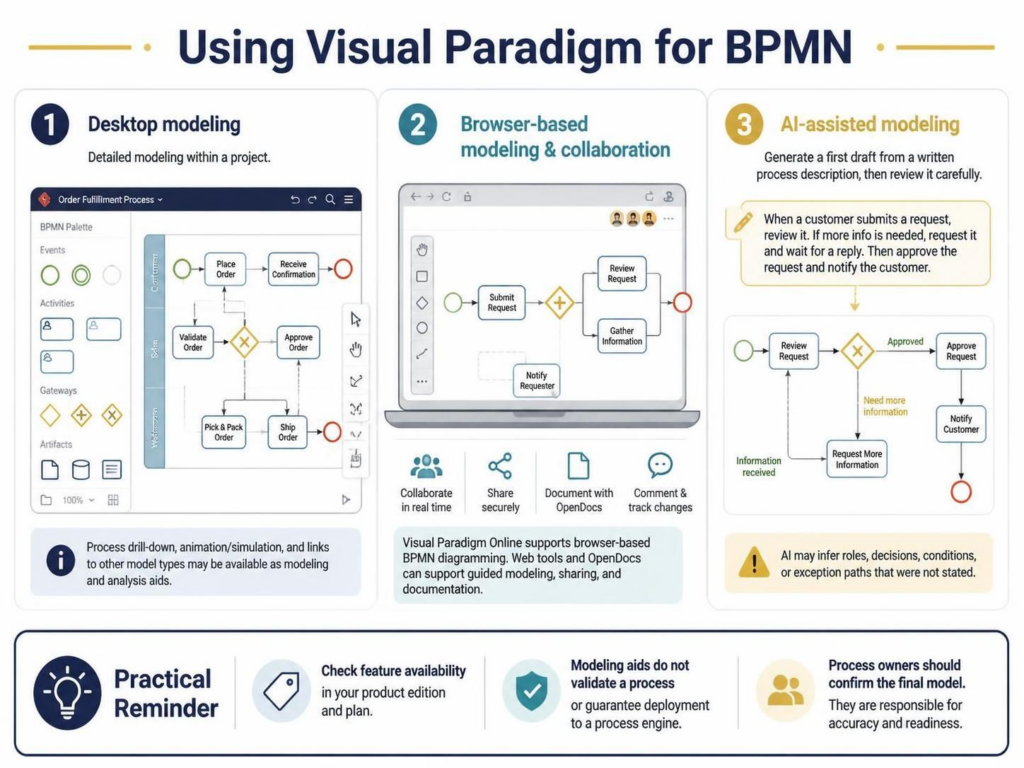
Business Process Model and Notation (BPMN) is the industry standard for modeling complex workflows. Visual Paradigm (VP) provides a robust ecosystem to handle these diagrams across different environments. Whether you are building deep system architectures in the desktop client or collaborating in the cloud, understanding the specific strengths of each mode is crucial for accurate process documentation.
This tutorial breaks down the three primary workflows presented in the Visual Paradigm documentation: Desktop Modeling, Browser-Based Collaboration, and AI-Assisted Drafting. We will explore how to leverage these tools to move from raw requirements to a validated, deployable process model.
1. Desktop Modeling: The Architect’s Workbench
Visual Paradigm Desktop is designed for detailed, heavy-lifting modeling work. It serves as the central repository for your projects, offering a comprehensive palette of BPMN elements that are essential for rigorous system design.
Core Features and Capabilities
- Comprehensive Palette: The desktop environment provides full access to the BPMN 2.0 specification, including Events (Start, Intermediate, End), Activities, Gateways (Exclusive, Parallel, Inclusive), and Connectors (Sequence, Message, Association).
- Advanced Analysis: Beyond static drawing, the desktop supports Process Drill-down (decomposing high-level processes into detailed sub-processes), Animation (visualizing flow execution), and Simulation (analyzing bottlenecks).
- Integration: Desktop models can be linked to other model types, such as UML class diagrams or ERDs, creating a unified view of the system architecture.
The Limitation of Modeling Aids
It is vital to understand that while the Desktop version is powerful, it functions primarily as a modeling and analysis aid. Creating a sophisticated diagram with simulation features does not automatically validate the business logic or guarantee that the process engine will execute it without errors. The “Practical Reminder” in the source material emphasizes that process owners must confirm the final model’s accuracy.
2. Browser-Based Modeling & Collaboration
For teams that require real-time collaboration or need to share diagrams quickly without installing software, Visual Paradigm Online offers a powerful alternative. This mode is ideal for workshops, quick documentation, and distributed teams.
Key Capabilities
- Drag-and-Drop Creation: The browser interface simplifies the creation of BPMN diagrams using intuitive drag-and-drop functionality.
- Real-time Collaboration: Multiple users can work on the same diagram simultaneously, with features for commenting and tracking changes.
- OpenDocs Integration: This feature allows for “guided modeling,” where diagrams are incorporated into documentation, making it easier to explain processes to non-technical stakeholders.
When using the browser-based tools, ensure you check your specific product plan. Collaboration and publishing functions (like secure sharing or advanced document integration) often depend on the edition you have purchased.
3. AI-Assisted Modeling: The Rapid Prototyping Workflow
Visual Paradigm has introduced an AI-assisted modeling feature to accelerate the initial drafting phase. This tool bridges the gap between textual requirements and visual diagrams.
How the AI Workflow Functions
The AI tool acts as a starting point rather than a final solution. The typical workflow involves:
- Input: You provide a written process description (e.g., “When a customer submits a request, review it. If info is needed, request it and wait for a reply.”).
- Generation: The AI parses the text and generates a first-draft BPMN diagram, inferring roles, decision points, and flow logic.
- Review: The user must review the generated diagram carefully.
Understanding AI Inference Risks
The AI model is designed to infer logic where it is ambiguous. For example, if the text says “If info is needed,” the AI might automatically create an Exclusive Gateway. However, the AI may infer roles, decisions, conditions, or exception paths that were not explicitly stated. Therefore, the generated model is a draft that requires significant human validation to ensure it matches the actual business reality.
Technical Implementation Example
To demonstrate the structure of a BPMN process suitable for these tools, consider a standard Order Fulfillment scenario. Below is a representation of how the logic is structured.
@startuml
' Visual Paradigm / BPMN Logic Structure
skinparam bpmnStyle classic

start

:Receive Order;
:Validate Order;

if (Order Valid?) then (Yes)
  :Approve Order;
  :Pick & Pack Order;
  :Ship Order;
  :Send Confirmation;
else (No)
  :Request More Info;
  :Notify Customer;
  :Wait for Response;
  if (Info Provided?) then (Yes)
    :Re-Validate Order;
    stop
  endif
endif

stop

@enduml
When modeling this in the Desktop, you would utilize the Gateway element to manage the “Order Valid?” decision. In the Browser, you might collaborate with a stakeholder to verify that the “Wait for Response” loop is correctly implemented. If using AI, you would paste the text description of the order flow and refine the resulting diagram.
Conclusion
Visual Paradigm offers a flexible environment for BPMN that caters to both deep technical analysis and agile collaboration. By distinguishing between the detailed capabilities of the Desktop, the collaborative nature of the Online environment, and the rapid prototyping of the AI tools, you can select the right workflow for your project’s needs. Remember, regardless of the tool used, the validation of the business process remains a responsibility of the process owner.

 English
 Arabic
 Chinese (Simplified)
 Dutch
 French
 German
 Italian
 Japanese
 Korean
 Portuguese
 Russian
 Spanish