


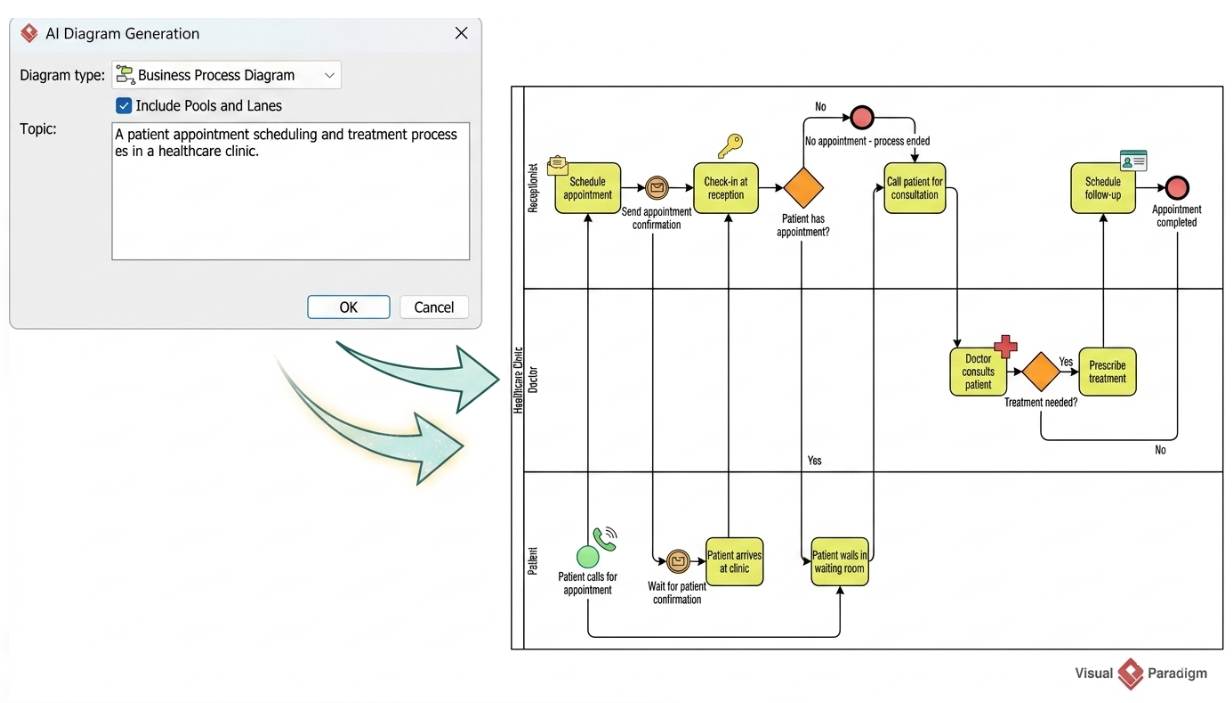
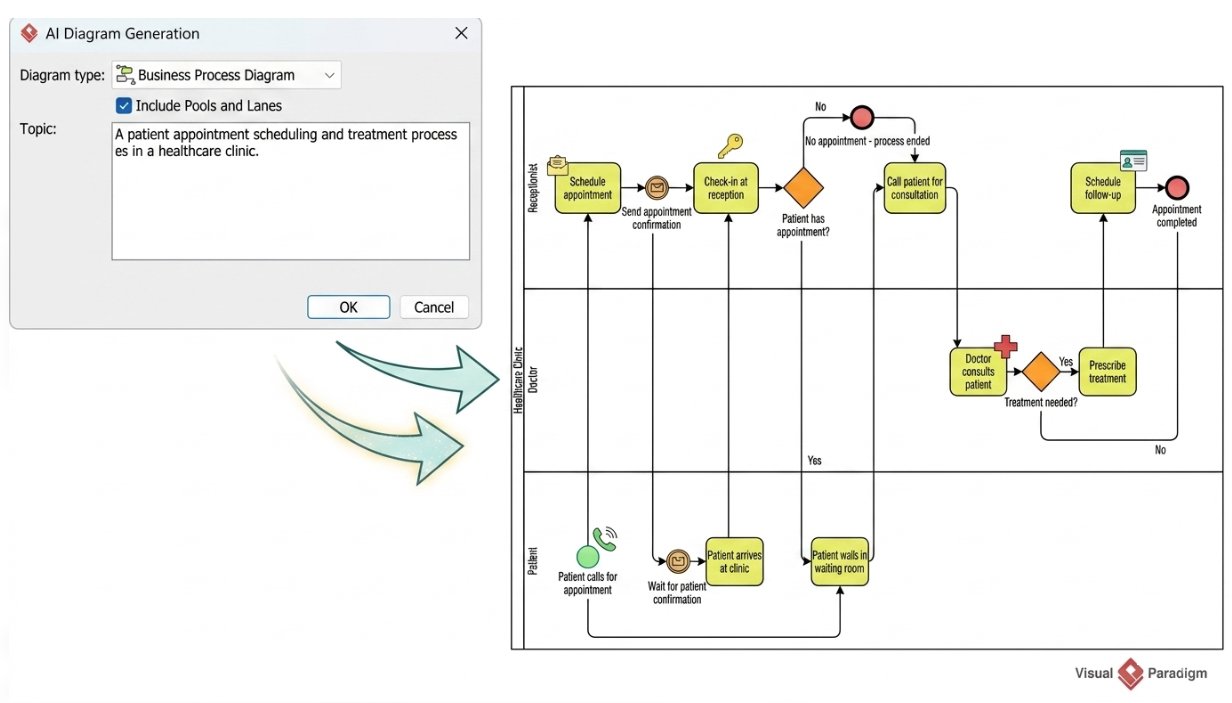
Visual Paradigm has evolved from a traditional modeling tool into a platform that integrates Artificial Intelligence to accelerate business process analysis. The core capability demonstrated here is the ability to transform a natural-language topic description into a structured BPMN (Business Process Model and Notation) diagram. This tutorial explores the system architecture behind this feature, the semantic rules required to generate accurate diagrams, and how to interpret the resulting workflow.
The Architecture of AI-Assisted Diagram Generation
The workflow shown in the interface illustrates a two-stage generation process. It begins with the Input Layer, where the user defines the scope, and moves to the Processing Layer, where the AI engine parses the intent.
1. The Prompt Configuration
Before the diagram is rendered, the system requires specific parameters to define the “Pools” (Organizations) and “Lanes” (Departments/Actors). In the provided interface, the user selects Business Process Diagram as the Diagram type.
Crucially, the Include Pools and Lanes checkbox is enabled. This setting tells the AI to not just draw a linear flow, but to infer the organizational structure of the process. Without this, the AI might generate a flat list of activities rather than a structured swimlane diagram.
2. The Semantic Input
The “Topic” field contains the prompt: “A patient appointment scheduling and treatment process in a healthcare clinic.” This serves as the seed data. The AI engine analyzes this sentence to extract:
- Actors: The terms “patient,” “receptionist,” and “doctor” are implicitly defined by the context of “healthcare clinic.”
- Scope: The process covers the lifecycle from “scheduling” to “treatment.”
- Entities: Keywords like “appointment” and “treatment” define the data objects involved.
Deconstructing the Generated Workflow
The output diagram represents a standard BPMN 2.0 execution path. It effectively breaks down the narrative prompt into atomic tasks and decision points. Let’s trace the logic flow shown in the generated model.
Phase 1: Initiation and Scheduling
The process begins with the Patient lane. The trigger event is “Patient calls for appointment.” This activity is initiated by the patient but requires immediate validation by the Receptionist.
The flow moves to the Receptionist lane, where the Schedule appointment task occurs. This triggers a notification event (the envelope icon) to send a confirmation to the patient. This illustrates a cross-lane interaction where one actor triggers a status change for another.
Phase 2: Arrival and Validation
The process moves to the physical clinic. The patient performs the task Patient arrives at clinic, followed by Check-in at reception.
At this point, a Gateway (Decision) is encountered: “Patient has appointment?” This is a critical control point in the architecture. The AI has correctly inferred that a check-in is not valid without a pre-existing appointment. If the answer is “No,” the process terminates immediately via the red circle end event labeled “No appointment – process ended.”
Phase 3: The Medical Consultation
If the appointment exists, the process transitions to the Doctor lane. The flow includes a Call patient for consultation activity. Once the patient is called, the core medical event Doctor consults patient takes place.
Following the consultation, the system presents a second decision gateway: “Treatment needed?”
- Yes Path: The flow proceeds to Prescribe treatment.
- No Path: If no treatment is required, the flow bypasses the prescription step.
Phase 4: Termination
Regardless of whether treatment was prescribed, the process converges at the final activity: Schedule follow-up. This leads to the final End Event, “Appointment completed,” signifying the successful closure of the process cycle.
Best Practices for AI Modeling
When using AI to generate process models, the quality of the output is directly proportional to the clarity of the input. The AI acts as a draftsman, not an analyst. It can infer logical structures (like the check-in gate), but it cannot know the specific business rules of your organization.
To ensure high-fidelity results:
- Be Explicit about Actors: Always mention the roles (e.g., “Patient,” “Manager”) in the prompt so the AI creates the correct Lanes.
- Define Exception Paths: AI often defaults to the “Happy Path” (the ideal scenario). You must explicitly state what happens on errors (e.g., “If the item is out of stock, cancel the order”).
- Validate Semantics: The generated diagram is a prototype. You must manually verify that the decision gateways (diamonds) cover all logical outcomes and that no paths lead to dead ends.

 English
 Arabic
 Chinese (Simplified)
 Dutch
 French
 German
 Italian
 Japanese
 Korean
 Portuguese
 Russian
 Spanish