


Business processes are the backbone of any successful organization, yet they are often difficult to communicate. Without a standardized language, misunderstandings occur between business analysts, managers, and developers. Business Process Model and Notation (BPMN) solves this problem by providing a universal visual language for describing business processes.
Imagine a flowchart that is not just for programmers, but is powerful enough to describe complex business logic, decision points, and communication steps. That is the essence of BPMN. It bridges the gap between business requirements and technical implementation.
The Anatomy of a BPMN Diagram
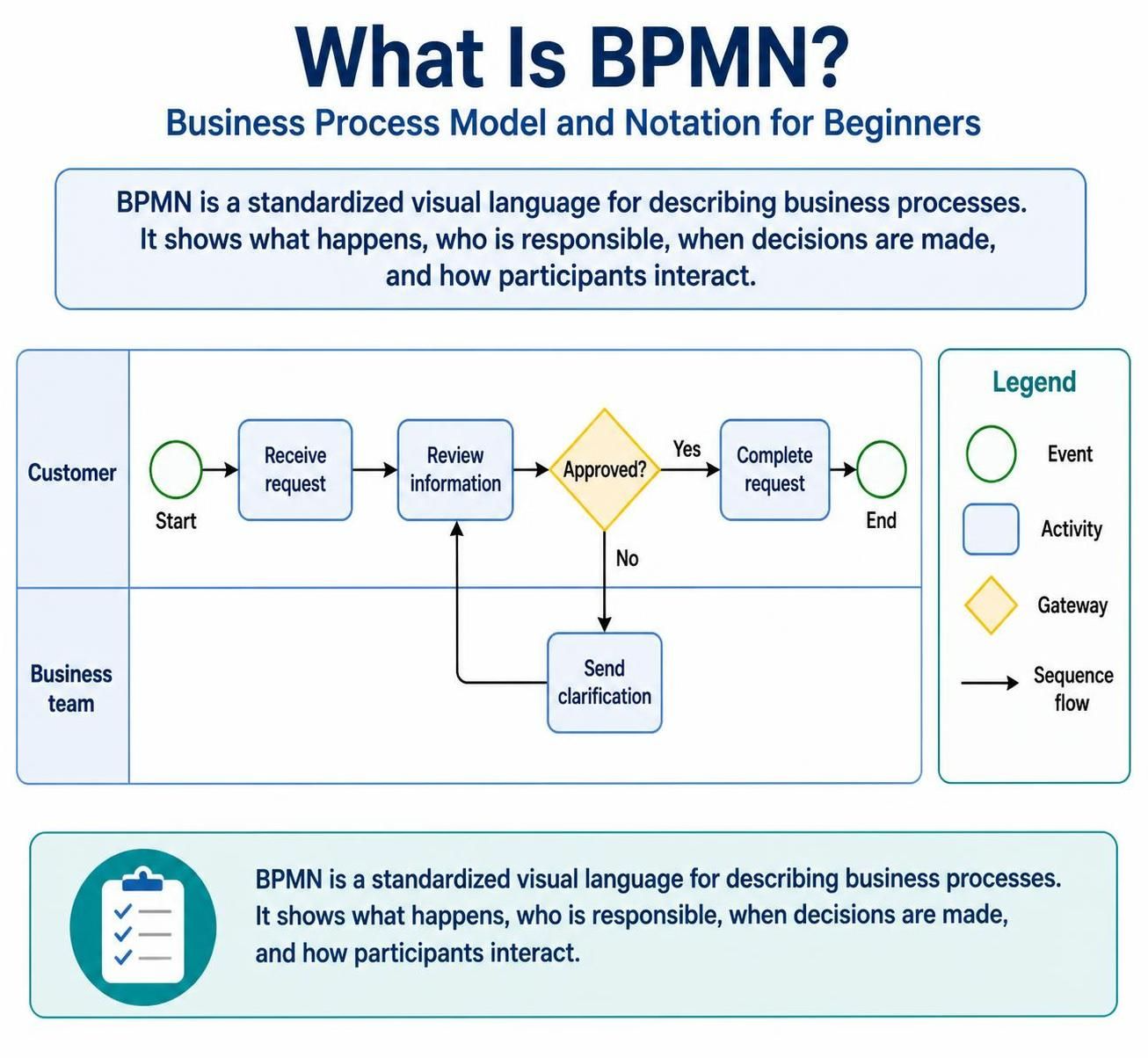
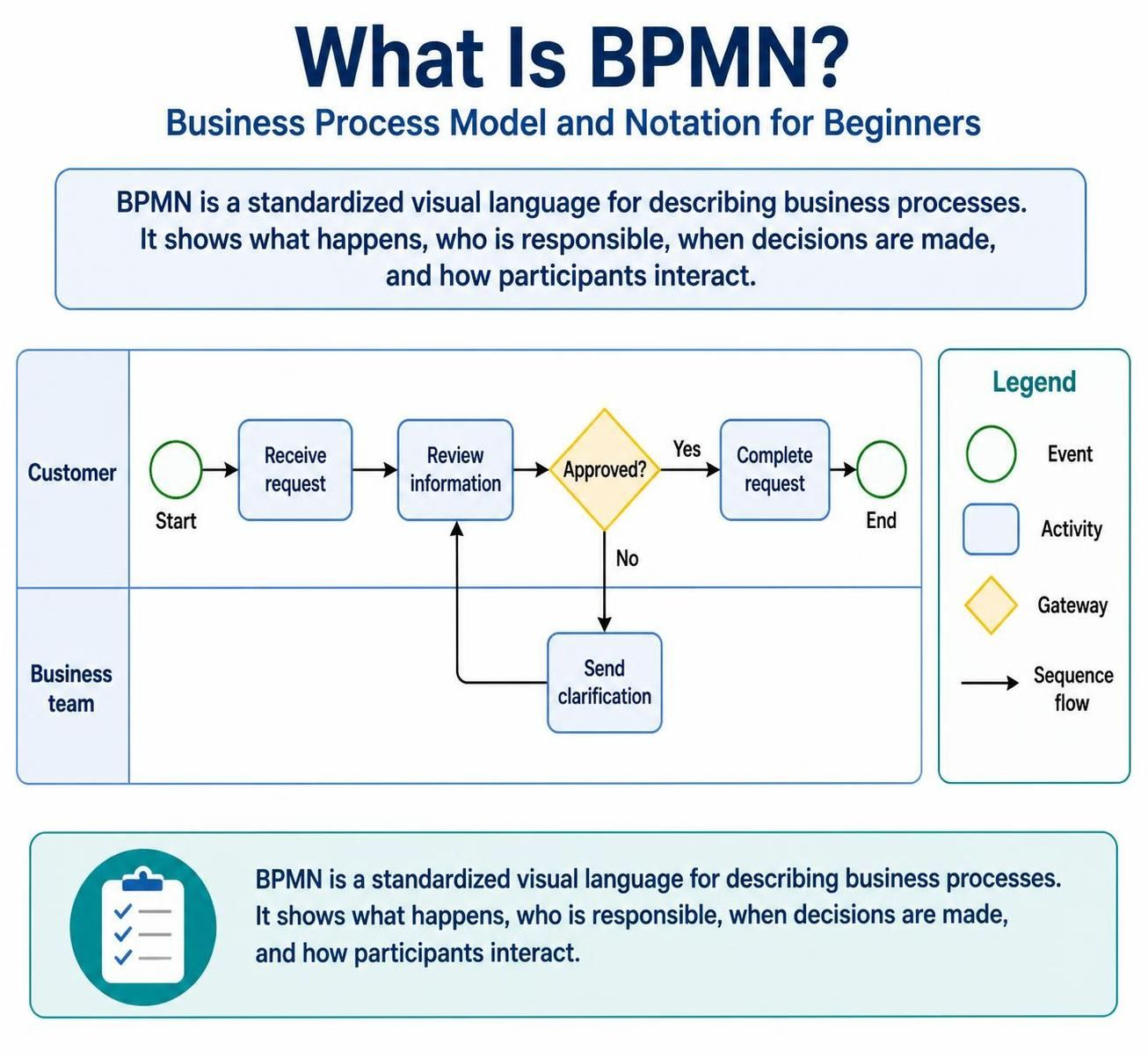
At its core, a BPMN diagram is a visual representation of a process. Unlike standard flowcharts, BPMN uses specific shapes and colors to convey precise meaning. Let’s break down the fundamental building blocks using a simple “Customer Request” scenario.
1. Events: The Triggers and Outcomes
Events are represented by circles. They mark the beginning, middle, or end of a process. Events do not consume time; they are instant occurrences that either trigger an activity or signify the completion of a process.
- Start Event: This is where the process begins. In our example, it is triggered when a customer initiates a request. It is typically depicted as a green circle.
- End Event: This marks the successful completion of the process. The process stops here once the request is finalized.
2. Activities: The Work Being Done
Activities are represented by rounded rectangles. These are the actual tasks or actions performed within the process. In the diagram, we see “Receive Request” and “Review Information.” These are the steps that consume time and effort.
3. Gateways: The Decision Points
Gateways are the logic controllers of the diagram, represented by diamonds. They determine the path the process takes next based on specific conditions. In the provided model, the yellow diamond labeled “Approved?” is a gateway.
If the answer is Yes, the process moves to completion. If the answer is No, the process loops back for clarification. This decision logic is crucial for modeling real-world scenarios where not everything goes according to plan.
4. Sequence Flow: The Order of Operations
The arrows connecting these shapes are called Sequence Flows. They indicate the order in which activities are performed. They are the “connective tissue” that turns a collection of shapes into a logical narrative.
Collaboration and Communication
One of the most powerful features of BPMN is its ability to show who is doing what. In the diagram, we see a clear separation between the Customer and the Business Team. This concept is known as a “Lane” (or Swimlane).
Lanes visually separate responsibilities. The process starts in the Customer lane, but when the business team needs to “Send clarification,” the flow moves to the Business Team lane. This ensures that stakeholders can immediately identify their role in the process without needing to read a dense paragraph of text.
Why Use BPMN?
Using a standardized notation like BPMN offers several distinct advantages:
- Clarity: It eliminates ambiguity. A diamond shape always means a decision, regardless of who reads the diagram.
- Consistency: It allows different departments to document processes using the same rules, making it easier to integrate systems.
- Communication: It provides a common language for non-technical stakeholders (like managers) to understand the logic that developers must build.
Conclusion
BPMN is more than just a drawing tool; it is a structured way of thinking about how work gets done. By breaking down complex workflows into Events, Activities, and Gateways, organizations can visualize their operations, identify bottlenecks, and streamline their efficiency. Whether you are onboarding a new employee or processing a customer order, BPMN provides the map you need to navigate the journey.

 English
 Arabic
 Chinese (Simplified)
 Dutch
 French
 German
 Italian
 Japanese
 Korean
 Portuguese
 Russian
 Spanish