


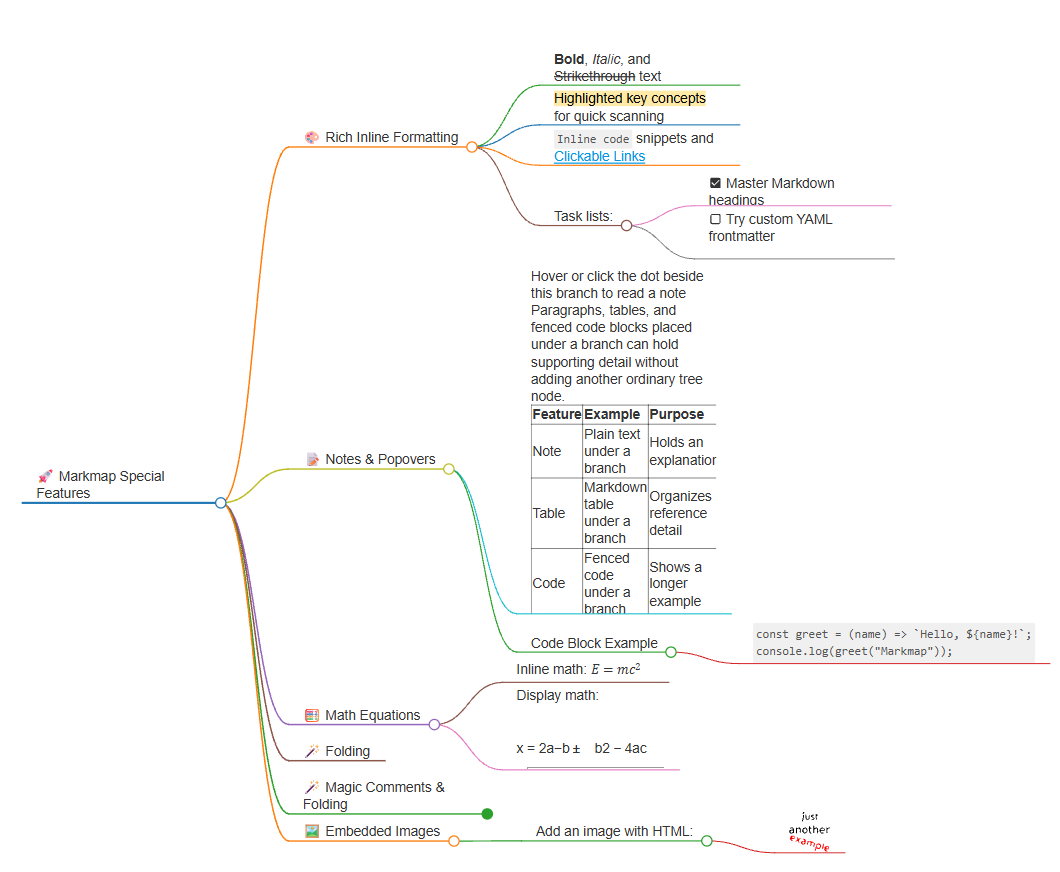
Visual Paradigm’s VPasCode tool offers a powerful bridge between static text documents and dynamic visual diagrams. Specifically, the integration with Markmap allows developers and technical writers to transform hierarchical Markdown content into interactive, collapsible mind maps. This tutorial explores the architecture behind this rendering engine, demonstrating how to structure data, apply styling, and utilize advanced directives to create professional-grade concept maps.
1. The Architecture of Markdown Rendering
The fundamental logic behind Markmap relies on the structural hierarchy of Markdown. Unlike a standard text editor where formatting is purely visual, Markmap interprets the text as a data tree. The rendering engine parses the document from the top down, assigning roles to different elements based on indentation and syntax.
Frontmatter and Configuration
Every Markmap diagram begins with a YAML block at the very top of the document. This is known as “frontmatter.” It acts as the configuration layer for the rendering engine, defining the visual theme and initial state of the diagram.
theme: Selects the color palette and font style.layout: Defines the arrangement of branches (e.g., tree, org chart).colorScheme: Overrides specific color assignments for branches.initialExpandLevel: Controls how many levels of the tree are visible when the map first loads.
Note: While these settings are standard, the exact behavior may vary depending on the specific version of the renderer or the host application.
Tree Structure Logic
The core of the visualization is the tree structure. The root of the map is the document title. Each level of heading (##) represents a top-level branch, while the content beneath it represents child nodes. Indentation is the critical factor here; inconsistent indentation will break the parent-child relationships, resulting in a disjointed diagram.
2. Rich Content and Inline Formatting
A static mind map is often insufficient for complex technical documentation. Markmap supports a rich set of inline formatting that enhances readability and information density.
Styling and Hierarchy
Text within a node can be styled to emphasize importance. You can use standard Markdown syntax for bold, italic, and strikethrough text. Furthermore, the tool supports highlight-style text (often using ==text== syntax), which is particularly useful for “quick scanning” of key concepts.
Task Lists and Links
The rendering engine can interpret task lists as interactive checkboxes. This allows you to turn a mind map into a project management tool. Additionally, standard Markdown links create clickable anchors, allowing the diagram to function as a navigation hub.
# Root Node
## Main Concept
- [x] Completed Task
- [ ] Pending Task
- **Bold** for emphasis
- *Italic* for distinction
- ==Highlight== to stand out
- [Clickable Link](https://example.com)
3. Supporting Material: Notes and Code
One of the most significant advantages of this architecture is the ability to associate supporting material with a branch without cluttering the visual hierarchy. This is achieved through the “Notes & Popovers” concept.
The Popover Mechanism
When you add a paragraph, table, or code block immediately beneath a branch node, the rendering engine treats this content as a “note.” In the visual interface, this usually manifests as a small dot or icon next to the node. Hovering over or clicking this element reveals the content in a popover or a side panel.
Code and Tables
This feature is invaluable for technical diagrams. You can attach a full code snippet or a structured reference table to a single node. This keeps the main map clean while providing deep technical details on demand.
## Feature Overview
This node holds the main concept.
4. Advanced Features: Math, Folding, and Images
For technical diagrams involving logic or mathematics, Markmap provides specialized rendering engines.
Mathematical Equations
Math support is enabled via standard LaTeX syntax. The renderer must be configured to support MathJax or KaTeX. You can use inline math (e.g., $E=mc^2$) or display-style equations. If the renderer does not support this feature, the dollar signs may appear as plain text.
Folding Directives
Controlling the view is essential for large diagrams. Markmap supports folding directives via HTML comments. The syntax <!-- markmap: fold --> forces a specific branch to start in a collapsed state. This is a powerful tool for managing cognitive load in complex maps.
Embedded Images
Finally, the engine supports direct HTML image tags. It is best practice to use direct image URLs (assets) rather than home-page links to ensure reliability. The renderer parses the <img> tag to display dimensions and alt text within the branch.
Conclusion
By mastering the interplay between Markdown syntax, YAML configuration, and HTML directives, you can create sophisticated, interactive diagrams using VPasCode. This system architecture allows you to maintain a single source of truth (your text file) while generating multiple visual representations for different audiences.

 English
 Arabic
 Chinese (Simplified)
 Dutch
 French
 German
 Italian
 Japanese
 Korean
 Portuguese
 Russian
 Spanish