


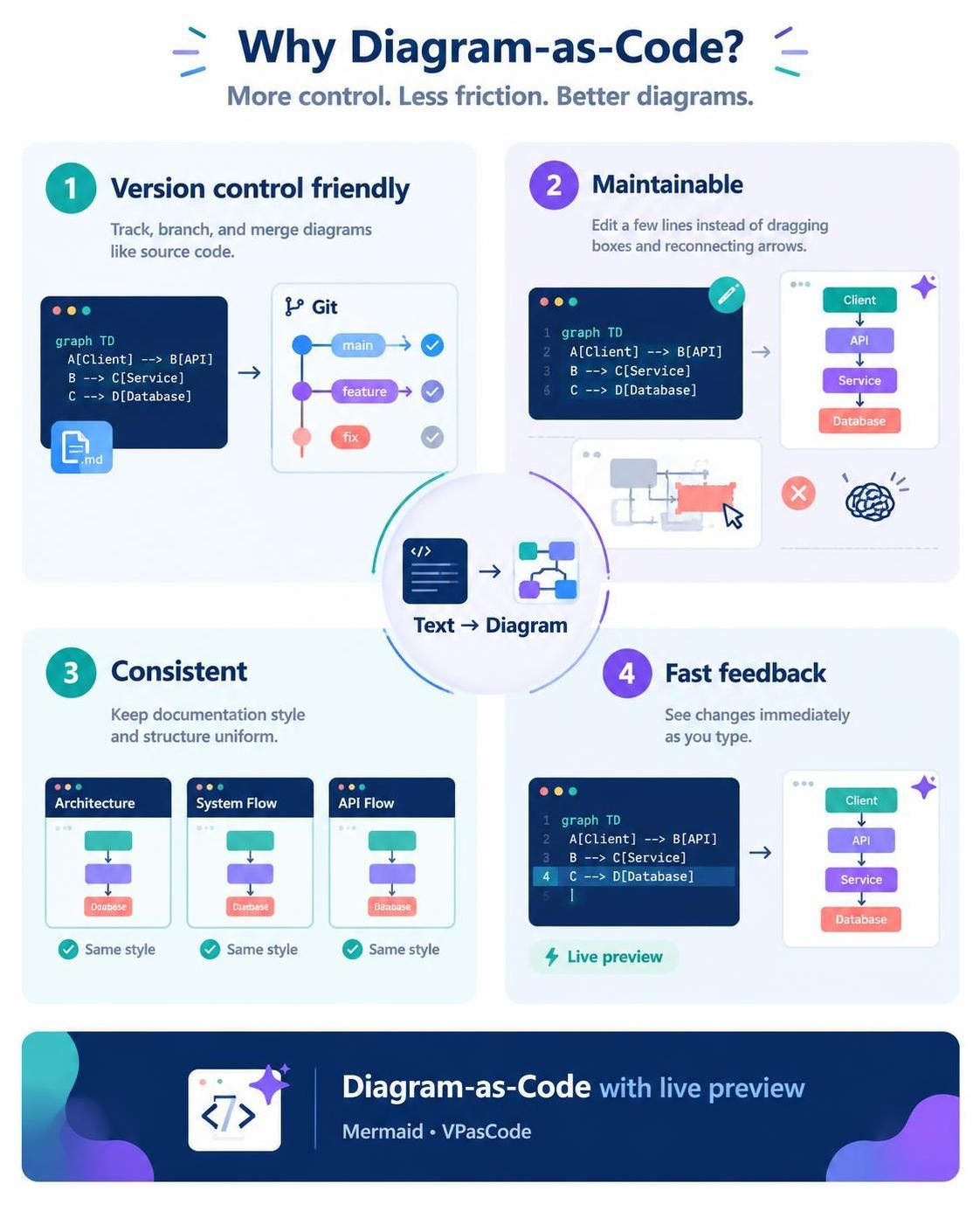
In the era of DevOps and Agile development, documentation has often lagged behind the speed of code. Traditionally, architects and developers relied on GUI-based drawing tools where diagrams were static images. If you needed to change a single connection or update a label, you had to manually drag and drop shapes, often breaking the layout in the process. This friction led to “documentation rot,” where diagrams became outdated shortly after they were created.
The solution is Diagram-as-Code. This methodology treats visual diagrams not as static images, but as text files—just like your source code. This shift is transforming how technical teams collaborate, document, and maintain their system architectures.
1. Version Control Friendly: Diagrams as Source Code
The most significant advantage of Diagram-as-Code is its compatibility with version control systems like Git. Because diagrams are written in plain text, they can be committed to a repository, tracked, and managed just like your application code.
- Commit History: Every change to a diagram is recorded. You can see exactly who changed a node, when it happened, and why, allowing for a clear audit trail of architectural decisions.
- Branching and Merging: You can work on a “feature” branch of your documentation. If you decide to refactor a database schema, you can merge those diagram changes into your main branch, resolving conflicts just as you would with code.
- Collaboration: Teams can review changes to architecture via Pull Requests (or Merge Requests), ensuring that documentation updates go through the same quality gate as the software itself.
2. Maintainable: Edit Text, Not Shapes
Maintaining a diagram in a graphical user interface (GUI) is often a nightmare of resizing boxes and reconnecting arrows to maintain alignment. In a text-based approach, maintenance is streamlined.
When you need to update a system component, you simply edit the corresponding lines of text. The rendering engine (such as Mermaid or Graphviz) automatically recalculates the layout and positions the elements. This means you never lose the visual integrity of the diagram while making updates. It shifts the cognitive load from “drawing” to “describing,” which is often faster and less error-prone.
3. Consistency: Enforcing Standards via Code
One of the challenges in large organizations is ensuring that documentation looks uniform across different teams and projects. GUI tools often rely on manual formatting, leading to a mix of fonts, colors, and alignment styles.
Diagram-as-Code enforces consistency through style definitions. When you use a tool like VPasCode with Mermaid, you define a global style that applies to every node. Whether you are documenting the Architecture, the System Flow, or the API Flow, the visual language remains identical. This uniformity builds trust with your audience and makes your documentation look professional and cohesive.
4. Fast Feedback: The Live Preview Workflow
The gap between typing and seeing a result is the enemy of productivity. Modern tools have bridged this gap with Live Preview editors. As you type the text definition of your diagram, the system renders the visual representation instantly.
This immediate feedback loop allows you to:
- Iterate rapidly on complex flows without waiting for a render cycle.
- Experiment with different layouts or configurations without fear of breaking the file.
- Focus on the logical structure of the system rather than the aesthetic placement of boxes.
Workflow Overview
The workflow transforms the traditional “Text → Diagram” concept. You write code (text), the tool parses the syntax rules (like Mermaid or Graphviz), and the engine generates the visual output. This process is the backbone of modern documentation tools like VPasCode, enabling teams to generate diagrams from code and even leverage AI to generate boilerplate code for standard patterns.
Conclusion
Adopting Diagram-as-Code is not just about changing tools; it is about changing the culture of documentation. By treating diagrams as code, teams gain the power of version control, the ease of maintainability, and the speed of live editing. With tools like VPasCode and the integration of AI generation, the barrier to creating high-quality, maintainable architectural diagrams has never been lower.

 English
 Arabic
 Chinese (Simplified)
 Dutch
 French
 German
 Italian
 Japanese
 Korean
 Portuguese
 Russian
 Spanish