


In the previous article, we introduced relationships in ArchiMate. Relationships define how components of a system work, how they flow, how they influence each other, and define their positions within the architecture model.
In this article, we will begin discussing what these components actually are, how they are represented, and how these relationships combine them within viewpoints.
Elements
ArchiMate defines three fundamental core elements: Passive Element, Behavior Element, and Active Element.
Active elements (Active Structure) use certain types of behaviors to access or act upon passive elements. Passive elements can be databases, files, or other repositories. Passive elements do nothing other than provide static elements.
Behavior elements describe actions taken to accomplish certain tasks. This includes processes, functions, events, and more.
Active Structure elements are those that execute behaviors, such as actors, roles, or collaborations.
Layers in the ArchiMate3 Core Framework
The layered view provides a natural way to view service-oriented models. Higher layers use services provided by lower layers. ArchiMate distinguishes three main layers:
- Business Layer: Provides products and services to external customers, with its business processes carried out by business personnel and roles.
- Application Layer: Supports the business layer by implementing application services through (software) application components.
- Technology Layer: Requires applications to run, providing infrastructure services (such as processing, storage, and communication services) through computer and communication hardware and system software.
Two other concepts further guide the functional aspects of the system: services and interfaces. Services provide useful functions from the system to entities outside the system. Interfaces are structural elements used to make services available.
At a lower level, services can be provided through the interaction of two collaborative structural elements’ behaviors.
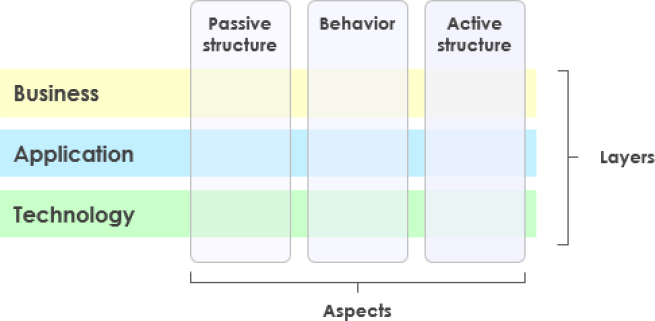
ArchiMate Core Framework Example
You can clearly see the unified approach across layers. In the example below, you can observe integration from different domains:
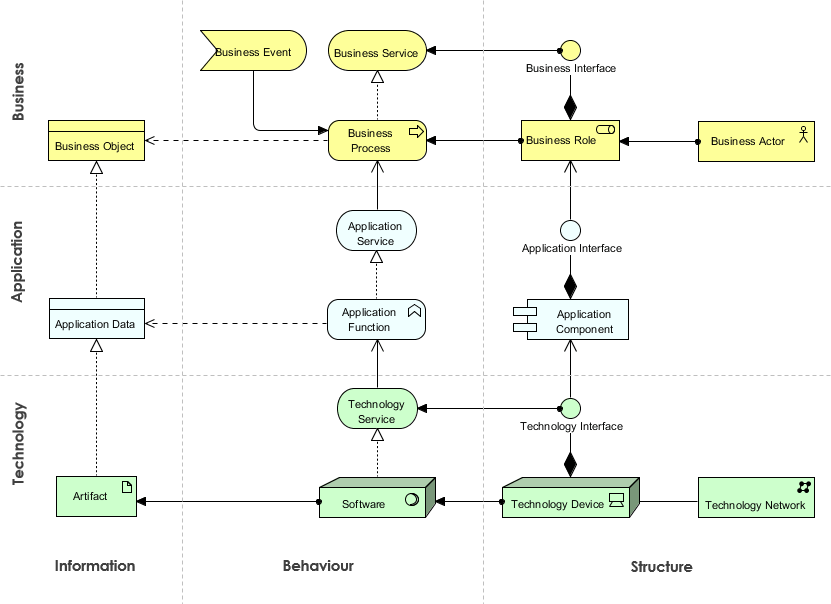
 This illustrates multiple layers and aspects of enterprise architecture in a single diagram. There are two types of layers: Specialized Layers and Service Layers.
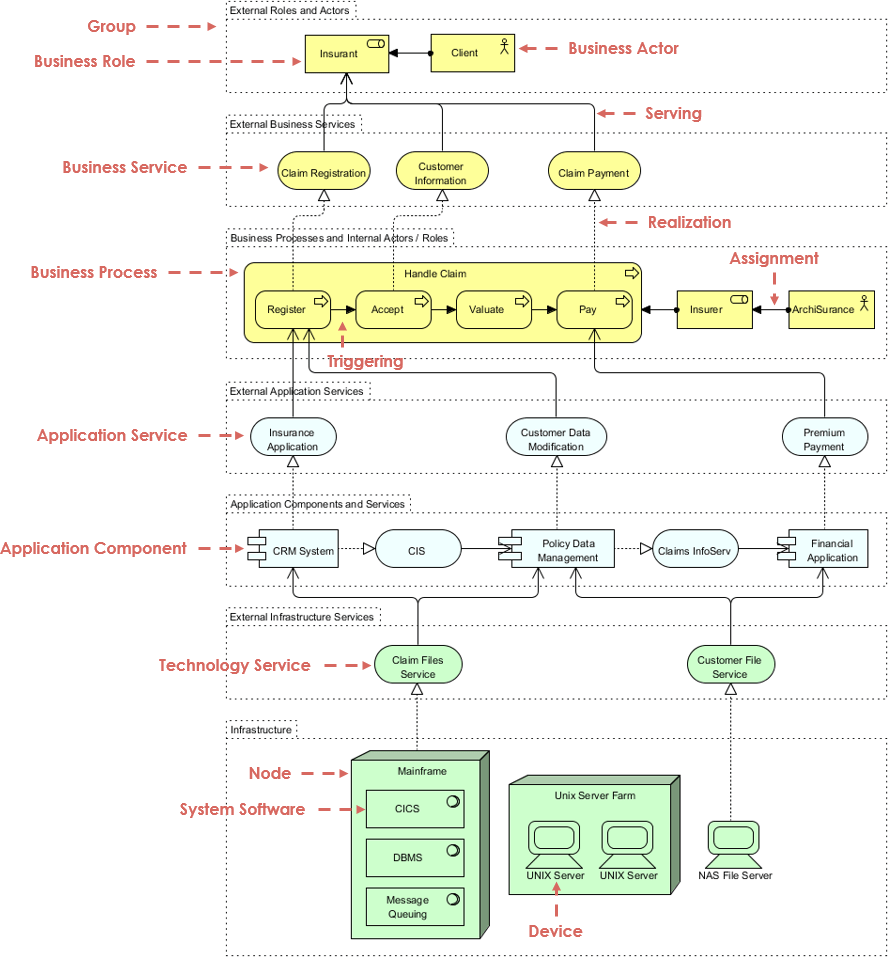
The underlying structural principle behind a fully layered view is that each specialized layer exposes a layer of services via an “implements” relationship, which are then “used” by the next specialized layer. Thus, we can easily separate the internal structure and organization of a specialized layer from its externally observable behavior, which is represented as the service layer implemented by that specialized layer.
The order, number, or nature of these layers is not fixed; however, a typical (more or less) complete and natural ArchiMate model should generally include the consecutive layers described in the example below.
However, this example is by no means prescriptive. The primary goal of the layered viewpoint is to provide an overview in a single diagram. Additionally, this viewpoint can be used to support impact or extension analysis of changes or service composition.
Next time…
In our next article, we will delve deeper into ArchiMate’s layers and framework.
Open Group Certified ArchiMate 3 Tool
ArchiMate 3 Diagrams
Use The Open Group ArchiMate® 3 to model enterprise architecture for business improvement projects. ArchiMate 3 provides a rich set of modeling symbols and concepts, supporting consistent modeling within and across domains. As a certified ArchiMate 3 enterprise architecture tool, Visual Paradigm supports all vocabulary, symbols, grammar, and semantics of the ArchiMate 3 visualization modeling language. Moreover, by integrating ArchiMate with TOGAF ADM, you can achieve consistent description and representation of architectural details throughout the transformation lifecycle.
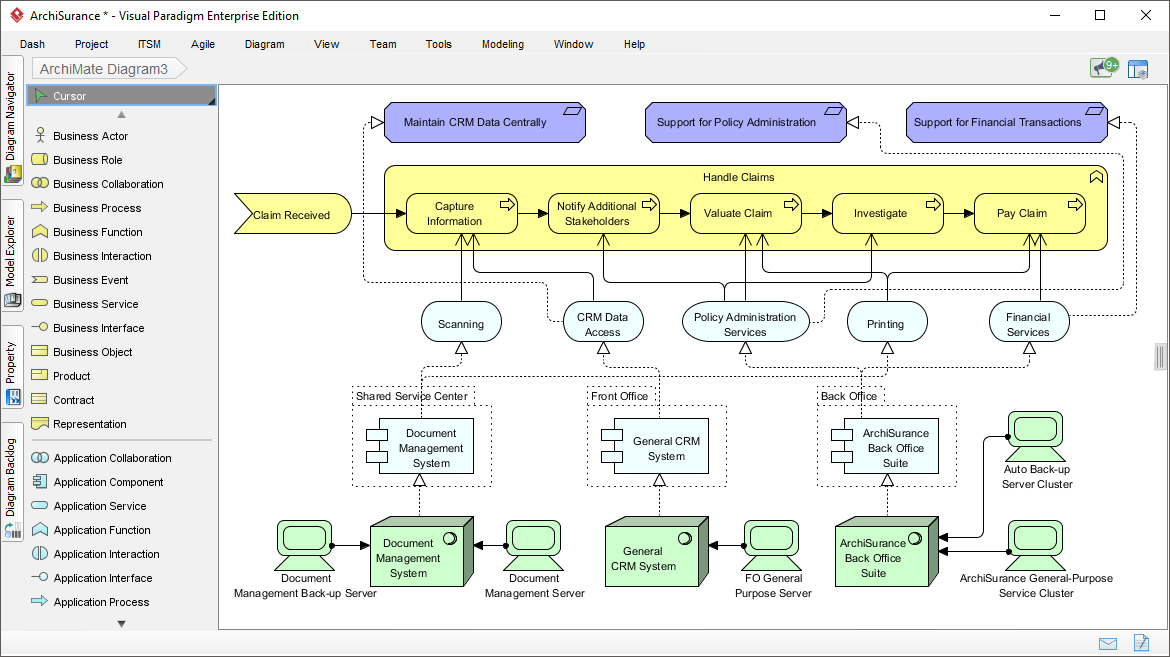
Certified ArchiMate 3 Tool
Visual Paradigm is a certified ArchiMate 3 enterprise architecture tool (Certificate from The Open Group), supporting all vocabulary, symbols, grammar, and semantics of all ArchiMate language elements and relationships. Additionally, Visual Paradigm supports ArchiMate viewpoint mechanisms, allowing users to create model views using any official viewpoint (examples) or user-defined viewpoints. Visual Paradigm also supports ArchiMate 3.0 model exchange file format.
Other ArchiMate Resources

 English
 Arabic
 Chinese (Simplified)
 Dutch
Dutch French
 German
 Italian
 Japanese
 Korean
 Portuguese
 Russian
 Spanish