


In the fast-paced world of system analysis, software engineering, and project management, the ability to quickly visualize complex ideas can make or break a project’s success. On December 3, 2025, Visual Paradigm announced a groundbreaking update to its AI Diagram Generator in the Desktop Professional edition. This enhancement introduces support for 11 new diagram types, including Data Flow Diagrams (DFDs) in multiple notations, Entity-Relationship Diagrams (ERDs) using Chen Notation, Mind Maps, SysML Internal Block Diagrams (IBDs), and several others. Powered by generative AI, this tool now allows users to transform textual descriptions into fully structured, professional-grade diagrams in seconds—revolutionizing how professionals approach modeling and design.
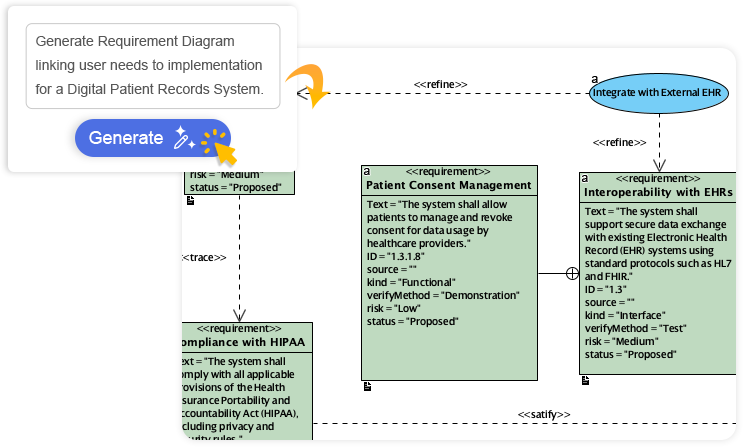
This update isn’t just about adding features; it’s about addressing real-world pain points in diverse industries. Let’s dive into what this means, explore examples, and discuss why, when, and who stands to gain the most value from this innovation.
The Challenge: Navigating Diverse Modeling Needs in a Complex World
Modern projects rarely fit into a single box. System analysts might start with a high-level conceptual overview, then drill down into data flows, entity relationships, and decision logic—all while ensuring compliance with industry standards. Traditionally, creating these diagrams involved manual labor: selecting shapes, applying notations like Chen for ERDs or Gane-Sarson for DFDs, and meticulously organizing elements. This process was not only time-consuming but also prone to errors, inconsistencies, and rework.
For instance, an engineer designing a new software system might spend hours on a SysML IBD to map internal components, only to realize mid-way that adjustments are needed based on stakeholder feedback. Similarly, project managers crafting migration roadmaps could waste valuable time aligning timelines and dependencies manually. In high-stakes environments like healthcare IT or aerospace engineering, such delays can escalate costs and risks.
Visual Paradigm’s update tackles these issues head-on by leveraging AI to automate the heavy lifting. The result? Faster iteration, reduced errors, and more time for strategic thinking.
What’s New: A Suite of 11 Advanced Diagram Types
The expanded AI Diagram Generator now supports a comprehensive range of diagram types, categorized by their primary applications:

- Data Analysis Diagrams:
- Data Flow Diagram (DFD): Visualizes how data moves through a system.
- ERD (Chen Notation): Models entities, attributes, and relationships in databases.
- Gane-Sarson DFD: A notation emphasizing processes and data stores.
- Yourdon & Coad DFD: Focuses on object-oriented data flows.
- Yourdon DeMarco DFD: Highlights processes, external entities, and data flows.
- Conceptual and Planning Diagrams:
- Mind Mapping: Organizes ideas hierarchically for brainstorming and planning.
- Decision Table: Structures complex logic and conditions for decision-making.
- Implementation Plan Diagram: Outlines steps, timelines, and resources for project execution.
- Migration Roadmap: Maps out transitions, such as system upgrades or data migrations.
- System Engineering Diagrams:
- SysML Internal Block Diagram (IBD): Depicts internal structures and connections in systems engineering.
- Object-Oriented Design Diagrams:
- CRC Card Diagram: Models classes, responsibilities, and collaborations in software design.
Users can customize outputs with AI options for tone, content type, and audience—ensuring diagrams are tailored for technical reports, executive summaries, or educational materials. This flexibility maintains standards compliance while adapting to specific needs.
Real-World Examples: From Concept to Visualization in Seconds
To illustrate the power of this tool, consider two examples provided by Visual Paradigm.
Example 1: Data Flow Diagram for an Online Food Ordering System
Imagine you’re analyzing an e-commerce platform for food delivery. By inputting a simple textual description like “Online Food Ordering System: Customers place orders, process payments, and interact with inventory systems,” the AI generates a complete DFD. This diagram shows data flows between entities such as the customer, ordering platform, payment gateway, and kitchen inventory. External entities (e.g., customers) are connected to processes (e.g., order validation), with data stores for menus and orders.
In practice, this could reveal bottlenecks, like delays in payment processing, allowing teams to optimize workflows early. The tool supports multiple notations—Gane-Sarson for a more structured look or Yourdon DeMarco for process-centric views—making it versatile for different methodologies.
Example 2: Chen Notation ERD for Music Streaming Subscription Services
For a database designer working on a music app, entering “Music Streaming Subscription Services” prompts the AI to create an ERD in Chen Notation. This includes entities like Users, Subscription Plans, Artists, Playlists, and Tracks, with relationships such as “subscribes to” (between Users and Plans) or “creates” (between Artists and Tracks). Cardinality indicators show one-to-many or many-to-many connections, ensuring a robust data model.
This instant generation helps identify missing relationships, like linking Playlists to Users for personalization, preventing costly database redesigns later.
These examples demonstrate how the AI handles complexity: It interprets context, applies correct notations, and produces editable diagrams ready for refinement in Visual Paradigm.
Why Use It: Unlocking Productivity and Precision
The core value lies in speed and accuracy. Manual diagram creation can take hours or days; AI reduces it to seconds, freeing professionals to focus on analysis rather than drafting. This boosts productivity by up to 80-90% in modeling tasks, based on similar AI tools in the industry.
Key benefits include:
- Consistency and Compliance: AI ensures diagrams adhere to standards (e.g., Chen Notation for ERDs), minimizing errors.
- Scalability: Handle large-scale projects without proportional time increases.
- Collaboration: Generate visuals quickly for meetings, reports, or stakeholder reviews.
- Innovation: Experiment with ideas iteratively, fostering creativity in design.
In an era of agile methodologies, this tool aligns perfectly with rapid prototyping and iterative development.
When to Use It: Ideal Scenarios for Maximum Impact
Deploy this feature during key project phases where visualization accelerates progress:
- Early Planning: Use Mind Maps or Migration Roadmaps at project kickoff to brainstorm and outline strategies.
- Analysis and Design: Generate DFDs or ERDs during requirements gathering to model processes and data.
- Decision-Making: Create Decision Tables when evaluating complex logic, such as in software testing or policy development.
- Engineering Reviews: Produce SysML IBDs or CRC Cards mid-project for system architecture validation.
- Documentation: Tailor diagrams for end-of-project reports, ensuring they’re audience-appropriate.
It’s especially valuable in time-sensitive situations, like tight deadlines in consulting or crisis response in IT operations.
Who Will Benefit: Targeting High-Value Users
This update is a game-changer for professionals across domains:
- System Analysts and Business Analysts: Quickly model data flows (DFDs) and entities (ERDs) to uncover insights in industries like finance, healthcare, or retail.
- Software Engineers and Developers: Use CRC Cards and SysML IBDs for object-oriented design and complex system architectures in tech firms or embedded systems.
- Project Managers: Leverage Mind Maps, Implementation Plans, and Migration Roadmaps for planning and execution in construction, IT migrations, or product launches.
- Consultants and Educators: Generate customized diagrams for client presentations or teaching, adapting to audiences like executives or students.
- Teams in Regulated Industries: Aerospace, automotive, or pharmaceuticals benefit from compliant, rigorous models that speed up compliance checks.
Anyone dealing with multifaceted projects—where switching between diagram types is common—will see high ROI through saved time and improved outcomes.
How to Get Started: Simple Access in Visual Paradigm Desktop
Accessing these features is straightforward in the Professional edition:
- Open the Tool menu.
- Select AI Diagram.
- Choose your diagram type from the dropdown.
- Enter a topic or description.
- Click OK to generate.
Update your application today to unlock this capability—no additional setup required.
Conclusion: Elevate Your Workflow with AI-Powered Modeling
Visual Paradigm’s latest AI expansion transforms diagram creation from a chore into a superpower. By supporting these 11 new types, it empowers users to visualize ideas instantly, maintain high standards, and drive projects forward with unprecedented efficiency. Whether you’re an analyst streamlining data models or an engineer architecting systems, this tool delivers tangible value in today’s demanding landscape.
Don’t wait—update Visual Paradigm Desktop and experience the future of modeling. For more details, visit the Visual Paradigm website or explore the in-app tutorials.
| Site Title | URL |
|---|---|
| Instantly Generate Complex Diagrams with Our New AI Diagram Generator | Visual Paradigm Product Updates – AI Diagram Generator Expansion |
| Generate ArchiMate Diagrams and Viewpoints Instantly with AI | Visual Paradigm AI ArchiMate Generator |
| AI Tree Diagram Maker – Visual Paradigm | AI Tree Diagram Maker for Mind Maps, WBS, Org Charts |
| Visual Paradigm AI: Advanced Software & Intelligent Apps | Visualize Complex Ideas with AI Tools |

 English
 Arabic
 Chinese (Simplified)
 Dutch
Dutch French
 German
 Italian
 Japanese
 Korean
 Portuguese
 Russian
 Spanish