


This guide explores AI-Powered Business Process Management (BPM), focusing on tools like Visual Paradigm’s platform that automate workflow discovery, design, visualization, and analysis. It restructures the topic using the 5W1H framework (Why, What, When, Who, How), with practical examples, a balanced review, suggestions, and tips/tricks.
Why Use AI-Powered Business Process Management?
Traditional BPM requires manual diagramming, documentation, and analysis, which consume time and lead to errors. AI-powered BPM addresses these challenges by automating tedious tasks and delivering deeper insights.
Key reasons to adopt it:
- Speed and Efficiency — Convert textual descriptions into structured workflows, diagrams, and reports in minutes.
- Clarity and Accessibility — Generate visual diagrams (e.g., swimlane charts) and narratives that make complex processes easy to understand for all team members.
- Data-Driven Insights — AI identifies bottlenecks, risks, and improvement opportunities automatically.
- Collaboration and Alignment — Create a single source of truth for teams, reducing miscommunication.
- Scalability — Handle simple or complex processes without proportional manual effort.
In short, it shifts focus from documentation to execution and continuous improvement.
What Is AI-Powered Business Process Management?
AI-Powered BPM integrates artificial intelligence into workflow management. It uses natural language processing (NLP) and generative AI to transform plain-text descriptions into structured outputs: process outlines, visual diagrams, KPIs, and analytical reports.
Core components (based on leading tools like Visual Paradigm):
- Process Discovery → AI parses descriptions to identify steps, stakeholders, and issues.
- Guided Design → Step-by-step wizards for building narratives and visuals.
- Visualization → Automatic generation of diagrams (e.g., swimlane or flowchart).
- Performance Tracking → Define and monitor KPIs.
- Insight Generation → Custom reports on risks, resources, implementation plans, and summaries.
The result: A comprehensive, interconnected process model updated in real-time.
When to Use AI-Powered BPM
Use it in these scenarios:
- Documenting inconsistent or undocumented processes (e.g., customer support workflows).
- Onboarding new team members or aligning cross-functional teams.
- Process improvement initiatives, such as identifying inefficiencies or risks.
- Project planning and scope definition.
- Preparing for audits, compliance, or digital transformation projects.
- Scaling operations where manual diagramming becomes a bottleneck.
It shines when processes involve multiple stakeholders or require frequent updates.
Who Benefits from AI-Powered BPM?
This tool targets roles and teams that manage or optimize workflows:
- Business Analysts — Quickly document and analyze processes without manual diagramming tools.
- Project Managers — Define clear scopes, timelines, and KPIs.
- Process Improvement Consultants — Identify risks and generate optimization recommendations.
- Operations Teams — Standardize repetitive processes like customer support or onboarding.
- Leadership and Executives — Gain high-level insights for decision-making.
It suits small teams needing quick wins or larger organizations handling complex workflows.
How Does AI-Powered BPM Work?
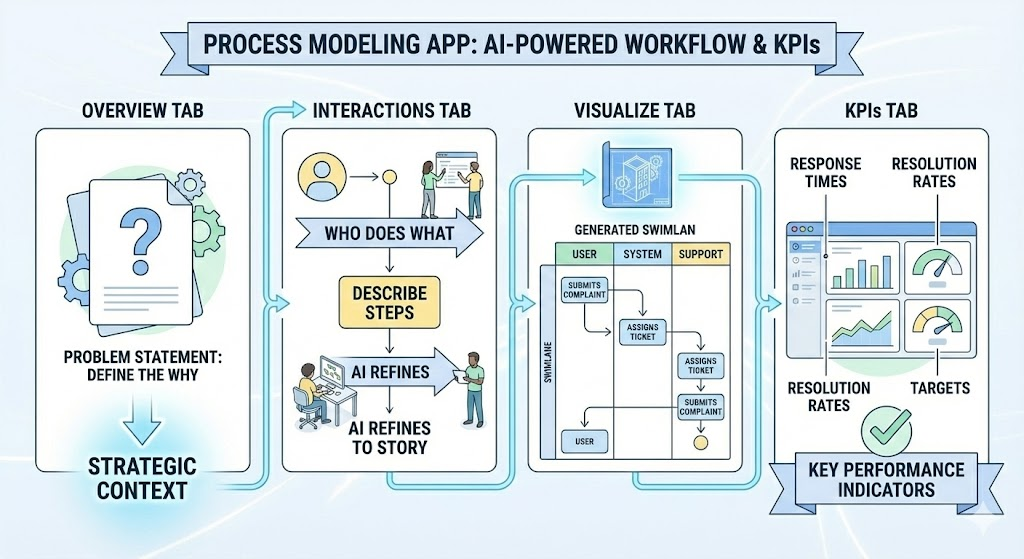
Most platforms follow a guided, tab-based workflow:
- Define the Overview — Input a problem statement or high-level description.
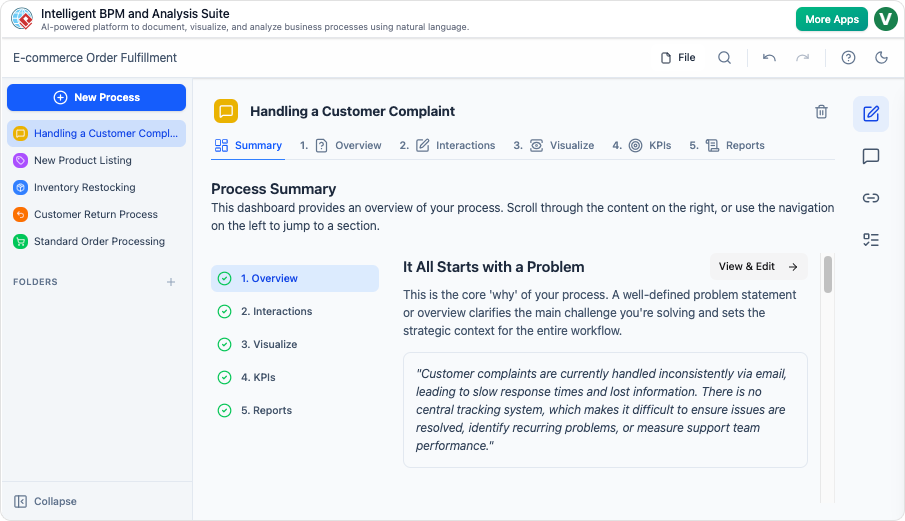
- Build Interactions — Write sequential steps in plain language; AI refines them into a narrative.
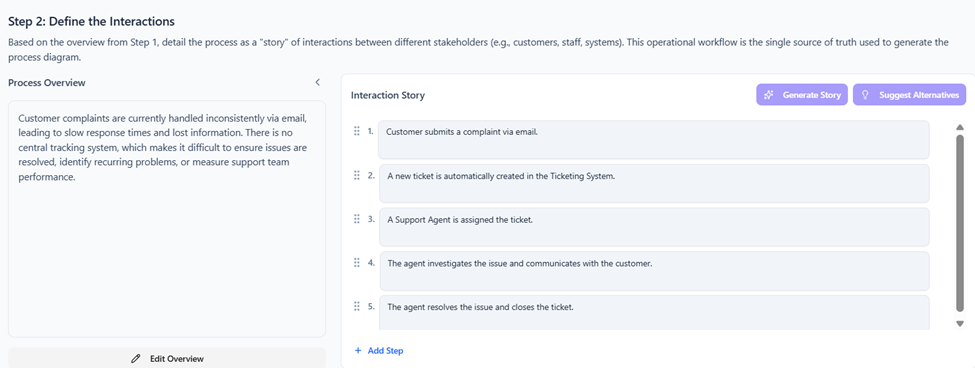
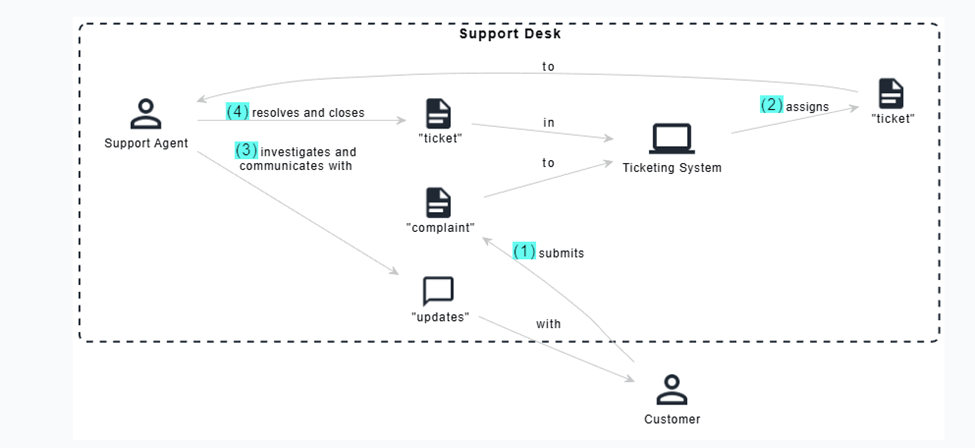
- Visualize — AI generates diagrams showing stakeholders and flows.
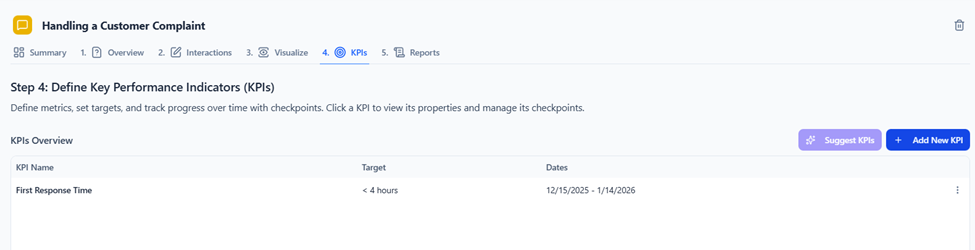
- Set KPIs — Define measurable targets (e.g., response time < 4 hours).
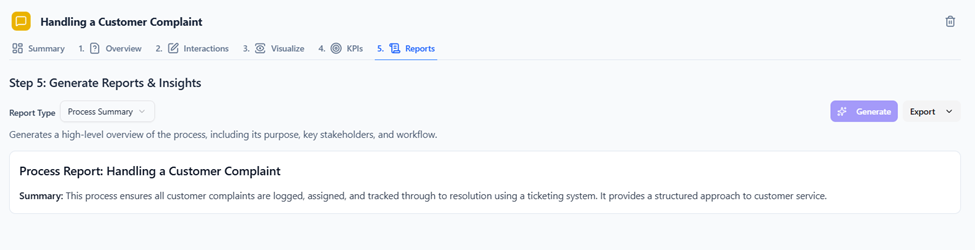
- Generate Reports — Select report types (summary, risk analysis, implementation plan); AI produces detailed outputs.
- Edit and Iterate — Changes in one area propagate across the model.
Exports integrate with tools like Microsoft Office for sharing.
Practical Example: Handling a Customer Complaint
Problem Statement (Overview): “Customer complaints are handled inconsistently via email, leading to slow responses, lost information, no central tracking, difficulty resolving issues, identifying recurring problems, and measuring performance.”
Interactions (Steps):
- Customer submits complaint via email or form.
- Support system creates a ticket.
- Agent is assigned.
- Agent investigates and communicates with the customer.
- Issue is resolved and ticket closed.
- Feedback collected (optional).
Visualization: AI generates diagrams showing stakeholders and flows, for Customer, Support Agent, Ticketing System, and Support Manager. Arrows show flows like “submits complaint” → “creates ticket” → “assigns to agent.”
KPIs:
- First Response Time: Target < 4 hours.
- Resolution Time: Target < 48 hours.
- Customer Satisfaction Score: Target > 90%.
Generated Reports:
- Risk Analysis → Highlights bottlenecks like delayed ticket assignment; suggests automation.
- Implementation Plan → Step-by-step rollout guide.
- Resource Planning → Estimates needed personnel and tools.
This example turns a vague issue into a actionable, visual process in minutes.
Review: Strengths and Limitations
Pros:
- Extremely fast for creating professional-grade diagrams and reports.
- Intuitive interface with real-time updates.
- Strong AI insights (e.g., risk identification) add real value.
- Excellent for collaboration and creating a “single source of truth.”
Cons/Limitations:
- Heavily dependent on input quality—vague descriptions yield vague outputs.
- May require iterations for complex or highly customized processes.
- Lacks mentioned integrations with external ticketing systems or advanced automation (e.g., direct execution).
- No public pricing information, which can complicate evaluation.
Overall Rating: 4.5/5 — Excellent for discovery, design, and analysis phases; best complemented with execution tools.
Suggestions and Recommendations
- Start with Visual Paradigm‘s free trial or “Try It Now” feature to test it hands-free.
- Pair it with execution-focused BPM tools (e.g., Camunda, Appian) if you need workflow automation beyond documentation.
- Consider alternatives like Process Street (checklist-focused) or Microsoft Power Automate (integration-heavy) based on your needs.
- Ideal for consulting firms or internal process excellence teams.
Tips and Tricks
- Start Broad — Begin with a high-level paragraph; let AI structure it before adding details.
- Refine Inputs — Use clear, sequential language in the Interactions tab for better diagrams.
- Customize Reports — Add instructions like “focus on risks” or “emphasize resource needs” for targeted outputs.
- Iterate Visually — Use the “View & Edit” mode to drag/drop in diagrams—changes sync everywhere.
- Export Often — Save diagrams and reports for presentations or stakeholder reviews.
- Handle Complexity — Break large processes into sub-processes rather than one massive description.
- Troubleshoot Diagrams — If visuals are off, simplify step descriptions or remove ambiguity.
AI-Powered BPM tools like this one make process management faster, smarter, and more accessible—transforming ideas into actionable, insight-rich workflows with minimal effort.

 English
 Arabic
 Chinese (Simplified)
 Dutch
Dutch French
 German
 Italian
 Japanese
 Korean
 Portuguese
 Russian
 Spanish