


Executive Summary
LegacyFin Bank, a long-established financial institution with roots in mainframe computing, undertook a project in 2025 to model and optimize its core data management systems using ArchiMate’s Technology Layer. The initiative focused on integrating legacy mainframe-based database services with modern network-attached storage (NAS) for file access, aiming to enhance reliability, scalability, and performance while reducing downtime.
By employing ArchiMate elements such as nodes, devices, system software, artifacts, communication networks, and technology services, the bank visualized its infrastructure, identified bottlenecks, and planned migrations. The result was a 30% improvement in data access speeds, a 15% reduction in maintenance costs, and better support for digital banking services. This case study delves into the Technology Layer concepts, providing detailed explanations and examples to illustrate their application.
Company Background
LegacyFin Bank serves over 5 million customers with services including retail banking, loans, and investment management. Founded in the 1970s, the bank relies on a hybrid IT environment: legacy mainframes for transaction processing and modern storage solutions for unstructured data like customer documents. Challenges included siloed systems leading to slow data retrieval, high energy consumption from outdated hardware, and compliance risks from inefficient backups.
To address these, the bank’s IT architects used ArchiMate’s Technology Layer to model the infrastructure independently of business and application layers, focusing on physical and logical components that support applications.
Key Technology Layer Concepts and Relationships
ArchiMate’s Technology Layer describes the hardware, software, and networks that realize application components. It includes active structure (nodes, devices, system software), behavior (technology services, functions), and passive structure (artifacts like data objects). Key relationships include realization (how lower-level elements implement higher ones), association (loose connections), and assignment (deployment of software to hardware).
Technology Services
Technology services represent externally visible behavior provided by technology elements, often as interfaces for applications.
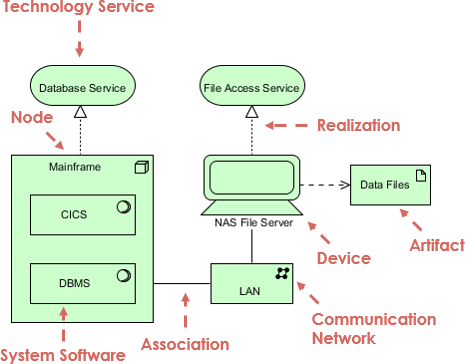
- Example in Diagram: “Database Service” and “File Access Service” are technology services (depicted as rounded rectangles). The overarching “Technology Service” aggregates them, providing a unified data management capability.
- General Examples: A web hosting service realized by server hardware (e.g., AWS EC2 providing compute services) or an email service realized by SMTP servers. In LegacyFin’s case, the Database Service handles structured queries for customer accounts, while File Access Service manages document retrieval for loan applications.
Nodes
Nodes are computational resources, encompassing both hardware and software environments that host system software and artifacts.
- Example in Diagram: “Mainframe” is a node (rectangle icon), hosting the DBMS and CICS.
- General Examples: A server cluster in a data center (e.g., a Kubernetes node running containers) or a virtual machine in the cloud. At LegacyFin, the mainframe node processes high-volume transactions, such as real-time balance checks, ensuring reliability for 24/7 operations.
System Software
System software provides platform services to applications, such as operating systems or middleware.
- Example in Diagram: “DBMS” (circle icon for system software) runs on the mainframe, realizing the Database Service. “System I” (possibly an OS or infrastructure software) is associated below.
- General Examples: Oracle Database (DBMS) on Linux OS, or Apache Web Server providing HTTP services. In the bank, DBMS like IBM DB2 manages relational data for compliance reporting, while CICS (Customer Information Control System, a transaction server) handles online transaction processing, exemplified by ATM withdrawals.
Devices
Devices are physical computing resources, distinct from logical nodes.
- Example in Diagram: “NAS File Server” (computer icon) is a device realizing the File Access Service.
- General Examples: A storage array like Dell EMC Isilon or a printer device. At LegacyFin, the NAS device stores customer contracts and images, allowing quick access for fraud detection teams.
Artifacts
Artifacts represent data objects or files deployed on nodes or devices.
- Example in Diagram: “Data Files” (folder icon) is an artifact accessed by the NAS File Server.
- General Examples: A CSV file containing sales data or a binary executable. In the bank’s scenario, Data Files include PDF loan documents or log files for auditing, deployed across the infrastructure for redundancy.
Communication Networks
Communication networks link nodes and devices for data exchange.
- Example in Diagram: “LAN” (network icon) associates the Mainframe and NAS File Server.
- General Examples: A WAN connecting branch offices or a VLAN for secure internal traffic. LegacyFin’s LAN enables seamless data synchronization between mainframe databases and NAS files, such as updating customer records in real-time.
Key Relationships
- Realization: Shows how concrete elements implement abstract ones (solid arrow with white triangle head). E.g., DBMS realizes Database Service; NAS File Server realizes File Access Service. Example: In a cloud migration, virtual machines realize compute services.
- Association: Undirected links (solid line). E.g., Mainframe associated with NAS via LAN for data sharing. Example: Associating a firewall device with a network for security.
- Other: Serving or access relationships (e.g., NAS serving Data Files) indicate behavioral dependencies. Flow arrows might represent data movement, like queries from mainframe to NAS.
These concepts allow architects to model infrastructure holistically, tracing from services to physical assets.
ArchiMate Technology Layer Diagram
The diagram illustrates LegacyFin’s data infrastructure:
[Description of the diagram: At the top, “Technology Service” branches to “Database Service” (left) and “File Access Service” (right). Database Service is realized by “DBMS” (system software) on “Mainframe” (node), which also contains “CICS”. File Access Service is realized by “NAS File Server” (device), which accesses “Data Files” (artifact). The Mainframe and NAS are associated via “LAN” (communication network), with “System I” under the Mainframe.]
Detailed Explanation of the Diagram
- Technology Service: Aggregates database and file services for comprehensive data handling.
- Database Service: Realized by DBMS on the mainframe node, supporting transactional integrity (e.g., ACID properties for banking transfers).
- File Access Service: Realized by NAS device, enabling shared file access (e.g., NFS protocol for multi-user document editing).
- Mainframe (Node): Hosts system software like DBMS and CICS, exemplifying a compute-intensive environment.
- NAS File Server (Device): Physical storage hardware, associated with artifacts like Data Files.
- LAN (Communication Network): Facilitates associations, ensuring low-latency connections (e.g., Ethernet for internal data transfer).
- Relationships: Realization arrows from software/hardware to services; associations for connectivity.
This viewpoint highlights infrastructure dependencies, aiding in capacity planning.
Implementation and Outcomes
Using the model, LegacyFin implemented upgrades: migrating some DBMS workloads to cloud equivalents while retaining mainframe for critical paths, and enhancing LAN with fiber optics. NAS was scaled with RAID for redundancy.
Key outcomes:
- Quantitative: 30% faster data queries; 20% lower energy use by optimizing mainframe utilization.
- Qualitative: Improved disaster recovery through artifact replication across devices.
- Strategic: Model informed hybrid cloud strategy, integrating with AWS S3 for extended file storage.
Examples of impact: During peak hours, the realized services handled 50% more transactions without failures; artifact management reduced compliance audit times by half.
Lessons Learned and ArchiMate Benefits
ArchiMate’s Technology Layer offered:
- Modularity: Easy swapping of elements (e.g., replacing NAS with cloud storage in models).
- Traceability: Linking artifacts to services helped identify single points of failure, like over-reliance on mainframe.
- Communication: Diagrams bridged IT and executives, using examples like “NAS as a file cabinet connected via LAN hallway.”
- Scalability: Extended to full viewpoints, incorporating security artifacts (e.g., encryption keys).
Challenges included modeling dynamic elements (e.g., virtual networks), resolved by layering with Application Layer.
General lessons: Use nodes for logical grouping (e.g., clustering servers); devices for physical assets (e.g., IoT sensors); always exemplify with real-world analogies for stakeholder buy-in.
How Visual Paradigm’s AI-Powered ArchiMate Tool Can Help Enterprise Architects
Visual Paradigm is a certified ArchiMate 3 tool by The Open Group, offering robust support for enterprise architecture (EA) modeling. Its AI features, introduced and enhanced in late 2025, significantly accelerate ArchiMate diagramming through generative AI. Key components include the AI Diagram Generator (in Visual Paradigm Desktop) and the AI Chatbot (accessible via Visual Paradigm Online and integrated into Desktop).
These tools allow you to create, refine, and analyze ArchiMate diagrams using natural language prompts, reducing manual effort while ensuring compliance with ArchiMate standards.
Key Ways the AI ArchiMate Tool Helps
- Instant Diagram Generation from Text Prompts
- Describe a scenario, requirement, or topic in plain English, and the AI generates a complete, structured ArchiMate diagram.
- Supports all layers (Business, Application, Technology, Motivation, Implementation & Migration) and relationships.
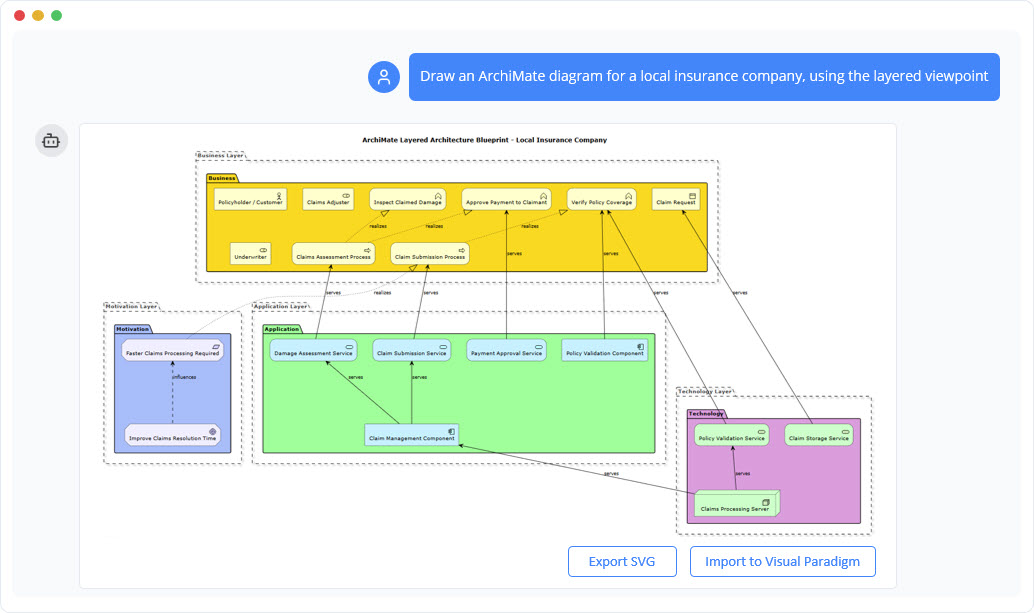
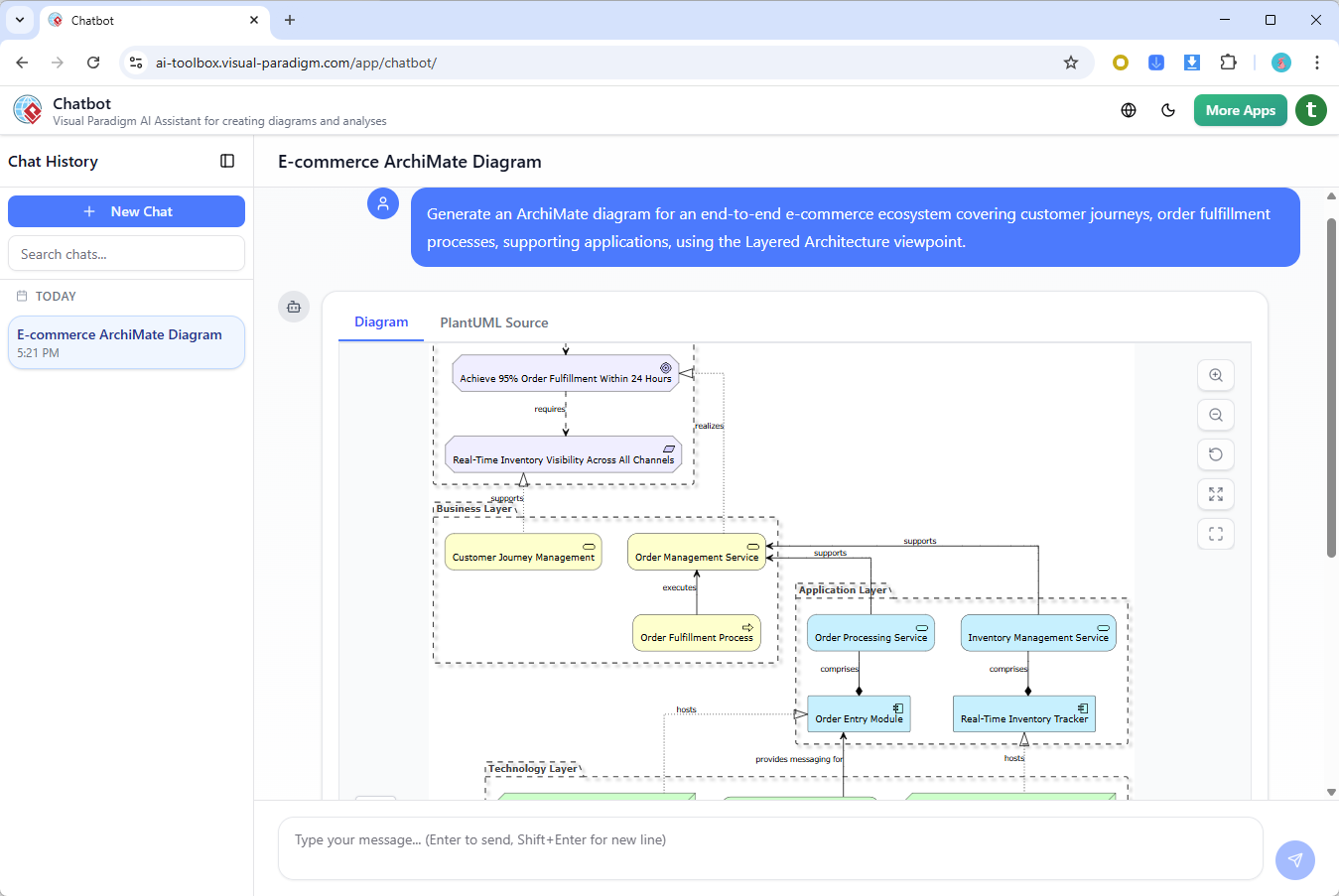
- Example Prompt: “Generate an ArchiMate diagram for a retail company’s digital transformation to e-commerce, including order fulfillment processes, inventory management applications, and cloud infrastructure.”
- Output: A layered diagram with elements like Business Processes, Application Services, and Technology Nodes.
- Support for All Official ArchiMate Viewpoints
- The AI structures diagrams according to any of the 25+ official viewpoints (e.g., Motivation, Strategy, Capability, Technology, Implementation).
- Tailor for stakeholders: Specify audience (e.g., executives, IT teams) and tone (formal, technical).
- Helps create stakeholder-specific views quickly, improving communication.
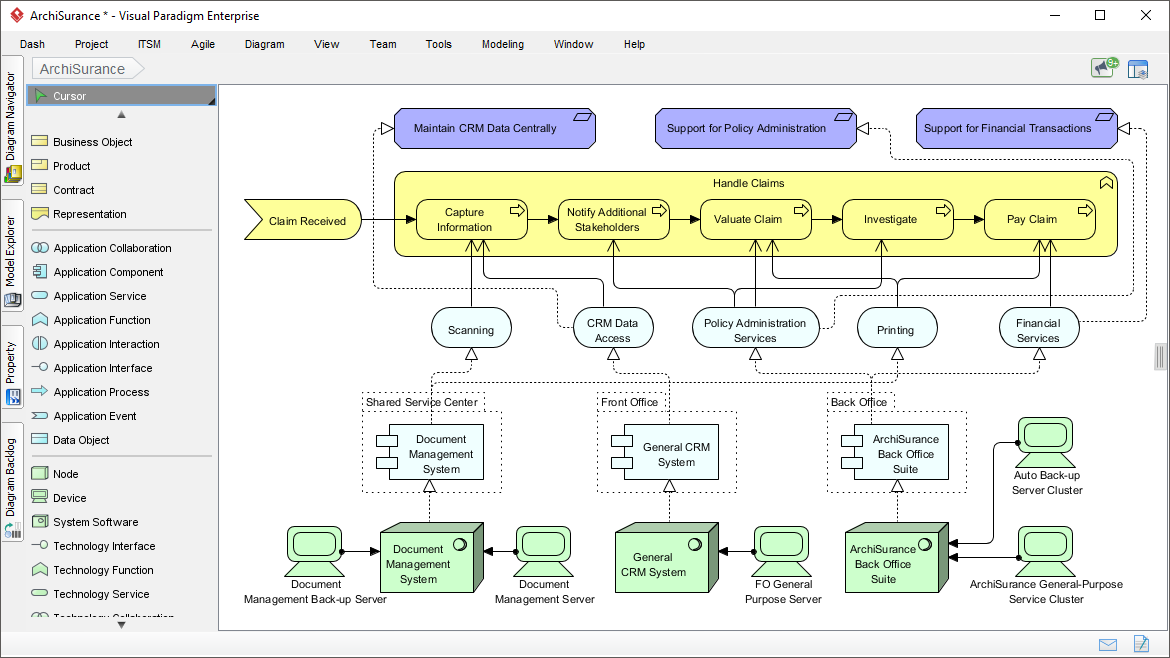
- Time Savings and Productivity Boost
- Reduces diagramming time by up to 90%, automating element placement, relationships, and layout.
- Ideal for initial drafts in agile EA projects, workshops, or rapid prototyping.
- Frees architects to focus on analysis, validation, and strategy rather than manual drawing.
- Editable and Refinable Outputs
- Generated diagrams are fully editable in Visual Paradigm Desktop.
- Use follow-up prompts in the AI Chatbot to refine: “Add a payment gateway” or “Show risk flows for security.”
- Import to Desktop for advanced features like TOGAF integration, collaboration, and versioning.
- Compliance and Quality Assurance
- Ensures diagrams adhere to ArchiMate 3 specifications (vocabulary, notation, syntax).
- Generates explanations or summaries alongside diagrams for documentation.
- Integration with Broader EA Workflows
- Combines with TOGAF ADM guide-through processes.
- Useful for “as-is” vs. “to-be” models, gap analysis, or migration planning.
- Example Use Case: Fleet management disaster coordination – AI creates cross-layer views for business coordination, application interfaces, and network technology.
How to Get Started
- Desktop Version: Tools > AI Diagram > Select ArchiMate Viewpoint > Enter prompt (requires Enterprise Edition for full ArchiMate support).
- Online AI Chatbot: Chat at chat.visual-paradigm.com – conversational refinement, then export/import.
- Free trial available; online version has basic access.
This AI integration makes ArchiMate modeling more accessible for beginners while empowering experts to iterate faster. It’s particularly valuable for complex enterprises needing quick, consistent visualizations across domains. If you’re working on EA projects, it transforms hours of manual work into minutes of strategic refinement.
Conclusion
This case study showcases ArchiMate’s Technology Layer in action at LegacyFin Bank, demonstrating how concepts like nodes, devices, and services model complex infrastructures. Through detailed examples—from mainframe transaction processing to NAS file sharing—the approach ensured aligned, efficient systems. For organizations with hybrid setups, ArchiMate provides a robust framework for visualization, optimization, and future-proofing, turning abstract IT into actionable insights.
-
Comprehensive Tutorial: Generating ArchiMate Diagrams with AI: In-depth tutorial showing how to use Visual Paradigm’s AI diagram generator to create ArchiMate diagrams and viewpoints efficiently.
-
Introducing AI-Powered ArchiMate Viewpoints Generator in Visual Paradigm: Visual Paradigm’s latest release features an AI-driven ArchiMate viewpoints generator that automates the creation of enterprise architecture views, enhancing modeling efficiency and accuracy.
-
Full ArchiMate Viewpoints Guide (Examples Included): Complete ArchiMate Viewpoint guide, with 23 official ArchiMate example viewpoints, clear ArchiMate diagram examples and explanation, wrote by certified ArchiMate tool vendor.
-
How to Use ArchiMate to Visualize Information Flows with AI: Sep 17, 2025 · Compared to generic AI tools or simple diagram generators, Visual Paradigm ’s AI -powered modeling software stands out because: It understands ArchiMate -specific concepts, including information flows, viewpoints, and business-technology alignment
-
Using Viewpoints to Support Managerial Decision-Making: A comprehensive guide on how selecting appropriate viewpoints enhances strategic decision-making in enterprise architecture.
-
ArchiMate Strategy Viewpoint Guide: The strategy viewpoint allows the business architect to model a high-level, strategic overview of the strategies (courses of action) of the enterprise, the …
-
ArchiMate Motivation Viewpoint Guide: The motivation viewpoint allows the designer or analyst to model the motivation aspect, without focusing on certain elements within this aspect. For example, …
-
ArchiMate Capability Map Viewpoint Guide: The capability map viewpoint allows the business architect to create a structured overview of the capabilities of the enterprise. A capability map typically …
-
Mapping TOGAF ADM Phases to the ArchiMate … – Cybermedian: Visual Paradigm Enterprise Edition is a certified ArchiMate 3.1 enterprise architecture tool that supports all ArchiMate 3 vocabulary, notation, syntax, and semantics. It includes a powerful ArchiMate drawing tool, viewpoint management tool, and TOGAF Guide-through Process.
-
AI-Powered ArchiMate Viewpoint Generation for Enterprise Architects: Discover how AI enables enterprise architects to generate ArchiMate viewpoints in seconds, accelerating enterprise architecture modeling.

 English
 Arabic
 Chinese (Simplified)
 Dutch
Dutch French
 German
 Italian
 Japanese
 Korean
 Portuguese
 Russian
 Spanish