Introduction to UML Sequence Diagrams
A UML (Unified Modeling Language) sequence diagram is a dynamic interaction diagram that maps out how objects or components in a system exchange messages over time. It captures the time-ordered sequence of interactions, making it ideal for modeling complex workflows, system behaviors, and real-time communication patterns in software development.
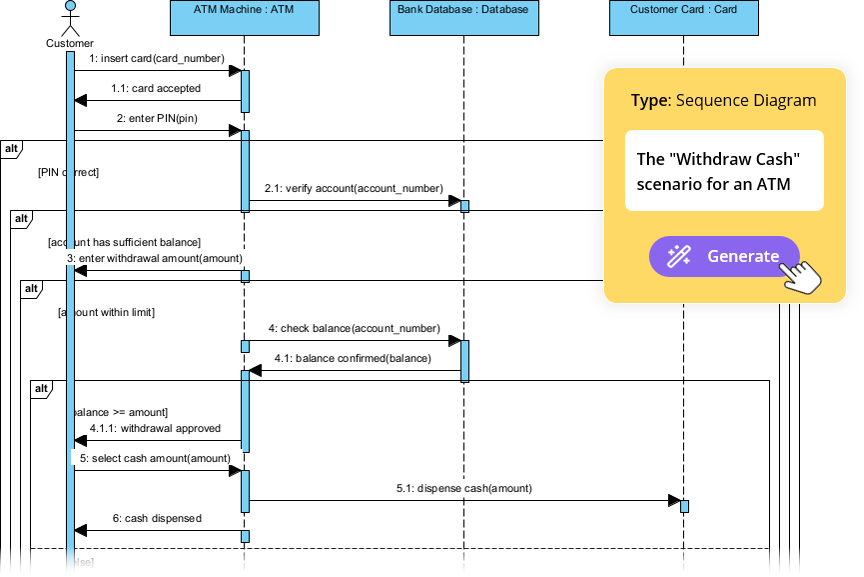
Sequence diagrams are particularly useful during the analysis and design phases of software engineering, where understanding object collaboration, method execution order, and control flow is essential.
🔗 [1] https://www.visual-paradigm.com/guide/uml-unified-modeling-language/what-is-sequence-diagram/
Core Components of a Sequence Diagram
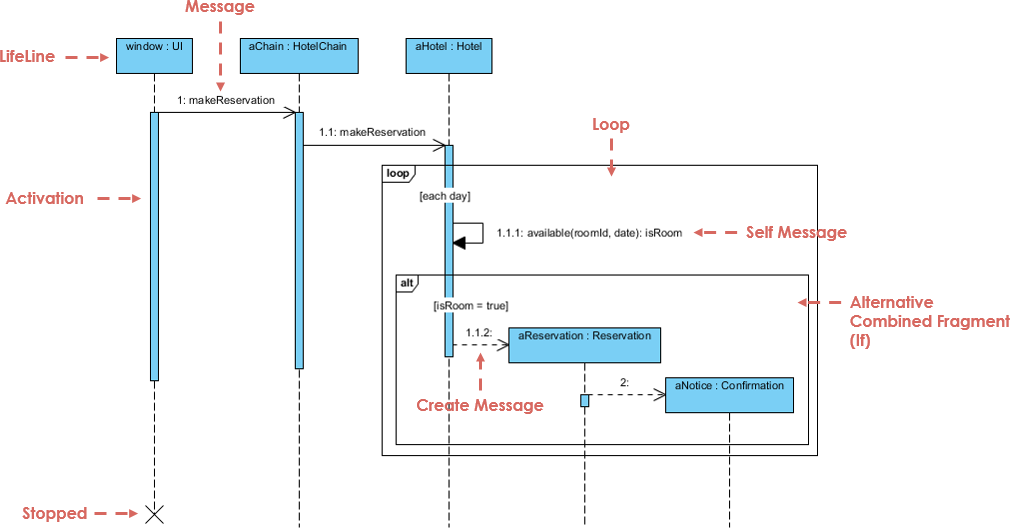
1. Lifelines
-
Represent individual objects, actors, or participants in the interaction.
-
Drawn as vertical dashed lines extending downward from the top of the diagram.
-
Each lifeline typically includes a label (e.g.,
User,LoginService,Database) to identify the entity.
2. Messages
-
Horizontal arrows between lifelines that represent communication.
-
Types of messages include:
-
Synchronous Call: Solid arrowhead (blocks execution until response).
-
Asynchronous Call: Open arrowhead (non-blocking; continues immediately).
-
Return Message: Dashed arrow back to the sender, indicating a response.
-
-
Messages are labeled with the method name or action (e.g.,
login(username, password)).
3. Activation Bars (Activation Rectangles)
-
Rectangular bars on lifelines that indicate when an object is actively performing an operation.
-
The bar starts when the object receives a message and ends when the processing is complete.
-
Helps visualize concurrent behavior and execution duration.
4. Combined Fragments
Used to model complex control logic:
-
alt(Alternative): Conditional branching (if-then-else). -
opt(Optional): Optional execution. -
loop: Repeated execution. -
break: Early exit from a loop. -
par(Parallel): Parallel execution of multiple actions.
🔗 [2] https://blog.visual-paradigm.com/in/%F0%9F%8C%9F-unlock-seamless-sequence-diagram-with-visual-paradigm-%F0%9F%8C%9F/
🔗 [7] https://www.youtube.com/watch?v=X2rhFIblGiY
Why Use Sequence Diagrams?
| Benefit | Description |
|---|---|
| Clarity in Communication | Visualizes complex interactions clearly. |
| Early Bug Detection | Reveals flaws in logic or missing steps before coding. |
| Design Documentation | Serves as living documentation for developers and stakeholders. |
| Facilitates Collaboration | Enables shared understanding between teams (Dev, QA, Product). |
| Supports Code Generation | Can be used to generate skeleton code or test cases. |
🔗 [11] https://agilemodeling.com/artifacts/sequencediagram.htm
Visual Paradigm: A Next-Gen Platform for UML Modeling
Visual Paradigm is a powerful, AI-enhanced UML modeling tool that streamlines the creation, editing, and management of UML diagrams—including sequence diagrams—through intelligent automation and integration with modern development workflows.
It supports full lifecycle modeling, code generation, documentation, and team collaboration, all within a single integrated environment.
🔗 [5] https://www.youtube.com/watch?v=ebSrPTHbhLc
Key Features of Visual Paradigm’s Sequence Diagram Support
1. AI-Powered Text-to-Diagram Generation
-
Description: Users can describe a scenario in plain English (e.g., “Draw a sequence diagram for logging into a website”) and the AI assistant generates a fully structured UML sequence diagram.
-
How it works:
-
Input: Natural language description.
-
AI parses intent, identifies entities, messages, and sequence.
-
Outputs a valid, UML-compliant sequence diagram.
-
-
Use Case: Rapid prototyping, onboarding, or documenting user stories without manual drawing.
🔗 [3] https://chat.visual-paradigm.com/docs/uml-sequence-diagram-a-definitive-guide-to-modeling-interactions-with-ai/
2. AI Refinement Tool
-
Description: Allows users to refine, expand, or modify existing diagrams using natural language.
-
Capabilities:
-
Add new lifelines.
-
Insert conditional logic (
alt,loop,opt). -
Adjust message order or add return messages.
-
-
Example Input: “Add a retry mechanism if login fails three times.”
-
Result: AI updates the diagram with appropriate
loopandaltfragments.
🔗 [8] https://www.visual-paradigm.com/features/ai-sequence-diagram-refinement-tool/
3. Instant Diagram Updates via Code or Model Changes
-
When a class or method is renamed in the code (or via the IDE), Visual Paradigm automatically updates all related diagrams.
-
Ensures model consistency across the project.
-
Reduces manual synchronization errors and improves maintainability.
🔗 [6] https://blog.visual-paradigm.com/case-study-enhancing-system-modeling-efficiency-with-visual-paradigms-ai-powered-chatbot/
4. AI-Driven Validation & Documentation
-
UML Compliance Checks: AI validates diagrams for correct syntax, proper message types, lifeline usage, and fragment logic.
-
Automated Explanations: Generates natural language summaries of the diagram (e.g., “This diagram shows the login process with error handling”).
-
Report Generation: Produces documentation reports for stakeholders, including sequence descriptions, participant roles, and potential failure points.
🔗 [9] https://www.youtube.com/watch?v=wQ2FYYH1G0A
🔗 [10] https://www.visual-paradigm.com/features/ai-assisted-uml-class-diagram-generator/
Practical Example: Generating a Login Sequence Diagram
Step 1: Describe the Scenario in Plain English
“Create a sequence diagram for a user logging into a web application. The user enters their email and password. The system checks if the credentials are valid. If valid, the user is redirected to the dashboard. If invalid, an error message is shown.”
Step 2: Use Visual Paradigm’s AI Assistant
-
Open Visual Paradigm.
-
Type the description into the AI chatbot.
-
Click “Generate Diagram”.
Step 3: AI Output Includes
-
Lifelines:
User,Login UI,Authentication Service,Database,Dashboard. -
Messages:
-
submitLogin(email, password) -
validateCredentials(email, password) -
fetchUserByEmail(email) -
checkPassword(password) -
redirect(to: Dashboard) -
showError("Invalid credentials")
-
-
Combined Fragments:
-
altfor valid vs invalid credentials. -
loopif retry attempts are added.
-
✅ Result: A complete, UML-compliant sequence diagram ready for review or code generation.
Advanced Integration: From Diagram to Code
Visual Paradigm enables bidirectional traceability between models and code:
-
Generate Code from Diagram:
-
Automatically generate skeleton classes, methods, and interfaces from the sequence diagram.
-
Supports Java, C#, Python, and other languages.
-
-
Reverse Engineering:
-
Import existing code and visualize interactions as sequence diagrams.
-
-
Test Case Generation:
-
Use the diagram to generate unit or integration test scripts.
-
🔗 [5] https://www.youtube.com/watch?v=ebSrPTHbhLc
🔗 [12] https://www.diagrams-ai.com/the-evolution-of-uml-from-manual-drafting-to-ai-powered-strategic-design/
Best Practices for Using AI-Generated Sequence Diagrams
| Practice | Why It Matters |
|---|---|
| Review AI Outputs | AI may misinterpret ambiguous language or miss edge cases. Always verify logic and message flow. |
| Use Clear, Specific Descriptions | Vague inputs → inaccurate diagrams. Be explicit about conditions, loops, and error handling. |
| Combine AI with Manual Editing | Use AI for rapid prototyping, then refine with precise control over lifelines and fragments. |
| Maintain Consistency Across Diagrams | Ensure naming conventions (e.g., UserService, login() ) match across UML models. |
| Document Assumptions | Add notes to explain decisions (e.g., “Assumes password hashing is handled internally”). |
Conclusion: The Future of Modeling is AI-Augmented
Visual Paradigm transforms traditional, time-consuming UML modeling into an intuitive, AI-driven workflow that accelerates design, improves accuracy, and enhances collaboration. By leveraging AI for text-to-diagram generation, refinement, validation, and documentation, teams can focus more on innovation and less on manual diagramming.
Whether you’re a developer, system analyst, product owner, or software architect, Visual Paradigm’s AI-powered sequence diagrams provide a powerful bridge between requirements, design, and code.
🔗 [6] https://blog.visual-paradigm.com/case-study-enhancing-system-modeling-efficiency-with-visual-paradigms-ai-powered-chatbot/
References & Further Reading
- What is a Sequence Diagram?
- AI-Powered UML Sequence Diagrams
- Text-to-Diagram with AI
- AI Refinement Tool
- AI-Assisted UML Class Diagram Generator
- Case Study: AI-Powered Chatbot in Visual Paradigm
- Combined Fragments Explained
- AI Validation & Documentation
- Agile Modeling: Sequence Diagrams
- The Evolution of UML: From Manual Drafting to AI
⚠️ Note: While AI significantly enhances productivity, always verify AI-generated diagrams for correctness, completeness, and UML compliance. AI is a powerful assistant, but human oversight remains critical.
✅ Start Your Journey Today:
👉 Try Visual Paradigm Free and unlock the power of AI-driven UML modeling.

 English
 Arabic
 Chinese (Simplified)
 Dutch
Dutch French
 German
 Italian
 Japanese
 Korean
 Portuguese
 Russian
 Spanish