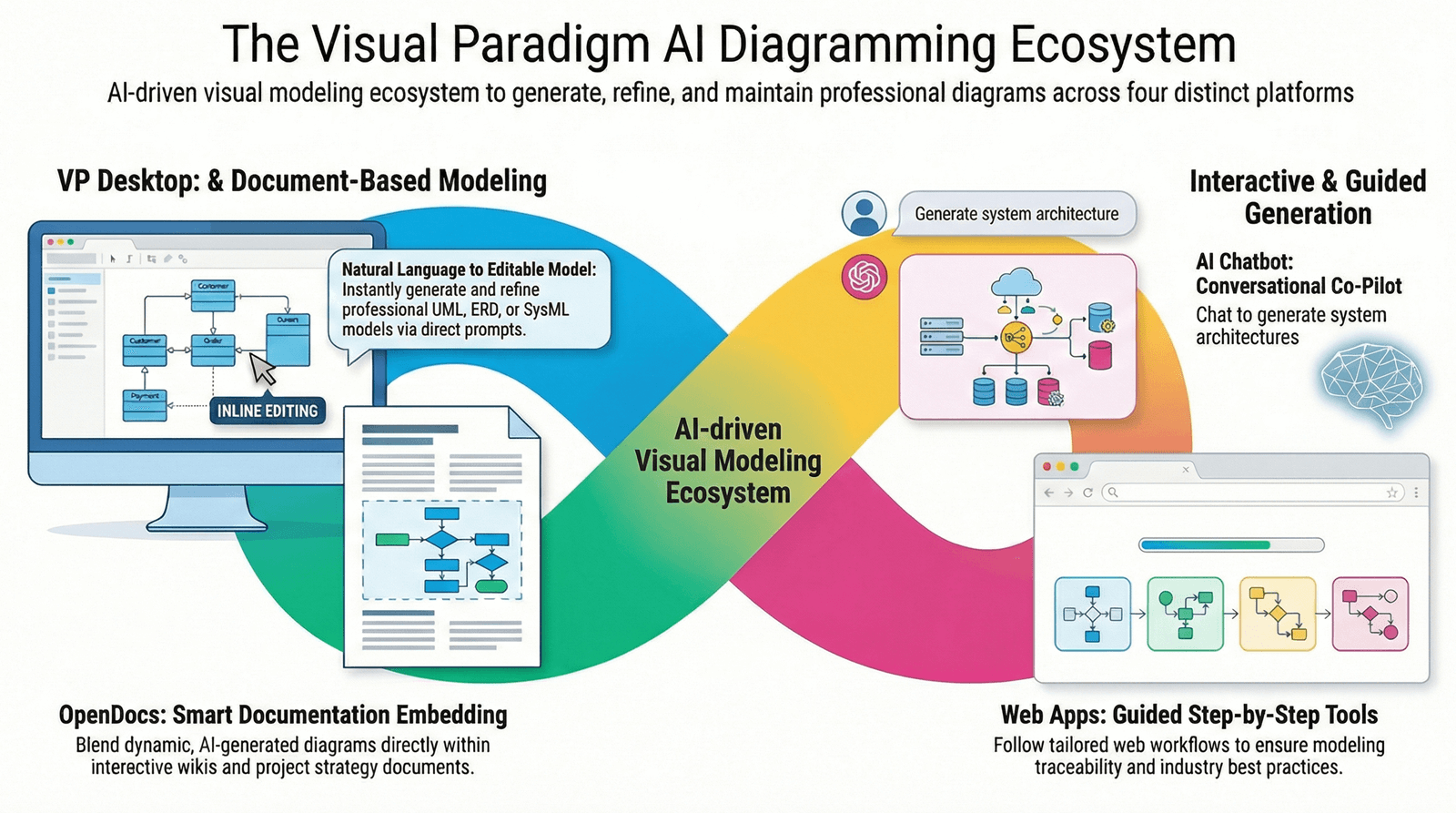
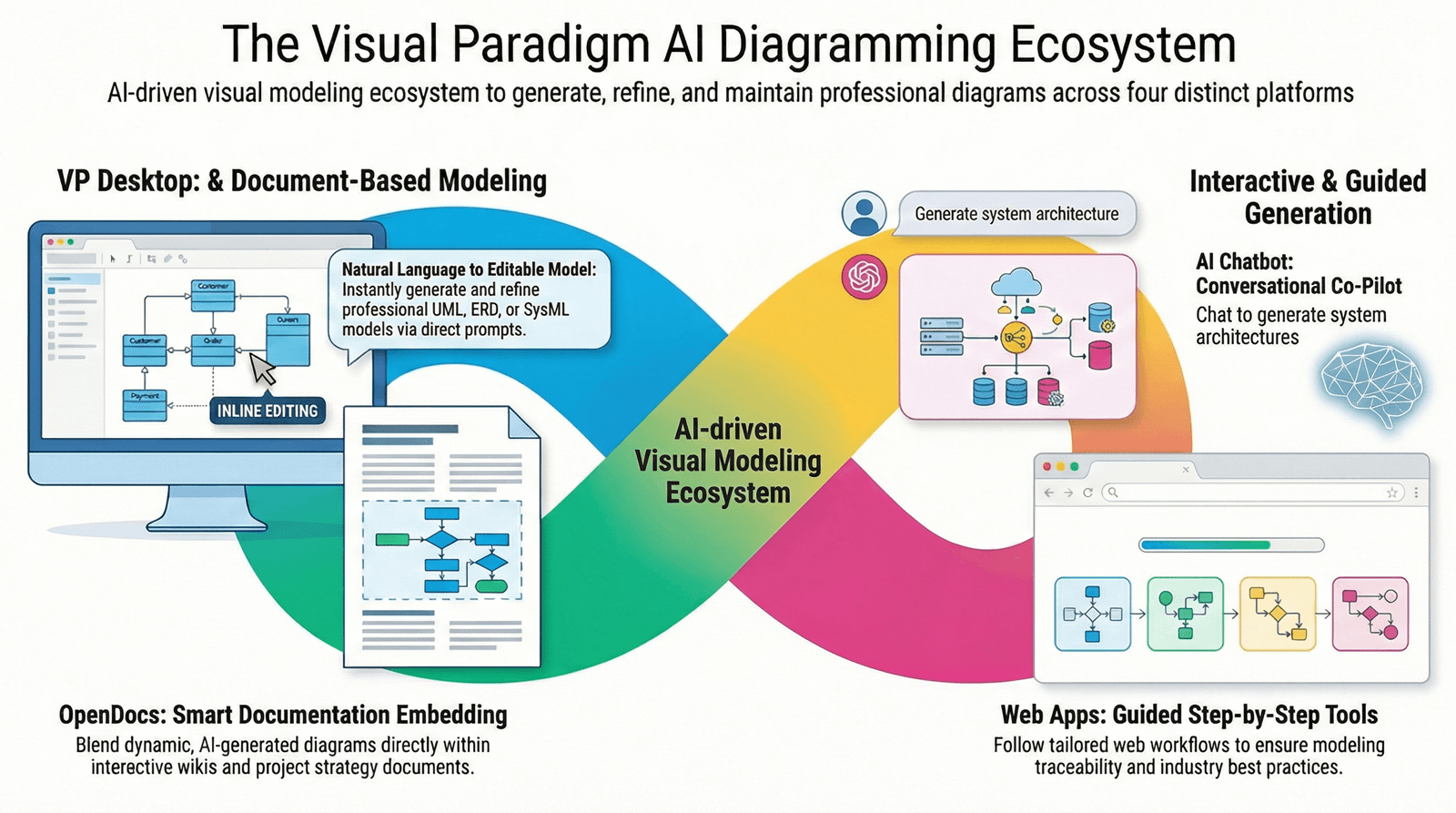
Visual Paradigm’s AI ecosystem revolutionizes use case modeling, transforming it from a painstaking manual drawing task into an efficient, automated, text-driven process. This guide outlines the key features, workflows, and capabilities of Visual Paradigm’s Use Case Modeling Studio, designed to streamline your modeling efforts.
Introduction to Use Case Modeling Studio
The Use Case Modeling Studio employs a structured, AI-guided workflow to facilitate the creation of use cases, diagrams, and associated documents. By using natural language prompts, you can generate various components, from high-level system boundaries to detailed test scripts.
Key Capabilities in Use Case Modeling
1. Automated Use Case Descriptions
When you input a simple goal statement (e.g., “ATM System”), the AI generates a comprehensive use case specification, including:
-
Preconditions and Postconditions: The necessary conditions for a use case to begin and the state of the system after execution.
-
Standard Flows: Detailed sequences outlining the typical or “happy path” scenarios.
-
Alternative and Exception Flows: AI identifies edge cases and error scenarios to ensure thorough coverage.
2. Instant Diagram Generation
The AI analyzes textual descriptions and automatically creates Use Case Diagrams, managing everything from layout to the inclusion of actors and system boundaries.
3. Intelligent Relationship Refinement
The ecosystem incorporates specialized tools to analyze your models and propose UML relationships like <<include>> and <<extend>>, ensuring that your diagrams maintain professional quality and adherence to standards.
4. Behavioral Modeling
With a single click, the AI can convert a use case narrative into various UML diagrams, displaying the system’s logic through Activity Diagrams or Sequence Diagrams.
5. Built-in Test Planning
The AI generates comprehensive Test Cases, including Test ID, Scenario, and Expected Results, directly derived from your use case descriptions.
6. Professional Reporting
After completing the modeling process, you can create a full Software Design Document (SDD) in PDF or Markdown format. This document consolidates all diagrams, descriptions, and test plans for easy sharing and reference.
Workflow Overview
-
Define Scope: Start by providing a brief prompt about your system’s purpose.
-
Identify Actors: Allow the AI to suggest users and external systems involved in the use case.
-
Elaborate: Utilize the Use Case Description Generator to detail specific interactions and behaviors.
-
Visualize & Refine: Generate diagrams and engage with the AI chatbot to iteratively add features or manage exceptions.
Example Prompt for Generating a Specific Diagram
Suppose you would like to create a Use Case Diagram for an ATM System. An example prompt could be:
“Generate a Use Case Diagram for an ATM System, including actors such as Bank Customer, Bank Teller, and ATM System, with use cases such as Withdraw Cash, Deposit Cash, and Check Balance.”
Exporting Models to Development Tools
Visual Paradigm allows easy export of your models to various development tools. You can integrate the generated diagrams and documents directly into your project management suite, enhancing collaboration and workflow efficiency. Export formats typically include:
-
UML diagrams in formats such as PNG, SVG, or PDF.
-
Comprehensive reports as Markdown or PDF files suited for documentation needs.
These export options ensure that your modeling efforts align seamlessly with your development lifecycle.
Conclusion
Visual Paradigm’s AI-powered Use Case Modeling Studio streamlines the process of creating detailed use case models by leveraging automated textual prompts. By transforming manual tasks into efficient workflows, this tool enhances productivity and improves the quality of software design.
References
- Use Case Modeling Studio – Visual Paradigm: This official feature page details Visual Paradigm’s AI-powered Use Case Modeling Studio, highlighting its ability to generate use case descriptions, diagrams, and test cases from natural language prompts.
- Revolutionizing Use Case Elaboration with Visual Paradigm AI: This in-depth guide explores how Visual Paradigm’s AI transforms traditional use case modeling into an intelligent, text-driven workflow, enabling faster and more accurate system analysis.
- Mastering AI-Driven Use Case Diagrams with Visual Paradigm: This tutorial demonstrates how to generate professional-quality Use Case Diagrams using AI, including automatic actor detection, system boundary definition, and intelligent layout optimization.
- From Use Case to Activity Diagram: AI-Powered Workflow: This step-by-step tutorial shows how Visual Paradigm’s AI can automatically convert use case narratives into detailed Activity Diagrams, enhancing behavioral modeling and system logic visualization.
- AI-First QA: Building Smarter Software Testing Workflows: This article highlights how AI generates comprehensive test scenarios from use case descriptions, democratizing testing across teams and improving test coverage and accuracy.
- Use Case Modeling Studio – Visual Paradigm (Feature Overview): A detailed overview of the core functionalities of the Use Case Modeling Studio, including AI-driven description generation, diagram creation, and integration with other UML modeling tools.
- Use Case to Activity Diagram – Visual Paradigm: This page explains how Visual Paradigm’s AI enables one-click conversion of use case descriptions into structured Activity Diagrams, supporting seamless transition from requirements to process modeling.
- AI-Powered Use Case Modeling Studio – Visual Paradigm AI: A dedicated tool page showcasing the AI capabilities of the Use Case Modeling Studio, including natural language input, automated flow generation, and intelligent relationship suggestions.
- Free AI Use Case Diagram Tool – Visual Paradigm Updates: This release announcement highlights the availability of a free AI-powered tool for generating use case diagrams, making advanced modeling accessible to developers and students.
- Visual Paradigm AI: Use Case Modeling in Action (YouTube): A video demonstration showing real-time use case modeling using Visual Paradigm’s AI, including prompt input, diagram generation, and refinement via the AI chatbot.
- AI Use Case Description Generator – Visual Paradigm: This feature page explains how the AI automatically generates structured use case descriptions with preconditions, postconditions, standard, alternative, and exception flows from simple prompts.
- Use Case Diagram Refinement Tool – Visual Paradigm AI: This tool page details how AI analyzes diagrams to suggest and apply UML relationships such as
<<include>>and<<extend>>, ensuring model accuracy and compliance with best practices. - AI-Powered Use Case Diagram Refinement – Visual Paradigm: A feature overview emphasizing how AI enhances diagram quality by detecting and correcting modeling inconsistencies and recommending standard UML constructs.
- AI-Powered Use Case Diagram Refinement – Visual Paradigm AI: This page elaborates on the intelligent refinement engine that analyzes use case diagrams and proposes improvements to relationships, naming, and structure.
- Use Case Modeling Studio – Visual Paradigm AI: A comprehensive tool page describing the end-to-end AI workflow for use case modeling, from initial prompt to final documentation.
- Use Case Modeling Studio – Visual Paradigm (Feature Page): A complete overview of the studio’s capabilities, including AI-driven modeling, test case generation, and professional reporting.
- AI-Powered Use Case Modeling Studio – Visual Paradigm Updates: This release note details the latest enhancements to the AI ecosystem, including improved natural language understanding, faster diagram generation, and expanded export options.
- AI Use Case Description Generator – Visual Paradigm: A focused feature page explaining how the AI generates complete use case specifications with structured sections and edge-case detection.
- Visual Paradigm AI: From Use Case to Sequence Diagram (YouTube): A practical video walkthrough demonstrating how to generate Sequence Diagrams from use case narratives using Visual Paradigm’s AI tools.
- Modeling Systems with IDEF0 and UML – ScienceDirect: This academic paper discusses the foundational role of use case and process modeling in software development, providing context for modern AI-driven approaches like those in Visual Paradigm.
This guide covers the essentials of utilizing Visual Paradigm’s AI ecosystem for effective use case modeling, positioning you to fully leverage its capabilities for your projects.

 English
 Arabic
 Chinese (Simplified)
 Dutch
Dutch French
 German
 Italian
 Japanese
 Korean
 Portuguese
 Russian
 Spanish