


Introduction
Visual Paradigm has revolutionized the landscape of software modeling and diagramming with its comprehensive AI-powered ecosystem. This integrated suite of intelligent tools transforms how businesses, developers, and analysts create, manage, and optimize visual models. From automatic UML diagram generation to AI-powered agile planning, Visual Paradigm’s AI ecosystem represents the cutting edge of intelligent visual modeling.
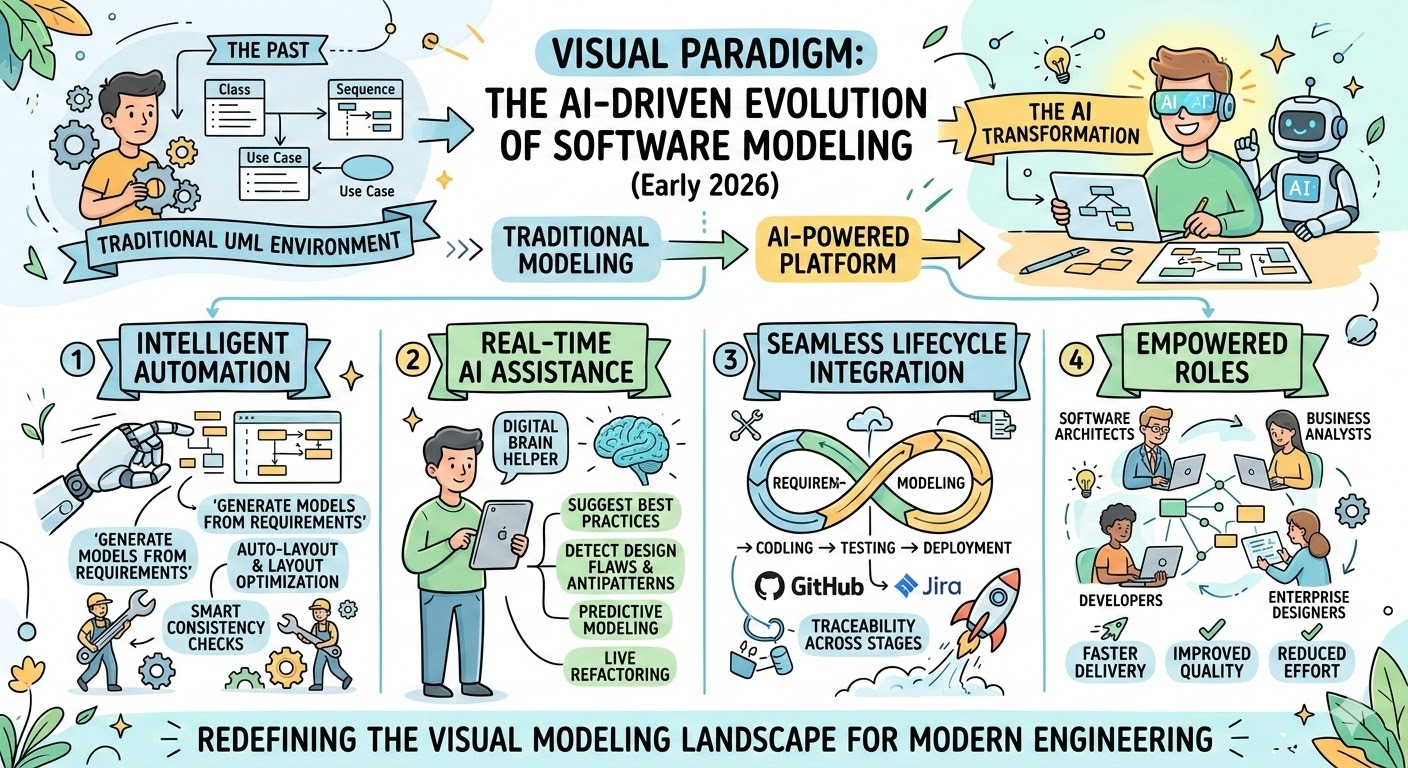
1. AI Chatbot: Your Intelligent Diagramming Assistant
Overview
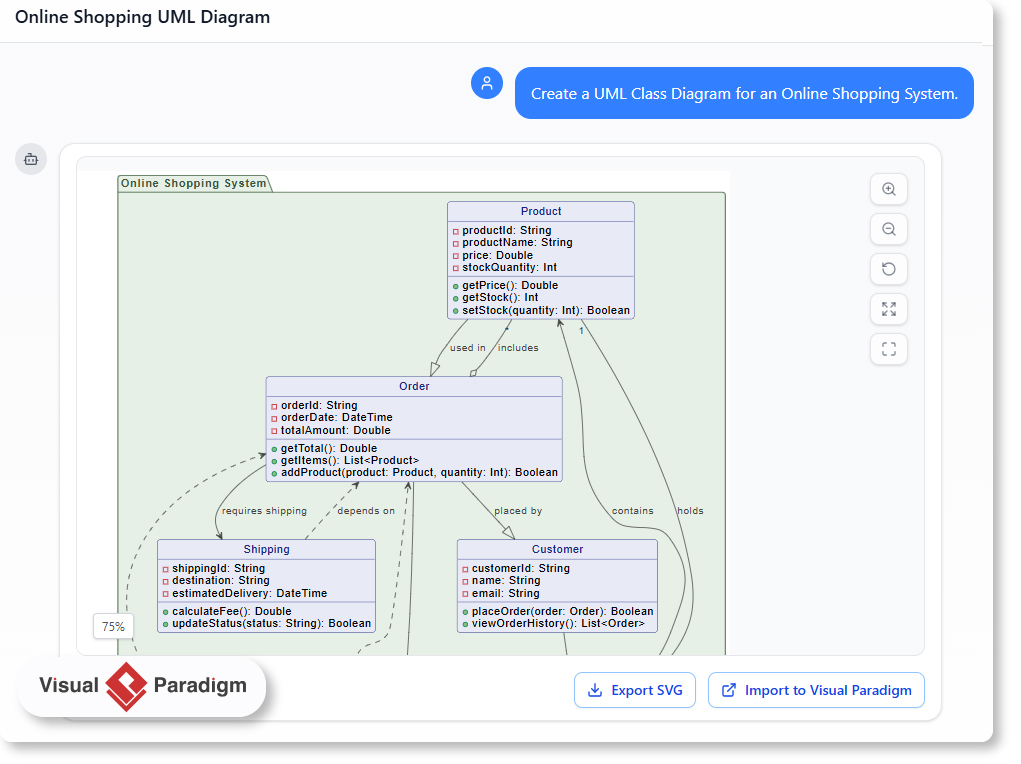
The AI Chatbot stands as the cornerstone of Visual Paradigm’s AI ecosystem, serving as the primary interface for generating professional-grade UML and business diagrams through natural language conversation. This revolutionary tool eliminates the traditional learning curve associated with complex modeling software, allowing users to create sophisticated diagrams simply by describing what they need.
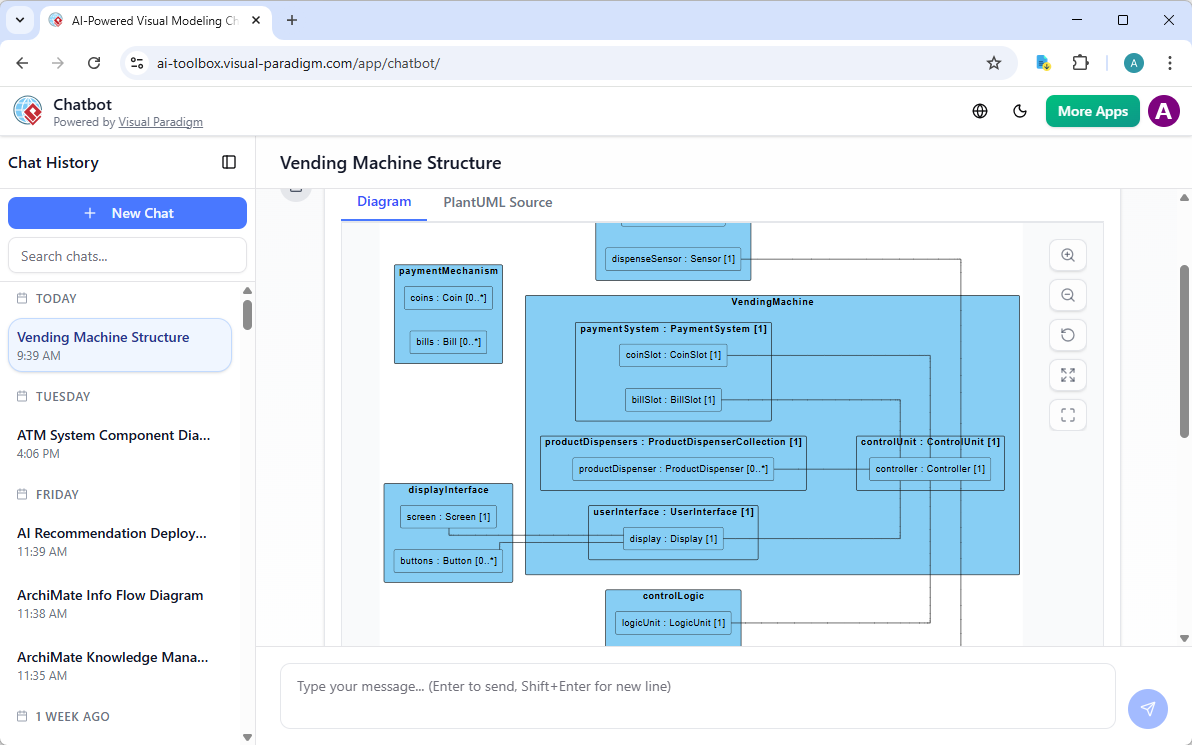
Key Capabilities
Natural Language to Professional Diagrams
The AI Chatbot understands context and intent, converting simple text prompts into detailed, standards-compliant diagrams. Whether you need a complex component diagram for an enterprise system or a straightforward activity diagram for a business process, the chatbot delivers production-ready results.
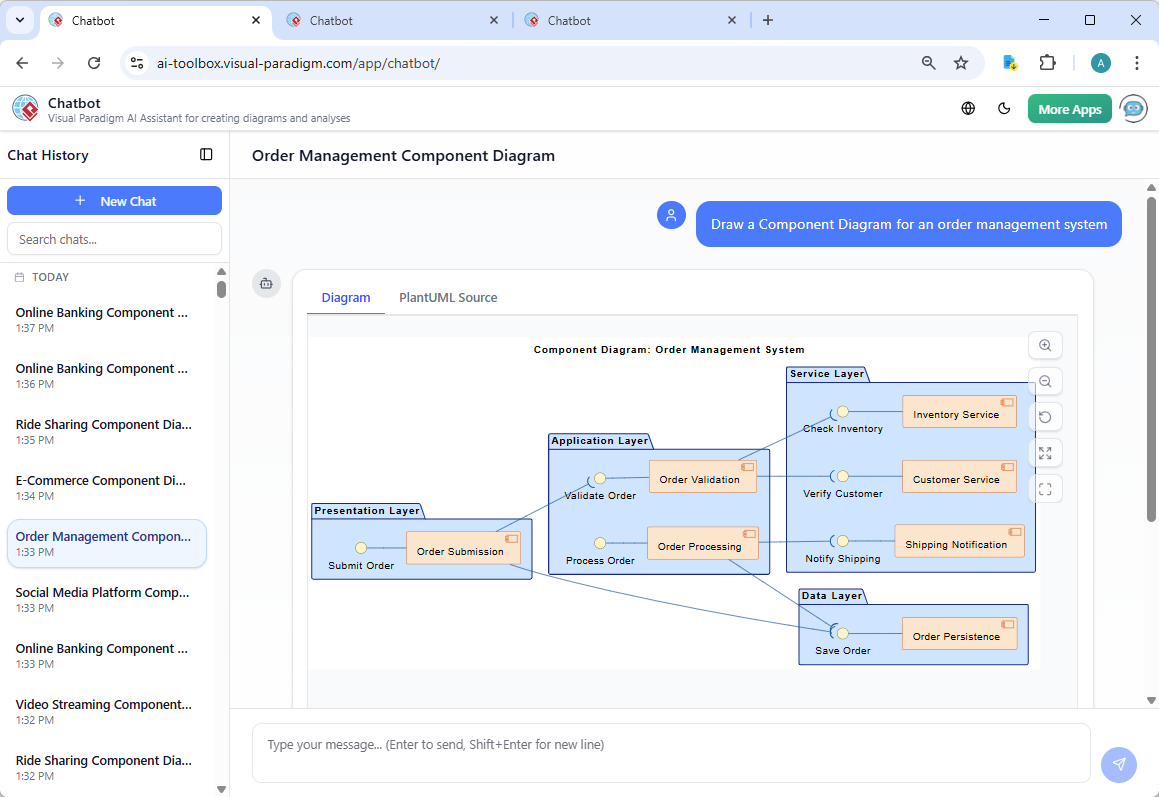
Supported Diagram Types
The chatbot supports an extensive range of diagram types:
-
UML Diagrams: Class diagrams, sequence diagrams, use case diagrams, activity diagrams, component diagrams, deployment diagrams, state machine diagrams, and composite structure diagrams
-
Business Diagrams: Flowcharts, BPMN diagrams, organizational charts
-
Architecture Diagrams: System architecture, cloud architecture, network diagrams
-
Agile Artifacts: User story maps, backlog visualizations
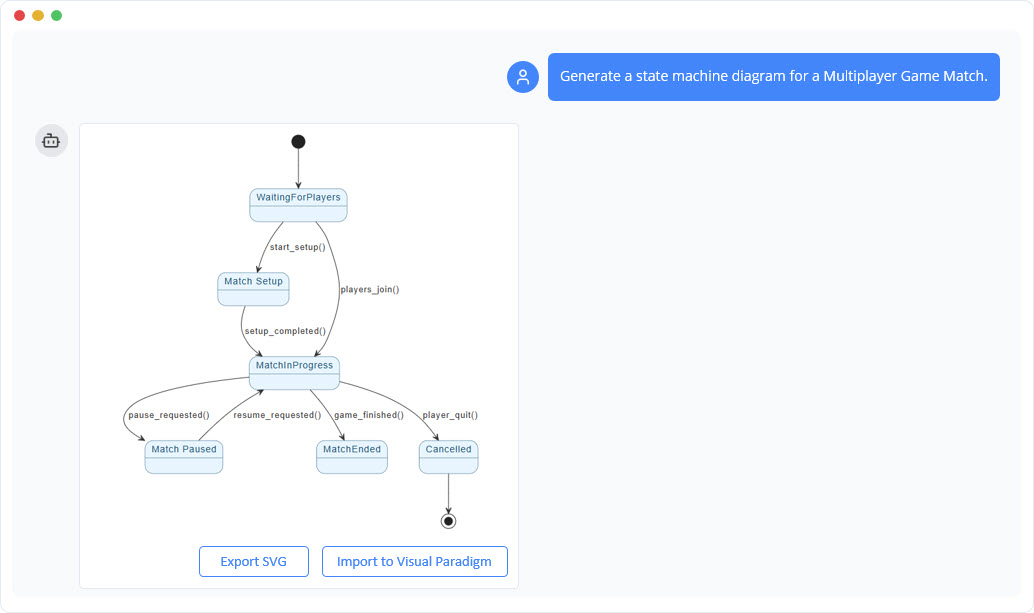
How to Use the AI Chatbot
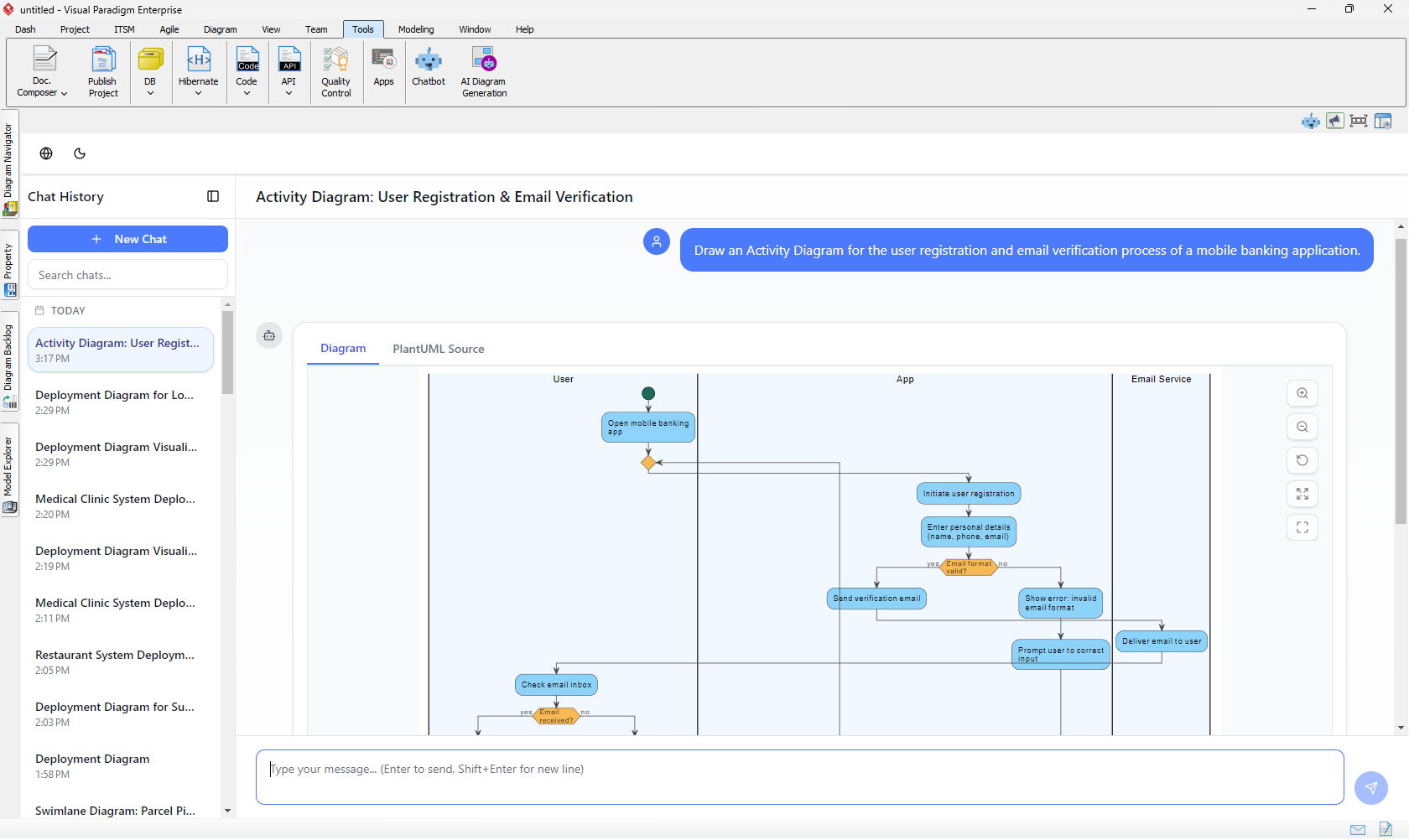
Step 1: Access the Chatbot
Launch the AI Chatbot through Visual Paradigm Online or the standalone web interface. The intuitive chat interface welcomes you with a clean, conversation-ready workspace.
Step 2: Describe Your Requirements
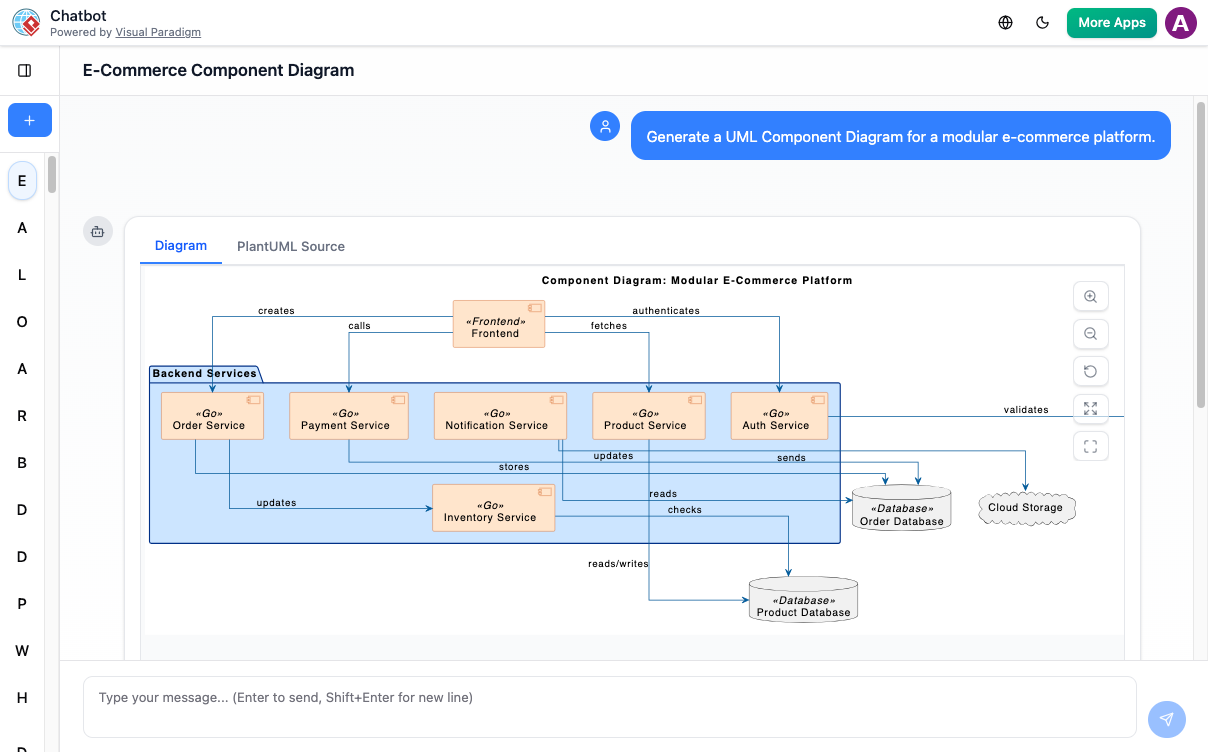
Simply type what you need in natural language. For example:
-
“Generate a class diagram for a university course registration system”
-
“Create a component diagram for an e-commerce platform with microservices”
-
“Draw an activity diagram for user authentication process”
Step 3: Refine Through Conversation
The AI Chatbot supports iterative refinement. If the initial diagram needs adjustments, simply continue the conversation:
-
“Add more attributes to the Customer class”
-
“Show the relationships between services more clearly”
-
“Include database components in the architecture”
Step 4: Export and Integrate
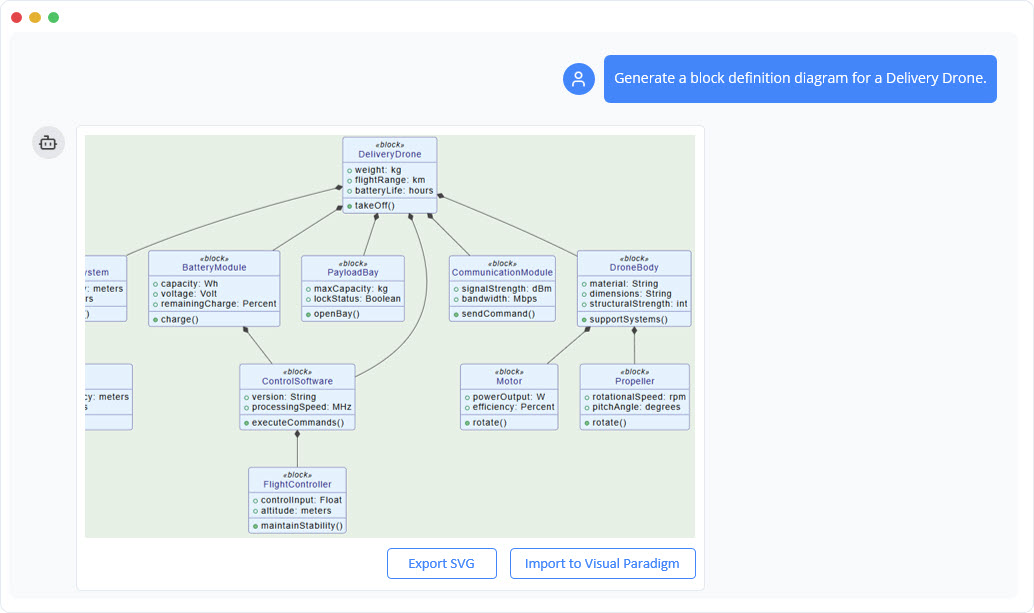
Once satisfied, export your diagram in multiple formats (SVG, PNG, PlantUML source) or import it directly into Visual Paradigm Desktop for further editing and professional refinement.
Advanced Features
Contextual Understanding
The chatbot maintains conversation context, allowing for complex, multi-turn dialogues where you can build upon previous diagrams or create variations of existing models.
PlantUML Source Generation
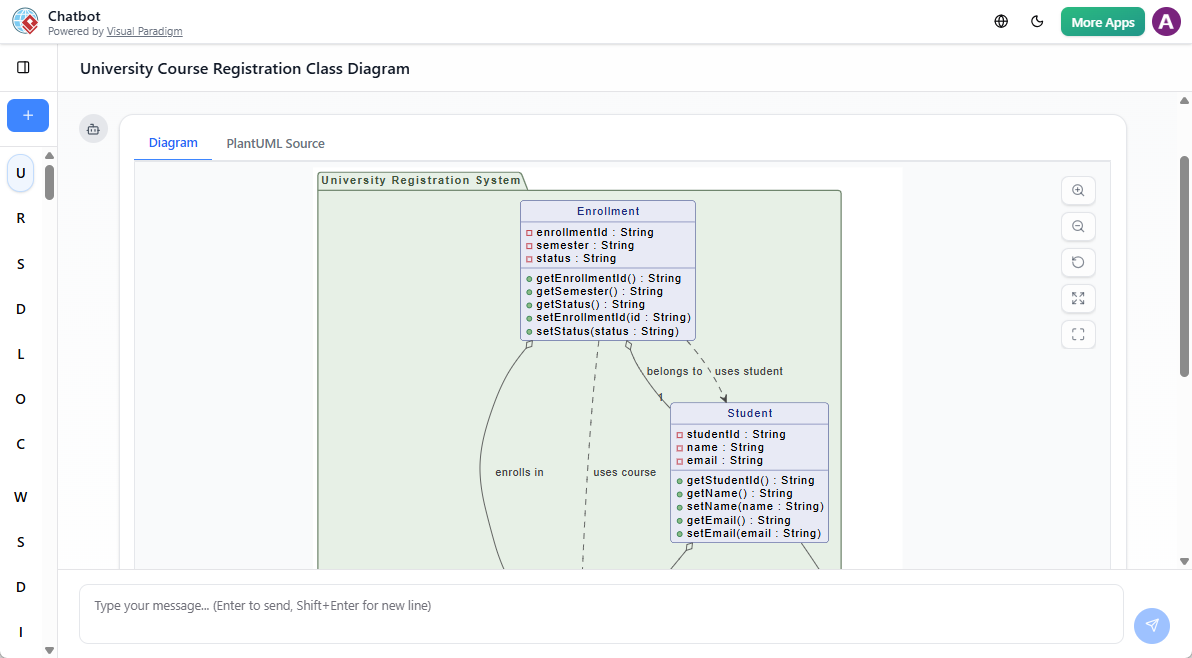
Every diagram generated includes the underlying PlantUML source code, giving developers full transparency and the ability to version-control diagram definitions alongside their code.
Chat History Management
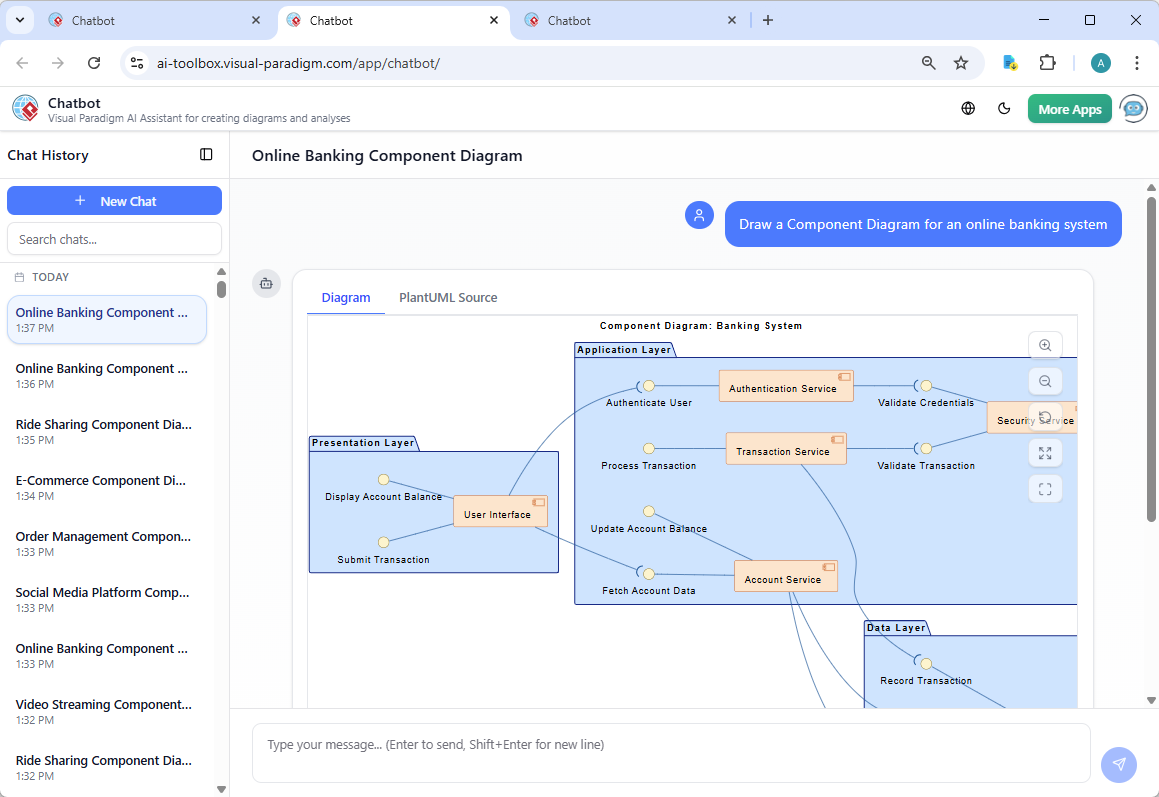
All your conversations and generated diagrams are automatically saved and organized, making it easy to revisit, modify, or reuse previous work.
Best Practices for AI Chatbot Usage
-
Be Specific: Provide clear, detailed descriptions including system components, relationships, and key attributes
-
Iterate Gradually: Start with a basic diagram and refine through conversation rather than requesting everything at once
-
Use Domain Terminology: Leverage industry-standard terms for better accuracy
-
Review and Validate: Always review AI-generated diagrams for accuracy and completeness
-
Leverage Examples: Study the example prompts and generated diagrams to understand the chatbot’s capabilities
2 & 3. Desktop & Online Integration: Seamless Hybrid Architecture
The Power of Connected Intelligence
Visual Paradigm’s AI features leverage a sophisticated hybrid architecture that combines the robustness of desktop software with the scalability of cloud-based AI services. This integration ensures users get the best of both worlds: powerful local processing and cutting-edge cloud AI capabilities.
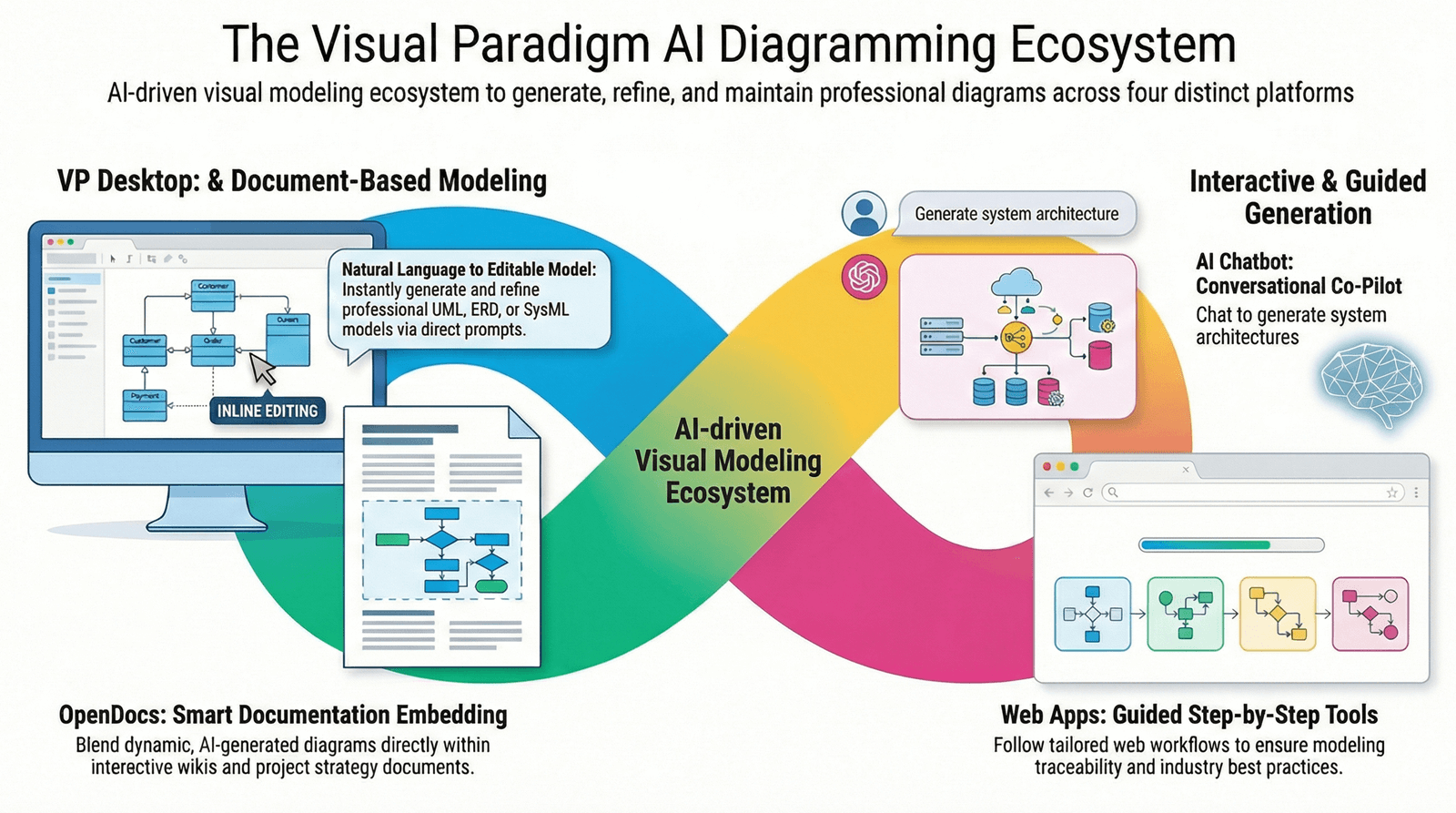
Visual Paradigm Desktop: Professional Modeling Powerhouse
Latest Version AI Integration
The latest version of Visual Paradigm Desktop includes native AI features that bring intelligent assistance directly into your professional modeling environment. This integration allows you to:
-
Generate diagrams using AI without leaving your desktop environment
-
Import AI-generated diagrams from the cloud for professional refinement
-
Leverage AI-powered suggestions and auto-completion while modeling
-
Access intelligent consistency checks and design pattern recommendations
Desktop Advantages
-
Full-Featured Editing: Professional-grade diagram editing tools with pixel-perfect control
-
Offline Capability: Core modeling features work without internet connection
-
Enterprise Integration: Direct integration with enterprise tools, databases, and version control systems
-
Advanced Features: Code engineering, model transformation, and complex analysis tools
-
Performance: Optimized for handling large-scale enterprise models with thousands of elements
Visual Paradigm Online: Cloud-Based AI Services
Cloud AI Infrastructure
Visual Paradigm Online serves as the gateway to powerful cloud-based AI services that power the intelligent features across the ecosystem:
-
Scalable AI Processing: Leverage state-of-the-art language models and diagram generation algorithms
-
Always Current: Access the latest AI improvements without software updates
-
Cross-Platform Access: Use AI features from any device with a web browser
-
Collaborative Features: Share AI-generated diagrams and collaborate in real-time
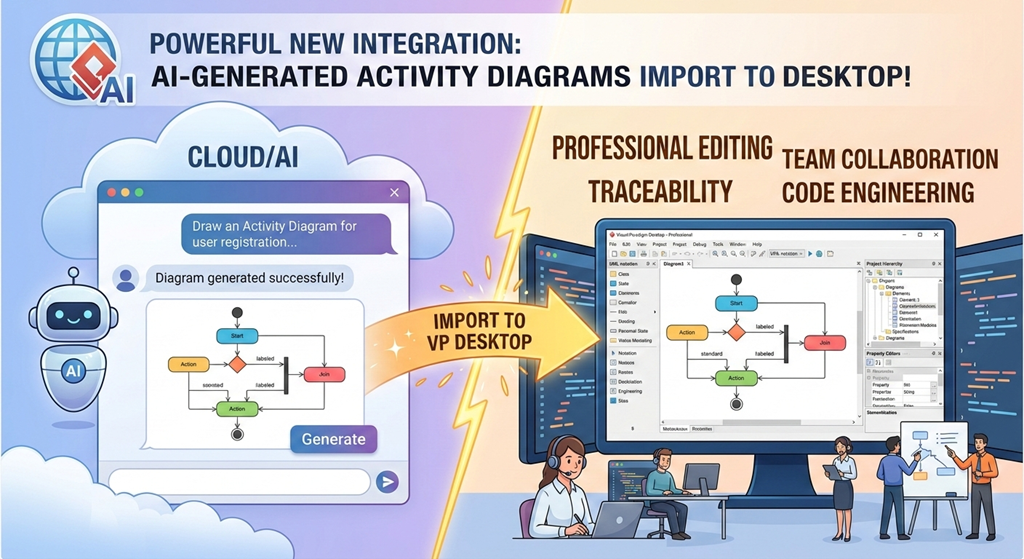
The Integration Workflow
Seamless Import Process
The integration between Desktop and Online is designed for frictionless workflow:
-
Generate in Cloud: Use the AI Chatbot or specialized AI apps in Visual Paradigm Online to rapidly generate diagrams
-
One-Click Import: Import generated diagrams directly into Visual Paradigm Desktop with a single click
-
Professional Refinement: Leverage Desktop’s advanced editing tools to refine and customize the AI-generated content
-
Bidirectional Sync: Changes can be synced back to the cloud for collaboration and sharing
Connection Requirements
To leverage cloud-based AI services from Visual Paradigm Desktop:
-
Active internet connection required for AI features
-
Valid Visual Paradigm license with AI features enabled
-
Authentication with Visual Paradigm Online account
-
Firewall configuration to allow secure API communication
Use Case: Enterprise Architecture Development
Scenario: An enterprise architect needs to create a comprehensive system architecture for a new cloud-based platform.
Workflow:
-
Initial Generation: Use the AI Chatbot in Visual Paradigm Online to generate initial architecture diagrams based on requirements
-
Cloud Architecture: Leverage the AI Cloud Architecture Studio to create detailed cloud infrastructure diagrams
-
Import to Desktop: Import all generated diagrams into Visual Paradigm Desktop
-
Detailed Modeling: Add enterprise-specific details, constraints, and integration points using Desktop’s professional tools
-
Code Engineering: Generate code skeletons and API specifications from the refined models
-
Documentation: Create comprehensive documentation with embedded diagrams
-
Team Collaboration: Publish to Visual Paradigm Online for team review and feedback
Benefits of the Hybrid Approach
Speed + Precision: AI-powered rapid generation combined with professional-grade editing precision
Accessibility + Power: Cloud accessibility for quick tasks, desktop power for complex modeling
Innovation + Stability: Cutting-edge AI features with enterprise-grade reliability
Collaboration + Control: Easy sharing and collaboration with fine-grained access control
Technical Architecture
API Integration
Visual Paradigm Desktop communicates with Visual Paradigm Online through secure RESTful APIs:
-
Encrypted data transmission (TLS/SSL)
-
OAuth 2.0 authentication
-
Automatic session management
-
Intelligent caching for performance
Data Synchronization
-
Real-time sync for collaborative editing
-
Conflict resolution mechanisms
-
Version history and rollback capabilities
-
Selective sync options for large projects
4. Specialized AI Apps: Targeted Intelligence for Specific Needs
Overview
Beyond the general-purpose AI Chatbot, Visual Paradigm offers a suite of specialized AI applications designed to address specific modeling and development challenges. These focused tools provide deep expertise in their respective domains, delivering superior results for targeted use cases.
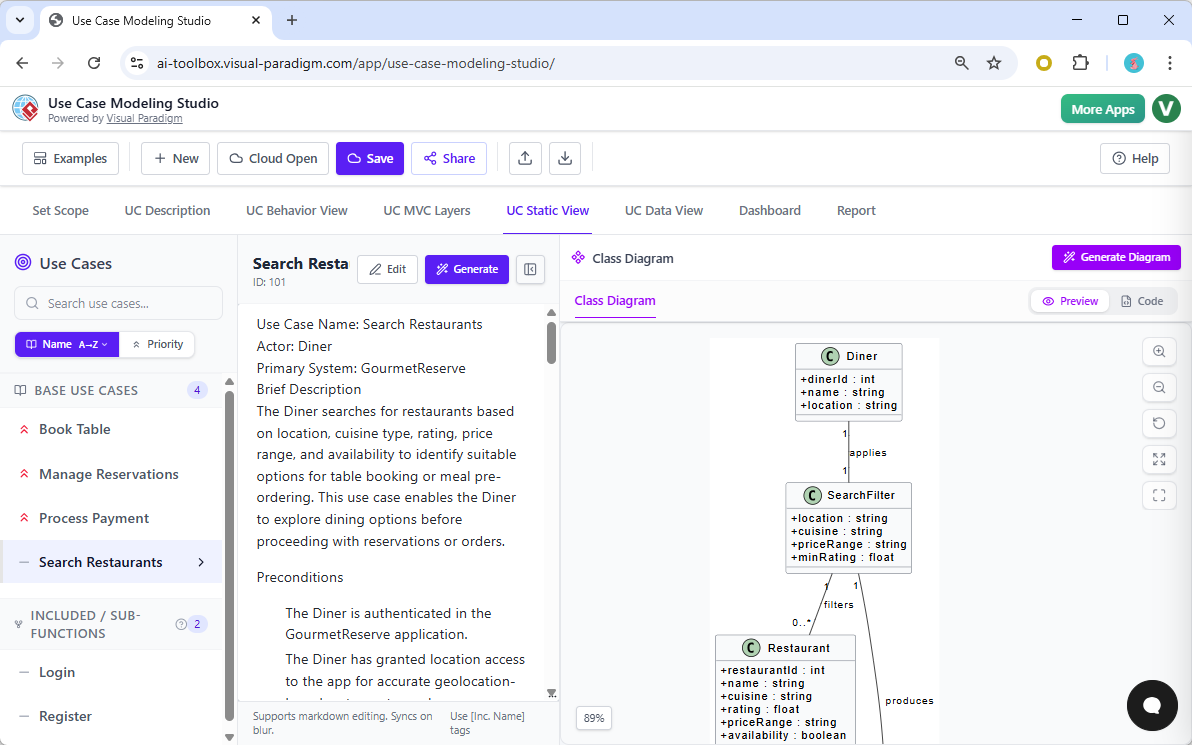
AI Development Plan Generator
Purpose and Functionality
The AI Development Plan Generator transforms high-level project concepts into comprehensive, actionable development plans. This tool is invaluable for project managers, team leads, and entrepreneurs who need to quickly establish project roadmaps.
Key Features
-
Automatic Work Breakdown: Decomposes project goals into manageable tasks and subtasks
-
Timeline Estimation: Provides intelligent timeline estimates based on task complexity and dependencies
-
Resource Planning: Suggests resource allocation and team structure
-
Risk Identification: Highlights potential risks and mitigation strategies
-
Milestone Definition: Identifies key project milestones and deliverables
How It Works
Input: Provide a project description, objectives, and constraints
Processing: AI analyzes requirements and applies industry best practices
Output: Comprehensive development plan with:
-
Detailed task breakdown structure
-
Dependencies and critical path
-
Time and effort estimates
-
Resource requirements
-
Risk assessment
Use Case Example
Project: “Develop a mobile banking application with biometric authentication”
Generated Plan Includes:
-
User authentication module (biometric integration, security protocols)
-
Account management features (balance inquiry, transaction history)
-
Transfer functionality (internal transfers, external payments)
-
Security layers (encryption, fraud detection)
-
Compliance requirements (regulatory standards, audit trails)
-
Testing phases (unit testing, security testing, UAT)
AI Image Translator
Purpose and Functionality
The AI Image Translator bridges the gap between visual sketches and professional diagrams. This tool uses computer vision and AI to convert hand-drawn sketches, whiteboard photos, or rough mockups into formal, editable diagrams.
Key Features
-
Sketch Recognition: Identifies diagram elements from hand-drawn sketches
-
Automatic Conversion: Transforms images into standard diagram formats (UML, BPMN, flowcharts)
-
Element Detection: Recognizes shapes, connectors, and text annotations
-
Format Flexibility: Supports various input formats (photos, scans, digital sketches)
-
Editable Output: Generates fully editable diagrams in Visual Paradigm format
Supported Conversions
-
Hand-drawn flowcharts → Professional flowcharts
-
Whiteboard UML sketches → Formal UML diagrams
-
Paper wireframes → Digital wireframes
-
Napkin sketches → Architecture diagrams
Workflow
-
Capture: Take a photo or scan of your sketch
-
Upload: Import the image into AI Image Translator
-
Process: AI analyzes and identifies diagram elements
-
Review: Verify and correct any recognition errors
-
Export: Generate professional diagram ready for refinement
Best Practices
-
Use clear, well-lit photos
-
Draw distinct shapes with clear boundaries
-
Label elements legibly
-
Use standard diagram symbols when possible
-
Review and validate AI interpretations
Agilien: AI-Powered Jira Backlog Planner
Revolutionizing Agile Planning
Agilien represents a paradigm shift in agile project management, combining the power of AI with Jira integration to automate and optimize backlog creation and sprint planning.
Core Capabilities
1. AI-Powered Backlog Generation
Transform product visions into structured, prioritized backlogs:
-
Natural Language Input: Describe your product or feature in plain English
-
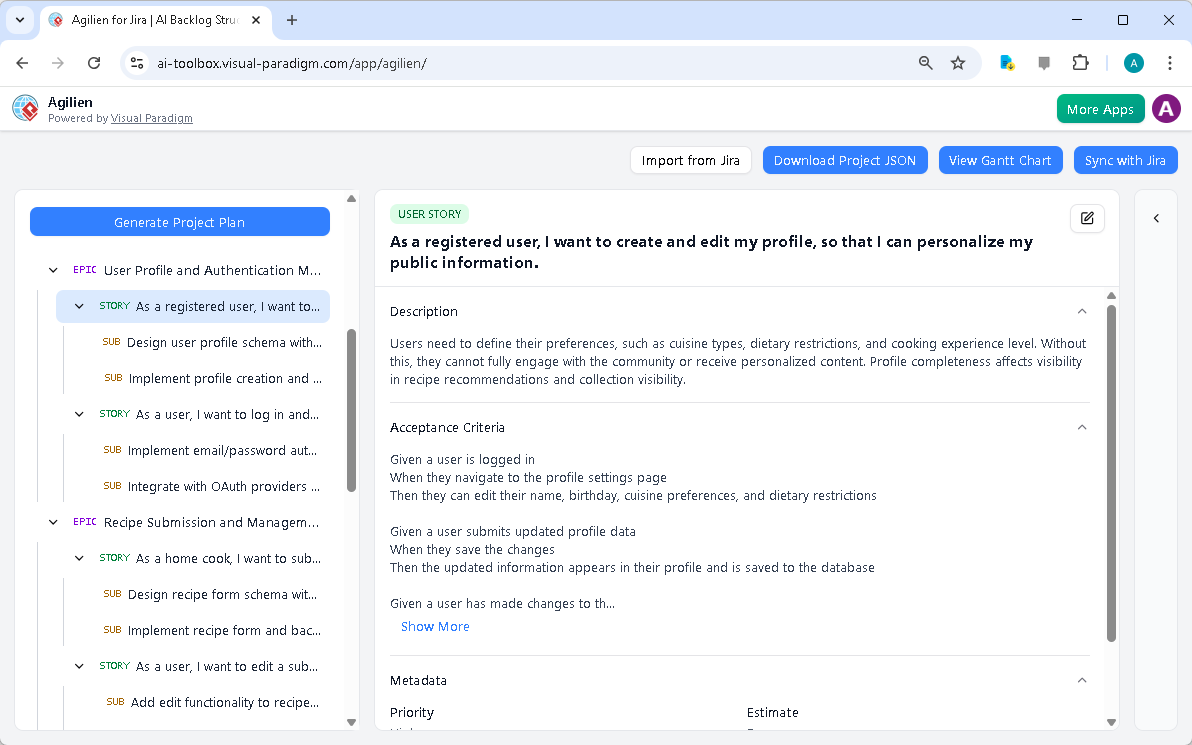
Automatic User Story Creation: AI generates detailed user stories with acceptance criteria
-
Epic Breakdown: Intelligently decomposes epics into manageable user stories
-
Story Refinement: Suggests improvements and identifies missing details
2. Jira Integration
Seamless bidirectional synchronization with Jira:
-
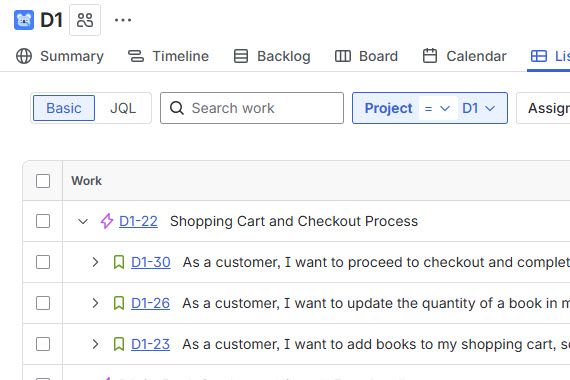
Import from Jira: Pull existing Jira projects and backlogs into Agilien
-
Sync to Jira: Push AI-generated or refined backlogs directly to Jira
-
Real-Time Updates: Changes in either system automatically sync
-
Field Mapping: Intelligent mapping between Agilien and Jira fields
3. Visual Modeling Integration
Unique integration of visual models with agile artifacts:
-
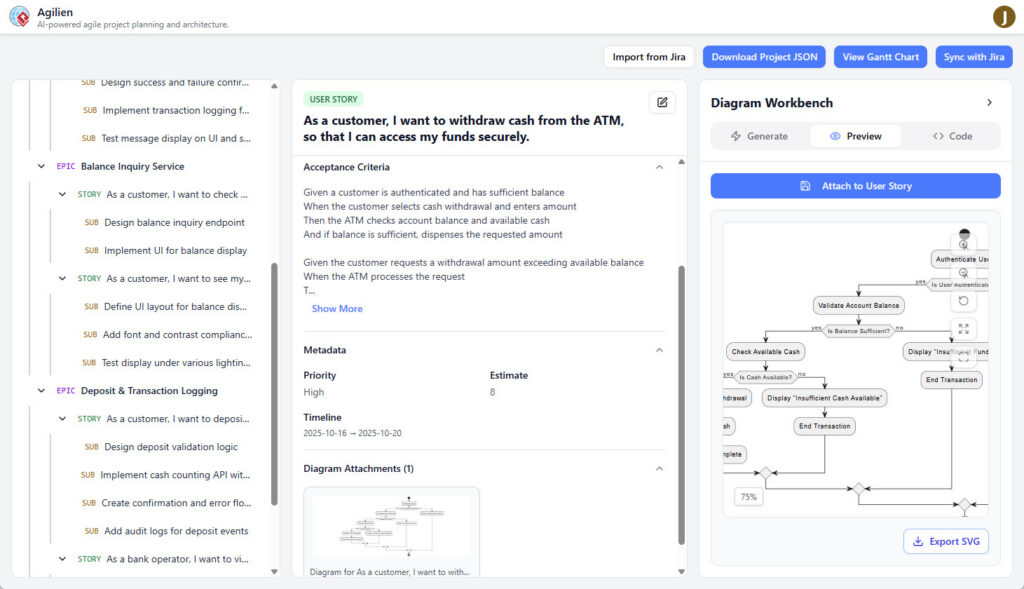
Automatic Diagram Generation: Create UML diagrams, flowcharts, and architecture diagrams for user stories
-
Visual Documentation: Attach diagrams to user stories for clarity
-
Traceability: Link diagrams to specific backlog items
-
Diagram Workbench: Built-in tools for creating and editing diagrams
4. Sprint Planning Assistance
AI-powered sprint planning features:
-
Velocity Prediction: Estimates team velocity based on historical data
-
Sprint Capacity Planning: Suggests optimal sprint scope
-
Story Point Estimation: AI-assisted story point recommendations
-
Dependency Analysis: Identifies and visualizes story dependencies
5. Gantt Chart Visualization
Transform agile backlogs into traditional project timelines:
-
Automatic Gantt Generation: Create Gantt charts from user stories
-
Timeline Visualization: View project timeline and critical path
-
Resource Allocation: Visualize team capacity and workload
-
Milestone Tracking: Monitor key project milestones
Detailed Workflow: From Concept to Jira Backlog
Step 1: Project Definition
Enter your project concept:
"Build a food delivery platform connecting restaurants with customers,
featuring real-time order tracking, multiple payment options, and
review system"
Step 2: AI Analysis
Agilien’s AI analyzes the requirements and identifies:
-
Core features and functionalities
-
User roles (customers, restaurants, delivery personnel, admins)
-
Integration points (payment gateways, mapping services)
-
Non-functional requirements (scalability, performance, security)
Step 3: Backlog Generation
AI generates comprehensive backlog structure:
Epics:
-
User Registration and Authentication
-
Restaurant Management
-
Order Placement and Tracking
-
Payment Processing
-
Review and Rating System
-
Notification System
User Stories (for Order Placement Epic):
-
“As a customer, I want to browse restaurants by cuisine type so that I can find food I like”
-
“As a customer, I want to add items to my cart so that I can order multiple items at once”
-
“As a customer, I want to track my order in real-time so that I know when my food will arrive”
Each story includes:
-
Detailed description
-
Acceptance criteria (Given-When-Then format)
-
Priority level
-
Estimated effort
-
Dependencies
Step 4: Diagram Generation
For complex user stories, Agilien automatically generates supporting diagrams:
-
Sequence Diagrams: Show interaction flow for order placement
-
Activity Diagrams: Illustrate order processing workflow
-
Class Diagrams: Define data model for orders, items, and payments
-
Component Diagrams: Show system architecture for payment integration
Step 5: Review and Refinement
Product owners and team leads review AI-generated content:
-
Adjust priorities based on business needs
-
Refine acceptance criteria
-
Add technical constraints
-
Modify estimates based on team capacity
-
Attach additional diagrams or documentation
Step 6: Jira Synchronization
Push refined backlog to Jira:
-
Select target Jira project
-
Map fields and custom fields
-
Configure sync options (one-way or bidirectional)
-
Execute sync
-
Verify in Jira
Step 7: Ongoing Management
Maintain synchronization throughout project lifecycle:
-
Update stories in Agilien or Jira
-
Track progress and velocity
-
Generate sprint reports
-
Adjust plans based on actual progress
Advanced Features
AI-Powered Refinement Suggestions
Agilien continuously analyzes your backlog and provides intelligent suggestions:
-
Story Splitting: Identifies stories that are too large and suggests how to split them
-
Dependency Resolution: Recommends strategies to reduce or eliminate dependencies
-
Acceptance Criteria Enhancement: Suggests additional acceptance criteria based on similar stories
-
Estimation Calibration: Adjusts estimates based on team’s actual velocity
Team Collaboration
-
Multi-User Editing: Multiple team members can collaborate on backlog refinement
-
Comment and Discussion: Threaded discussions on individual stories
-
Change History: Complete audit trail of all modifications
-
Approval Workflows: Configurable approval processes for backlog items
Analytics and Reporting
-
Backlog Health Metrics: Measures backlog quality, completeness, and readiness
-
Velocity Trends: Tracks team velocity over time
-
Sprint Burndown: Visualizes sprint progress
-
Cumulative Flow: Shows work item distribution across states
-
Predictive Analytics: Forecasts project completion dates
Integration Ecosystem
Beyond Jira, Agilien integrates with:
-
GitHub/GitLab: Link commits and branches to user stories
-
Confluence: Embed backlog items in documentation
-
Slack/Teams: Notifications and quick updates
-
CI/CD Tools: Trigger builds and deployments based on story status
Use Cases for Agilien
1. Startup Environment
Challenge: Rapidly evolving product with limited documentation
Solution: Use Agilien to quickly transform ideas into structured backlogs, enabling fast iteration while maintaining clarity
2. Enterprise Digital Transformation
Challenge: Large-scale modernization projects with complex requirements
Solution: Leverage AI to break down massive initiatives into manageable epics and stories, ensuring traceability and alignment
3. Outsourcing and Vendor Management
Challenge: Clear communication of requirements to external teams
Solution: Generate detailed, unambiguous user stories with visual diagrams to eliminate misunderstandings
4. Agile Coaching and Training
Challenge: Teams new to agile struggle with writing good user stories
Solution: Use AI-generated examples as templates and learning tools
Additional Specialized AI Tools
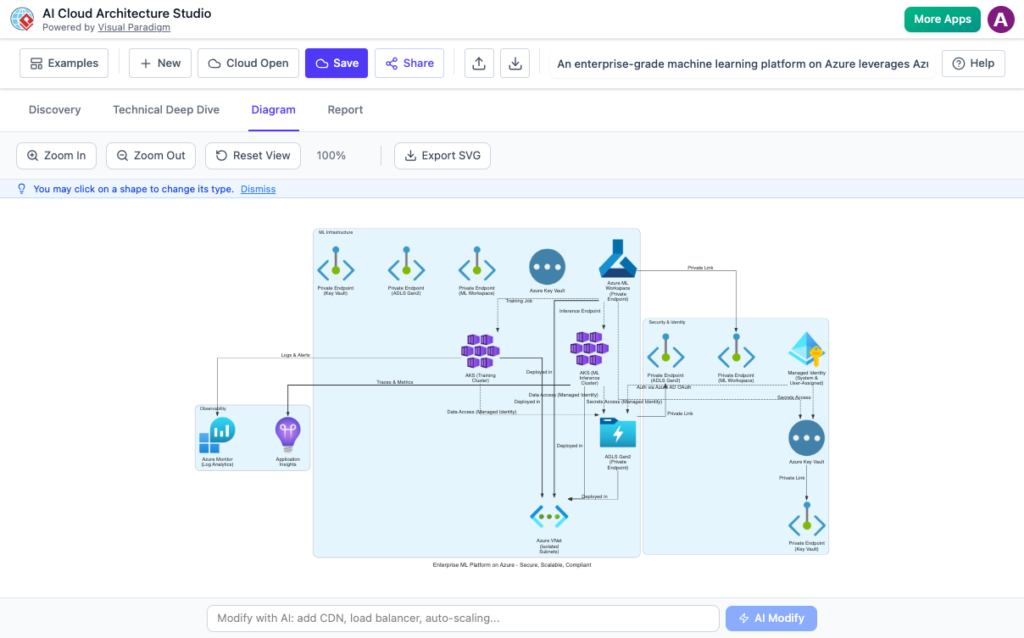
AI Cloud Architecture Studio
Specialized tool for designing cloud infrastructure:
-
Multi-cloud support (AWS, Azure, Google Cloud)
-
Architecture pattern recommendations
-
Cost optimization suggestions
-
Security best practices integration
-
Compliance checking
AI Use Case Modeling Studio
Focused on comprehensive use case development:
-
Actor identification and classification
-
Use case discovery and prioritization
-
Scenario generation
-
Use case diagram creation
-
Integration with requirements management
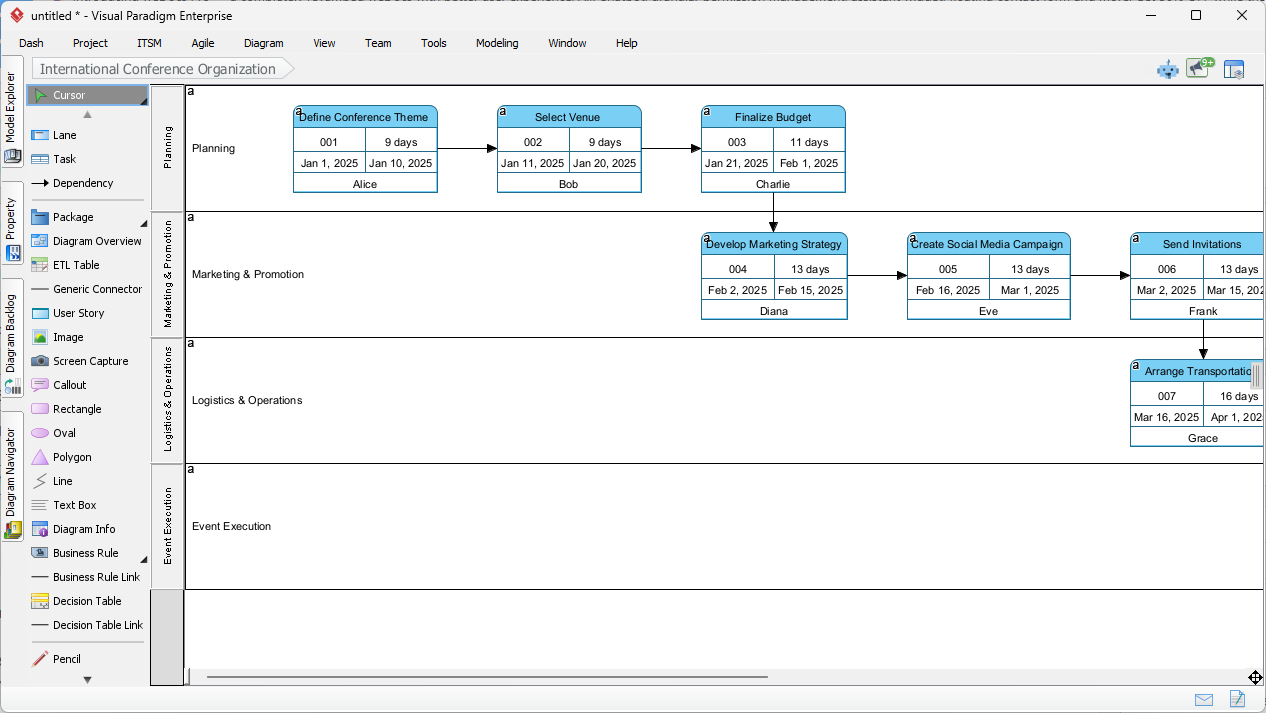
AI PERT Chart Generator
Project scheduling and timeline visualization:
-
Automatic PERT chart creation from task lists
-
Critical path analysis
-
Resource leveling suggestions
-
What-if scenario modeling
AI Business Process Modeler
BPMN-focused AI assistance:
-
Process discovery from descriptions
-
BPMN diagram generation
-
Process optimization suggestions
-
Bottleneck identification
-
Compliance checking
Best Practices for Leveraging Visual Paradigm’s AI Ecosystem
1. Start with Clear Objectives
Define what you want to achieve before engaging AI tools:
-
Identify the specific diagram type or model needed
-
Gather requirements and constraints
-
Determine the level of detail required
-
Consider the target audience
2. Combine AI Speed with Human Expertise
-
Let AI handle the heavy lifting: Use AI for initial generation and repetitive tasks
-
Apply domain knowledge: Review and refine AI output with your expertise
-
Validate assumptions: AI makes educated guesses; verify critical decisions
-
Add context: Supplement AI generation with organization-specific knowledge
3. Iterate and Refine
-
Progressive elaboration: Start broad, then add detail through iterations
-
Feedback loops: Use AI suggestions, apply judgment, request adjustments
-
Version control: Maintain history of changes and alternatives
-
Continuous improvement: Learn from AI suggestions to improve your own skills
4. Leverage the Full Ecosystem
-
Choose the right tool: Match the task to the most appropriate AI feature
-
Integrate workflows: Combine multiple AI tools for comprehensive solutions
-
Cross-pollinate insights: Apply learnings from one tool to another
-
Maximize synergies: Use Desktop and Online together for optimal results
5. Maintain Quality Standards
-
Review all AI output: Never accept AI-generated content without validation
-
Ensure consistency: Apply organizational standards and conventions
-
Document decisions: Record rationale for modifications to AI suggestions
-
Peer review: Have colleagues review critical models and diagrams
6. Security and Compliance
-
Protect sensitive information: Avoid sharing confidential data with AI
-
Compliance checking: Verify AI output meets regulatory requirements
-
Access control: Manage who can use AI features and access AI-generated content
-
Audit trails: Maintain records of AI usage and modifications
Real-World Implementation Scenarios
Scenario 1: Greenfield Software Development
Context: A development team is building a new customer relationship management (CRM) system from scratch.
AI Ecosystem Application:
-
Requirements Gathering: Use AI Chatbot to generate initial use case diagrams and user stories
-
Architecture Design: Leverage AI Cloud Architecture Studio for system architecture
-
Detailed Modeling: Import to Visual Paradigm Desktop for detailed class and sequence diagrams
-
Agile Planning: Use Agilien to create and manage Jira backlog
-
Documentation: Generate comprehensive documentation with embedded diagrams
-
Code Generation: Utilize Desktop’s code engineering features to generate skeleton code
Outcome: 60% reduction in initial modeling time, improved backlog quality, enhanced team alignment
Scenario 2: Legacy System Modernization
Context: An enterprise is modernizing a 15-year-old monolithic application to microservices architecture.
AI Ecosystem Application:
-
As-Is Documentation: Use AI Image Translator to convert existing paper diagrams to digital format
-
Gap Analysis: Leverage AI to identify missing documentation and inconsistencies
-
To-Be Design: Generate microservices architecture diagrams using AI Chatbot
-
Migration Planning: Use AI Development Plan Generator for migration roadmap
-
Service Decomposition: Create detailed component diagrams for each microservice
-
Integration Modeling: Design API contracts and integration patterns
Outcome: Clear modernization roadmap, reduced risk, improved stakeholder communication
Scenario 3: Rapid Prototyping
Context: A startup needs to quickly prototype a fintech application for investor presentations.
AI Ecosystem Application:
-
Concept Visualization: Use AI Chatbot to rapidly generate system architecture diagrams
-
User Journey Mapping: Create activity diagrams for key user workflows
-
Data Model: Generate class diagrams for core domain entities
-
Pitch Deck Integration: Export diagrams in presentation-ready formats
-
Iterative Refinement: Quickly adjust diagrams based on feedback
Outcome: Professional prototypes in days instead of weeks, improved investor confidence
Advanced Techniques and Tips
Prompt Engineering for AI Chatbot
Effective Prompt Structure:
-
Context: Provide background information
-
Objective: Clearly state what you want to create
-
Constraints: Specify limitations or requirements
-
Details: Include specific elements, relationships, or attributes
-
Format: Indicate preferred diagram type and level of detail
Example of Effective Prompt:
"Create a UML component diagram for a microservices-based e-commerce platform.

Context: We're building a scalable online marketplace with multiple vendors.

Requirements:
- Separate services for: user management, product catalog, order processing,
  payment, inventory, shipping, and notifications
- Use event-driven architecture with message queues
- Include API gateways and load balancers
- Show database per service pattern
- Include caching layer (Redis)
- Support third-party integrations (payment gateways, shipping providers)

Please show:
- Service boundaries clearly
- Inter-service communication patterns
- Data storage for each service
- External system integrations
- Infrastructure components

Use standard UML component notation with interfaces."
Maximizing Agilien Effectiveness
1. Invest Time in Project Definition
The quality of AI-generated backlog depends heavily on the initial project definition:
-
Provide comprehensive context
-
Specify target users and personas
-
Detail key features and functionalities
-
Mention technical constraints and preferences
-
Include non-functional requirements
2. Leverage Diagram Attachments
Don’t just generate text-based user stories:
-
Attach sequence diagrams for complex workflows
-
Include wireframes for UI-heavy features
-
Add architecture diagrams for technical stories
-
Create data models for data-intensive features
3. Customize AI Behavior
-
Adjust AI creativity vs. conservatism based on project needs
-
Configure default story formats and templates
-
Set estimation preferences (story points, ideal days)
-
Define team-specific terminology and conventions
Integration Strategies
Desktop-Online Workflow Optimization:
-
Batch Generation: Generate multiple diagrams in Online, then batch import to Desktop
-
Template Creation: Create AI-generated templates in Online, customize in Desktop
-
Collaborative Review: Share AI-generated content via Online for team feedback
-
Version Management: Use Desktop for version-controlled master models
Tool Chain Integration:
Idea → AI Chatbot (initial diagrams) → Agilien (backlog creation) →
Jira (task management) → Visual Paradigm Desktop (detailed modeling) →
GitHub (code repository) → CI/CD (automated builds)
Measuring Success and ROI
Key Metrics
Efficiency Gains:
-
Time saved in diagram creation (target: 50-70% reduction)
-
Reduced rework through better initial quality
-
Faster onboarding of new team members
-
Accelerated requirement elaboration cycles
Quality Improvements:
-
Increased diagram consistency and standards compliance
-
Reduced errors and omissions
-
Better traceability between artifacts
-
Improved stakeholder understanding
Business Impact:
-
Faster time-to-market for features
-
Reduced development costs
-
Improved customer satisfaction
-
Enhanced team productivity and morale
Tracking Methods
-
Time Tracking: Compare time spent with and without AI tools
-
Quality Audits: Regular reviews of AI-generated vs. manually created artifacts
-
Team Surveys: Collect feedback on tool effectiveness
-
Project Metrics: Monitor velocity, defect rates, and delivery timelines
Future Directions and Emerging Capabilities
Visual Paradigm continues to expand its AI ecosystem with emerging capabilities:
Upcoming Features
-
Enhanced Natural Language Processing: Better understanding of domain-specific terminology
-
Multi-Modal Input: Support for voice commands and sketch recognition
-
Predictive Modeling: AI suggestions for design improvements and optimizations
-
Automated Refactoring: AI-powered model transformation and optimization
-
Intelligent Collaboration: AI-assisted conflict resolution and merge suggestions
AI Model Improvements
-
Domain-Specific Models: Specialized AI trained on industry-specific patterns
-
Contextual Awareness: Better understanding of organizational context and constraints
-
Learning from Feedback: Continuous improvement based on user corrections
-
Cross-Project Insights: Leverage patterns from similar projects
Conclusion
Visual Paradigm’s AI Ecosystem represents a transformative approach to visual modeling and software development. By combining the speed and intelligence of AI with the precision and power of professional modeling tools, organizations can achieve unprecedented levels of productivity and quality.
The four key components work together seamlessly:
-
AI Chatbot provides instant diagram generation through natural conversation
-
Desktop & Online Integration offers the perfect balance of local power and cloud intelligence
-
Specialized AI Apps deliver deep expertise for specific challenges
-
Agilien revolutionizes agile planning with AI-powered backlog management
Getting Started
To begin your journey with Visual Paradigm’s AI Ecosystem:
-
Start Small: Begin with the AI Chatbot for simple diagrams
-
Experiment: Try different prompts and approaches
-
Expand Gradually: Incorporate additional tools as you gain confidence
-
Share Knowledge: Collaborate with your team and share best practices
-
Continuous Learning: Stay updated with new features and capabilities
The future of visual modeling is here, powered by artificial intelligence. Embrace these tools to unlock new levels of creativity, efficiency, and excellence in your software development and business analysis endeavors.
Ready to transform your modeling workflow? Explore Visual Paradigm’s AI Ecosystem today and experience the future of intelligent visual modeling.

 English
 Arabic
 Chinese (Simplified)
 Dutch
Dutch French
 German
 Italian
 Japanese
 Korean
 Portuguese
 Russian
 Spanish