


In 2026, Visual Paradigm has evolved from a leading visual modeling tool into the most mature and comprehensive AI-powered modeling platform available—blending intelligent automation with enterprise-grade structure, traceability, and collaboration. With its groundbreaking AI Diagram Generator, AI Visual Modeling Chatbot, AI Apps & Studios, and deep integration across VP Desktop, VP Online, and OpenDocs, Visual Paradigm empowers users to transform natural language into professional, editable, and traceable diagrams—fast, accurately, and at scale.
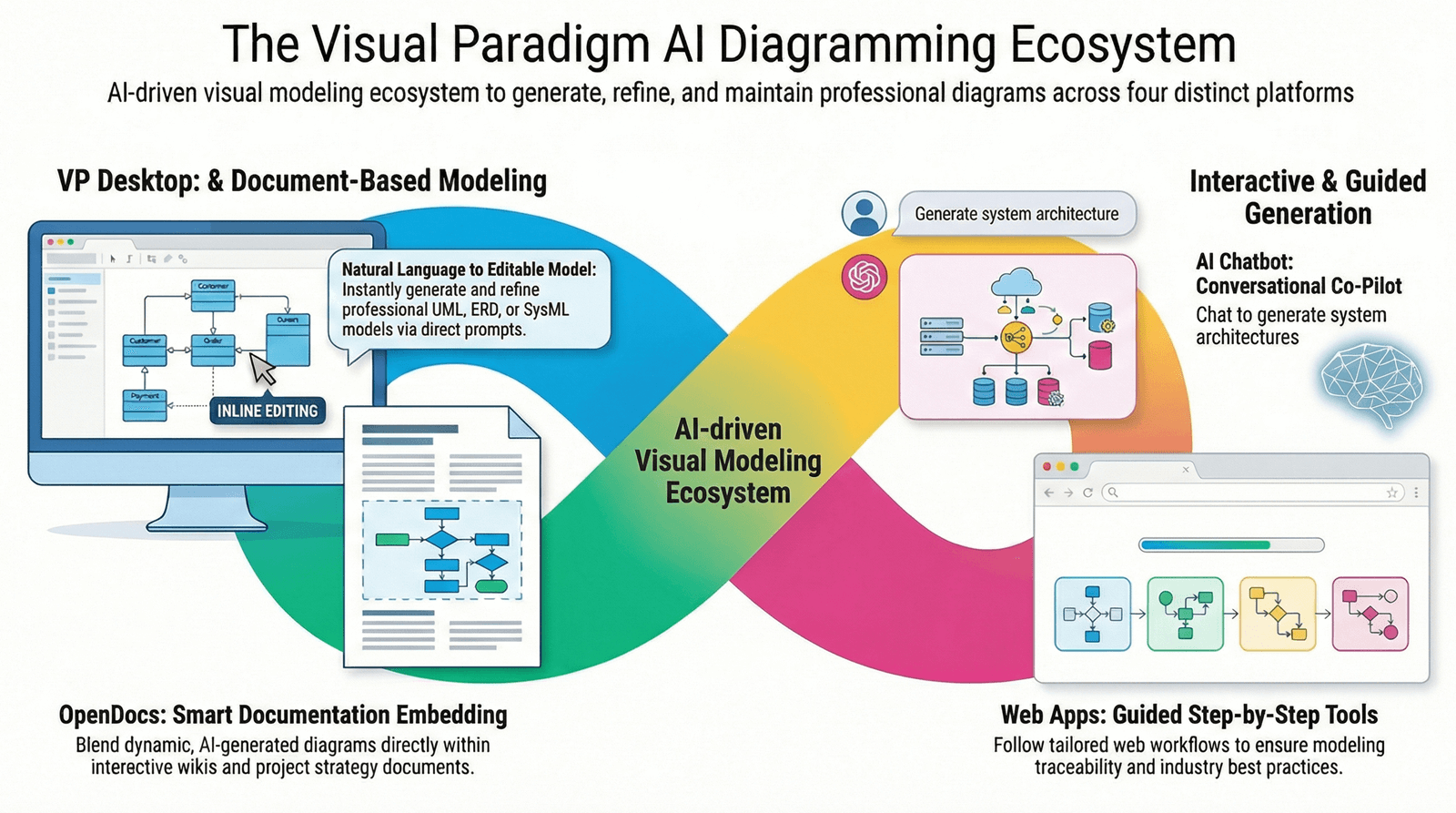
Unlike generic AI diagram generators that produce static images with little to no editing capability, Visual Paradigm’s ecosystem is built around iterative refinement, model consistency, cross-diagram traceability, and seamless transitions into full visual editing or code generation. This guide explores every facet of the platform’s AI capabilities, offering a comprehensive, step-by-step roadmap for professionals, architects, developers, and knowledge managers who want to harness AI not just to draw diagrams—but to build smarter, more connected, and future-proof models.
🔍 Why Visual Paradigm Stands Out in 2026
While many AI tools generate visual outputs from text, they often fall short in:
-
Editability (images can’t be modified)
-
Consistency (diagrams don’t align with modeling standards)
-
Traceability (no links to requirements or user stories)
-
Integration (no connection to real projects or code)
Visual Paradigm solves all of these. It’s not just an AI diagram generator—it’s a full lifecycle modeling co-pilot, enabling users to:
-
Generate diagrams from plain English
-
Refine them conversationally
-
Enforce best practices through guided workflows
-
Maintain model integrity across multiple diagram types
-
Embed diagrams into documentation, reports, and wikis
-
Export to code or integrate with development environments
✅ In short: Visual Paradigm turns natural language into living, collaborative, and actionable models.
🛠️ Core AI Diagram Generation Approaches (2026)
Visual Paradigm offers four complementary AI-powered methods, each suited to different stages of the modeling process:
| Method | Best For | Key Strength |
|---|---|---|
| 1. Direct Text-to-Diagram (AI Diagram Generator) | Rapid prototyping, quick validation | One-shot generation, fast results |
| 2. Conversational AI (AI Visual Modeling Chatbot) | Brainstorming, iterative refinement | Natural dialogue, real-time feedback |
| 3. Guided AI Apps & Studios | Learning standards, ensuring completeness | Step-by-step guidance, best-practice enforcement |
| 4. Embedded AI in OpenDocs & Desktop | Knowledge management, offline editing | Seamless integration, traceability, version control |
Let’s explore each in detail.
📌 Method 1: Direct Text-to-Diagram (AI Diagram Generator)
The Fastest One-Shot Generation
Ideal for: Rapid prototyping, early-stage ideation, validating concepts.
📍 Where to Find It:
-
VP Desktop:
Tools > AI Diagram -
VP Online / OpenDocs: AI panel in the sidebar
✅ How to Use (Step-by-Step – VP Desktop, 2026 Edition)
-
Open Visual Paradigm Desktop (Professional or Enterprise edition recommended).
-
Navigate to Tools > AI Diagram Generation.
-
In the AI popup window:
-
Select Diagram Type: Choose from over 30 supported types (e.g., UML Sequence, C4 Container, ArchiMate Technology Viewpoint, ERD, DFD).
-
Enter Prompt: Be specific and include scope, actors, flows, exceptions, and layout preferences.
🔹 Good Prompt:
“Generate a UML activity diagram for a customer placing an order on an e-commerce site: include steps for login, cart checkout, payment processing, order confirmation, and failure path if payment fails.”🔹 Advanced Prompt:
“Create a full C4 model for a mobile banking app: system context, container level, component level, and deployment diagram. Use vertical layout and ensure all components are traceable.”
-
-
Click Generate.
-
Review the preview:
-
Accept, edit, or regenerate.
-
Choose Import to Project or Open in Editor to refine.
-
-
Once imported:
-
Reorganize layout (auto-layout available)
-
Add notes, constraints, or links to requirements
-
Connect to other diagrams via traceability links
-
💡 Pro Tips:
-
Use “full suite” in your prompt for C4 or ArchiMate to generate all levels automatically.
-
Add “traceable”, “with exception handling”, or “in vertical layout” for better results.
-
The AI uses PlantUML under the hood but renders it as a fully editable vector diagram.
💬 Method 2: Conversational AI (AI Visual Modeling Chatbot)
The Iterative Brainstorming Partner
Ideal for: Overcoming blank-page syndrome, refining complex flows, exploring alternatives.
📍 Access Points:
-
Standalone: ai.visual-paradigm.com
-
Embedded in VP Desktop, VP Online, and OpenDocs
✨ How It Works:
-
Open a new chat session.
-
Start with a simple request:
“Draw a UML use case diagram for a library management system.”
-
AI responds with a visual preview (rendered via PlantUML + vector engine).
-
Refine conversationally:
-
“Add an admin actor who can manage books and users.”
-
“Include the ‘return book’ use case with a pre-condition: book must be overdue.”
-
“Show the ‘issue book’ flow in a sequence diagram.”
-
“Export this as an editable VP project file.”
-
-
Once satisfied, import into VP Desktop for deeper editing, traceability, or code generation.
🏆 Why It’s Powerful:
-
No rigid templates—you can explore ideas freely.
-
Real-time feedback loop: You can ask for changes, restructure, or expand scope.
-
Traceability built-in: AI can suggest linking use cases to requirements or user stories.
-
Multi-diagram generation: One conversation can spawn multiple diagrams.
🔄 Example Flow:
Use case → Sequence → Activity → Class → Component
All generated in one conversation, with automatic traceability.
🎯 Method 3: Guided AI Apps & Studios
The Best-Practice Enforcer
Ideal for: Learning standards, ensuring completeness, onboarding new team members.
📍 Access:
-
AI App Library: ai.visual-paradigm.com/apps
-
Built into VP Online and VP Desktop
📚 Notable AI Apps (2026 Updates):
| App Name | Purpose |
|---|---|
| AI-Powered Use Case Modeling Studio | Generate use cases, actors, and relationships → auto-generate sequence/activity diagrams |
| AI-Assisted UML Class Diagram Generator | From text → classes, attributes, methods, associations, inheritance |
| AI-Powered C4 PlantUML Studio | Full C4 suite (Context → Container → Component) with traceability |
| AI Sequence Diagram Refinement Tool | Enhance sequence diagrams with lifelines, messages, alt/alt blocks |
| AI Use Case to Activity Diagram Generator | Convert use case flows into structured activity diagrams |
| AI-Powered Decision Table Generator | Turn business rules into decision tables with conditions/actions |
| DBModeler AI | Convert text or database schema → ERD (Chen, Crow’s Foot) |
| AI MVC System Architecture Generator | Generate MVC-based architecture diagrams from description |
| Multi-Aspect Infographic Designers | Create SWOT, PESTLE, Porter’s Five Forces, McKinsey 7S, BCG Matrix, etc., with 3–8 visual aspects |
🛠️ Workflow Example: Use Case Modeling Studio
-
Launch Use Case Modeling Studio.
-
Answer guided questions:
-
“What is the system name?” → Online Course Platform
-
“Who are the primary actors?” → Student, Instructor, Admin
-
“List 3 key functions.” → Enroll in course, Upload assignment, Grade submission
-
-
AI generates:
-
Use case diagram
-
Use case descriptions (preconditions, postconditions, flow of events)
-
Suggested sequence diagrams
-
-
Click Generate Related Diagrams → AI creates linked sequence and activity diagrams.
-
Export to project or share as PDF.
✅ Perfect for onboarding, training, or audit compliance—ensuring all diagrams follow ISO/IEC 2382, UML 2.5, ArchiMate 3.1, and C4 Model standards.
🧩 Method 4: Embedded AI in OpenDocs & Desktop
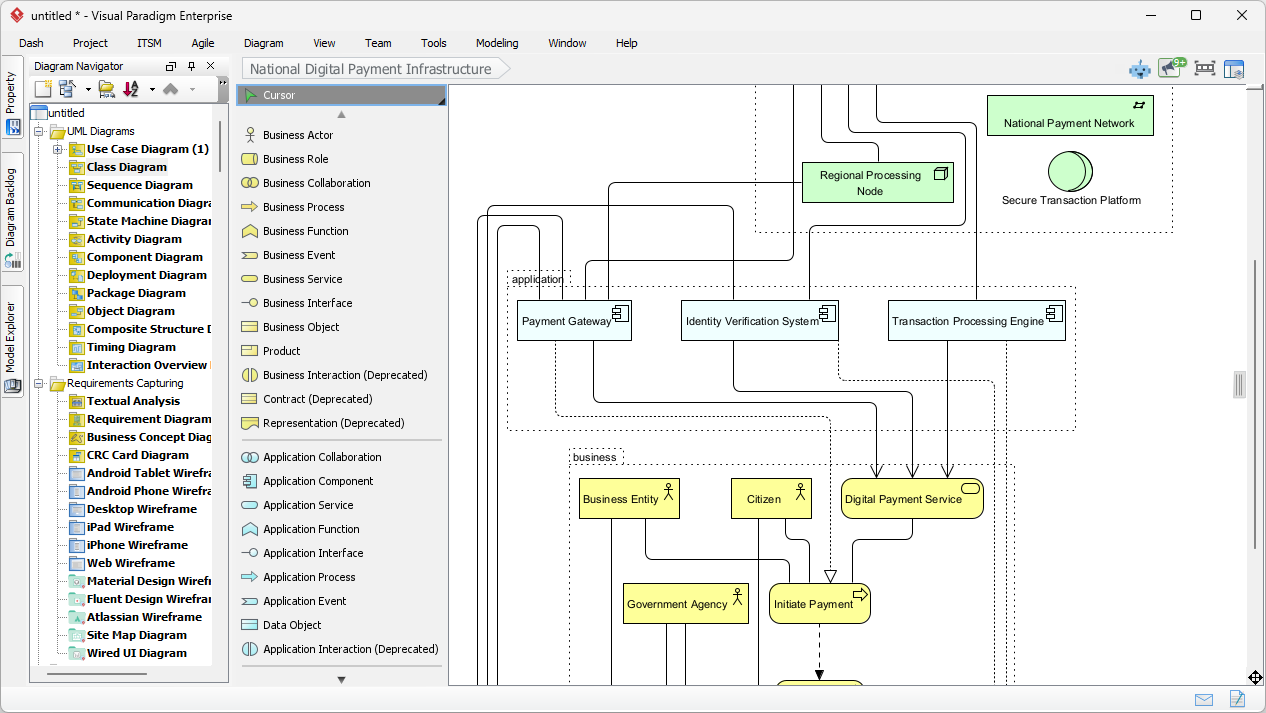
The Living Documentation Engine
Ideal for: Knowledge management, maintaining up-to-date documentation, team collaboration.
📌 Key Features (2026):
-
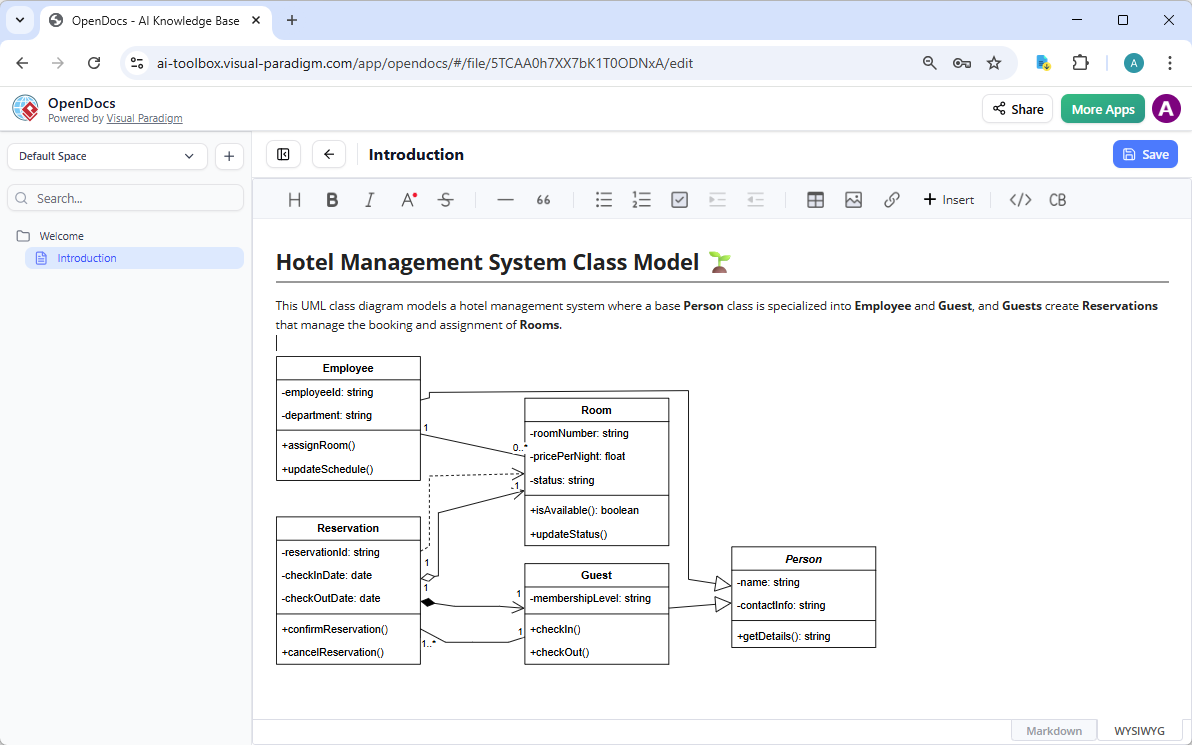
AI-powered diagram insertion directly into OpenDocs articles.
-
Dynamic diagrams: Changes to the model auto-update in the document.
-
Offline editing with full traceability in VP Desktop.
-
Version control integration: Track changes across model updates.
-
Link to requirements, user stories, or code via traceability matrix.
💬 Use Case: Maintain a Living Architecture Document
-
Create a new OpenDoc titled “Banking App Architecture.”
-
Use AI to insert a C4 Container Diagram:
“Insert a C4 container diagram for a mobile banking app, including: mobile app, backend API, database, and third-party payment gateway.”
-
AI generates the diagram and embeds it live.
-
Later, update the model in VP Desktop.
-
Return to OpenDoc → Refresh → Diagram auto-updates.
🔄 No more stale diagrams. No more manual rework.
📊 Quick Comparison: Which Method Should You Use?
| Goal | Recommended Method | Speed | Structure | Iterative Power | Traceability |
|---|---|---|---|---|---|
| Fast prototype (any diagram) | AI Diagram Generator | ★★★★★ | ★★☆☆☆ | ★★☆☆☆ | ★★★☆☆ |
| Brainstorming & refinement | AI Visual Modeling Chatbot | ★★★★☆ | ★★★☆☆ | ★★★★★ | ★★★★☆ |
| Learning / best practices | Guided AI Apps & Studios | ★★★☆☆ | ★★★★★ | ★★★★☆ | ★★★★★ |
| Enterprise modeling | Combination (Chatbot → App → Desktop) | ★★★☆☆ | ★★★★★ | ★★★★★ | ★★★★★ |
✅ Pro Tip: For complex systems, start with the chatbot, refine with guided apps, then finalize in VP Desktop for traceability and code integration.
🎯 Best Practices & Pro Tips (2026 Edition)
-
Master Prompt Engineering
-
Be specific: “UML Activity Diagram”, “C4 Component Level”, “ArchiMate Motivation Viewpoint”
-
Include scope: “for a healthcare portal used by patients and doctors”
-
Define exceptions: “include failure path if login fails after 3 attempts”
-
Specify layout: “use horizontal swimlanes”, “stack vertically”
-
-
Start Broad → Drill Down
Begin with high-level views (e.g., C4 System Context), then use AI to generate detailed components, sequences, and deployment diagrams. -
Enforce Traceability
Link generated diagrams to:-
Requirements (from ReqView)
-
User stories (from Jira, Azure DevOps)
-
Code (via code generation or reverse engineering)
-
-
Use VP Desktop for Power Users
-
Offline editing
-
Advanced layout tools
-
Code generation (Java, C#, Python, etc.)
-
Model validation & simulation
-
Team collaboration via shared repositories
-
-
Leverage OpenDocs for Knowledge Base
Embed live diagrams in wikis, reports, or onboarding guides. Auto-update when models change. -
Combine Methods for Maximum Impact
Chatbot → Import to Desktop → Use AI Studio → Export to OpenDocs → Share with stakeholders
-
Explore the AI App Library
New apps are added monthly. Check ai.visual-paradigm.com for the latest.
🌐 Supported Diagram Types (2026 Status)
Visual Paradigm now supports dozens of modeling notations, with continuous expansion. Key families include:
🧩 UML (Unified Modeling Language)
-
Use Case, Class, Sequence, Activity, State Machine, Package, Deployment, Component, Object, Communication, Timing, Composite Structure
-
All now fully supported with AI generation
🛰️ SysML (Systems Modeling Language)
-
Requirement, Block Definition, Internal Block, Parametric Diagram
-
AI can generate full SysML models from text descriptions
🏢 C4 Model (Context, Container, Component, etc.)
-
Full suite supported
-
AI can generate entire C4 model in one prompt
-
Traceability across levels
🗃️ Database & Data Modeling
-
ERD: Chen, Crow’s Foot, IDEF1X
-
DFD: Yourdon & Coad, Gane-Sarson, Yourdon-DeMarco
-
Reverse engineering: From DB to ERD
-
AI DBModeler: Text → ERD
🏛️ Enterprise Architecture (EA)
-
ArchiMate 3.1: 26+ viewpoints (Business, Application, Technology, Motivation, etc.)
-
Value Stream Mapping, EPC, Process Overview
-
AI generates compliant EA models with traceability
📊 Business & Strategic Analysis
-
SWOT, PEST/PESTLE, Porter’s Five Forces, McKinsey 7S, Balanced Scorecard
-
Ansoff Matrix, BCG Matrix, RACI, Eisenhower Matrix, Decision Tables
-
Multi-aspect infographic designers now support 3–8 visual dimensions
🎨 General & Visualization
-
Mind Map, Markmap
-
Flowchart, Organization Chart
-
Infographic (multi-aspect), KPI Dashboards
-
Radar, Bar, Line, Pie, Scatter charts
-
Tree diagrams
✅ Recent Additions (2025–2026):
Full Activity Diagram support
Package Diagram generation
State Machine AI modeling
ERD & DFD with reverse engineering
C4 Model suite (context to deployment)
Multi-aspect infographic generators
🚀 Final Thoughts: The Future of Visual Modeling is Here
In 2026, Visual Paradigm’s AI ecosystem is no longer just a tool—it’s a modeling co-pilot. Whether you’re a developer sketching a class diagram, an architect designing a microservices architecture, a business analyst mapping a process, or a knowledge manager building a living documentation hub, Visual Paradigm gives you the intelligence, structure, and integration to work smarter.
✅ Start Your Journey Today:
-
Free Trial: visual-paradigm.com
-
Try the AI Chatbot: ai.visual-paradigm.com
-
Explore AI Apps: ai.visual-paradigm.com/apps
-
Learn with Guides: guides.visual-paradigm.com
📌 The days of staring at a blank canvas are over.
With Visual Paradigm, your ideas are no longer trapped in text—they’re alive, editable, traceable, and ready to build.
📌 References & Further Reading
📣 Ready to transform your diagrams from static images into dynamic, intelligent models?
Start with the free trial.
Let AI do the heavy lifting.
Build the future—visually.
-
AI Chatbot Feature – Intelligent Assistance for Visual Paradigm Users: This resource introduces the AI-powered chatbot functionality designed to provide users with instant guidance, task automation, and enhanced productivity.
-
Visual Paradigm Chat – AI-Powered Interactive Design Assistant: An interactive AI interface that helps users generate diagrams, write code, and solve design challenges in real time through a conversational assistant.
-
AI Chatbot for Diagramming: How It Works with Visual Paradigm: This article explains how the chatbot acts as an AI-powered modeling assistant that turns natural language directly into diagrams without requiring knowledge of specific syntax.
-
Introducing Visual Paradigm AI Chatbot: A Smarter Way to Create Diagrams: This update highlights how the chatbot enables natural language diagram generation, smart editing, and contextual analysis for enterprise modeling.
-
Visual Paradigm AI Chatbot: Turn Your Ideas into Diagrams Instantly: A guide highlighting the assistant’s ability to visualize concepts through conversational prompts, allowing designs to grow from raw text into full models.
-
How to Turn Requirements into Diagrams with an AI Chatbot: This article explores the workflow of converting project requirements into clear visual models through a continuous conversational interface.
-
How AI Chatbot Can Help You Learn UML Faster: A resource detailing how the chatbot provides an interactive learning environment where users can practice UML concepts and receive instant feedback.
-
Case Study: Enhancing System Modeling Efficiency with Visual Paradigm’s AI-Powered Chatbot: This case study demonstrates how the chatbot improves productivity and accuracy in system modeling by enabling conversational diagram creation.
-
Visual Paradigm AI Chatbot: The World’s First Purpose-Built AI Assistant for Visual Modeling: This article highlights the launch of a groundbreaking AI assistant tailored specifically for visual modeling with intelligent guidance.
-
Mastering Sequence Diagrams with Visual Paradigm: AI Chatbot Tutorial: A beginner-friendly tutorial that uses a real-world e-commerce case study to demonstrate conversational diagramming with the AI assistant.

 English
 Arabic
 Chinese (Simplified)
 Dutch
Dutch French
 German
 Italian
 Japanese
 Korean
 Portuguese
 Russian
 Spanish