


Scrum artifacts provide key information that Scrum teams and stakeholders need to understand the product being developed, the activities being planned, and the work completed in a project. The following artifacts are defined within the Scrum Process Framework.
- Product Vision
- Sprint Goal
- Product Backlog
- Sprint Backlog
- Definition of Done
- Burndown Chart
- Increment
- Burndown Chart
- Other required artifacts…
Note:
These are the most common artifacts in Scrum projects, but project artifacts are not limited to these.
Product Vision
The Product Vision is the artifact that defines the long-term goals of the project/product. It establishes the overall direction and guides the Scrum team. Everyone should be able to remember the product vision; therefore, it must be concise and precise.
Sprint Goal
The Sprint Goal helps focus the Sprint. By implementing the forecasted product backlog items, the Sprint achieves this goal and provides the development team with guidance on why they are building the product increment.
According to the Scrum Guide, the responsibility of establishing the Sprint Goal lies with the Scrum Team. However, the Product Owner plays a significant role in supporting this process by defining a clear business objective for the upcoming Sprint, which also helps in ordering the Product Backlog more effectively.
Product Backlog
The Product Backlog lists everything needed for the product, serving as a dynamic and most accessible set of requirements for any changes to the product. The Product Owner owns the Product Backlog, which includes all features, features, requirements, enhancements, and fixes that will constitute changes to the product in future releases.
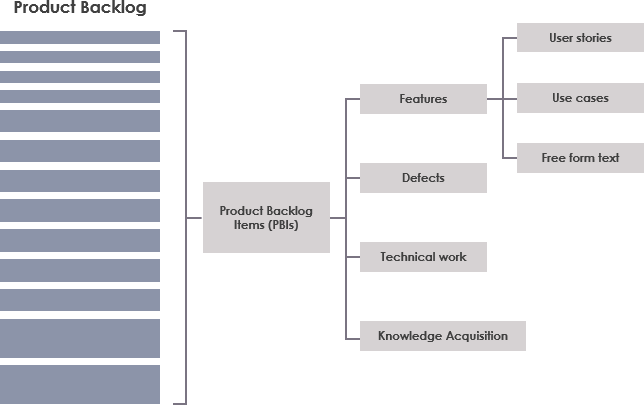
Product Backlog
Typically, product requirements are constantly changing—due to business needs, market conditions, or technological shifts. Therefore, the Product Backlog is continuously updated to reflect what is most valuable to the target users.
Sprint Backlog
The Sprint Backlog is the selected set of Product Backlog items for the Sprint, along with the plan for delivering the product increment and achieving the Sprint Goal. The Sprint Backlog represents the development team’s forecast of the features to be included in the next increment and the work required to deliver them. The Sprint Backlog defines the work the development team will do to transform Product Backlog items into a “Done” increment. It shows all the work the team has committed to in order to meet the Sprint Goal.
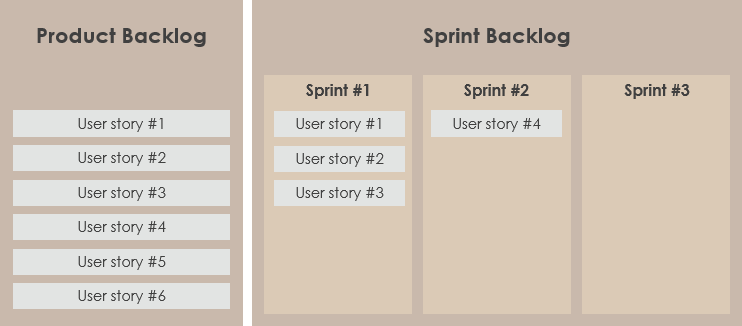
Sprint Backlog
Definition of Done
Each Product Backlog item has acceptance criteria that clearly define what must be met when the item is declared complete. Many criteria apply to all or most Product Backlog items. It proves useful to gather these criteria in one place rather than redefining them for each item: the Definition of Done. Therefore, the “Definition of Done” is a shared understanding among the Scrum team of what it means to have completed work. It typically includes quality standards, constraints, and overall non-functional requirements. Here are some examples:
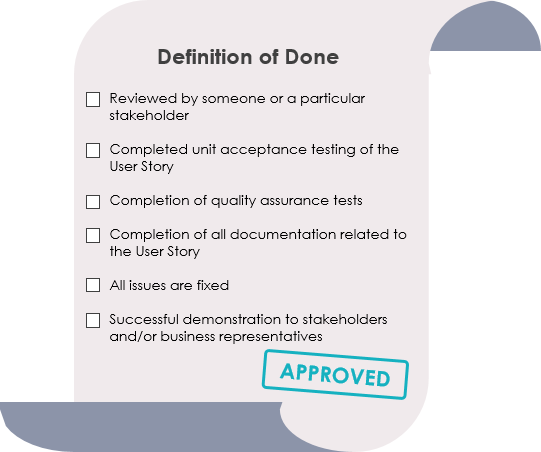
Definition of Done (DoD)
Increment
The Increment is the sum of all Product Backlog items completed during the Sprint and all previous Sprints.
At the end of a Sprint, the Increment must be “Done,” meaning:
- It must conform to the Scrum team’s Definition of Done.
- It must be in a usable state, regardless of whether the Product Owner decides to release it.
Burndown Chart
The Burndown Chart is a graphical representation of the overall progress of a project. As tasks are completed, the chart “burns down” to zero. It is used as a guide for the development team to successfully complete the Sprint with the final product. If the team decides they have achieved more goals from the Product Backlog to the Sprint Backlog, the Burndown Chart can help identify which tasks cannot be completed in time, allowing them to be moved back to the Product Backlog.
The following Sprint Burndown Chart shows the remaining tasks in the Sprint Backlog. Updated daily, it provides a concise view of Sprint progress. It also offers a quick visual reference.
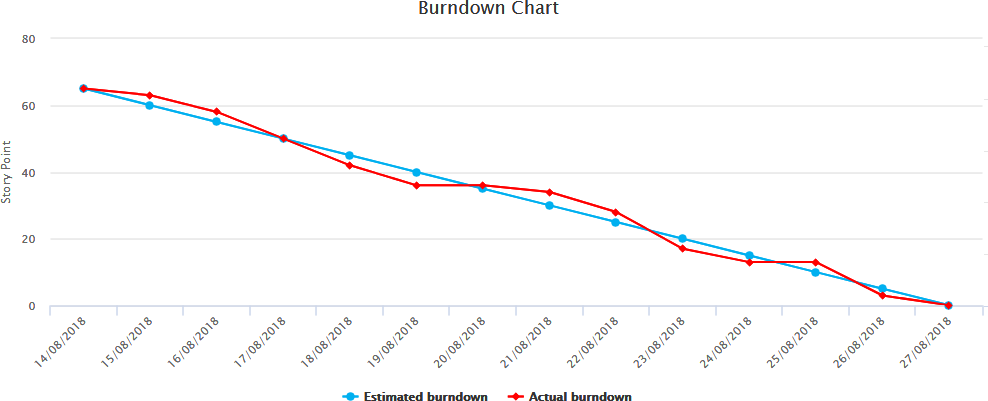
Burndown Chart


 English
 Arabic
 Chinese (Simplified)
 Dutch
Dutch French
 German
 Italian
 Japanese
 Korean
 Portuguese
 Russian
 Spanish