🌐 OVERVIEW
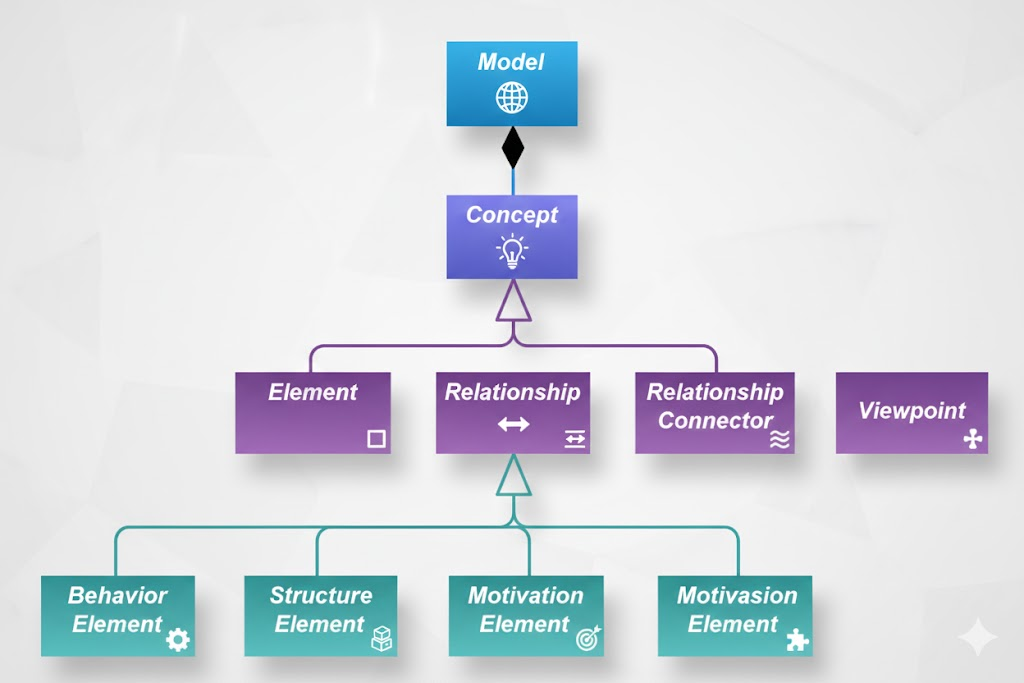
This diagram illustrates the top-level conceptual hierarchy of the ArchiMate modeling language, which is a standardized framework for describing enterprise architecture. The structure is hierarchical and classifies all architectural concepts into a few core categories that can be further specialized.
The diagram is not meant to represent actual model elements you’d use in practice — rather, it shows the abstract classification system underlying the language.
🔶 KEY NOTATION EXPLANATION (As Mentioned in Text)
“These are abstract concepts; they are not intended to be used directly in models. To signify this, they are depicted in white with labels in italics.”
- White boxes: Indicate abstract or meta-level concepts — they serve as categories or base classes.
- Italics: Reinforce that these are abstract types — you don’t instantiate them directly.
- Solid lines with arrows: Show inheritance or generalization (“is-a” relationship). For example, “Behavior Element” is a kind of “Element”.
- Diamond symbol (◆): Represents composition — “Model” contains “Concepts”. This means a Model is composed of one or more Concepts.
🧩 DETAILED BREAKDOWN OF THE HIERARCHY
1. Model
At the top of the hierarchy.
- A Model represents the entire architectural description — essentially, your complete enterprise architecture model.
- It is composed of Concepts (via the diamond-shaped composition symbol).
- Think of it like a container or repository holding all the building blocks of your architecture.
✅ Example: Your organization’s “Digital Transformation Architecture Model” would contain dozens or hundreds of Concepts.
2. Concept
Direct child of Model via composition.
- Concept is the root abstract type for everything else in the hierarchy.
- All architectural artifacts — whether elements, relationships, or connectors — are ultimately Concepts.
- This is an abstract base class — you never create a generic “Concept”; instead, you specialize it into concrete types.
💡 Why? Because it allows for consistent handling of all model components under a single umbrella.
3. Three Main Subtypes of Concept
From “Concept”, three direct specializations branch out:
a. Element
An Element represents something within the architecture — a thing that exists, performs actions, or has properties.
- Examples: Application Component, Business Process, Data Object, etc.
- Further subdivided into four abstract categories:
- Behavior Element: Describes what happens — activities, processes, functions, events.
e.g., “Process Order”, “Validate User”
- Structure Element: Describes what things exist — components, nodes, roles, groups.
e.g., “Customer Service Department”, “Database Server”
- Motivation Element: Captures why things are done — goals, drivers, values, stakeholders.
e.g., “Improve Customer Satisfaction”, “Regulatory Compliance”
- Composite Element: An element made up of other elements (used for grouping or abstraction).
e.g., “Enterprise Application Suite” containing multiple apps.
- Behavior Element: Describes what happens — activities, processes, functions, events.
⚠️ Note: These four are still abstract — you won’t use “Behavior Element” directly; instead, you’ll use specific instances like “Business Process”.
b. Relationship
Represents how two or more Elements are connected — dependencies, associations, flows, etc.
- Not shown in detail here, but examples include:
- Realization: A service realizes a business process.
- Access: An application accesses data.
- Aggregation: A composite element contains others.
❗ Important: Relationships connect Elements, not other Relationships or Connectors.
c. Relationship Connector
A less commonly discussed concept — typically used when you need to connect Relationships themselves (meta-level connections), though rarely needed in standard modeling.
📌 In most practical ArchiMate modeling, you’ll primarily deal with Elements and Relationships.
└── ◆ Composed of → Concept
├── ▲ Generalizes → Element
│ ├── ▲ Generalizes → Behavior Element
│ ├── ▲ Generalizes → Structure Element
│ ├── ▲ Generalizes → Motivation Element
│ └── ▲ Generalizes → Composite Element
├── ▲ Generalizes → Relationship
└── ▲ Generalizes → Relationship Connector
🎯 PURPOSE AND SIGNIFICANCE
This hierarchy serves several critical purposes:
1. Consistency & Standardization
By defining a clear taxonomy, ArchiMate ensures that all architects and tools interpret and implement the language uniformly.
2. Extensibility
New element types or relationship types can be added while staying within the defined structure.
3. Tooling Support
Modeling tools (like Archi, BiZZdesign, Sparx EA) rely on this hierarchy to validate models, enforce rules, and generate views/reports.
4. Abstraction Layer
It separates the language specification from model usage. You work with concrete elements (e.g., “Application Component”), but those are grounded in this abstract foundation.
📘 CONNECTION TO CHAPTER 4 (AS MENTIONED)
The reference to Chapter 4 likely explains the full notation system used in ArchiMate diagrams — including colors, shapes, icons, and line styles for different element/relationship types. This diagram uses only basic UML-like notation (boxes and arrows), but real ArchiMate diagrams use rich visual semantics (e.g., yellow for behavior, blue for structure, green for motivation).
✍️ PRACTICAL TAKEAWAY FOR MODELERS
While you won’t draw “Concept” or “Element” in your actual models, understanding this hierarchy helps you:
- Know where each element belongs (e.g., Is “Data Object” a Structure or Behavior? → Structure)
- Understand why certain relationships are allowed between certain elements
- Better navigate ArchiMate documentation and tool interfaces
- Design consistent, well-structured models aligned with the standard
🧭 FINAL THOUGHT
Think of this diagram as the “periodic table” of ArchiMate — it organizes all possible building blocks into logical families based on their nature and role in architecture. Just as chemists understand atoms through their position in the periodic table, enterprise architects understand model components through this conceptual hierarchy.

 English
 Arabic
 Chinese (Simplified)
 Dutch
Dutch French
 German
 Italian
 Japanese
 Korean
 Portuguese
 Russian
 Spanish