


Introduction: The Power of Simplicity in Object-Oriented Design
In the world of software development, especially within agile and extreme programming (XP) methodologies, finding lightweight, collaborative, and effective techniques for early design is crucial. Enter CRC cards — a proven, intuitive method for object-oriented analysis and design (OOAD) that emphasizes behavior, collaboration, and clarity over complexity.
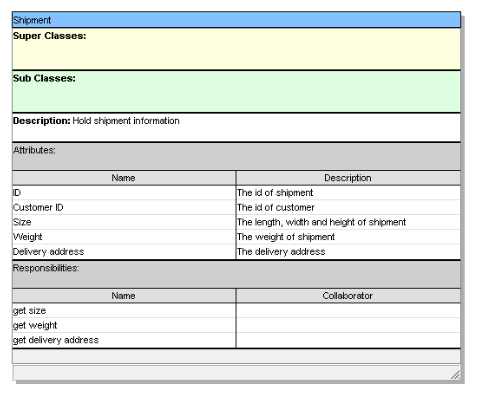
Developed by Ward Cunningham and Kent Beck in 1989, CRC cards (Class-Responsibility-Collaborator) have stood the test of time as a foundational tool for building robust, maintainable systems. This guide explores everything you need to know about CRC cards — from their structure and usage to best practices and modern digital support via tools like Visual Paradigm.
What Are CRC Cards?
CRC cards are a lightweight, informal, and collaborative technique used to model software systems during the early stages of design. They help teams identify classes, define their responsibilities, and uncover interactions without writing code or creating complex UML diagrams.
Core Philosophy
-
Focus on what a class does (responsibilities), not just what it stores (attributes).
-
Encourage team collaboration between developers, analysts, and domain experts.
-
Promote responsibility-driven design (RDD) — a mindset where each class owns specific duties.
Physical vs. Digital
Traditionally, CRC cards are written on 4×6 inch index cards, encouraging simplicity and mobility. However, modern tools now allow for digital CRC cards, offering scalability and persistence while preserving the core collaborative spirit.
Structure of a CRC Card
Each card represents a single class (or object type) and is divided into three key sections:
1. Class Name (Top Section)
-
Should be a noun or noun phrase drawn from the domain language.
-
Example:
Customer,Order,PaymentProcessor,InventoryManager
✅ Best Practice: Use terms that reflect real-world domain concepts — avoid technical jargon unless it’s part of the business vocabulary.
2. Responsibilities (Left Side)
-
Describes what the class knows or does.
-
Written in active voice, using verbs or short phrases.
-
Focus on behavior, not data storage (though attributes emerge from “knows” responsibilities).
🔹 Examples:
-
“Calculates total cost”
-
“Validates payment details”
-
“Sends confirmation email”
-
“Maintains order history”
⚠️ Avoid: “Stores customer data” — this is a data description, not a responsibility. Instead, say: “Knows customer name and address.”
3. Collaborators (Right Side)
-
Lists the other classes this class must interact with to fulfill its responsibilities.
-
Each collaborator is typically aligned with the corresponding responsibility.
🔹 Examples:
-
Order→ collaborates withCustomer,ShoppingCart,PaymentGateway -
PaymentProcessor→ collaborates withPaymentGateway,NotificationService
🔄 Tip: If a class needs to talk to many others, it may be a god class — a sign to refactor.
Sample CRC Card (Text Representation)
+---------------------------+
|        Order              |
+---------------------------+
| Responsibilities          | Collaborators         |
| - Knows order date        | - Customer            |
| - Calculates total        | - ShoppingCart        |
| - Validates items         | - InventoryManager    |
| - Sends confirmation      | - EmailService        |
+---------------------------+
📝 Optional Additions: Stereotypes (e.g.,
<<Service>>), brief descriptions, or notes.
How to Use CRC Cards in Software Development
CRC cards are most effective in the early phases of OOAD, particularly during agile planning, user story breakdown, or use case analysis.
Here’s a step-by-step process to maximize their impact:
1. Preparation: Assemble the Right Team
-
Gather 3–6 people: developers, domain experts, analysts, UX designers.
-
Use physical index cards (ideal for brainstorming) or digital tools (for remote teams).
-
Have user stories, use cases, or requirements available.
💡 Pro Tip: Facilitate with a neutral moderator to keep the session focused and inclusive.
2. Brainstorm Candidate Classes (Noun Mining)
-
Scan requirements for nouns — these are potential classes.
-
Don’t overthink! Avoid implementation details like “DatabaseConnection” or “XMLParser” at this stage.
✅ Good Candidates:
-
Customer,Product,ShoppingCart,Invoice,ShippingAddress
❌ Avoid:
-
CustomerDAO,PaymentService,OrderManager(these are implementation artifacts, not domain concepts)
🎯 Goal: Identify domain-driven classes that reflect real-world entities and processes.
3. Assign Responsibilities (Responsibility-Driven Design)
For each class, ask:
-
“What does this class know?”
-
“What does this class do?”
-
“What decisions does it make?”
Use active verbs and keep responsibilities small and focused.
✅ Example: Instead of “Handles order processing,” break it into:
“Validates order items”
“Calculates tax and shipping”
“Transfers payment”
🚫 Anti-pattern: “Knows everything” — this leads to god classes.
4. Identify Collaborators
For each responsibility, ask:
“Who else do I need to talk to?”
This reveals dependencies and interactions between classes.
🔍 Example:
Ordercalculates total → needsTaxCalculatorandShippingRateService
PaymentProcessorsends confirmation → needsEmailService
🧠 Insight: Collaborators often become associations in class diagrams.
5. Role-Play & Scenario Walkthrough (The Magic Step!)
This is where CRC cards truly shine.
🎭 How It Works:
-
Choose a realistic use case (e.g., “Customer places an order”).
-
Team members become the classes — each holds their card.
-
One person acts as the system driver (e.g., the user or a controller).
-
The team simulates message passing:
-
“Order: I need to validate items — who do I ask?”
→ “ShoppingCart: I’ll check availability.” -
“Order: I need to calculate total — who helps?”
→ “TaxCalculator: I’ll compute tax.”
-
🎯 Why It Matters:
-
Reveals missing responsibilities or incorrect collaborations.
-
Exposes design flaws early (e.g., circular dependencies, lack of encapsulation).
-
Encourages shared understanding across the team.
🔄 Iterate: Refine cards after each walkthrough.
6. Iterate and Refine
-
Run multiple scenarios (e.g., “Cancel an order”, “Apply discount”).
-
Look for patterns:
-
Are multiple classes collaborating with the same entity? → Consider a shared service.
-
Is one class involved in too many responsibilities? → Split it.
-
-
Remove anemic domain models (classes with no behavior).
-
Eliminate redundant or overly granular classes.
✅ Goal: Achieve a clean, cohesive, and well-distributed design.
7. Transition to Formal Modeling
Once the design is stable, convert CRC cards into formal artifacts:
| CRC Element | Maps To… |
|---|---|
| Class Name | UML Class Name |
| Responsibilities | Operations (Methods) |
| “Knows X” | Attributes |
| Collaborators | Associations / Dependencies |
🔄 Use tools like Visual Paradigm to generate UML Class Diagrams, Sequence Diagrams, or Collaboration Diagrams from your CRC model.
Benefits of the CRC Card Approach
| Benefit | Explanation |
|---|---|
| Promotes Collaboration | Brings developers, users, and analysts together in a shared mental model. |
| Focuses on Behavior | Encourages responsibility-driven design, avoiding anemic domain models. |
| Low Barrier to Entry | No special software needed — just cards and a whiteboard. |
| Reveals Flaws Early | Role-playing exposes design issues before coding begins. |
| Agile-Friendly | Lightweight, fast, and just-in-time — perfect for XP and Scrum. |
| Great for Learning | Ideal for teaching OOAD principles to beginners. |
Common Pitfalls and Best Practices
❌ Pitfalls to Avoid
-
Creating Data-Only Classes
→ Don’t write “Stores name” — instead, “Knows name and email”. -
God Classes or Anemic Models
→ Spread responsibilities; avoid putting everything in one class. -
Skipping Role-Playing
→ The real value comes from simulating interactions. -
Over-Documenting
→ Keep cards simple. Use bullet points, not full sentences.
✅ Best Practices
-
✅ Use active verbs in responsibilities.
-
✅ Keep responsibilities small and atomic.
-
✅ Name classes using domain language.
-
✅ Involve the whole team in sessions.
-
✅ Take photos of physical card layouts for documentation.
-
✅ Refactor frequently — CRC is iterative, not linear.
How Visual Paradigm’s CRC Tool Enhances the Process
While physical cards excel in brainstorming sessions, Visual Paradigm brings CRC cards into the digital age — making them ideal for remote teams, long-term documentation, and integration with full UML modeling.
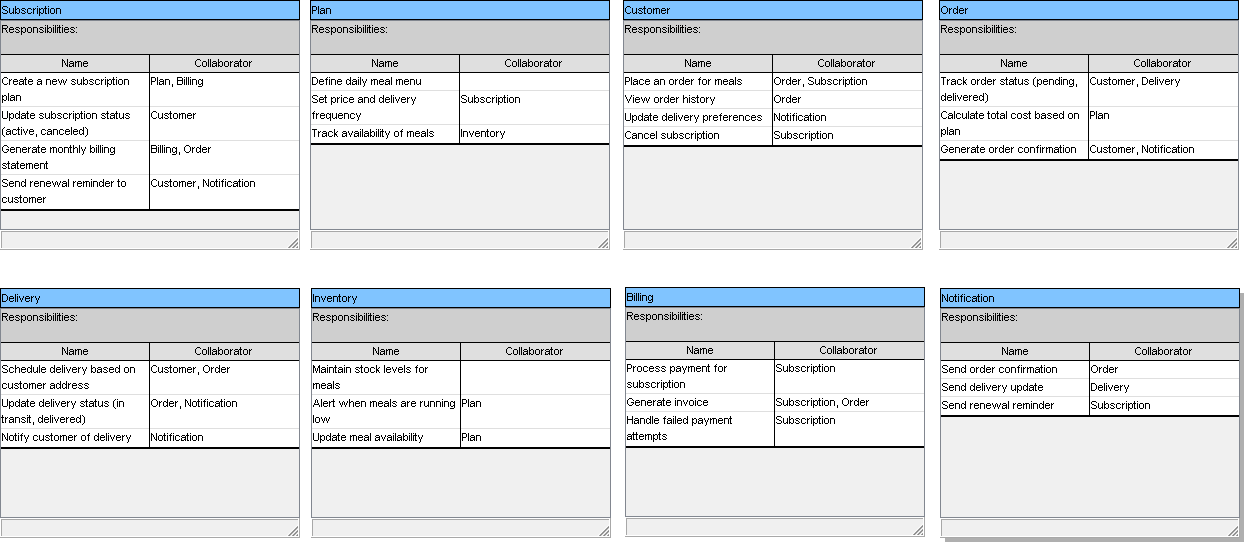
✨ Key Features of Visual Paradigm’s CRC Card Support
| Feature | Benefit |
|---|---|
| Dedicated CRC Card Diagram | Create a new diagram via Diagram > New > CRC Card Diagram. |
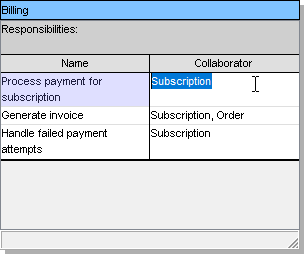
| Drag-and-Drop Cards | Easily add and edit class cards with editable sections. |
| Visual Layout & Organization | Arrange cards spatially; group related classes; use colors and alignment. |
| Integration with UML | Seamlessly link CRC cards to classes, use cases, and other diagrams. |
| AI-Assisted Generation | Describe a system in plain English → get candidate CRC cards automatically. |
| Candidate Noun Mining | Automatically extract potential classes from requirements text. |
| Team Collaboration | Concurrent editing (Enterprise Edition) with version control and comments. |
| Export & Sharing | Export to PDF, HTML, or images for reviews and presentations. |
🌐 Ideal For: Remote teams, documentation-heavy projects, or when you need to evolve CRC models into full UML designs.
Hybrid Workflow: Physical + Digital for Maximum Impact
Many successful teams adopt a hybrid approach:
-
Start with Physical CRC Cards
→ Hold a workshop with index cards and role-play scenarios. -
Take Photos
→ Capture the layout for reference. -
Recreate in Visual Paradigm
→ Formalize the model, add metadata, and integrate with other diagrams. -
Iterate and Evolve
→ Use the digital model for ongoing design refinement.
✅ This combo leverages the tactile, creative power of physical cards with the persistence, scalability, and traceability of digital tools.
Conclusion: CRC Cards — Simplicity That Scales
The CRC card approach is more than a design technique — it’s a philosophy of collaboration, clarity, and responsibility. By focusing on what classes do rather than what they store, teams build systems that are not only functional but also maintainable, extensible, and aligned with business needs.
Whether you’re:
-
A startup team kicking off a new product,
-
A university class learning OOAD,
-
Or a seasoned development team refining your domain model — CRC cards offer a proven, human-centered path to better software design.
Final Takeaways
-
Start simple: Use index cards to spark creativity and collaboration.
-
Think behavior, not data: Focus on responsibilities — what the class does, not just what it knows.
-
Role-play your scenarios: This is where the magic happens — real-time simulation reveals hidden flaws.
-
Iterate relentlessly: Design is not a one-time activity; refine your model as understanding grows.
-
Leverage tools wisely: Use Visual Paradigm to preserve, share, and evolve your CRC models into full UML designs.
Bonus: Quick CRC Card Checklist (For Your Next Workshop)
✅ Gather 3–6 people (include domain experts)
✅ Prepare physical cards or open Visual Paradigm
✅ Review user stories or use cases
✅ Brainstorm candidate classes (noun mining)
✅ Assign responsibilities using active verbs
✅ Identify collaborators for each responsibility
✅ Run 1–2 role-play scenarios (e.g., “Place an order”)
✅ Refine cards based on feedback
✅ Take photos (if using physical cards)
✅ Transition to UML or digital modeling (optional but recommended)
In Summary
CRC cards are not just a tool — they’re a mindset.
They remind us that software is built by people, for people, and should reflect real-world logic and collaboration.
By embracing the CRC card approach — whether on index cards or in a powerful tool like Visual Paradigm — you’re not just designing classes. You’re building shared understanding, reducing technical debt, and laying the foundation for software that truly works.
Further Reading & Resources
-
Extreme Programming Explained by Kent Beck (the original source of CRC cards)
-
Domain-Driven Design by Eric Evans (complements CRC with rich domain modeling)
-
Visual Paradigm Official Website: https://www.visual-paradigm.com
→ Free trial available | CRC Card Diagrams, AI assistance, UML integration -
YouTube Tutorials: Search “CRC Card Workshop” for live demos and role-playing examples
Ready to Try It?
Grab a stack of index cards — or open Visual Paradigm — and start modeling your next feature with CRC cards today.
Because sometimes, the best design starts with a simple piece of paper… and a shared idea.
📌 Pro Tip: Save your best CRC card sessions as “design retrospectives.” They’re gold for onboarding new team members and documenting the evolution of your system’s architecture.
Build smarter. Design together. Think in responsibilities.
With CRC cards, you’re not just coding software — you’re crafting a shared vision.
- How to Draw CRC Cards in Visual Paradigm: This step-by-step guide provides instructions on creating CRC cards using the software’s dedicated diagramming tools.
- Understanding CRC Card Diagrams in Visual Paradigm: An overview that explains how these diagrams are used to model object-oriented systems and their interactions.
- How to Create a CRC Card Diagram in Visual Paradigm: A detailed tutorial found on the Community Circle covering the creation and customization of CRC diagrams.
- Introduction to CRC Diagrams in Visual Paradigm: A comprehensive guide focused on utilizing CRC diagrams for object-oriented design and broader system modeling.
- Generating CRC Cards from Class Diagrams: This community discussion explores methods for leveraging existing class diagrams to automatically generate cards through reverse engineering.
- Synchronizing CRC Cards with Class Diagrams: A technical resource discussing bidirectional modeling to ensure design consistency between cards and class models.
- Introduction to CRC Card Diagrams (PDF Guide): A downloadable technical resource that explains the core concepts and applications of CRC cards in system analysis.
- Establishing Links Between CRC Cards and Class Diagrams: This article highlights techniques for maintaining traceability and linkage between different modeling levels.
- CRC Card Template in Visual Paradigm Gallery: A resource featuring a downloadable template designed to support early-stage object-oriented design.
- Moving CRC Cards Between Diagrams: A guide detailing how to transfer cards across different diagrams while maintaining data consistency.



 English
 Arabic
 Chinese (Simplified)
 Dutch
Dutch French
 German
 Italian
 Japanese
 Korean
 Portuguese
 Russian
 Spanish