


🔷 What Are CRC Cards?
CRC Cards (Class-Responsibility-Collaborator) are a lightweight, collaborative technique used in object-oriented software design to identify and organize the key components of a system during early design phases.
They help teams:
-
Brainstorm classes
-
Define responsibilities
-
Identify collaborations between objects
-
Build intuitive mental models of complex systems
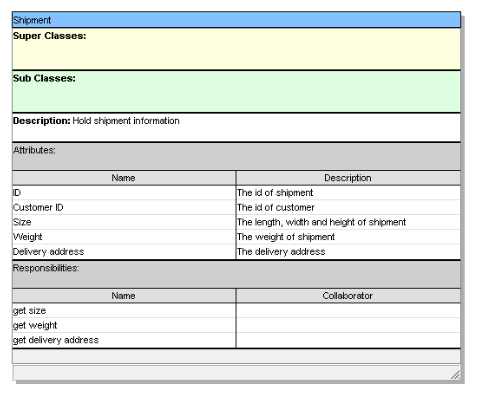
Each card represents a single class, and on it, you write:
-
Class Name
-
Responsibilities (what the class knows or does)
-
Collaborators (other classes it interacts with)
✅ Key Insight: CRC cards are not diagrams — they are physical or digital index cards used for rapid prototyping and team discussion.
🔷 Core Concepts of the CRC Card Approach
1. Class
A conceptual grouping of data and behavior. Represents an object in the system.
📌 Example:
Book,User,Loan,LibrarySystem
2. Responsibility
What the class knows (data) or does (behavior). Responsibilities are verbs or noun phrases that describe the class’s role.
✅ Good Responsibility:
“Manage borrower’s borrowing history”
“Validate ISBN format”
“Notify user when due date approaches”
❌ Bad Responsibility:
“Handle everything”
“Do the job”
“Be smart”
💡 Tip: Use the “Tell, Don’t Ask” principle — tell objects what to do, don’t query them and make decisions yourself.
3. Collaborator
Another class that this class interacts with to fulfill its responsibilities.
📌 Example:
Loancollaborates withBookandBorrower
Borrowercollaborates withLoanandNotificationService
🔷 Why Use CRC Cards? (Benefits)
| Benefit | Explanation |
|---|---|
| ✅ Simplicity | No complex syntax — just plain language. Great for beginners and non-technical stakeholders. |
| ✅ Collaboration | Encourages team discussions around design decisions. |
| ✅ Iterative Design | Easy to modify, discard, or restructure cards quickly. |
| ✅ Focus on Behavior | Shifts focus from data structures to what objects do. |
| ✅ Foundation for UML | Serves as a precursor to full UML class diagrams and code. |
🎯 Best For: Early-stage design, agile teams, education, and rapid prototyping.
🔷 Step-by-Step CRC Card Design Process
Follow this proven workflow to create effective CRC cards:
✅ Step 1: Identify Key Actors and Concepts
Start by listing all entities involved in the system.
🧩 Exercise: Think about who or what interacts with the system.
Example: For a Library Management System:
-
Borrower
-
Librarian
-
Book
-
Loan
-
Reservation
-
Notification Service
✅ Step 2: Assign Responsibilities (What Each Class Does)
For each class, ask:
“What does this class know? What does it do?”
Use action verbs and clear, specific tasks.
| Class | Responsibility |
|---|---|
Book |
Track availability status (available, checked out) |
| Store title, author, ISBN | |
| Notify librarian when due date nears | |
Borrower |
Register personal info |
| Request to borrow a book | |
| Pay fines if overdue | |
Loan |
Record borrowing date and due date |
| Track return status | |
| Calculate late fees | |
Librarian |
Approve book loans |
| Handle overdue notices | |
| Manage reservations |
🛠️ Pro Tip: Use “I can…” statements to frame responsibilities:
“I can check if a book is available.”
“I can send an email reminder.”
✅ Step 3: Identify Collaborators
For each responsibility, determine which other classes must be involved.
🔍 Ask: “Who else needs to be involved for me to fulfill this task?”
| Responsibility | Collaborator(s) |
|---|---|
| “Check if a book is available” | Book, Loan |
| “Send overdue email” | NotificationService, Borrower |
| “Calculate late fee” | Loan, FinePolicy |
| “Approve loan request” | Borrower, Book, Loan |
🔄 Iterative Process: As you add collaborators, you may discover new responsibilities or classes.
✅ Step 4: Refine and Iterate
-
Group similar responsibilities into single classes.
-
Split oversized classes (e.g., a class doing too many things).
-
Remove redundant or vague responsibilities.
-
Reorganize based on feedback from team members.
🧠 Use a whiteboard or digital tool (like Visual Paradigm) to move cards around and visualize relationships.
✅ Step 5: Transition to Formal Modeling
Once your CRC cards are stable:
-
Convert them into UML Class Diagrams
-
Generate source code stubs
-
Link to use cases or requirements
-
Export to documentation
🚀 AI Power-Up: Use Visual Paradigm’s AI Diagram Generation to auto-generate CRC cards from natural language input!
🔷 Real-World Example: Library Management System
Let’s walk through a full CRC card session using the Library Management System.
📌 Initial List of Classes
-
Borrower -
Book -
Librarian -
Loan -
Reservation -
FinePolicy -
NotificationService
📄 CRC Card 1: Book
| Field | Value |
|---|---|
| Class | Book |
| Responsibilities |
-
Store title, author, ISBN, publication year
-
Track current availability (available / checked out)
-
Notify librarian when due date nears
-
Validate ISBN format
| Collaborators |Loan,Librarian,Reservation|
📄 CRC Card 2: Borrower
| Field | Value |
|---|---|
| Class | Borrower |
| Responsibilities |
-
Register personal details (name, address, ID)
-
Request to borrow a book
-
Return a book
-
Pay fines for overdue items
-
View borrowing history
| Collaborators |Loan,FinePolicy,NotificationService,LibrarySystem|
📄 CRC Card 3: Loan
| Field | Value |
|---|---|
| Class | Loan |
| Responsibilities |
-
Record date borrowed and due date
-
Update return status
-
Calculate late fees based on policy
-
Notify borrower and librarian of due dates
| Collaborators |Book,Borrower,FinePolicy,NotificationService|
📄 CRC Card 4: NotificationService
| Field | Value |
|---|---|
| Class | NotificationService |
| Responsibilities |
-
Send email reminders to borrowers
-
Send SMS alerts for overdue books
-
Log all sent notifications
-
Support multiple notification types (email, SMS, in-app)
| Collaborators |Loan,Borrower,Librarian|
📄 CRC Card 5: FinePolicy
| Field | Value |
|---|---|
| Class | FinePolicy |
| Responsibilities |
-
Define late fee rate (e.g., $0.50/day)
-
Set maximum fine cap
-
Determine grace period (e.g., 3 days)
-
Apply discounts for prompt returns
| Collaborators |Loan,Borrower,FineManager|
📄 CRC Card 6: Reservation
| Field | Value |
|---|---|
| Class | Reservation |
| Responsibilities |
-
Record borrower’s request to reserve a book
-
Track availability of reserved books
-
Notify borrower when book is available
-
Automatically cancel reservations after 7 days of inactivity
| Collaborators |Book,Borrower,NotificationService|
📄 CRC Card 7: Librarian
| Field | Value |
|---|---|
| Class | Librarian |
| Responsibilities |
-
Approve or deny loan requests
-
Manage book check-ins and check-outs
-
Handle overdue books and fines
-
Create new books in the system
-
View reports on borrowing trends
| Collaborators |Borrower,Book,Loan,Reservation,NotificationService|
🔷 Visualizing the CRC Diagram (With AI)
Now that we’ve defined all classes and their relationships, it’s time to visualize the design.
🖼️ How Visual Paradigm Helps
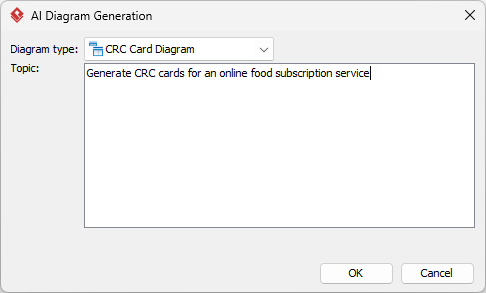
Using Visual Paradigm’s AI-powered CRC Card Diagram Generator, you can:
-
Type a natural language prompt like:
“Design a CRC card diagram for a library management system with borrowers, books, loans, fines, and notifications.”
-
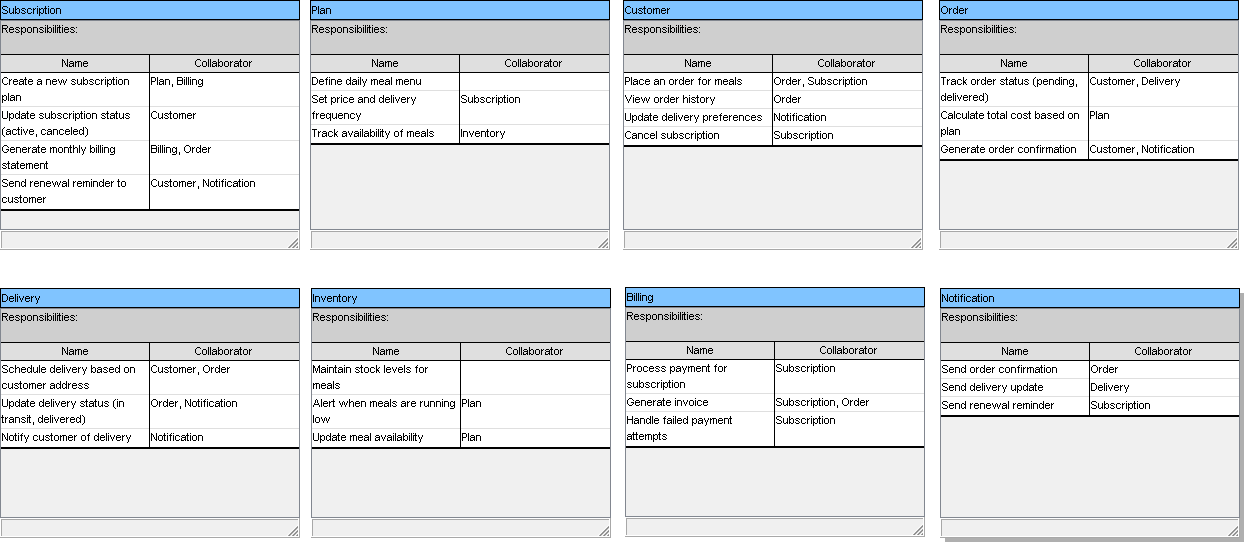
AI generates:
-
Pre-populated CRC cards
-
Responsibility suggestions
-
Collaborator mappings
-
Initial layout with connections
-
-
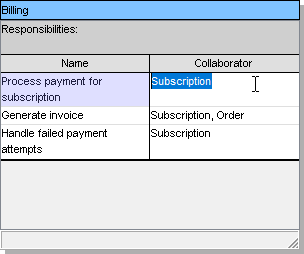
Refine in real time:
-
Drag & drop cards
-
Edit responsibilities
-
Add/remove collaborators
-
Export to PDF, PNG, or SVG
-
Generate UML class diagrams or code (Java, C#, Python)
-
✅ AI Insight: The tool learns from your project context and suggests better class names, responsibilities, and relationships over time.
🔷 Best Practices for Effective CRC Card Design
| Practice | Why It Matters |
|---|---|
| ✅ Use plain language | Avoid jargon; make cards understandable to all team members. |
| ✅ One responsibility per line | Prevents ambiguity and keeps cards focused. |
| ✅ Limit responsibilities to 3–5 per class | Prevents “god classes” that do too much. |
| ✅ Use verbs for actions, nouns for data | E.g., “Track availability” vs. “Availability status.” |
| ✅ Review with the team | Encourage debate — this is where good design emerges. |
| ✅ Iterate frequently | Don’t aim for perfection on first try. |
| ✅ Link to use cases | Ensure every responsibility supports a real user goal. |
🔷 Common Mistakes to Avoid
| Mistake | Fix |
|---|---|
| ❌ Too many responsibilities per card | Split into smaller, focused classes. |
| ❌ Vague or ambiguous responsibilities | Use concrete verbs: “Notify” instead of “Handle.” |
| ❌ Ignoring collaborators | If a class needs help, it must have a collaborator. |
| ❌ Treating CRC cards as final | They’re a prototype — evolve them into formal models. |
| ❌ Designing in isolation | Always involve developers, testers, and product owners. |
🔷 From CRC Cards to Code: The Full Lifecycle
Here’s how CRC cards fit into the entire software development lifecycle:
| Stage | How CRC Cards Help |
|---|---|
| Requirements Gathering | Identify key actors and domain concepts |
| Use Case Analysis | Map responsibilities to use cases (e.g., “Borrow Book”) |
| Design Phase | Generate initial class structure |
| Implementation | Use cards to guide method creation and class design |
| Testing | Create test scenarios based on responsibilities |
| Documentation | Export cards into user guides or technical specs |
🔄 Visual Paradigm Integration:
Auto-generate Java/C# class skeletons from CRC cards
Create UML class diagrams with attributes/methods
Export to Markdown, Confluence, or Word for documentation
Sync with Jira, GitHub, or Azure DevOps for traceability
🔷 Advanced Tips: Scaling CRC for Large Systems
For complex systems, use these strategies:
1. Group Cards into Packages
Organize related classes into logical groups:
-
User Management -
Inventory Control -
Billing & Fines -
Notifications
📦 In Visual Paradigm: Use Packages to cluster CRC cards visually.
2. Use CRC Cards for Domain-Driven Design (DDD)
-
Define Bounded Contexts using CRC cards
-
Identify Aggregates, Entities, and Value Objects
-
Map Domain Events and Services
Example:
Loancould be an Aggregate Root, withFineas a Value Object
3. Run CRC Card Workshops
Host collaborative sessions:
-
3–5 people per team
-
15–30 minutes per round
-
Rotate roles: “Card Writer,” “Reviewer,” “Skeptic”
🎯 Goal: Build shared understanding, not just diagrams.
🔷 Why Visual Paradigm Is the Ultimate CRC Card Tool
| Feature | Why It Stands Out |
|---|---|
| 🧠 AI-Powered Generation | Type a description → get a full CRC diagram in seconds |
| 🖥️ Desktop + Web + Mobile | Work anywhere, anytime |
| 🔄 Real-Time Collaboration | Multiple users edit the same diagram live |
| 📥 Export & Integration | Export to code, docs, UML, or CI/CD pipelines |
| 🔗 Traceability | Link CRC cards to use cases, requirements, and test cases |
| 💾 Offline Mode (Desktop) | No internet? No problem. Work securely offline |
| 📊 Auto-Generated Reports | Produce technical documentation with one click |
✅ Try It Free: Start with Visual Paradigm’s Free Edition — no credit card required.
👉 👉 Visit Visual Paradigm Now →
🔷 Conclusion: CRC Cards — Simple, Powerful, and AI-Enhanced
The CRC Card approach remains one of the most effective ways to kickstart object-oriented design. It’s not just a tool — it’s a collaborative mindset that encourages clarity, communication, and creativity.
With Visual Paradigm, you get:
-
The human touch of collaborative design
-
The speed of AI generation
-
The power of professional modeling tools
Whether you’re a student learning OOP, a developer designing a new feature, or a team lead managing a complex system — CRC cards are your starting point.
✅ Final Checklist: Your CRC Card Session Success Guide
Before you close your session, ask:
-
Did every class have 3–5 clear responsibilities?
-
Are all responsibilities verbs (e.g., “Send,” “Validate”)?
-
Do all responsibilities have collaborators?
-
Is there a shared understanding across the team?
-
Have we linked to real use cases or requirements?
-
Can we export this to a UML diagram or code?
If yes — you’ve just designed a solid foundation for your software.
📣 Ready to Supercharge Your Design Process?
👉 Try Visual Paradigm’s AI CRC Card Generator Today
Free for individuals and teams. No credit card. Full features.
🎯 Your next great design starts with one card.
Let AI help you write it — and build the rest.
- How to Draw CRC Cards in Visual Paradigm: This step-by-step guide provides instructions on creating CRC cards using the software’s dedicated diagramming tools.
- Understanding CRC Card Diagrams in Visual Paradigm: An overview that explains how these diagrams are used to model object-oriented systems and their interactions.
- How to Create a CRC Card Diagram in Visual Paradigm: A detailed tutorial found on the Community Circle covering the creation and customization of CRC diagrams.
- Introduction to CRC Diagrams in Visual Paradigm: A comprehensive guide focused on utilizing CRC diagrams for object-oriented design and broader system modeling.
- Generating CRC Cards from Class Diagrams: This community discussion explores methods for leveraging existing class diagrams to automatically generate cards through reverse engineering.
- Synchronizing CRC Cards with Class Diagrams: A technical resource discussing bidirectional modeling to ensure design consistency between cards and class models.
- Introduction to CRC Card Diagrams (PDF Guide): A downloadable technical resource that explains the core concepts and applications of CRC cards in system analysis.
- Establishing Links Between CRC Cards and Class Diagrams: This article highlights techniques for maintaining traceability and linkage between different modeling levels.
- CRC Card Template in Visual Paradigm Gallery: A resource featuring a downloadable template designed to support early-stage object-oriented design.
- Moving CRC Cards Between Diagrams: A guide detailing how to transfer cards across different diagrams while maintaining data consistency.


 English
 Arabic
 Chinese (Simplified)
 Dutch
Dutch French
 German
 Italian
 Japanese
 Korean
 Portuguese
 Russian
 Spanish