


In the fast-evolving world of software development, agility isn’t just a benefit—it’s a necessity. Enter Visual Paradigm’s Scrum Process Canvas, an all-in-one, browser-based Agile tool designed to streamline the entire Scrum lifecycle on a single, interactive, visual canvas. This powerful solution eliminates the complexity of juggling multiple tools and spreadsheets by unifying backlog management, sprint planning, team roles, artifact generation, and progress tracking into one intuitive, real-time workspace.
Whether you’re a small startup team or a large enterprise managing multiple Scrum teams, Visual Paradigm’s Scrum Process Canvas transforms how teams plan, execute, and deliver software—faster, smarter, and more collaboratively.
🌐 Overview: What Is the Scrum Process Canvas?
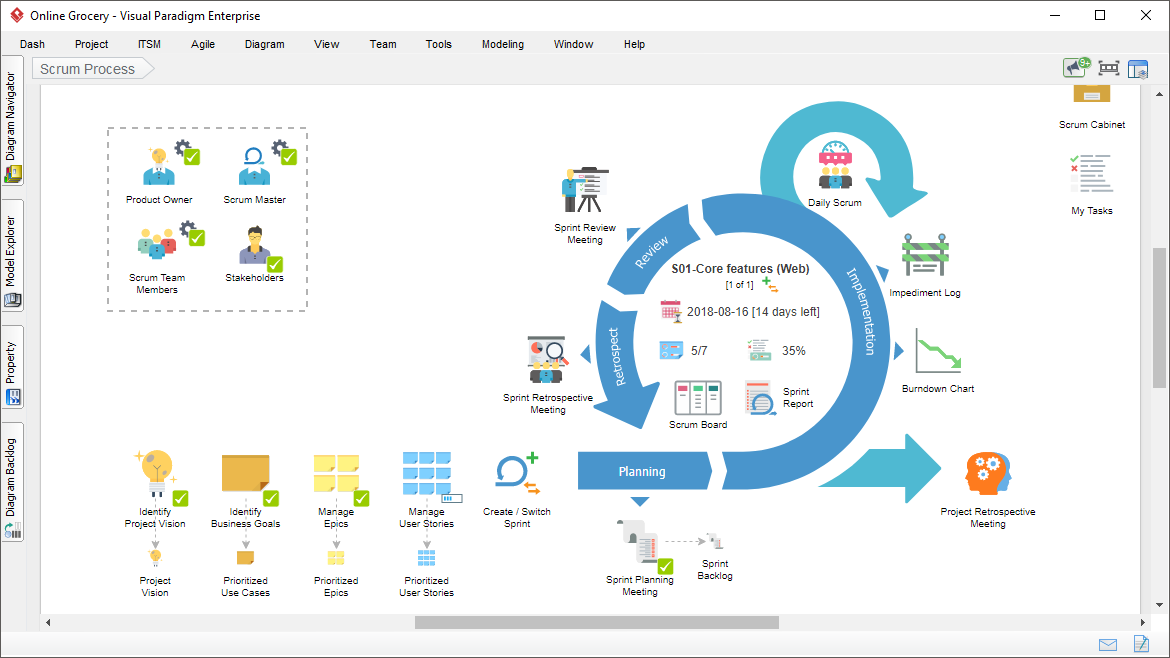
The Scrum Process Canvas is a visual, dynamic, and AI-powered Agile management platform that brings the full Scrum framework to life on a single page. It supports the full spectrum of Scrum events and artifacts, including:
-
Product Backlog
-
Sprint Planning
-
Daily Stand-ups
-
Sprint Review
-
Sprint Retrospective
-
Team Roles (Product Owner, Scrum Master, Developers)
-
User Story Mapping
-
Release Planning
✅ Purpose: To unify and simplify Agile workflows across teams and scales.
🛠 Platform: Fully browser-based (no installation required).
🔗 Access: Available via Visual Paradigm Online (Standard or higher editions) and Visual Paradigm Desktop (Professional or higher editions).
🎯 Ideal For: Product Managers, Scrum Masters, Agile Coaches, DevOps Teams, and Engineering Leaders.
[1] [2] [3] [5] [6]
🧩 Key Features & Capabilities
✅ 1. Integrated Workflow: One Page, End-to-End Scrum
The Scrum Process Canvas replaces fragmented tools with a single, cohesive visual roadmap for the entire Scrum lifecycle.
-
From initiation to delivery, every phase is represented clearly:
-
Product Vision & Roadmap
-
Backlog Refinement
-
Sprint Planning
-
Sprint Execution (with Daily Stand-up tracker)
-
Sprint Review & Retrospective
-
-
Drag-and-drop navigation allows teams to move between stages seamlessly.
-
Visual indicators (e.g., color-coded sprints, progress bars) show status at a glance.
This integration reduces context switching and keeps teams aligned.
[1] [5] [8]
✅ 2. User Story Mapping: Visualize the Product Backlog
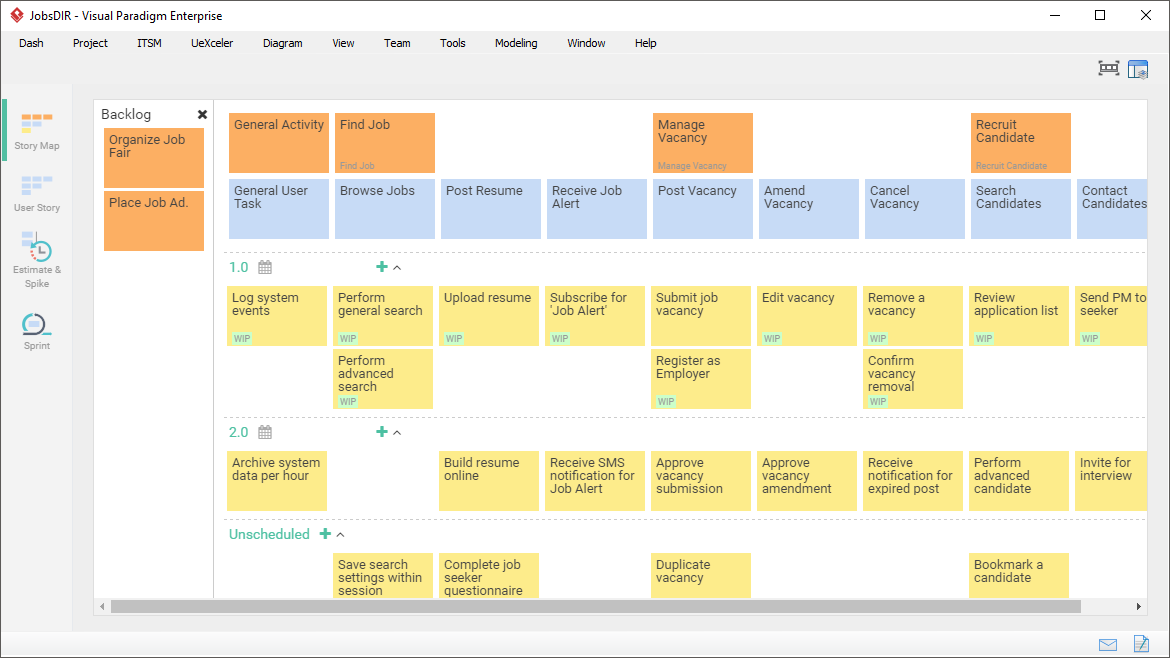
One of the most powerful features is AI-powered User Story Mapping, which transforms raw requirements into a structured, visual narrative.
-
Create story maps by dragging and dropping user tasks along a timeline.
-
Organize stories by epics, themes, and features.
-
Supports multiple backlog schemes:
-
Prioritized backlog
-
Epic → Feature → Story hierarchy
-
Timeline-based mapping (for release planning)
-
-
Drag-and-drop functionality for reordering and grouping.
This helps teams understand the “big picture” and prioritize features based on customer journey and value delivery.
[4] [5] [6]
✅ 3. Automation & Customization: Reduce Manual Work, Increase Consistency
The Scrum Process Canvas automates repetitive tasks and adapts to your team’s unique workflow.
-
Automatically generates:
-
Sprint Backlog from selected Product Backlog items
-
Daily Stand-up templates (with status columns: Done, To-Do, Blockers)
-
Sprint Review and Retrospective templates
-
-
Customizable templates for:
-
Different sprint lengths (1–4 weeks)
-
Team size (small, medium, large)
-
Industry-specific workflows (e.g., fintech, healthcare, SaaS)
-
-
Save custom configurations for reuse across projects.
Reduces administrative overhead and ensures consistency across sprints.
[2] [5] [8]
✅ 4. AI-Powered Assistance: Smart Suggestions, Faster Planning
Leverage AI to accelerate Agile planning and decision-making.
-
AI generates user stories from high-level ideas (e.g., “Users should be able to reset their password via email”).
-
AI suggests story points based on historical velocity and complexity.
-
AI analyzes backlog health, flagging:
-
Overloaded sprints
-
Unestimated items
-
Risky epics
-
-
AI assists in creating strategic maps (e.g., customer journey → feature mapping).
Ideal for new teams or those under time pressure.
[2] [5] [7] [8]
✅ 5. Collaboration & Real-Time Monitoring: Track Progress Together
Built for distributed and co-located teams, the canvas enables real-time collaboration and live progress tracking.
-
Multiple users can edit the same canvas simultaneously.
-
Live dashboard shows:
-
Sprint progress (% completed)
-
Velocity trend
-
Burn-down charts (automatically updated)
-
Team capacity vs. workload
-
-
Comment threads on specific backlog items for context.
-
Version history to track changes and revert if needed.
Keeps all stakeholders—product owners, developers, stakeholders—in sync.
[1] [5] [8]
✅ 6. Large-Scale Scrum (LeSS): Support for Multi-Team Projects
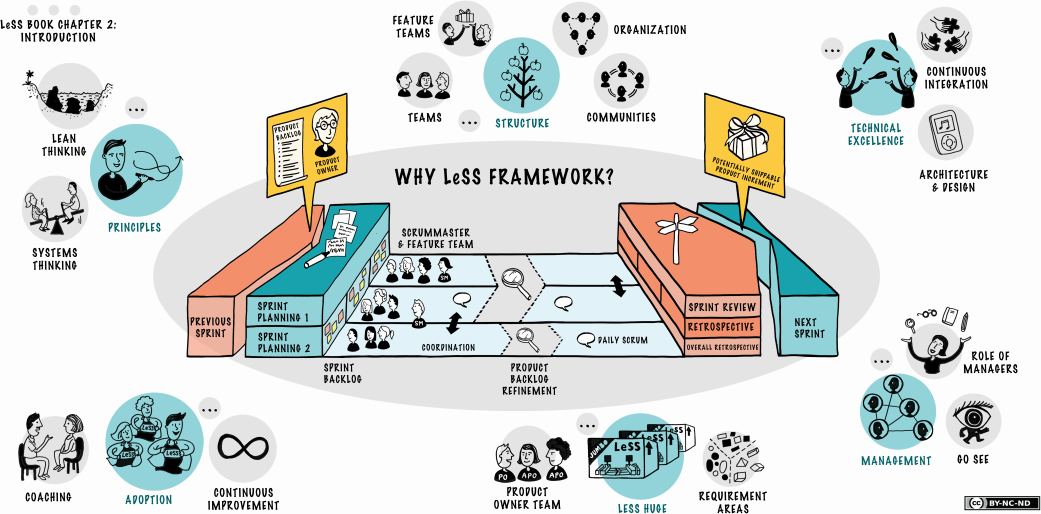
For enterprises managing multiple Scrum teams, Visual Paradigm offers LeSS (Large-Scale Scrum) support.
-
Dedicated LeSS view to manage:
-
Cross-team dependencies
-
Feature teams
-
Integration sprints
-
Shared product backlog
-
-
Visual dependency mapping to identify bottlenecks.
-
Scaled planning with synchronized sprint calendars.
-
Scrum-of-Scrums facilitation tools.
Enables seamless coordination across dozens of developers and multiple product lines.
[1] [2] [5] [6]
🛠 How to Use the Scrum Process Canvas: Step-by-Step Workflow
Follow this proven workflow to get your team up and running in minutes.
🔹 Step 1: Create a New Scrum Process Canvas
-
Go to Visual Paradigm Online → Create New Canvas → Select Scrum Process Canvas.
🔹 Step 2: Define the Product Vision & Roadmap
-
Enter the product vision, goals, and high-level features.
-
Use AI to generate a strategic roadmap.
🔹 Step 3: Build the Product Backlog with User Story Mapping
-
Use User Story Mapping to visualize the customer journey.
-
Drag stories into epics and themes.
-
Assign story points (manually or via AI suggestion).
🔹 Step 4: Plan the Sprint
-
Select backlog items for the sprint.
-
Auto-generate Sprint Backlog and Daily Stand-up templates.
-
Assign tasks to team members.
🔹 Step 5: Execute & Monitor
-
Update task status daily.
-
View real-time burn-down charts and velocity trends.
-
Flag blockers and log decisions in the comment section.
🔹 Step 6: Review & Retrospective
-
Use built-in templates to conduct Sprint Review and Retrospective.
-
Capture feedback and action items.
🔹 Step 7: Export & Share
-
Export the sprint report as PDF, Markdown, or HTML.
-
Share the canvas link with stakeholders.
📌 Pro Tip: Use the AI Assistant to generate summaries, update backlog, and analyze sprint performance with one click.
📊 Benefits: Why Teams Choose Visual Paradigm’s Scrum Process Canvas
| Benefit | Description |
|---|---|
| ✅ Faster Delivery | Automation and AI reduce planning time by up to 60%. |
| ✅ Improved Collaboration | Real-time editing and comments keep teams aligned. |
| ✅ Better Visibility | Live dashboards and burn-down charts show progress instantly. |
| ✅ Scalable for Large Teams | LeSS support enables enterprise-grade Agile at scale. |
| ✅ Lower Learning Curve | Intuitive UI with drag-and-drop makes onboarding easy. |
| ✅ Seamless Integration | Works with other Visual Paradigm tools (e.g., UML, BPMN, Kanban). |
🖥️ Access: Online vs. Desktop
| Feature | Visual Paradigm Online | Visual Paradigm Desktop |
|---|---|---|
| Platform | Web browser (Chrome, Firefox, Edge) | Windows/macOS |
| Access | Combo Edition or higher | Professional Edition or higher |
| Offline Use | ❌ No | ✅ Yes |
| Real-Time Collaboration | ✅ Yes | ✅ Yes |
| AI Features | ✅ Yes | ✅ Yes |
| Large-Scale Support | ✅ Yes | ✅ Yes |
🔗 Try Online: https://www.visual-paradigm.com/features/scrum-process-canvas/
🔗 Download Desktop: https://www.visual-paradigm.com/download/
📌 Conclusion: The Future of Agile Management is Visual and Intelligent
Visual Paradigm’s Scrum Process Canvas isn’t just another Agile tool—it’s a complete Agile operating system that unifies planning, execution, and monitoring in one intelligent, visual interface.
By combining:
-
✅ AI-powered automation
-
✅ User story mapping
-
✅ Real-time collaboration
-
✅ LeSS scalability
-
✅ Seamless export and reporting
…it empowers teams to deliver better software, faster, and with less friction.
Whether you’re leading a startup sprint or managing a multi-team enterprise initiative, Visual Paradigm’s Scrum Process Canvas isthe ultimate tool to simplify complexity, accelerate delivery, and scale agility.
🔗 Reference List (with Embedded URLs)
-
Large-Scale Scrum Software: Official feature page detailing support for LeSS, multi-team coordination, and scaled Agile planning.
-
Customized Scrum Process Canvas: Describes how teams can tailor the canvas to their specific workflows and project types.
-
Scrum Process Canvas User Guide: Detailed technical documentation for setup, configuration, and advanced usage.
-
Agile User Story Mapping Tool: Explains how to visualize and organize product backlogs using story mapping.
-
Scrum Process Canvas – Core Feature Page: Overview of the tool’s core capabilities, including automation, AI, and real-time collaboration.
-
Agile Development with Visual Paradigm: Guides on integrating Scrum into development workflows, including sprint planning and backlog refinement.
-
YouTube Demo: Scrum Process Canvas in Action: Video walkthrough of the tool’s interface and key features.
-
Visual Paradigm Canvas Tool: General overview of the canvas-based modeling platform, including Scrum, BMC, and other frameworks.
-
What is Scrum?: Foundational article explaining Scrum principles and how the canvas fits into the framework.
-
Visual Paradigm Features & Solutions: Central hub for all tools and features, including Agile, UML, BPMN, and AI-powered modeling.
🛠 Best Practices for Maximum Impact
-
Start with a Clear Product Vision
Use AI to generate a concise, compelling vision statement to guide the entire backlog. -
Use User Story Mapping Early
Map the customer journey before sprint planning to ensure alignment with user needs. -
Leverage AI for Backlog Refinement
Let AI suggest story points, identify duplicates, and flag ambiguous stories. -
Hold Daily Stand-ups on the Canvas
Update task statuses in real time—no need for separate meeting notes. -
Review Sprints with AI Insights
Use AI to analyze velocity trends and suggest improvements for future sprints. -
Export Reports for Stakeholder Communication
Share PDF or HTML summaries with executives and clients to demonstrate progress.
🚀 Ready to Transform Your Agile Workflow?
Stop juggling spreadsheets, sticky notes, and endless Slack threads.
Start building smarter, delivering faster, and scaling with confidence.
👉 Get Started Now: https://www.visual-paradigm.com/scrum/process-canvas/
Empower your team. Unify your Agile. Deliver with clarity.
✅ AI Note: While AI enhances speed and accuracy, always validate critical decisions with team consensus and real-world testing.
🔄 Double-check all AI-generated content before finalizing sprints or stakeholder presentations.
📌 Final Thought:
The future of Agile isn’t just about speed—it’s about intentional, visual, and intelligent execution. With Visual Paradigm’s Scrum Process Canvas, you’re not just managing sprints—you’re mastering the art of delivery.

 English
 Arabic
 Chinese (Simplified)
 Dutch
Dutch French
 German
 Italian
 Japanese
 Korean
 Portuguese
 Russian
 Spanish