


Note: While AI-powered tools like Visual Paradigm’s AI-assisted class diagram generator significantly accelerate design workflows, they may occasionally generate inaccurate or suboptimal models. Always verify outputs for correctness, consistency, and alignment with system requirements.
Overview
A class diagram is a foundational static UML (Unified Modeling Language) diagram that represents the structure of a system by defining its classes, attributes, methods (operations), and relationships (e.g., associations, inheritance, aggregation). It serves as a blueprint for object-oriented software design, enabling developers and architects to visualize system architecture before implementation.
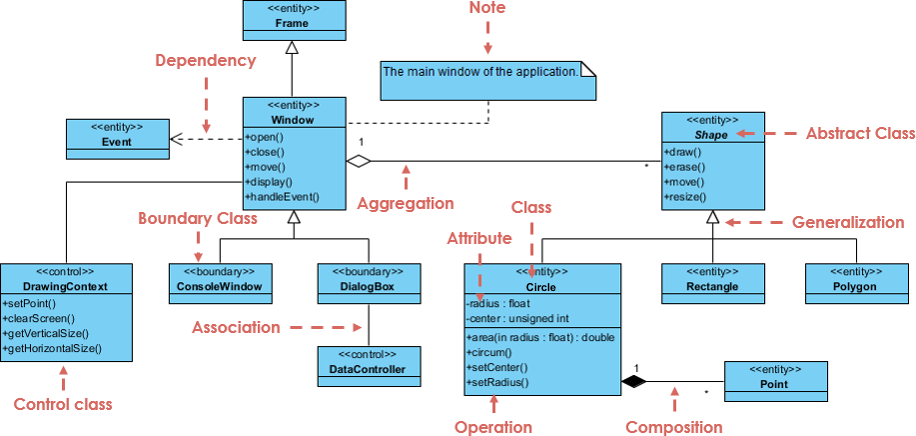
Visual Paradigm (VP) revolutionizes class diagram creation by integrating AI-powered automation, transforming natural language descriptions into fully formed, editable, and dynamically updatable UML class diagrams—streamlining the transition from concept to detailed design.
This comprehensive guide walks you through every aspect of using Visual Paradigm’s AI-driven class diagram generator, including setup, core features, integration, best practices, and limitations.
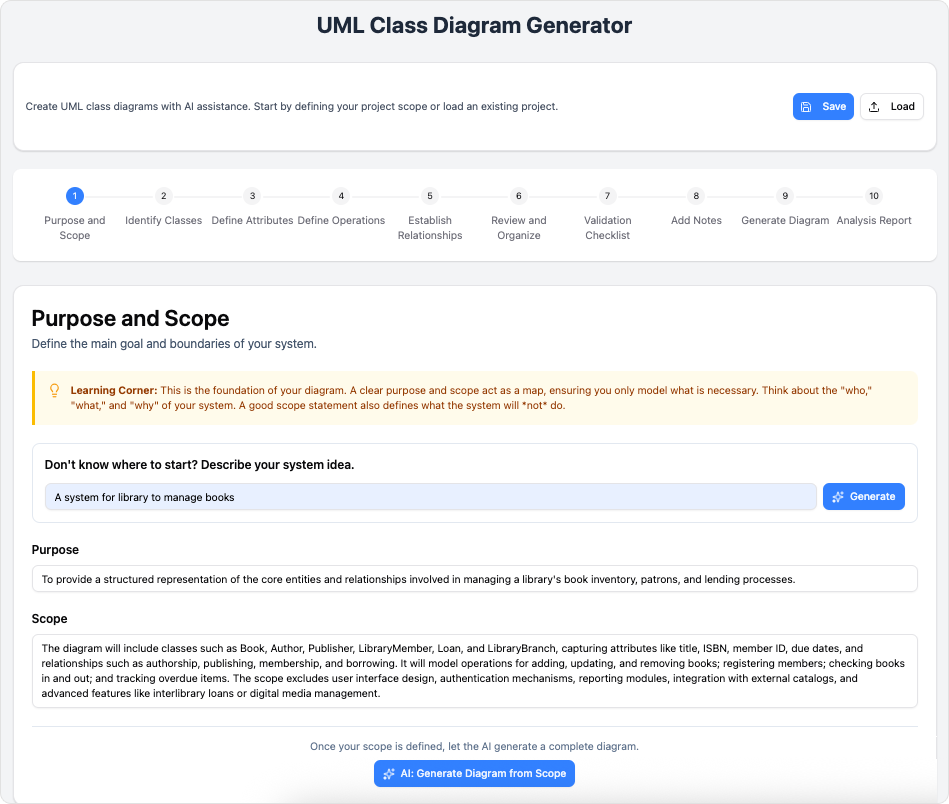
1. AI Textual Analysis – Transform Text into Visual Models Automatically
How It Works:
Visual Paradigm’s AI engine analyzes plain-text descriptions—such as “Create an online bookstore with users, books, and orders”—and automatically identifies:
-
Classes (e.g.,
User,Book,Order) -
Attributes (e.g.,
name,price,orderDate) -
Operations (Methods) (e.g.,
placeOrder(),calculateTotal()) -
Relationships (e.g.,
User1..Order,Book1..Order)
The AI then constructs a complete, structured UML class diagram in real time, complete with proper syntax, visibility symbols (+, -, #), and relationship types.
✅ Use Case:
A product owner describes a new e-commerce feature: “Users can create shopping carts, add items, and check out.”
👉 AI generates a class diagram with User, ShoppingCart, CartItem, Product, and Order classes, linked via associations and aggregation.
📌 Tip: Use clear, concise, and complete sentences for optimal results. Avoid ambiguous terms like “thing” or “it.”
2. Iterative Design with AI Chat – Refine Models in Real Time
Once the initial diagram is generated, users can interact with the AI via a chat interface to iteratively refine the model.
✅ Common Refinement Tasks:
-
Add a new class: “Add a ‘Payment’ class with attributes: amount, method, status.”
-
Modify relationships: “Change the association between User and Order to be optional.”
-
Rename a class or attribute: “Rename ‘Item’ to ‘Product’.”
-
Add inheritance: “Make ‘Admin’ inherit from ‘User’.”
-
Delete redundant elements: “Remove the ‘Address’ class—it’s now part of User.”
The AI interprets these natural language commands and updates the diagram instantly, preserving structure and consistency.
🔄 This enables rapid prototyping and agile modeling—perfect for design sprints or collaborative team environments.
3. Step-by-Step Wizard: Guided Modeling for Beginners and Experts
🔗 Reference: https://www.visual-paradigm.com/features/ai-assisted-uml-class-diagram-generator/
Visual Paradigm provides a guided wizard that walks users through each stage of class diagram creation:
🔹 Step 1: Define Scope and Purpose
-
Enter a high-level description of the system (e.g., “An online learning platform for students and instructors”).
-
AI suggests relevant domains (e.g.,
Course,Lecture,Quiz,Enrollment).
🔹 Step 2: Analyze Class Members
-
AI proposes attributes and operations based on context.
-
Users can accept, edit, or override suggestions (e.g., change
titletocourseTitle).
🔹 Step 3: Define Relationships
-
AI detects logical relationships (e.g., “a course has multiple lectures”).
-
Users can confirm, adjust multiplicity (e.g.,
1..*), or specify association names.
🔹 Step 4: Render and Review
-
The final diagram is rendered with proper formatting.
-
Users can export to PNG, SVG, PDF, or embed into documentation.
🎯 This wizard ensures even novice users can generate accurate, professional-grade diagrams without prior UML training.
4. Ecosystem Integration: Embed and Update Diagrams Dynamically
Visual Paradigm integrates seamlessly with its OpenDocs system, allowing users to:
-
Embed diagrams directly into documents, wikis, or reports.
-
Maintain live links between the diagram and the document.
-
Automatically update the diagram when changes are made in the model—ideal for documentation that evolves over time.
🛠 Example Workflow:
-
Generate a class diagram for a banking system.
-
Embed it into a Confluence page via OpenDocs.
-
Later, refine the model with AI: “Add a ‘Transaction’ class with timestamp and amount.”
-
The embedded diagram updates automatically in the document.
✅ This eliminates manual re-drawing and ensures documentation stays in sync with design.
5. Quality Assurance & Intelligent Recommendations
The AI doesn’t just generate diagrams—it evaluates and improves them.
✅ Built-in Quality Checks Include:
-
Redundant classes or attributes
-
Missing associations or multiplicities
-
Inconsistent naming conventions
-
Potential for inheritance or composition
🎯 AI-Powered Suggestions:
-
“Consider making ‘Admin’ a subclass of ‘User’ to reuse login logic.”
-
“The ‘Order’ class has a ‘total’ attribute. You might want to compute it dynamically via a method.”
-
“There’s a bidirectional association between ‘User’ and ‘Order’. Ensure it’s properly named.”
These insights help maintain clean, maintainable, and scalable designs aligned with SOLID principles.
6. Community vs. Pro Editions: Choose Your Workflow
Visual Paradigm offers two main editions:
| Feature | Community Edition | Pro Edition |
|---|---|---|
| Free to use | ✅ Yes | ❌ No |
| AI-powered class diagram generation | ✅ Yes | ✅ Yes |
| AI chat refinement | ✅ Limited | ✅ Full |
| Export formats | Basic (PNG, PDF) | Advanced (SVG, HTML, XML) |
| Integration with OpenDocs | ✅ Limited | ✅ Full |
| Collaboration & version control | ❌ No | ✅ Yes |
| Enterprise-grade security | ❌ No | ✅ Yes |
🎯 Ideal For:
-
Community Edition: Students, educators, hobbyists, and learners exploring UML.
-
Pro Edition: Professional developers, architects, and enterprise teams building complex systems.
7. Best Practices and Tips
-
Be Specific in Descriptions:
Instead of “Create a system with users and products”, use:
“Design a retail system with aUserclass with attributesuserId,name,email, andpassword, aProductclass withproductId,name,price, andstockQuantity, and anOrderclass that associates withUserandProductviaOrderItem.” -
Use Consistent Naming:
Stick to PascalCase for class names (User,OrderItem) and camelCase for attributes (orderDate,totalAmount). -
Leverage AI for Early Validation:
Ask: “Does this model follow good object-oriented design principles?” or “Are there any missing relationships?” -
Avoid Overloading the AI:
Break complex systems into smaller parts:-
First, generate the core domain (e.g., users, products).
-
Then, add features (e.g., payments, shipping, reviews).
-
-
Always Verify AI Output:
AI may misinterpret ambiguous terms. For example:-
“User can buy product” → Could mean association or a method like
buy(Product).
✅ Clarify: “Add a methodplaceOrder()to the User class that creates an Order.”
-
-
Use the AI to Generate Documentation:
Prompt: “Generate a brief description of this class diagram for technical documentation.”
→ The AI will produce a summary like:“This class diagram models an online shopping system with User, Product, Order, and OrderItem classes. Users can place orders, which contain multiple products. The design supports scalability and reuse through composition.”
8. Real-World Use Case: Building a Library Management System
📝 Prompt:
“Create a class diagram for a library system where books, members, and loans are managed. A member can borrow multiple books, and each book can be borrowed multiple times. Include due dates and late fees.”
✅ AI Output Includes:
-
Classes:
Member,Book,Loan,Fine -
Attributes:
-
Member:memberId,name,email -
Book:isbn,title,author,available -
Loan:loanId,borrowDate,dueDate,returnDate -
Fine:fineId,amount,status
-
-
Relationships:
-
Member—Loan(1..*): A member can have many loans. -
Book—Loan(1..*): A book can be borrowed multiple times. -
Loan—Fine(0..1): A loan may incur a fine.
-
-
Operations:
-
Member:borrowBook(),returnBook() -
Loan:calculateFine()
-
🔄 After generation, refine with: “Add a ‘status’ attribute to Loan (e.g., ‘Active’, ‘Returned’, ‘Overdue’). Also, make ‘Fine’ a subclass of ‘Payment’.”
9. Limitations and Cautions
While powerful, AI is not infallible. Be aware of:
| Risk | How to Mitigate |
|---|---|
| Misunderstanding ambiguous terms | Use precise language; define scope early. |
| Overlooking design patterns | Review if inheritance or composition is optimal. |
| Incorrect multiplicity | Double-check: “Can a book be borrowed by multiple members at once?” |
| Redundant or missing associations | Use AI feedback: “Suggest improvements to this model.” |
| Inconsistent naming | Use AI to standardize: “Rename all ‘Item’ references to ‘Product’.” |
🔍 Always perform a final review before using the diagram in documentation, code generation, or stakeholder presentations.
10. Conclusion: Accelerate Your Design with AI-Powered UML
Visual Paradigm’s AI-assisted class diagram generator transforms how teams approach software design:
✅ Turn natural language into UML diagrams in seconds
✅ Refine models interactively via AI chat
✅ Maintain consistency across documentation with OpenDocs integration
✅ Receive intelligent feedback and design recommendations
✅ Scale from learning to enterprise-level modeling
Whether you’re a student learning UML, a developer designing a microservice, or an architect modeling a complex enterprise system—Visual Paradigm’s AI-powered class diagram tool is your shortcut to faster, smarter, and more accurate modeling.
🔗 References (Embedded URLs)
- What is a Class Diagram?
- How to Generate Complex Class Diagrams with Visual Paradigm AI
- AI-Assisted UML Class Diagram Generator
- Harnessing Visual Paradigm’s AI for Diagram Generation (2026 Guide)
- AI Chatbot vs. Other AI Diagram Tools
- Visual Paradigm Community Edition Download
- YouTube: AI Class Diagram Demo
- Real-Life Case Study: AI in Action
- Visual Paradigm OpenDocs Integration
🛠 Start Building Today:
Visit https://www.visual-paradigm.com to explore the free Community Edition or try the Pro Edition with AI in your browser.
📌 Remember: AI is a powerful assistant—but your expertise is the final authority. Always validate, verify, and refine.

 English
 Arabic
 Chinese (Simplified)
 Dutch
Dutch French
 German
 Italian
 Japanese
 Korean
 Portuguese
 Russian
 Spanish