


Executive Summary
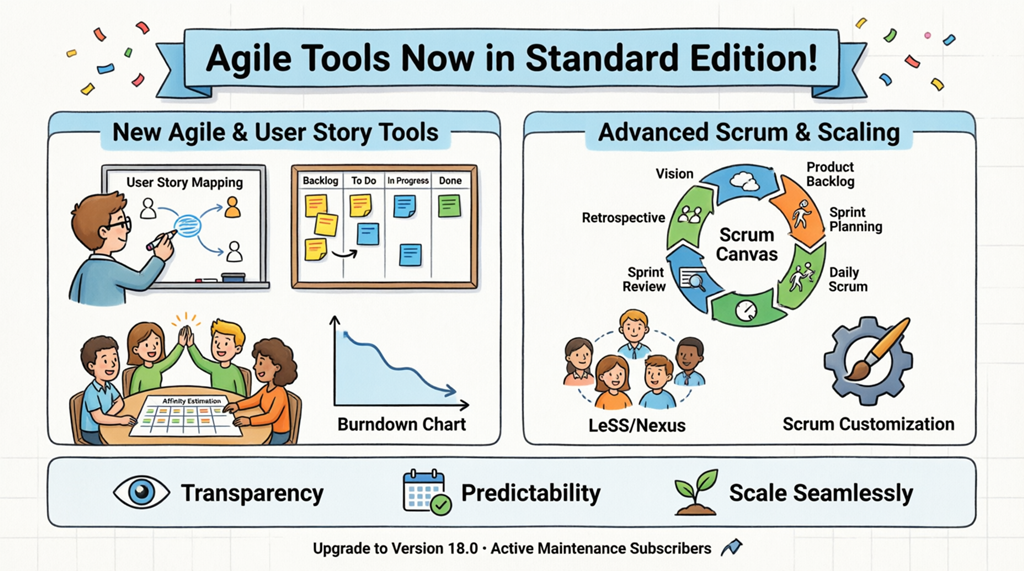
Visual Paradigm is proud to announce a transformative update to Standard Edition v18.0: professional-grade Agile and Scrum capabilities—previously exclusive to the Professional Edition—are now fully available to all Standard Edition users. This strategic realignment empowers teams of all sizes to access enterprise-level agile management tools without additional licensing costs.
Key Highlights:
-
✅ User Story Mapping, Scrumboard, Affinity Table estimation, and Burndown Charts now included
-
✅ Advanced scaling frameworks (LeSS, Nexus) and Scrum Canvas available in Standard Edition
-
✅ Zero additional cost for users with active maintenance subscriptions
-
✅ Enhanced transparency, predictability, and scalability for agile teams
This guide provides a complete overview of the new capabilities, practical implementation guidance, and curated resources to help your team maximize value from day one.
What’s New in Standard Edition v18.0
🎯 Professional Agile Toolset—Now Standard
| Feature | Previous Availability | New Availability | Primary Benefit |
|---|---|---|---|
| User Story Mapping | Professional Edition | ✅ Standard Edition | Visualize end-to-end user journeys |
| Scrumboard & Sprint Backlog | Professional Edition | ✅ Standard Edition | Real-time sprint tracking |
| Affinity Table Estimation | Professional Edition | ✅ Standard Edition | Collaborative, relative sizing |
| Burndown Charts | Professional Edition | ✅ Standard Edition | Visual progress & risk monitoring |
| Scrum Canvas | Professional Edition | ✅ Standard Edition | End-to-end Scrum process guidance |
| LeSS / Nexus Frameworks | Professional Edition | ✅ Standard Edition | Scale agile across multiple teams |
| Scrum Customization | Professional Edition | ✅ Standard Edition | Tailor processes to your organization |
Feature Deep Dive: New Agile & User Story Mapping Tools
1. User Story Map
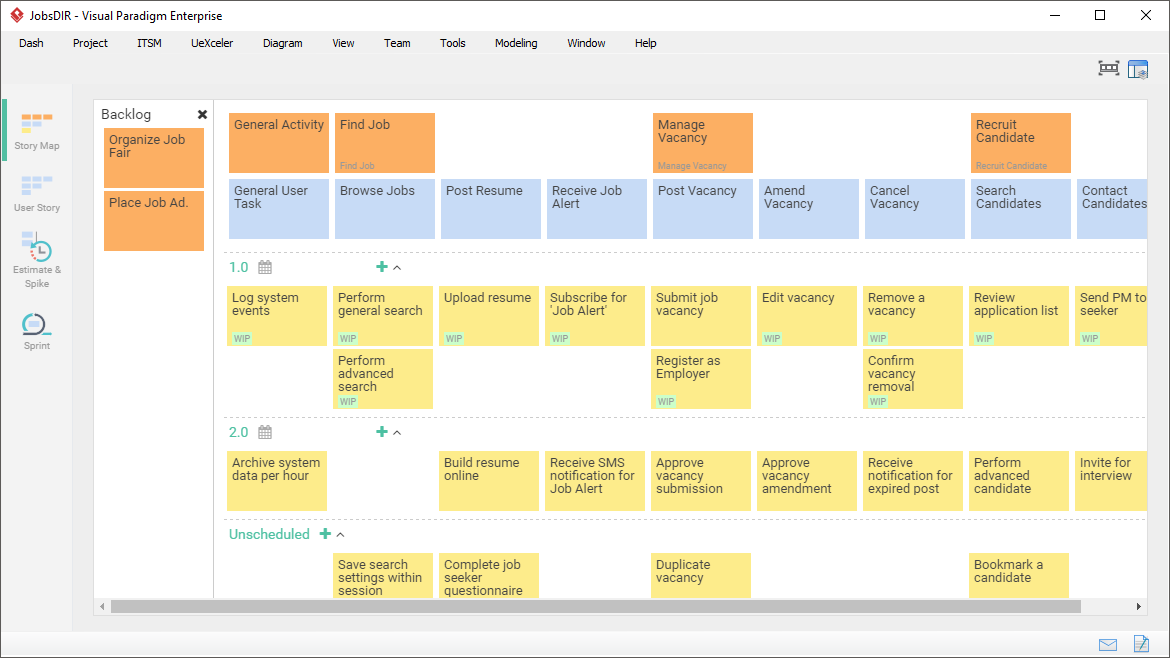
Purpose: Visually outline the complete user experience to identify gaps, prioritize value, and align stakeholders.
Key Capabilities:
-
Drag-and-drop visual editor for mapping user activities, tasks, and stories
-
Hierarchical organization: Epics → Features → User Stories → Tasks
-
Priority lanes for release planning and MVP definition
-
Collaboration features for remote and hybrid teams
When to Use:
-
Product discovery and roadmap planning
-
Backlog refinement sessions
-
Stakeholder workshops and requirement gathering
-
Release prioritization and scope negotiation
Pro Tip: Start with user goals, then map activities before detailing stories—this ensures your backlog stays user-centered, not feature-driven.
2. Sprint Backlog & Scrumboard
Purpose: Manage daily agile operations with a dynamic, customizable workflow board.
Key Capabilities:
-
Visual task tracking with customizable columns (To Do, In Progress, Review, Done)
-
Drag-and-drop task movement with real-time team synchronization
-
WIP (Work-in-Progress) limits to optimize flow and reduce bottlenecks
-
Integrated task details: assignees, estimates, dependencies, attachments
Best Practices:
-
Update the board during daily stand-ups for maximum transparency
-
Use color labels to distinguish bug fixes, features, and technical debt
-
Review cumulative flow diagrams weekly to identify process improvements
3. Story Estimation with Affinity Table
Purpose: Simplify effort estimation through collaborative, relative sizing.
Key Capabilities:
-
Group similar stories visually to establish baseline effort levels
-
Support for multiple estimation scales (Fibonacci, T-Shirt, Custom)
-
Real-time team voting and consensus building
-
Historical velocity tracking for improved forecasting
Estimation Workflow:
-
Import or create user stories in the Affinity Table
-
Facilitate team discussion to group stories by perceived effort
-
Assign relative values to each affinity group
-
Use estimates to inform sprint capacity planning
Why It Works: Relative estimation reduces anchoring bias and leverages collective team wisdom for more reliable planning.
4. Burndown Chart
Purpose: Monitor sprint health and project trajectory with visual progress tracking.
Key Capabilities:
-
Real-time visualization of work remaining vs. time elapsed
-
Ideal vs. actual burndown line comparison
-
Scope change annotations to explain variance
-
Exportable reports for stakeholder communication
Interpretation Guide:
-
📉 Line below ideal: Ahead of schedule (validate quality)
-
📈 Line above ideal: At risk (investigate blockers)
-
↔️ Flat line: No progress (address impediments immediately)
Advanced Capabilities: Scrum & Scaling Frameworks
Scrum Canvas: End-to-End Process Guidance
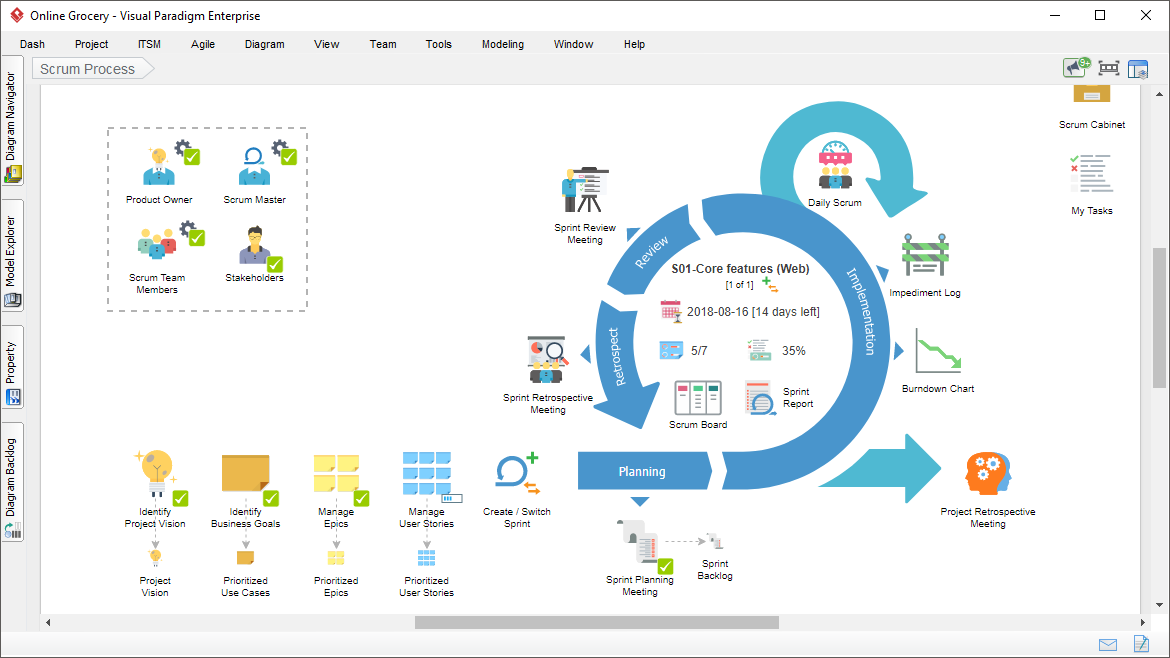
Purpose: A unified interface that guides teams through every Scrum event and artifact.
Integrated Components:
-
🎯 Product Vision & Goal Setting
-
📋 Product Backlog Refinement
-
🗓️ Sprint Planning & Goal Definition
-
🔄 Daily Scrum Facilitation
-
👥 Sprint Review & Stakeholder Demo
-
🔁 Retrospective & Continuous Improvement
Value Add: Reduces onboarding time for new Scrum teams and ensures process consistency across distributed organizations.
Scaling Frameworks: LeSS, Nexus & Customization
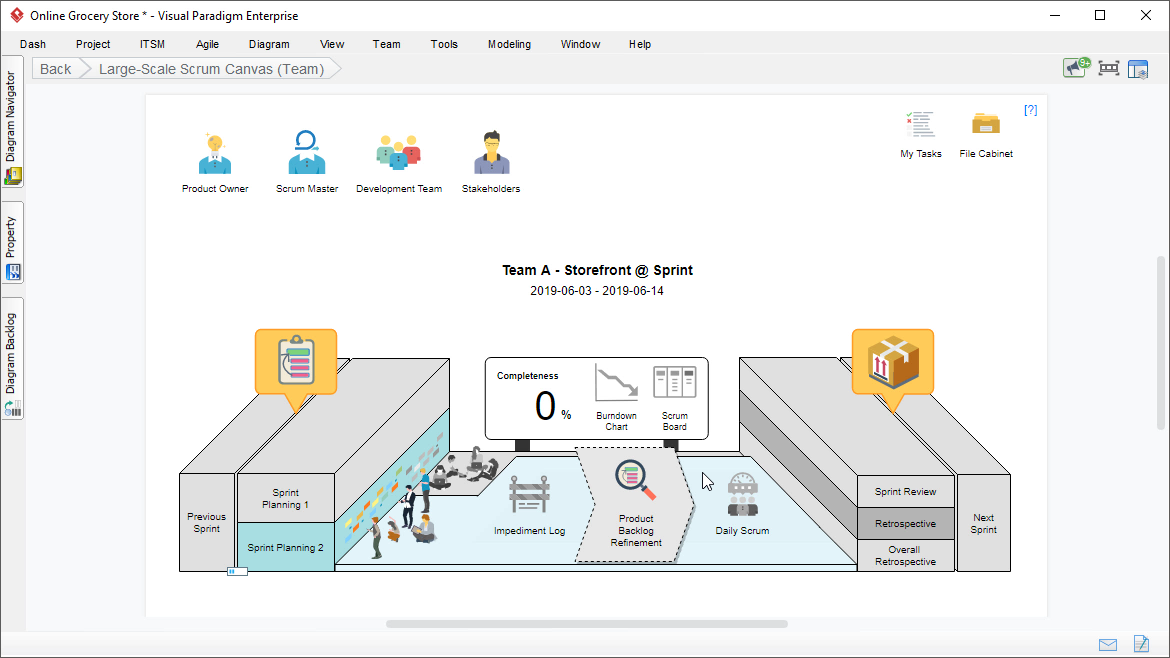
For Growing Teams: As your organization scales, coordinate multiple Scrum teams with purpose-built frameworks.
Large-Scale Scrum (LeSS)
-
Support for 2-8+ teams on a single product
-
Shared product backlog with team-specific refinement
-
Overall Sprint Planning and integrated Retrospectives
-
Minimal added roles—preserves Scrum simplicity at scale
Nexus Framework
-
Designed for 3-9 Scrum Teams delivering a single integrated increment
-
Nexus Integration Team coordination tools
-
Cross-team dependency visualization and resolution workflows
-
Integrated Definition of Done management
Scrum Customization
-
Tailor events, artifacts, and roles to your organizational context
-
Create reusable templates for consistent team onboarding
-
Add custom fields, workflows, and reporting metrics
-
Evolve your process iteratively as you learn and grow
Why This Update Matters: Tangible Benefits
🌟 For Agile Teams
-
All-in-One Workspace: Plan, execute, and review without switching tools
-
Reduced Context Switching: Integrated artifacts minimize tool sprawl
-
Faster Onboarding: Guided canvases accelerate new member ramp-up
📈 For Product Leaders
-
Improved Predictability: Better estimation + visual tracking = reliable forecasts
-
Strategic Alignment: User Story Maps connect daily work to product vision
-
Data-Driven Decisions: Burndown and velocity metrics inform roadmap adjustments
🏢 For Organizations
-
Cost Efficiency: Access Professional features without license upgrades
-
Scalable Foundation: Start small, scale confidently with LeSS/Nexus support
-
Compliance Ready: Audit trails and standardized processes support governance
🔑 The Core Promise
“Professional agile capabilities shouldn’t require an enterprise budget. With Standard Edition v18.0, every team can practice agile excellence—transparently, predictably, and at scale.”
Getting Started: Upgrade & Implementation Guide
✅ Step 1: Verify Eligibility
-
Active maintenance subscription required for free upgrade to v18.0
-
Check status: Help > License Management in Visual Paradigm
🔄 Step 2: Upgrade to Version 18.0
-
Download the latest installer from your Visual Paradigm account portal
-
Run the installer (existing settings and projects are preserved)
-
Launch Visual Paradigm and confirm version 18.0 in Help > About
-
Access new Agile tools via Agile menu or project templates
🚀 Step 3: Activate Your First Feature
| If your team needs… | Start with… | Quick Win |
|---|---|---|
| Better backlog clarity | User Story Map | Visualize your next release in 30 minutes |
| Improved sprint execution | Scrumboard + Burndown | Track today’s stand-up items in real-time |
| More accurate planning | Affinity Table | Estimate your next sprint backlog collaboratively |
| Scaling coordination | Scrum Canvas + LeSS | Align 2+ teams on a shared sprint goal |
📚 Step 4: Leverage Learning Resources
-
In-app guided tours: Help > Interactive Tutorials
-
Video library: Visual Paradigm Learning Center
-
Community forum: Share tips and ask questions
-
Professional services: Custom onboarding available
🔁 If Your Maintenance Has Expired
Renew now to regain access:
🔗 Extend Your Maintenance
Reference Resources
- What Is Scrum? A Complete Guide to Agile Project Management: This article provides a foundational overview of the core principles, roles, and processes of the Scrum framework within agile software development.
- Adopting UML in Agile Projects: A Complete Tutorial with Visual Paradigm: A detailed guide on how to effectively integrate UML modeling into Agile workflows to improve team communication and project clarity.
- Unleash the Power of Agile and Scrum with Visual Paradigm: This resource explores how specialized tools can enhance Agile and Scrum practices, facilitating better planning and delivery efficiency.
- Agile Methodology Tutorial: Principles and Practices Explained: A comprehensive tutorial covering the fundamental principles of Agile and its practical implementation in software development projects.
- Sprint Guide in the Agile Handbook | Visual Paradigm: An essential overview of the purpose and structure of sprints and their role in iterative software delivery.
- What Is a User Story? A Complete Guide to Agile Requirements: This guide explains the importance of user stories for capturing user needs effectively within an Agile environment.
- A Comprehensive Guide to User Story Mapping: This article explains how to use user story maps to visualize product development, align teams, and prioritize features.
- Scrum vs Waterfall vs Agile vs Lean vs Kanban: A comparative analysis of the most widely used methodologies in software development, clarifying their differences and use cases.
- What Is Sprint Planning in Scrum? A Complete Guide: An in-depth look at sprint planning, detailing the participants and key activities required for successful execution.
- The Scrum Sprint Cycle in 8 Clear Steps: A concise breakdown of the Scrum sprint cycle, from initial planning to final review and retrospective.
- Agile Retrospective: Gaming Sector Case Study: A practical case study demonstrating how an outcome-driven retrospective can drive innovation and new feature ideas in a studio environment.
- Agile Retrospective: Non-Profit Case Study: This resource highlights how a small organization improved its service delivery by 30% through structured Agile retrospectives.
- Agile Development: How to Become a Qualified Scrum Master?: An article focusing on the Scrum Master role and the practical use of the Scrum Process Canvas to manage agile practices.
- Classical Project Management vs Agile Project Management: This guide contrasts traditional management with Agile’s emphasis on continuous feedback and frequent software releases.
- Writing Effective User Stories: A Practical Guide for Agile Teams: A hands-on resource for Agile teams to craft high-quality, user-focused stories using proven techniques and real-world examples.
Conclusion: Agile Excellence, Within Reach
Visual Paradigm Standard Edition v18.0 represents more than a feature update—it’s a commitment to democratizing agile excellence. By bringing Professional-tier capabilities into the Standard Edition, we’ve removed barriers that once separated ambitious teams from the tools they need to thrive.
Your agile journey just got more powerful:
-
🗺️ Map user value with confidence using User Story Mapping
-
🏃 Execute sprints with clarity via Scrumboard and Burndown Charts
-
🎯 Estimate collaboratively and plan realistically with Affinity Table
-
🌐 Scale seamlessly with LeSS, Nexus, and customizable Scrum Canvas
-
💡 All within a single, integrated platform—no license upgrade required
The question isn’t whether your team can adopt professional agile practices anymore. It’s how quickly you’ll start leveraging these tools to deliver better outcomes.
Take action today:
-
Upgrade to v18.0 (if you have active maintenance)
-
Pick one new feature to pilot this sprint
-
Share this guide with your team and schedule a 30-minute onboarding session
-
Measure, learn, and iterate—just like agile intends
“Great agile teams aren’t built on expensive tools—they’re built on empowered people with the right capabilities. Visual Paradigm Standard Edition v18.0 puts those capabilities in your hands.”
🚀 Upgrade. Explore. Deliver. Your next level of agile maturity starts now.


 English
 Arabic
 Chinese (Simplified)
 Dutch
Dutch French
 German
 Italian
 Japanese
 Korean
 Portuguese
 Russian
 Spanish