


Introduction
Enterprise architecture is evolving rapidly, and the tools that support it must keep pace. Visual Paradigm is committed to streamlining your modeling workflow through cutting-edge AI diagram generation. We are excited to announce a significant enhancement to our AI Chatbot: seamless import of ArchiMate diagram into Visual Paradigm Desktop in ArchiMate 4 format.
This update bridges the gap between rapid AI-driven ideation and professional-grade architectural modeling, allowing users to leverage the latest advancements in the ArchiMate 4 standard instantly—accelerating design, improving accuracy, and reducing manual drafting time.
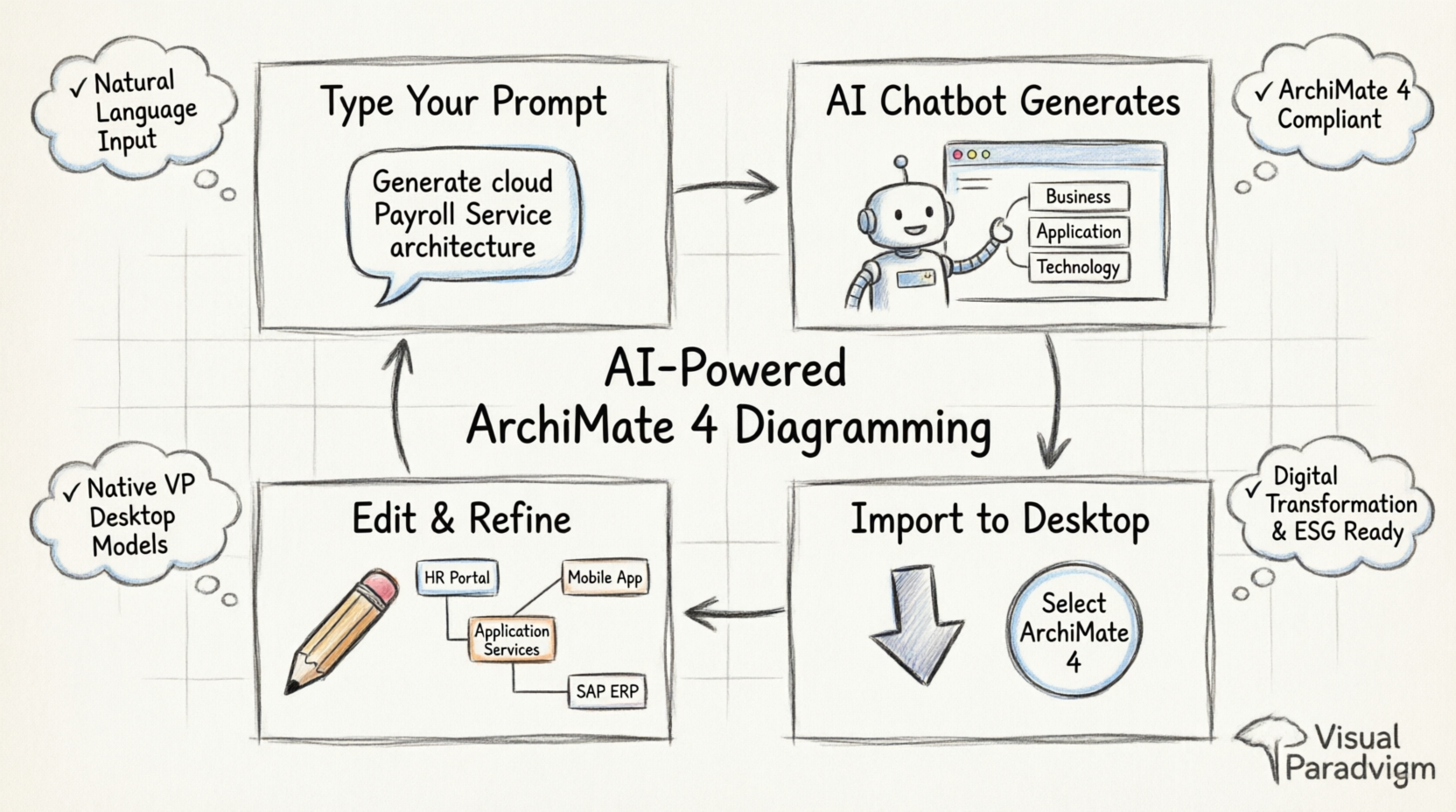
Key Concepts
🔹 What is ArchiMate 4?
ArchiMate 4 is the latest version of the open standard for enterprise architecture modeling, offering enhanced capabilities for:
- Digital transformation modeling: Better representation of cloud services, APIs, and microservices
- Sustainability & ESG modeling: New elements to capture environmental, social, and governance concerns
- Improved motivation & strategy layers: Stronger alignment between business goals and implementation
- Enhanced technology layer: Refined concepts for infrastructure, platforms, and physical elements
🔹 AI-Powered Diagram Generation
Visual Paradigm’s AI Chatbot uses natural language processing to:
- Interpret plain-English architecture descriptions
- Generate structured ArchiMate diagrams compliant with industry standards
- Suggest appropriate relationships, layers, and viewpoints
- Accelerate the initial drafting phase of enterprise architecture projects
🔹 Seamless Desktop Integration
Generated diagrams aren’t just static images—they import as native, editable Visual Paradigm models, preserving:
- Support of ArchiMate 4 syntax and semantics
- Element properties, documentation, and relationships
- Compatibility with all Visual Paradigm analysis, reporting, and collaboration features
Step-by-Step Guide: Generate & Import ArchiMate 4 Diagrams
Step 1: Open the AI Chatbot
Launch the AI Chatbot directly from within Visual Paradigm Desktop:
- Go to Tools > Chatbot in the main menu
- The Chatbot interface will open, ready for your prompt
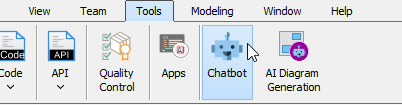
💡 Tip: Ensure you have an active internet connection and valid Visual Paradigm license to access AI features.
Step 2: Generate Your Diagram with Natural Language
Use clear, descriptive prompts to initiate AI ArchiMate generation. The more specific your request, the more accurate the output.
Example Prompt:
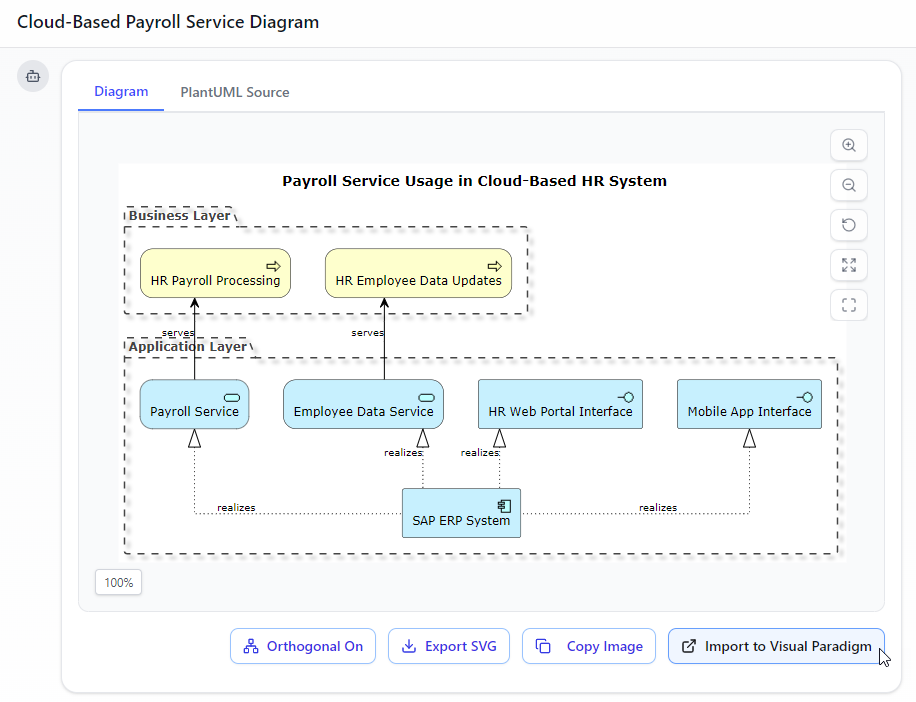
Generate an ArchiMate diagram for a cloud-based Payroll Service, showing how the HR Web Portal and Mobile App use Application Services realized by a centralized SAP ERP system.
The AI will:
- Parse your requirements
- Identify relevant ArchiMate elements (Business, Application, Technology layers)
- Construct relationships (serving, realization, assignment)
- Return a preview of your diagram

💡 Pro Tip: Include layer specifications (e.g., “Business Layer,” “Application Services”) and relationship types for more precise results.
Step 3: Import to Visual Paradigm Desktop
Once satisfied with the AI-generated preview:
- Click the “Import Visual Paradigm” button at the bottom-right corner of the Chatbot window
- The system will prepare the diagram for native import
Step 4: Select ArchiMate 4 Standard
During import, choose your target standard:
- Select the newly added ArchiMate 4 option
- This ensures the diagram uses the latest syntax, symbols, and modeling conventions
- ArchiMate 3.2 remains available for legacy project compatibility
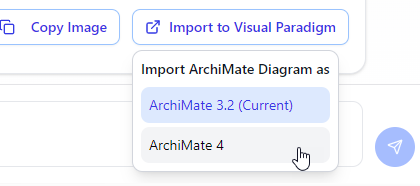
⚠️ Note: ArchiMate 4 diagrams cannot be downgraded to 3.2 after import. Select the appropriate standard based on your project requirements.
Step 5: Review and Refine in Desktop
A fully editable ArchiMate 4 diagram is created in Visual Paradigm Desktop. You can now:
- Adjust layout, styling, and element properties
- Add documentation, constraints, or requirements
- Generate reports, views, or presentations
- Collaborate with team members via VP Online or version control
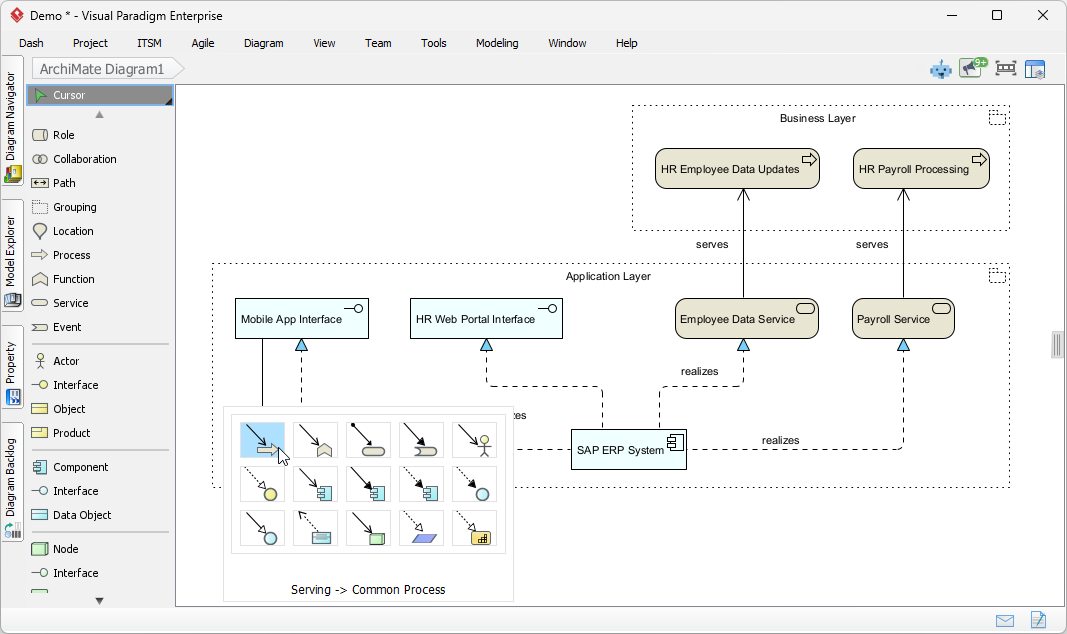
💡 Best Practice: Use the “Model Explorer” to navigate complex diagrams and the “Properties Panel” to enrich elements with metadata.
Best Practices for AI-Assisted ArchiMate Modeling
✅ Be Specific in Prompts
Include layer names, element types, and relationship intentions for higher accuracy.
✅ Iterate and Refine
Use the AI output as a starting point—refine relationships and add domain-specific details manually.
✅ Validate Against Standards
After import, use Visual Paradigm’s validation tools to ensure ArchiMate 4 compliance.
✅ Leverage Viewpoints
Apply ArchiMate viewpoints (e.g., “Layered,” “Motivation,” “Implementation”) to tailor diagrams for different stakeholders.
✅ Document as You Go
Add descriptions, rationales, and metadata to elements during refinement to support governance and auditability.
Troubleshooting & Support
| Issue | Solution |
|---|---|
| Chatbot not launching | Verify internet connection and license status; restart Visual Paradigm |
| Import fails or hangs | Check firewall settings; ensure VP Desktop is updated to latest version |
| Elements missing after import | Confirm ArchiMate 4 was selected; regenerate with more explicit prompt |
| Relationship types incorrect | Manually adjust in Desktop; provide clearer relationship language in prompt |
| Need ArchiMate 3.2 compatibility | Select “ArchiMate 3.2” during import step |
📧 Support: Visit Visual Paradigm Support or use in-app Help > Contact Support.
Experience the Power of AI Diagram Generation
Whether you are mapping out complex business ecosystems, designing IT infrastructure, or aligning strategy with execution, Visual Paradigm’s AI ArchiMate tool reduces the manual effort of initial drafting. Focus your energy on strategic analysis, stakeholder communication, and architectural decision-making—while AI handles the heavy lifting of diagram creation.
Download Visual Paradigm Desktop to get started today.
References
- Visual Paradigm AI Chatbot: Access the AI-powered chatbot interface for generating ArchiMate diagrams through natural language prompts.
- ArchiMate 4 Support in Visual Paradigm: Detailed documentation on the advancements and new features of ArchiMate 4 standard support in Visual Paradigm.
- Download Visual Paradigm Desktop: Official download page for Visual Paradigm Desktop application to start modeling with ArchiMate 4.
Related posts:
 Revolutionizing Enterprise Architecture in 2026: Visual Paradigm’s Generative AI for ArchiMate
 AI-Powered ArchiMate Diagrams: A Modern Guide to Enterprise Architecture Modeling
 Revolutionize Enterprise Architecture: The Best AI ArchiMate Viewpoint Generator in 2026
 Leveraging ArchiMate Viewpoints for Effective Enterprise Architecture Modeling: A Case Study of ArchiSurance

 English
 Arabic
 Chinese (Simplified)
 Dutch
Dutch French
 German
 Italian
 Japanese
 Korean
 Portuguese
 Russian
 Spanish