


🌟 Introduction
In today’s fast-paced agile environments, Scrum teams often struggle with tool fragmentation—juggling separate applications for backlog management, sprint planning, task tracking, documentation, and retrospectives. This context-switching drains productivity, obscures visibility, and complicates collaboration.
Enter the Visual Paradigm Scrum Process Canvas: a purpose-built, all-in-one visual workspace that consolidates the entire Scrum lifecycle onto a single, interactive page. Designed for Product Owners, Scrum Masters, and development teams alike, this canvas transforms abstract Scrum ceremonies into actionable, traceable work items—connected by intuitive navigation, enriched with AI-assisted insights, and unified with powerful modeling capabilities.
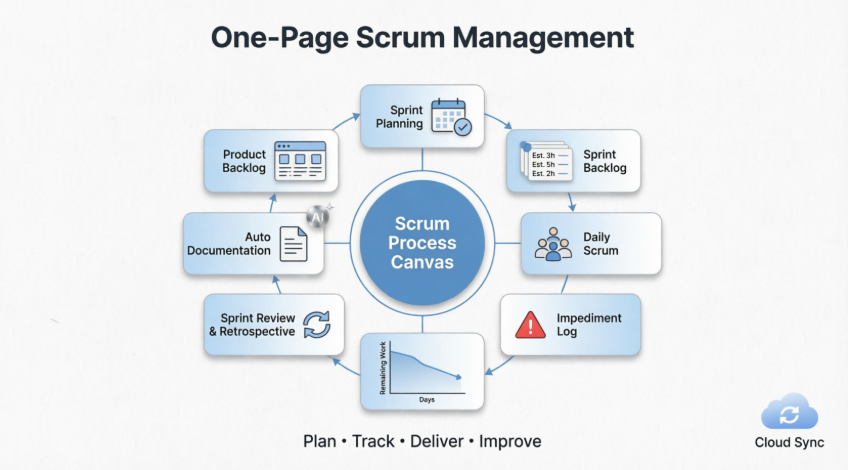
Whether you’re launching your first sprint or scaling agile across enterprise teams, the Scrum Process Canvas provides the clarity, structure, and flexibility needed to deliver value faster—with less overhead and greater alignment.
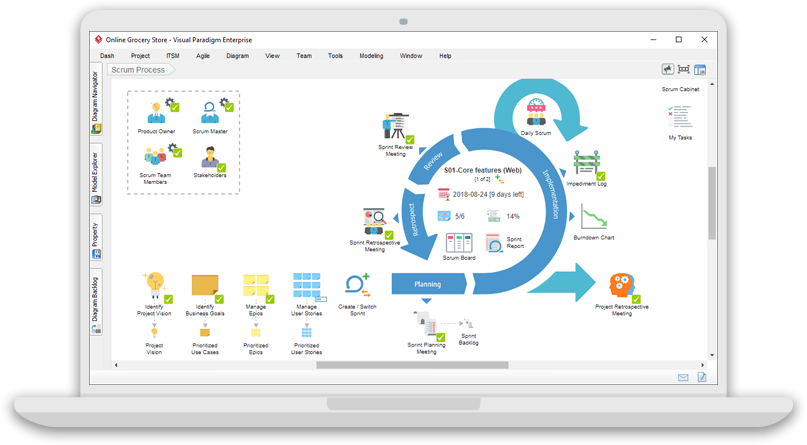
Manage your entire scrum project’s activities and resources within a one-page process canvas.
📋 Key Features at a Glance
The Scrum Process Canvas delivers everything your agile team needs in a single, intuitive interface:
✅ Actionable work items in a one-page canvas
✅ Product backlog with user story map and table
✅ Sprint backlog with effort-estimated task list
✅ Daily Scrum meeting records
✅ Impediment log for tracking blockers
✅ Burndown chart and scrum board for progress visualization
✅ Sprint and project review and retrospective tools
✅ Auto process docs. generation and archiving
🚀 What Is the Scrum Process Canvas?
A “One-Page” Scrum Tool
The Scrum Process Canvas presents the entire Scrum process in a single, clickable, and actionable canvas. Instead of juggling multiple tools or switching between tabs, your team navigates the complete Scrum workflow—from project vision to product delivery—within one unified visual interface.
Workflow Navigator
Each step of the Scrum framework (e.g., Sprint Planning, Daily Scrum, Retrospective) appears as a clickable “hotspot” on the canvas. Click any item to:
-
Access dedicated tools, diagrams, or data tables
-
Follow guided steps with built-in instructions
-
Generate artifacts directly within context
Comprehensive Management
Supports end-to-end agile practices including:
-
🗂️ Backlog grooming & prioritization
-
🗺️ User Story Mapping with drag-and-drop organization
-
✅ Task creation, estimation, and assignment
-
📊 Real-time progress tracking via burndown charts
-
🚫 Impediment identification and resolution
🛠️ How to Use the Scrum Process Canvas
Step 1: Select a Process Item
Click on any step in the canvas (e.g., “Sprint Planning,” “Daily Scrum,” “Sprint Review”). Each item is designed as an actionable work unit with clear entry points.
Step 2: Perform the Activity
Depending on the selected work item, you may:
-
📝 Fill in structured tables (e.g., acceptance criteria, task lists)
-
🎨 Draw diagrams using built-in modeling tools (UML, BPMN, ERD, DFD)
-
🖼️ Create wireframes to clarify requirements
-
💬 Add discussion notes or attach supporting files
Step 3: Leverage AI Assistance (Optional)
Utilize integrated AI capabilities to:
-
✨ Generate Scrum artifacts (user stories, acceptance criteria)
-
📈 Analyze project status and predict sprint outcomes
-
🗂️ Auto-create project diagrams from textual input
-
🔍 Suggest improvements based on team velocity data
Step 4: Manage and Track Progress
-
🔄 Use the “Sprint” view to move user stories between backlogs
-
👥 Switch to “Team” view to monitor individual contributions
-
📉 Review auto-generated burndown charts to assess timeline adherence
-
🎯 Track task completion percentages directly on the canvas
Step 5: Generate & Archive Documentation
As work items are completed:
-
📄 Automatically generate professional reports (Sprint Backlog, Retrospective Minutes, Release Notes)
-
🗄️ Archive documents in the Visual File Cabinet for easy retrieval
-
🔄 Export to Word, PDF, or Markdown formats for stakeholder sharing
👥 Who Uses the Scrum Process Canvas?
Scrum Teams
| Role | How They Benefit |
|---|---|
| Developers | Create tasks, update progress, collaborate on wireframes, and link technical diagrams to user stories |
| Product Owners | Prioritize backlogs, define acceptance criteria, manage releases, and communicate vision via use case models |
| Scrum Masters | Track impediments, facilitate ceremonies, monitor burndown trends, and generate retrospective reports |
Agile Managers & Leaders
-
🌐 Oversee high-level project progress across multiple teams and sprints
-
📊 Access consolidated dashboards for portfolio-level visibility
-
🔗 Integrate with enterprise architecture tools (TOGAF, ArchiMate) for strategic alignment
💡 Why Choose the Scrum Process Canvas?
✨ Increased Productivity
Eliminate context-switching between disparate tools. Everything your team needs—backlogs, tasks, diagrams, documentation—lives in one place.
🔍 Improved Transparency
A clear, one-page view of the entire Scrum project ensures everyone understands:
-
What’s being built (Product Backlog)
-
What’s being worked on now (Sprint Backlog)
-
What’s blocking progress (Impediment Log)
-
How the team is performing (Burndown Chart)
🎨 Full Customization
Tailor the canvas to your team’s unique workflow:
-
➕ Add custom work items (e.g., “JAD Session,” “Security Review”)
-
🖼️ Upload custom icons or images for visual clarity
-
🔗 Embed URLs, annotations, or reference materials directly on the canvas
-
⚙️ Configure artifact shortcuts for instant access to frequently used items
🔗 Seamless Integration
Combine agile project management with powerful visual modeling:
-
📐 UML, BPMN, ERD, DFD for technical design
-
🎨 Wireframing & prototyping for UX collaboration
-
💻 Code engineering & database reversal for development handoff
-
🤝 Team collaboration tools for comments, reviews, and approvals
☁️ Plus: Value-Added Cloud Services (FREE)
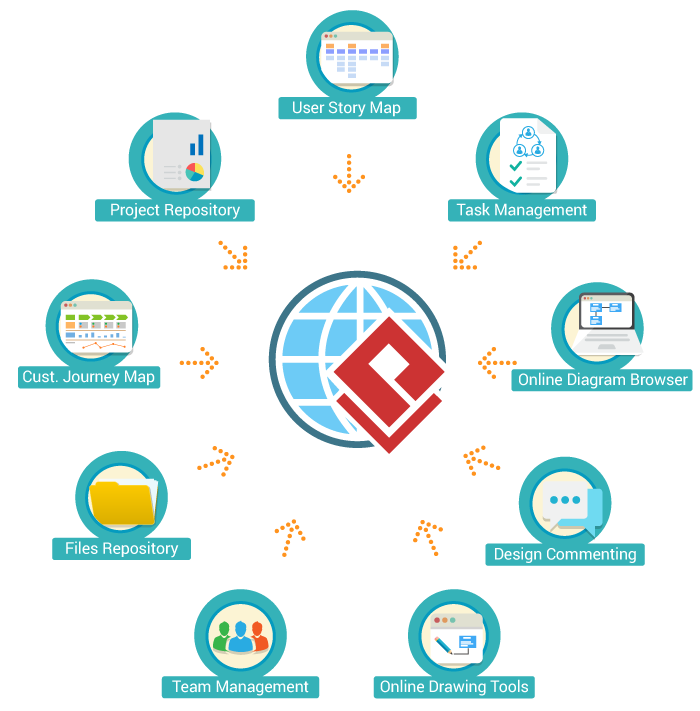
Enhance your Scrum Process Canvas with complimentary cloud capabilities:
-
🌐 Web-based access for distributed teams
-
💾 Auto-backup and version history
-
👥 Real-time collaboration with role-based permissions
-
📱 Mobile-responsive views for on-the-go updates
-
🔐 Enterprise-grade security and compliance
🏢 Trusted by Industry Leaders
Over 300,000 users and the world’s top brands use Visual Paradigm
From startups to Fortune 500 enterprises, organizations leverage the Scrum Process Canvas to:
-
Accelerate time-to-market by 30-40%
-
Improve team alignment and reduce miscommunication
-
Deliver higher-quality products through iterative feedback
-
Scale agile practices across global, multi-team environments
🔗 Related Visual Paradigm Editions
Visual Paradigm Enterprise
End-to-End Enterprise Architecture tool suite that supports TOGAF, ArchiMate, PMBOK process map and more
Read More »
Visual Paradigm Standard
Essential development tools for modeling (UML, BPMN, ERD, DFD, etc), wireframing, code and DB engineering tools, etc
Read More »
Visual Paradigm Modeler
Highly affordable visual modeling toolset that supports UML, BPMN, ERD, DFD, EPC and more
Read More »
⚠️ Important Note on AI Features
AI can make mistakes, so double-check responses.
While Visual Paradigm’s AI-assisted features can significantly accelerate artifact creation and analysis, always:
-
✅ Review AI-generated content for accuracy and relevance
-
🔍 Validate estimates, priorities, and recommendations with your team
-
📝 Customize outputs to reflect your project’s specific context and constraints
🎯 Executive Summary
| Aspect | Key Takeaway |
|---|---|
| What It Is | A one-page, visual Scrum management tool that integrates backlog grooming, sprint planning, daily stand-ups, retrospectives, and documentation into a single customizable canvas. |
| Core Value | Eliminates tool sprawl, boosts team transparency, and accelerates delivery by keeping all Scrum artifacts, tasks, and discussions in one actionable interface. |
| Key Features | • User Story Mapping & prioritized backlogs • Effort-estimated sprint task lists • Daily Scrum logs & impediment tracking • Real-time burndown charts & scrum boards • Auto-generated, archival-ready documentation • Optional AI assistance for artifact creation & analysis |
| Ideal For | Scrum teams seeking streamlined workflows; Agile coaches facilitating ceremonies; Managers requiring portfolio-level visibility without micromanagement. |
| Differentiators | • Seamless integration with UML/BPMN modeling & wireframing tools • Fully customizable canvas layout & work items • Free cloud services for collaboration, backup, and mobile access • Enterprise-grade scalability with Nexus & Large-Scale Scrum support |
| Getting Started | 1) Select a canvas step → 2) Complete guided activities → 3) Leverage AI (optional) → 4) Track progress in Sprint/Team views → 5) Auto-generate reports. |
| Pro Consideration | While AI features accelerate output, always validate generated content with team expertise to ensure contextual accuracy and quality. |
Bottom Line: The Scrum Process Canvas isn’t just another project management tool—it’s a visual command center for agile delivery. By making the Scrum framework tangible, traceable, and collaborative, it empowers teams to focus on what matters most: building great products, iteratively and confidently.
Ready to simplify your Scrum practice? Explore how a single-page canvas can transform your team’s agility, transparency, and output. 🚀
📚 References
- Scrum Framework Tool – A Scrum Canvas: Visual Paradigm’s Scrum Process Canvas is a comprehensive scrum tool that helps teams manage their entire scrum project from project vision to final product delivery, featuring a one-page canvas for backlog management, sprint planning, daily scrum, and documentation.
- Large-Scale Scrum Framework Tool: A visual process canvas designed for large-scale Scrum projects that consolidates all project artifacts in one location, supporting multi-team coordination with user story maps, backlog management, and auto-generated Scrum reports.
- Introducing the Visual Paradigm Model Canvas Tool: A 3-minute video tutorial demonstrating how to use Visual Paradigm’s AI-powered Model Canvas tool for creating and collaborating on various strategic planning canvases including Business Model Canvas, Lean Canvas, and Customer Journey Canvas.
- Scrum Process Canvas Customization: Learn how to tailor the Scrum Process Canvas to fit your project’s unique needs by adding custom work items, defining actionable steps, and building custom process reports with the drag-and-drop Doc. Composer.
- Scrum in 3 Minutes: A concise introduction to Scrum framework covering the three pillars of empiricism, the 3355 framework (3 roles, 3 artifacts, 5 events, 5 values), and how Scrum enables iterative, incremental product development.
- Scrum Framework Tool – A Scrum Canvas: Visual Paradigm’s Scrum Process Canvas is a comprehensive scrum tool that helps teams manage their entire scrum project from project vision to final product delivery.
- Nexus Canvas – A Nexus Framework Tool: A Nexus framework tool that maximizes project efficiency with a one-page Nexus process canvas, helping multi-team Scrum projects coordinate artifacts, events, and user story management across distributed teams.
- Why-Why Diagram Tool: A root cause analysis tool that helps teams systematically identify and address the underlying causes of impediments and problems encountered during Scrum projects.
- What is Scrum?: A comprehensive guide to the Scrum framework explaining its roles (Product Owner, Scrum Master, Development Team), artifacts (Product Backlog, Sprint Backlog, Burndown Chart), events (Sprint Planning, Daily Scrum, Sprint Review, Sprint Retrospective), and core principles.
💡 Pro Tip: Start small. Implement the Scrum Process Canvas with one pilot team, gather feedback, and gradually expand adoption across your organization. The visual, all-in-one nature of the canvas makes onboarding intuitive and reduces resistance to new tooling.
Ready to transform your agile workflow? Try Visual Paradigm Free today.


 English
 Arabic
 Chinese (Simplified)
 Dutch
Dutch French
 German
 Italian
 Japanese
 Korean
 Portuguese
 Russian
 Spanish