


Introduction to Sequence Diagrams
UML Sequence Diagrams are interaction diagrams that detail how operations are carried out. They capture the interaction between objects in the context of a collaboration. Sequence Diagrams are time-focused and show the order of interactions visually by using the vertical axis of the diagram to represent time—what messages are sent and when.
Why Use Sequence Diagrams?
Sequence diagrams are essential tools for:
-
Visualizing system behavior: See how objects interact over time
-
Understanding workflows: Map out complex business processes
-
Documenting requirements: Capture system interactions clearly
-
Debugging: Identify issues in object interactions
-
Communication: Bridge the gap between technical and non-technical stakeholders
Key Components of Sequence Diagrams
Before diving into examples, let’s understand the basic elements:
-
Lifelines: Vertical dashed lines representing objects or participants
-
Messages: Horizontal arrows showing communication between objects
-
Activation Bars: Rectangles on lifelines indicating when an object is active
-
Combined Fragments: Boxes that group messages (alt, opt, loop, break, etc.)
Learning Through Examples
1. Basic User-System Interactions
User and System Sequence Diagram
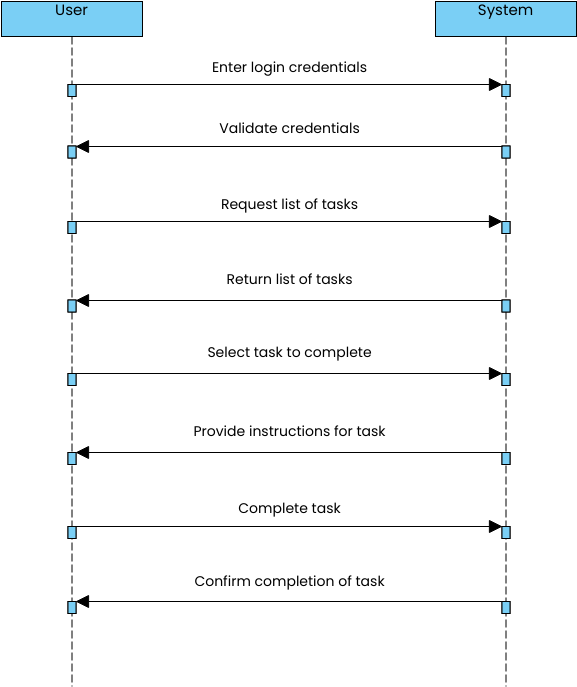
This fundamental example shows how a user interacts with a system. Notice the clear flow of messages from initiation to completion, demonstrating the basic request-response pattern common in most applications.
2. Financial and Banking Systems
ATM Operations
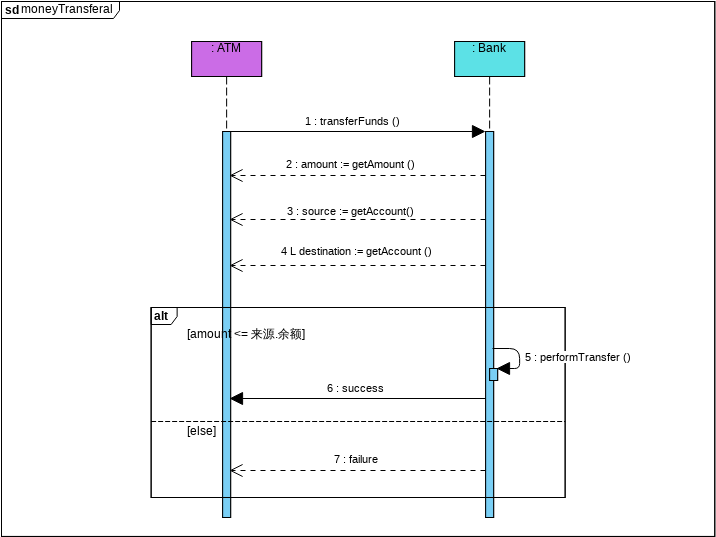
The ATM transferal diagram illustrates a complex financial transaction involving multiple validations, account checks, and fund transfers. This example demonstrates:
-
Sequential validation steps
-
Error handling paths
-
Database interactions
-
Transaction confirmation
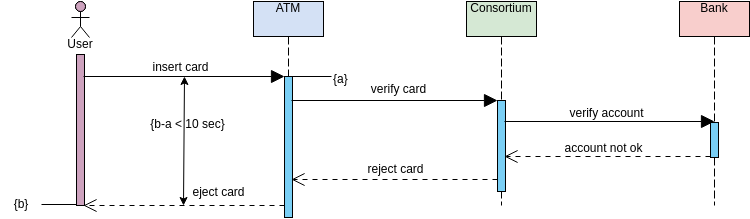
A simplified ATM example perfect for understanding basic withdrawal operations.
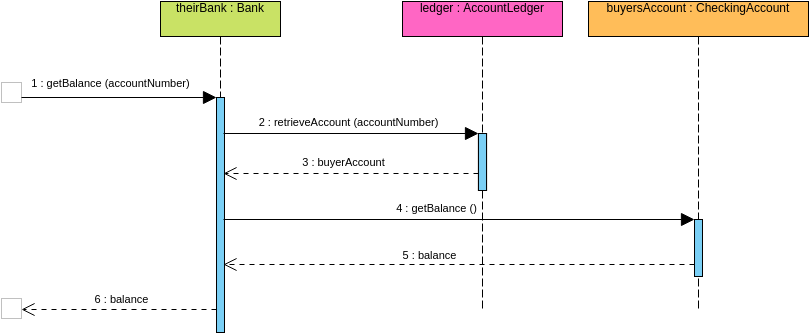
Bank operations showcase multiple banking activities and their interactions with various system components.
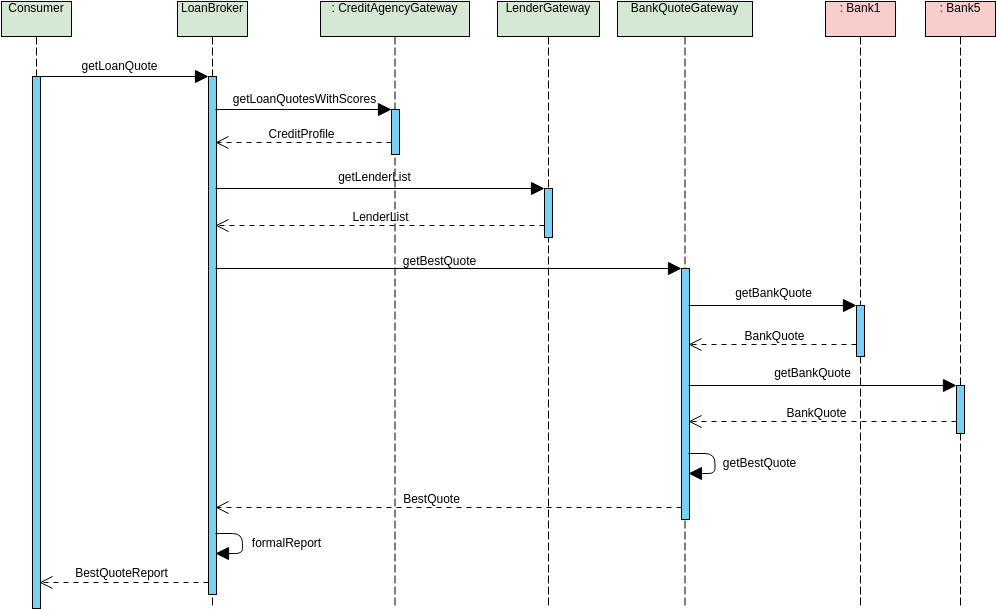
This example demonstrates how banking systems provide quotes and handle financial calculations.
3. E-Commerce and Reservation Systems
Hotel Reservation System
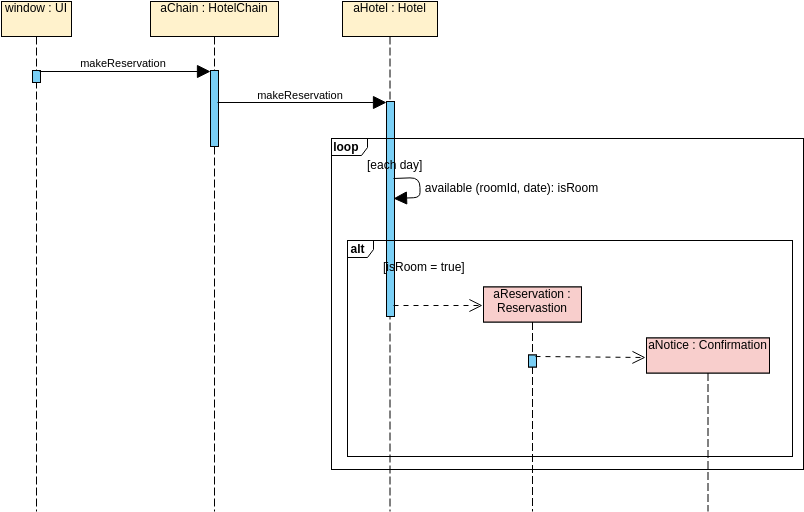
The hotel reservation diagram shows a complete booking workflow including:
-
Room availability checks
-
Price calculations
-
Payment processing
-
Confirmation generation
Ticket Booking
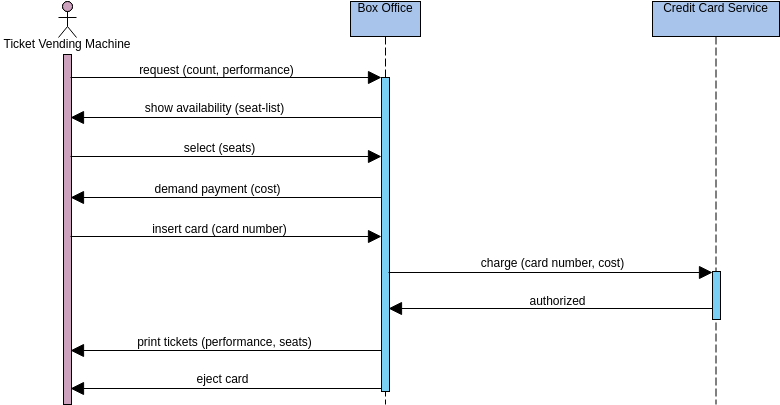
Ticket purchasing involves seat selection, payment validation, and ticket generation—perfect for understanding multi-step transactions.
Seat Booking
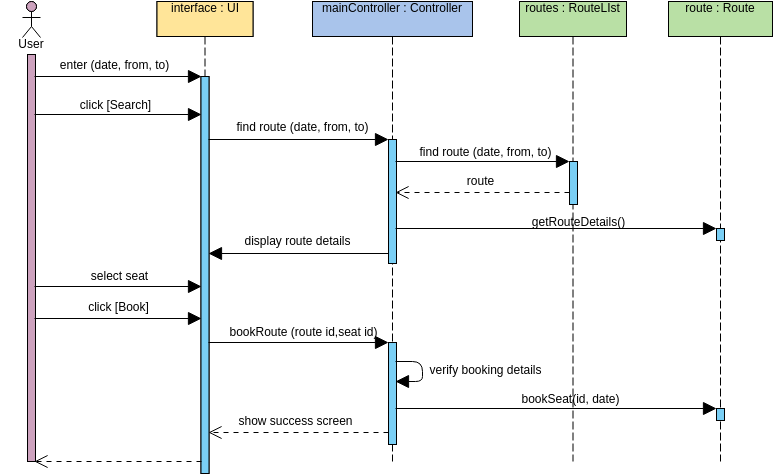
A focused example on seat reservation showing availability checking and booking confirmation.
Order Processing
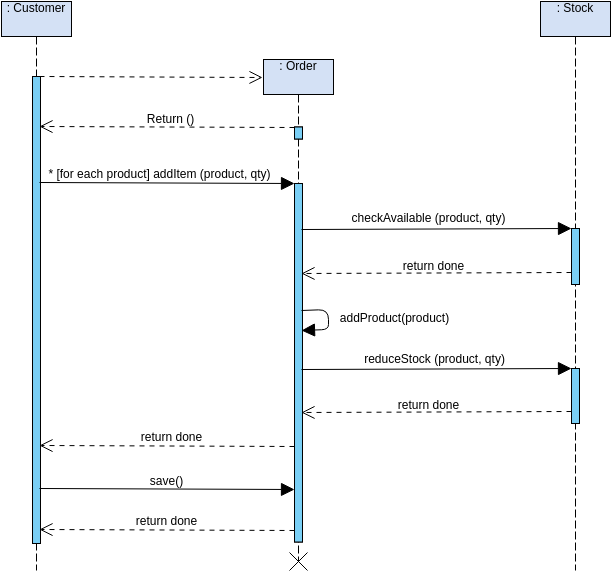
Order placement demonstrates inventory checks, order creation, and notification systems working together.
4. Educational Systems
Course Management
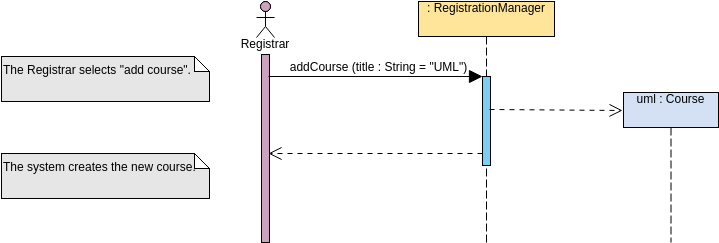
Course addition shows prerequisite checking, enrollment validation, and schedule management.
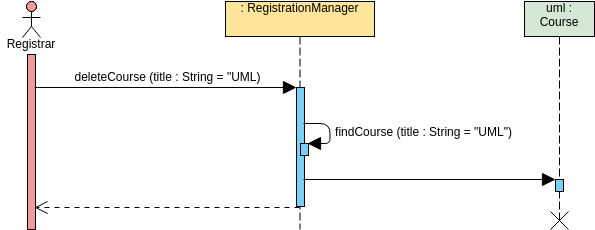
Course deletion demonstrates dependency checking and cascade operations.
Appointment Scheduling
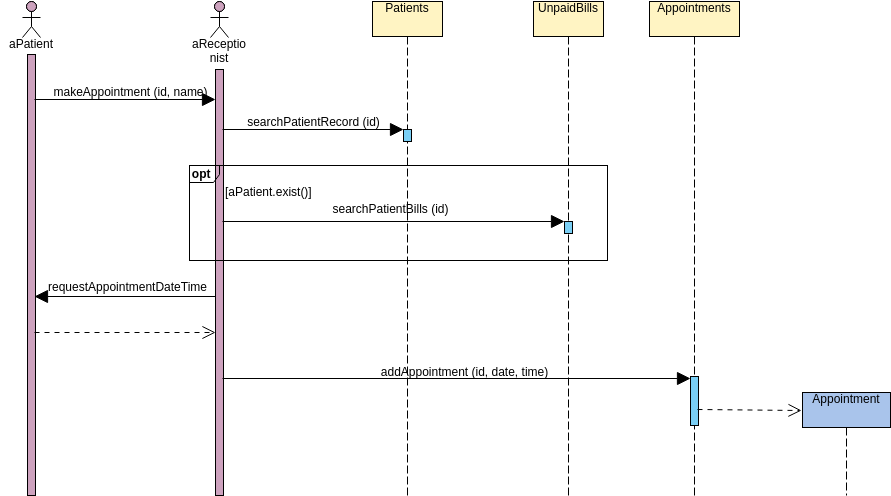
Appointment scheduling illustrates calendar integration, availability checking, and notification systems.
Examination Process
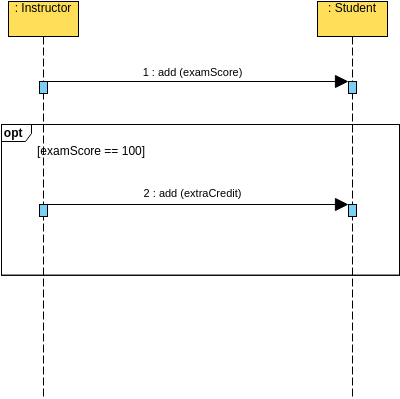
Examination workflows show question delivery, answer submission, and grading processes.
5. Advanced UML Concepts
Combined Fragments
Combined fragments allow you to model complex logic in sequence diagrams:
Alternative (alt) and Optional (opt) Fragments

This example shows conditional logic where different paths are taken based on specific conditions.
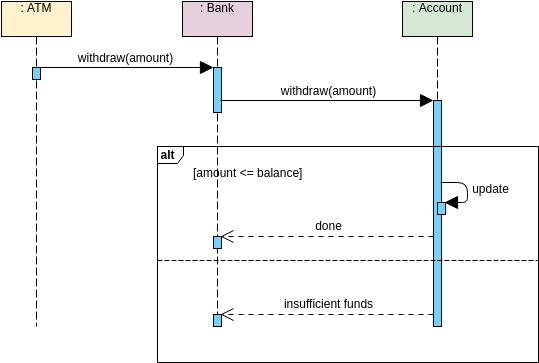
Alternative fragments model if-then-else scenarios in your system interactions.
Loop Fragments
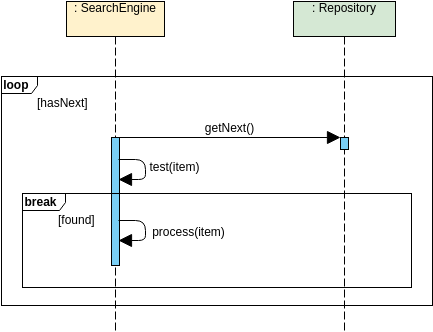
Loop fragments represent repeated interactions, essential for modeling iterations and batch processing.
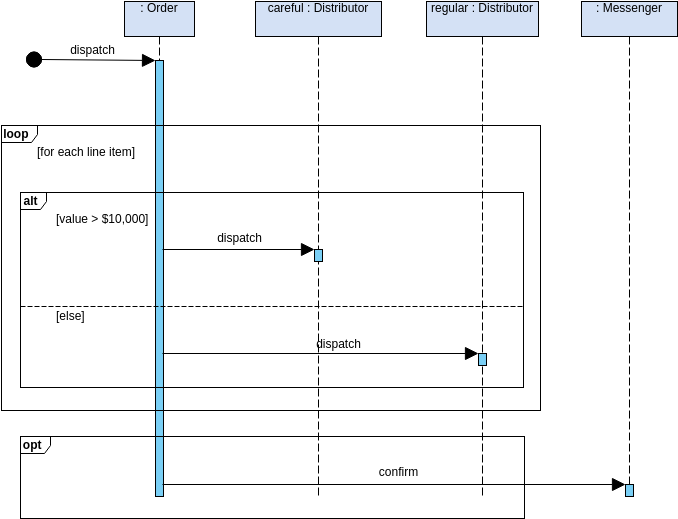
Combining selection and loops shows complex iterative decision-making processes.
Break Fragments
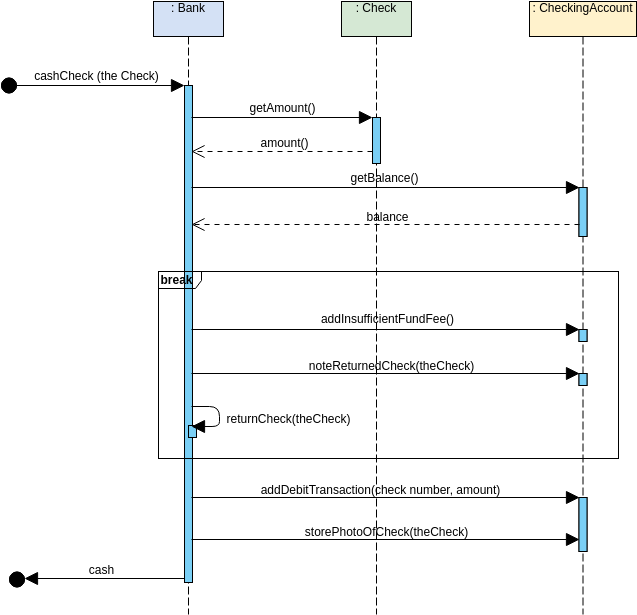
Break fragments model exception handling and early termination of sequences.
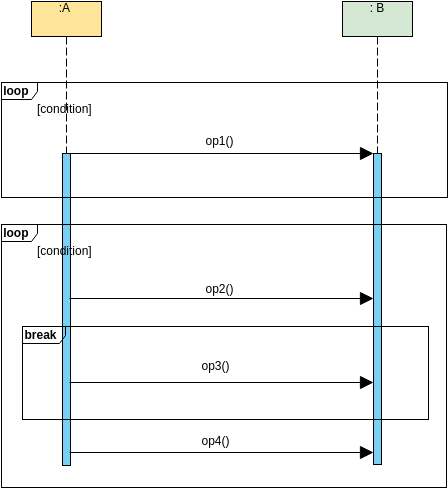
This example combines loop and break syntax for controlled iteration with exit conditions.
Critical Regions
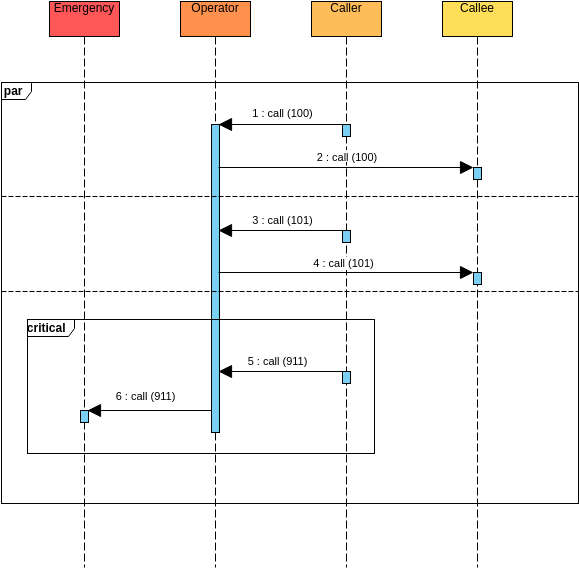
Critical regions ensure exclusive access to shared resources, crucial for concurrent systems.
Object Lifecycle Management
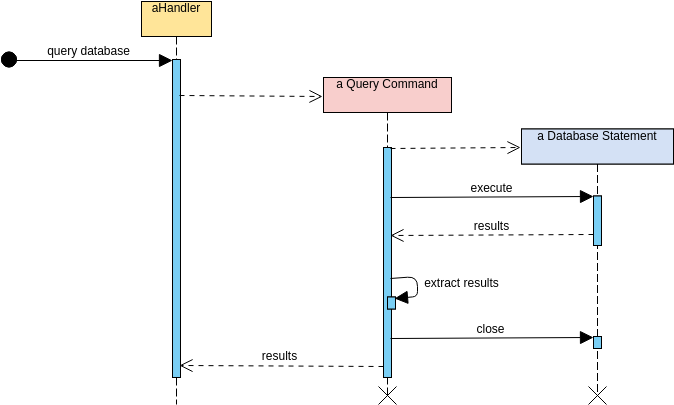
Understanding object creation and deletion is vital for memory management and resource allocation.
Interaction Uses
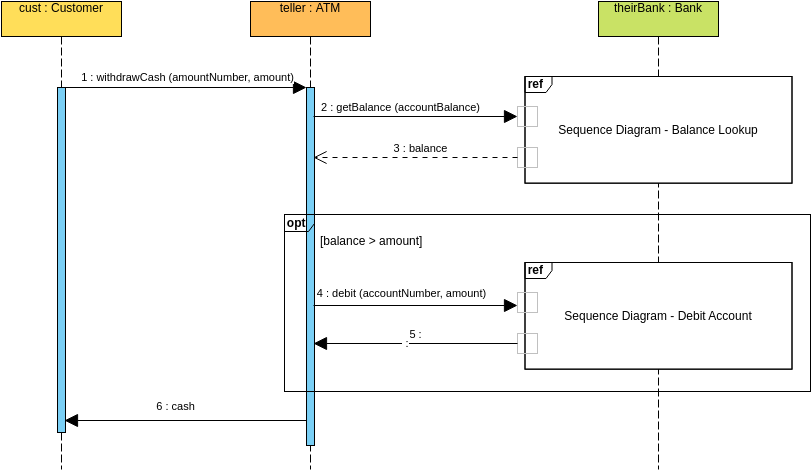
Interaction uses allow you to reference other sequence diagrams, promoting reusability and modularity.
Parallel Calls
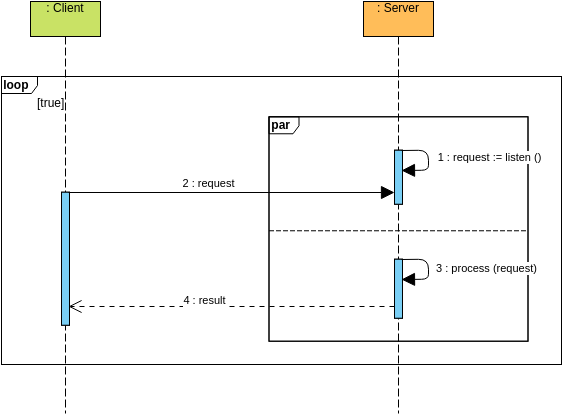
Parallel calls demonstrate concurrent operations, essential for understanding asynchronous systems.
6. Specialized Domain Examples
Auction Systems
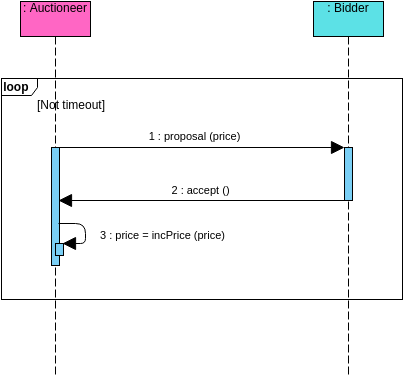
Auction systems show real-time bidding, time constraints, and competitive interactions.
Gaming and Entertainment
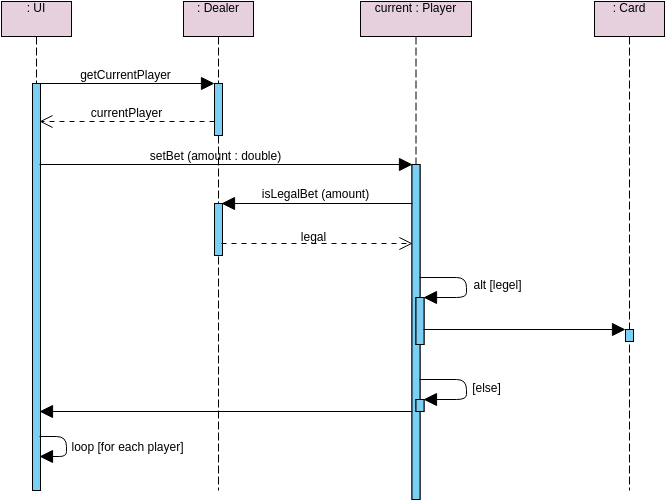
Gaming scenarios demonstrate turn-based interactions and state management.
Communication Systems
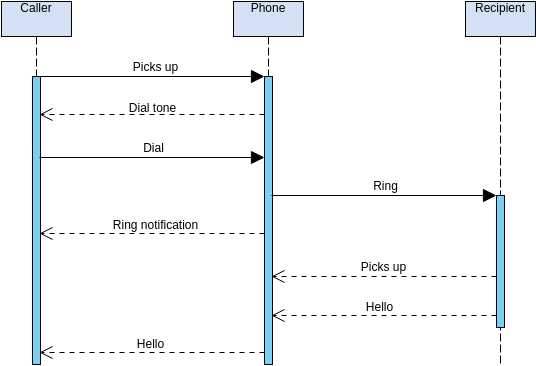
Phone call sequences model connection establishment, communication, and termination.
Music and Media
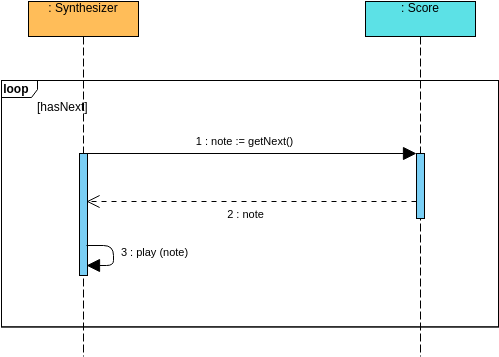
Media processing shows data streaming and real-time processing interactions.
7. Architecture Patterns
MVC Framework
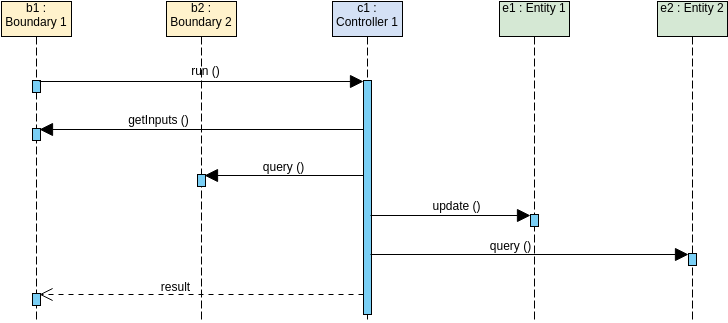
MVC (Model-View-Controller) pattern demonstrates separation of concerns and request flow in web applications.
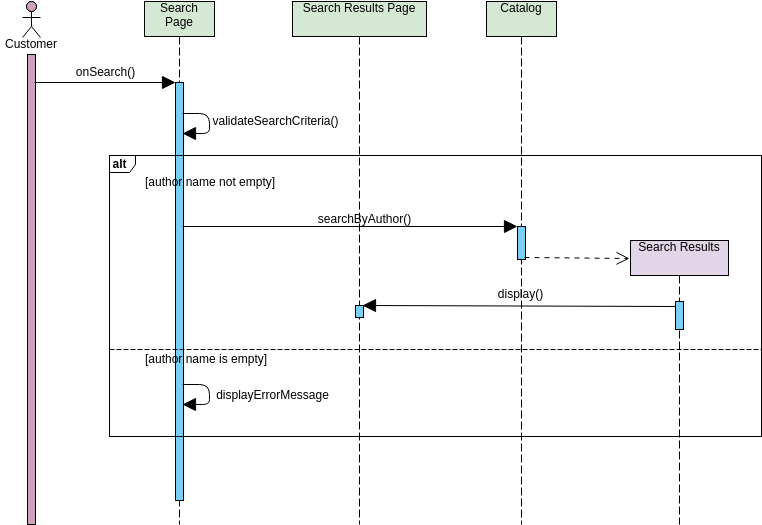
This example combines MVC architecture with conditional logic for complex user interactions.
File Management
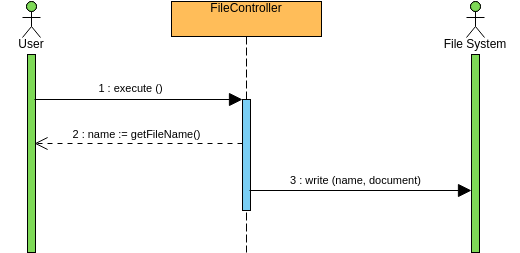
File controller operations show CRUD (Create, Read, Update, Delete) operations on file systems.
Supplier Management
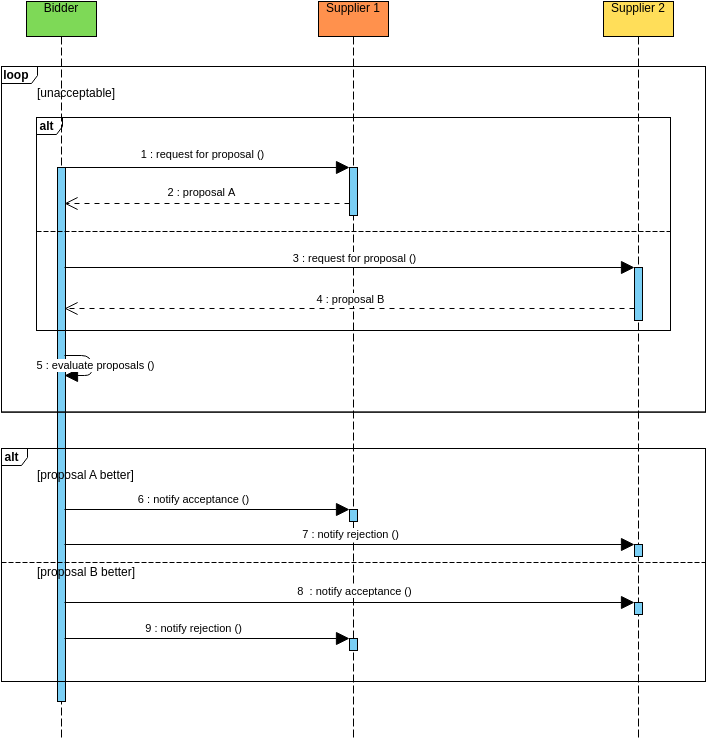
Supplier selection demonstrates evaluation criteria, comparison logic, and decision-making processes.
8. Collaboration Patterns
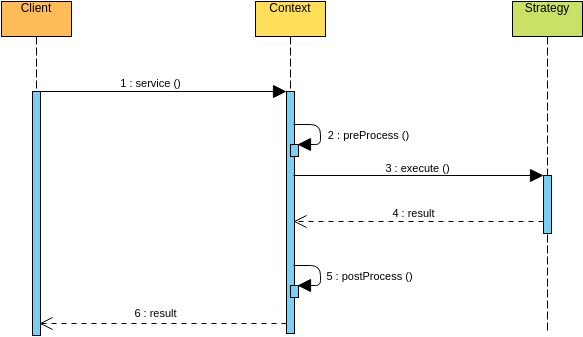
Collaboration diagrams show how multiple objects work together to achieve a common goal.
9. Time Constraints and Performance
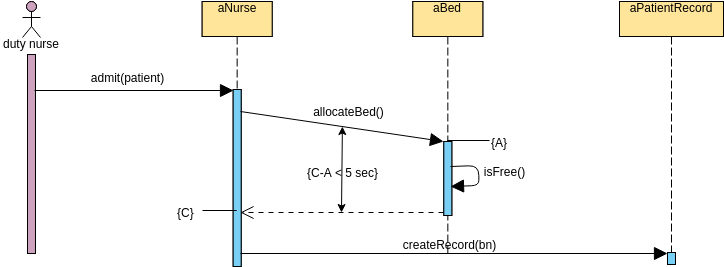
Hospital systems demonstrate critical time constraints where response times are vital for patient care.
10. Operator Syntax
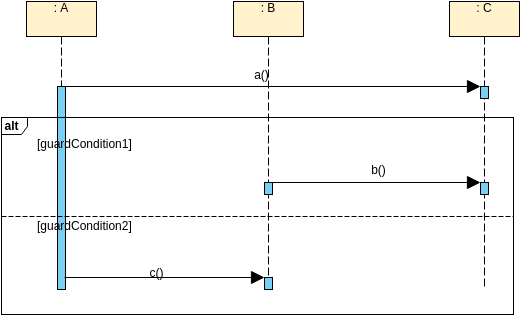
Operator syntax examples show advanced UML notation for complex operations.
Best Practices for Creating Sequence Diagrams
-
Keep it Simple: Focus on one scenario per diagram
-
Use Meaningful Names: Clear lifeline and message names improve readability
-
Limit Participants: Too many lifelines make diagrams hard to read
-
Show Important Details: Include critical messages but omit trivial ones
-
Use Combined Fragments Wisely: They add clarity but can complicate if overused
-
Maintain Consistency: Use consistent notation across all diagrams
-
Validate Logic: Ensure the sequence makes logical sense
-
Document Assumptions: Note any preconditions or postconditions
Common Mistakes to Avoid
-
Overcomplicating: Don’t try to show every possible path in one diagram
-
Missing Activation Bars: These show when objects are active
-
Incorrect Message Order: Time flows top to bottom—maintain logical sequence
-
Unclear Conditions: Always specify guard conditions for alternative paths
-
Ignoring Return Messages: Show responses, not just requests
When to Use Sequence Diagrams
✅ Use sequence diagrams when:
-
Documenting use case realizations
-
Understanding existing system behavior
-
Designing new system interactions
-
Debugging complex workflows
-
Communicating with stakeholders
❌ Avoid sequence diagrams when:
-
Showing structural relationships (use class diagrams)
-
Modeling state changes (use state diagrams)
-
Describing high-level architecture (use component diagrams)
- Reference List
- User and system Sequence diagram: Demonstrates basic user-system interaction patterns showing request-response flows
- Sequence Diagram: ATM Transferal: Illustrates complex financial transaction workflows with validation and fund transfers
- Poke Player (Betting Round): Shows gaming interaction patterns with turn-based betting mechanics
- Sequence Diagram Example: Make Appointment: Demonstrates scheduling system workflows with availability checking
- Sequence Diagram: Supplier Selection: Models procurement processes with evaluation and comparison logic
- Sequence Diagram: MVC Framework: Illustrates Model-View-Controller architecture patterns and request flows
- Sequence Diagram: Collaborations: Shows how multiple objects work together to achieve common goals
- Break Communication Fragment: Demonstrates exception handling and early termination patterns
- Branching with opt and alt: Shows conditional logic with optional and alternative fragments
- Sequence Diagram Example: Loop Fragment: Illustrates iterative processes and repeated interactions
- Sequence Diagram Example: Add Course: Models educational system enrollment with prerequisite checking
- Selection and Loops in a Combination: Combines selection and iteration for complex decision-making
- Sequence Diagram Example: Buy Tickets: Demonstrates e-commerce transaction flows with seat selection
- Sequence Diagram Example: Auctioneer and Bidder: Shows real-time bidding interactions and auction mechanics
- Sequence Diagram Example: Place Order: Models order processing with inventory and payment integration
- Sequence Diagram Simple ATM Example: Basic ATM withdrawal operations for learning fundamentals
- Sequence Diagram: Bank Operations: Comprehensive banking system interactions and transactions
- Sequence Diagram: Critical: Demonstrates critical region protection for concurrent access
- Sequence Diagram Bank Quote Example: Shows financial quote generation and calculation processes
- Sequence Diagram Example: Delete Course: Models course removal with dependency checking
- Hotel Reservation: Complete booking workflow from search to confirmation
- Sequence Diagram: Synthesizer and Score: Media processing with real-time data streaming
- Sequence Diagram: Phone Call: Communication system with connection establishment and termination
- Sequence Diagram Example: OperatorSyntax: Advanced UML operator notation examples
- Sequence Diagram Example: File Controller: File system CRUD operations and management
- Object Creation and Deletion: Object lifecycle management and memory allocation
- Sequence Diagram Example: LoopAndBreakSyntax: Controlled iteration with exit conditions
- Alternative Combined Fragment: If-then-else conditional modeling patterns
- Sequence Diagram Client and Server Parallel Call Example: Asynchronous and concurrent operation patterns
- Sequence Diagram Example: Book a Seat: Seat reservation with availability validation
- Sequence Diagram Example: Examination: Educational assessment workflows and grading
- Sequence Diagram Time Constraints Example: Hospital: Critical time-sensitive healthcare operations
- Sequence Diagram Interaction Use Example: Modular diagram references for reusability
- Sequence Diagram Example: ATM: Comprehensive ATM transaction modeling
- Using MVC Stereotypes with Conditional Statement: MVC architecture with conditional user interactions
- Conclusion
- Sequence diagrams are powerful tools for visualizing system interactions and understanding complex workflows. By studying these 35 comprehensive examples, you’ve seen how sequence diagrams can model everything from simple user interactions to complex distributed systems with parallel processing, time constraints, and sophisticated error handling.
- Remember to start simple, focus on clarity, and gradually incorporate advanced features like combined fragments as needed. With practice, you’ll be able to create sequence diagrams that effectively communicate system behavior to both technical and non-technical stakeholders.
- Happy diagramming!


 English
 Arabic
 Chinese (Simplified)
 Dutch
Dutch French
 German
 Italian
 Japanese
 Korean
 Portuguese
 Russian
 Spanish